
Month: September 2025
Blog

Maximizing Efficiency with Windows Dedicated Servers in India
Modern Windows server deployments are judged on latency to users, availability during maintenance, and governance that supports audit work without slowing operations. When those needs intersect with a Windows dedicated server in India, placing compute in Mumbai can shorten network paths for Indian users, but the result depends on user networks, routing, and application design. India’s Digital Personal Data Protection Act and phased 2025 Rules also make security, data-flow mapping, and implementation timing part of infrastructure planning. Local hosting can support an architecture, but it does not establish compliance by itself.
Choose Melbicom— Dozens of ready-to-go servers — Tier III data center in Mumbai — 40 CDN PoPs worldwide |
 |
This article distills what matters for IT managers running mission-critical Windows workloads: hotpatching, SMB over QUIC, Windows Server 2025 on Indian dedicated hardware, PowerShell automation, licensing choices, and Azure Arc management. It closes with practical implications for ERP and .NET applications, where network paths and maintenance windows matter.
Windows Server 2025: The Efficiency Toolkit for a Windows Dedicated Server in India
Windows Server 2025 adds hotpatching and SMB over QUIC capabilities that can reduce some maintenance interruptions and secure remote file access. On a Mumbai dedicated server, the operational benefit still depends on supported editions, licensing, client requirements, network paths, and deployment design.
Hotpatching: Security Updates with Fewer Reboots
Hotpatching applies eligible Windows security updates to in-memory code without restarting the server. Azure Arc-connected Windows Server 2025 Standard and Datacenter machines can use the feature after it is enabled. The regular cadence refreshes the cumulative-update baseline every three months, and those planned baseline updates require a restart; unplanned baselines can also occur. Nonsecurity, .NET, driver, firmware, and other updates may still require reboots. Azure Arc-enabled hotpatching for Windows Server 2025 is available at no extra hotpatch charge, but Windows licensing and other Azure management services can have separate costs. Treat hotpatching as a way to reduce planned restarts, not as continuous availability or proof of compliance.
SMB over QUIC: Secure File Access Without a VPN
SMB over QUIC is available in any edition of Windows Server 2025. It carries SMB traffic through a TLS 1.3-encrypted QUIC tunnel over UDP port 443, allowing supported Windows 11 clients to reach file shares over untrusted networks without exposing TCP port 445. A valid server certificate, firewall configuration, authentication design, and explicit server enablement are still required. For Windows Server 2025, Microsoft currently documents PowerShell as the supported configuration method. On a Windows dedicated server hosting in India, Mumbai supports network capacity up to 40 Gbps per server. Ready-to-go bandwidth is configuration-specific and is not the same as the facility maximum, so validate the selected port, transfer plan, storage, and client path. Windows Server 2025 also supports SMB over QUIC client access controls and client auditing.
PowerShell CI/CD Deployment Automation
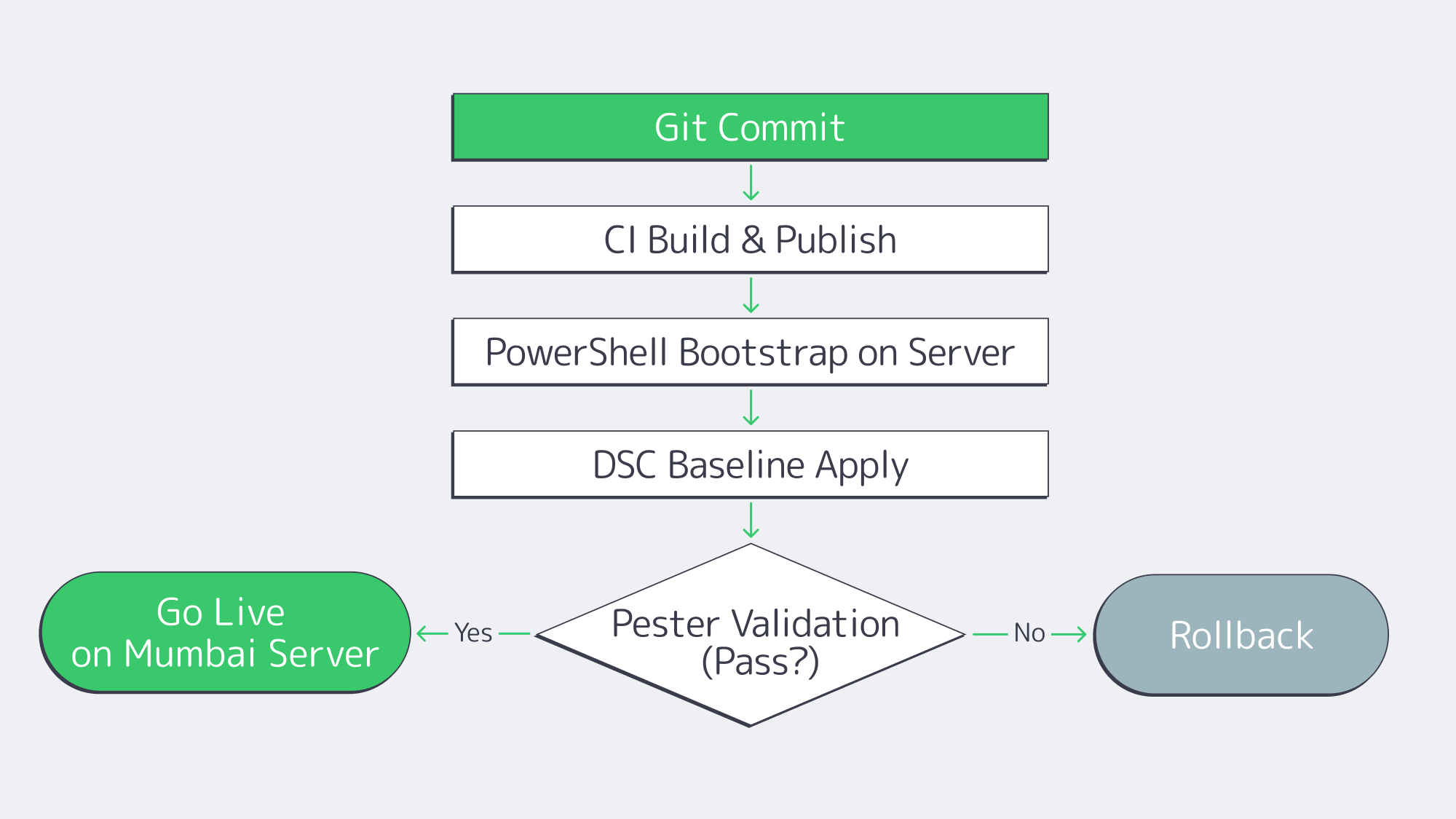
Cloud-like speed on dedicated hardware comes from treating servers like code. A PowerShell-first pipeline avoids drift and makes rollouts, rebuilds, and rollbacks predictable across dedicated servers in Mumbai and other regions.
# Idempotent Windows server bootstrap (excerpt)
# 1) Join domain, 2) install roles/features, 3) harden, 4) deploy app, 5) validate

Start-Transcript -Path C:\Logs\bootstrap.txt -Append

Add-Computer -DomainName corp.example.com -Credential $creds -Force
Install-WindowsFeature Web-Server, NET-Framework-Features, FS-FileServer -IncludeManagementTools
# Baseline hardening via DSC or policy
Start-DscConfiguration -Path .\Baselines\Win2025-Secured -Wait -Verbose -Force
# App deployment
.\Deploy-App.ps1 -Package .\drop\erp-api.zip -Config .\configs\erp-api.json
# Validation
Invoke-Pester .\Tests\postdeploy.tests.ps1 -Output Detailed

Stop-Transcript
Back this up with GitHub Actions or Azure DevOps: on commit, the pipeline can lint PowerShell, build artifacts, apply DSC baselines, run Pester tests, and register servers for monitoring. For day-two operations, Windows Admin Center and Azure Arc can centralize inventory and selected update workflows. The result is repeatable configuration and clearer audit evidence. It can reduce manual setup time, but hardware delivery, OS installation, network setup, and pipeline execution still determine when a new dedicated server in India is ready.
Windows Server Licensing Costs in India
Licensing determines whether a Windows deployment remains predictable at scale. The right model depends on physical core count, virtualization density, Client Access License (CAL) requirements, and whether the organization prefers perpetual, subscription, or usage-based licensing.
| Edition | Virtualization rights | When to use |
|---|---|---|
| Windows Server Standard | Two OSEs or Hyper-V-isolated containers after all physical cores are licensed | Physical or lightly virtualized hosts. Additional pairs require licensing all physical cores again. |
| Windows Server Datacenter | Unlimited OSEs and Hyper-V-isolated containers after all physical cores are licensed | Highly virtualized hosts; compare total licensing cost against repeated Standard licensing. |
Three levers help keep the dedicated server cost in India under control:
- Edition fit: License every physical core, subject to Microsoft’s minimums, and compare Standard re-licensing against Datacenter for the expected VM density.
- CALs and RDS CALs: Budget Windows Server CALs for users or devices where required, and separate RDS CALs for Remote Desktop Services. Confirm Product Terms exceptions and external-user licensing before deployment.
- Azure Arc pay-as-you-go: Microsoft offers Windows Server 2025 pay-as-you-go licensing through Azure Arc as an alternative to conventional perpetual licensing. Check the current Azure pricing page and your agreement before comparing it with perpetual or subscription licensing for the expected duty cycle.
Finally, confirm the OS image, license channel, CAL responsibilities, activation method, and monthly charges before ordering. Melbicom can help configure a server and install an operating system on a dedicated server in India; Windows Server licensing terms and charges depend on the selected setup.
Hybrid Windows Governance with Azure Arc
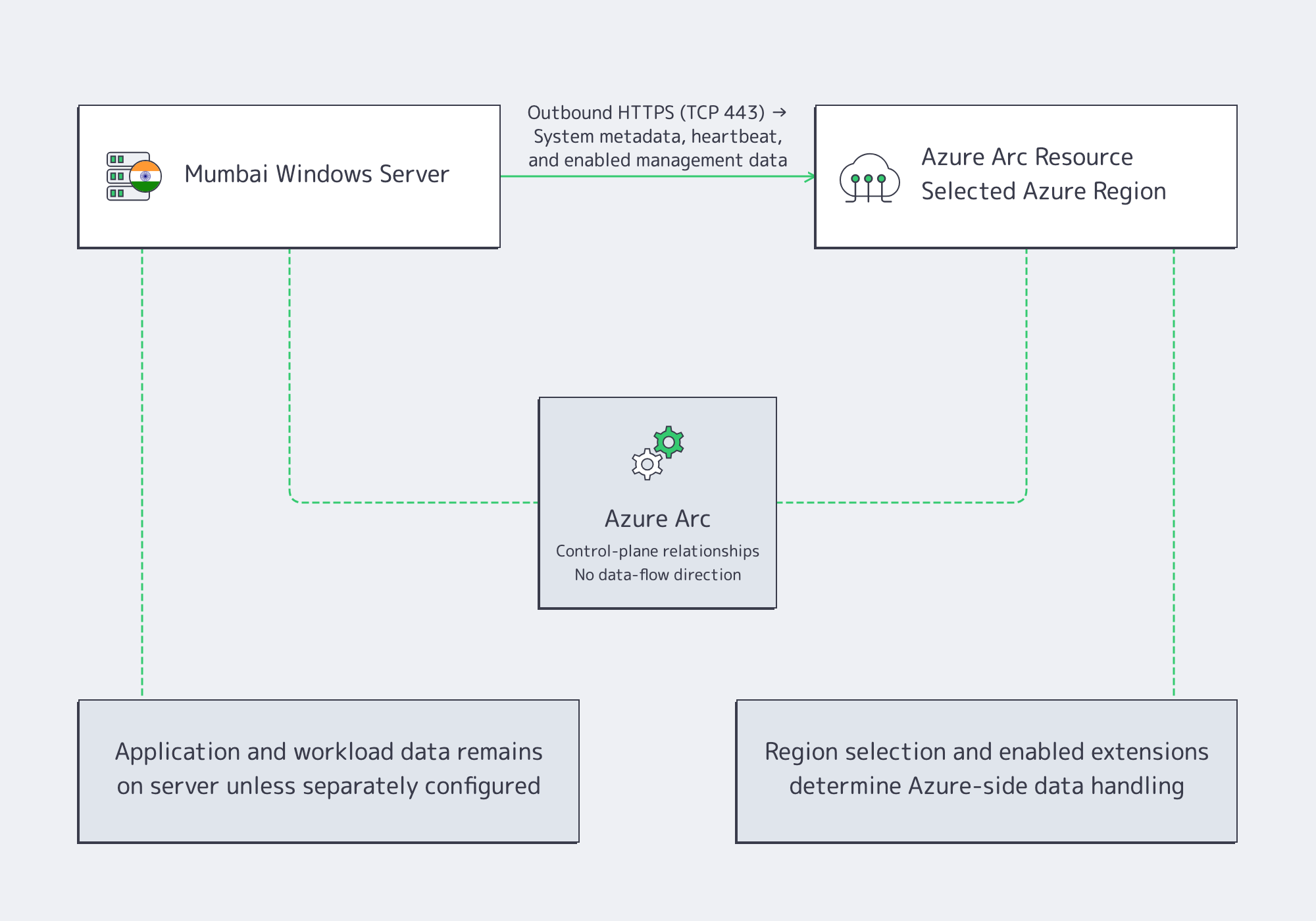
Azure Arc can register and manage a Windows Server outside Azure, but it does not keep all management data on the local machine. The Connected Machine agent sends system metadata and regular heartbeats to Azure. The Arc resource’s selected Azure region determines where that data is stored, and Azure replicates it within the same geography for resilience. Enabled extensions and connected services can collect or store additional logs, metrics, or configuration data. Application and workload data can remain on the Mumbai server unless separately configured to move, but teams must review Arc data collection, region selection, extensions, and outbound connectivity before treating the design as compliant.
Why it helps:
- Uniform policy & evidence: Use Azure Policy and machine configuration to assess or enforce selected settings across Arc-connected hosts; review policy scope, exclusions, and data sources before treating the reports as audit evidence.
- Operational consistency: Use Azure Update Manager to coordinate supported update workflows and Windows Admin Center for day-to-day tasks. Enabled Azure management services can have separate charges.
- Legal context: India’s DPDP Act provides for penalties up to ₹250 crore for certain failures to take reasonable security safeguards, while many provisions in the 2025 Rules have phased commencement. Review applicability at launch because Mumbai hosting alone does not establish compliance.
- Resilience planning: Keep backups and replicas on separately managed targets that meet recovery and residency requirements; Azure Arc is a management layer, not a backup or disaster-recovery service.
What It Means for ERP and .NET Workloads
ERP: Fewer Reboots and Shorter User Paths
ERP platforms such as Dynamics application tiers depend on predictable maintenance and network paths. Hotpatching can reduce restart frequency for eligible security updates, but baseline, .NET, driver, firmware, and application updates still require planned maintenance. Hosting application and file-integration tiers on a dedicated server in Mumbai can shorten paths to Indian users; measure the result from representative access networks instead of assuming fixed latency.
For resilience, Windows Storage Replica can maintain a synchronized copy only when a separately operated destination with appropriate Windows licensing exists. We operate our India dedicated-server location in Mumbai; a second Indian metro is not part of our current server footprint. Choose a replica or backup target according to recovery objectives, data-transfer limits, and residency requirements. SMB over QUIC can support secure branch file access, but it is not a backup protocol.
.NET: Throughput, Tail Latency, and Deployment Control
Custom .NET estates benefit along two axes.
- Network throughput: NIC offloads can reduce CPU overhead when the selected hardware, drivers, and workload support them. Mumbai offers up to 40 Gbps per server, but application throughput must be benchmarked on the chosen port, storage, and traffic pattern.
- Density & predictability: Datacenter licensing can support dense virtualization, but adding VMs or containers does not automatically improve p95 or p99 latency. Size CPU, memory, storage, and NUMA placement with workload measurements.
Operationally, a PowerShell pipeline can support blue/green or canary releases on a dedicated host: deploy packages, run Pester validations, switch traffic through the chosen load-balancing design, and follow a tested rollback procedure.
Conclusion
Windows Server 2025 addresses several operational concerns for on-premises Windows workloads. Hotpatching can reduce planned reboots for eligible security updates, while SMB over QUIC provides encrypted remote file access without opening TCP port 445 to the internet for supported clients. On a Windows dedicated server in India, Mumbai placement can shorten paths to Indian users, and Azure Arc plus PowerShell can centralize selected management and deployment tasks. None of these features removes the need to validate licensing, network performance, data flows, recovery design, or compliance controls.
For IT managers prioritizing ERP and .NET performance, the practical path is to measure latency from target user networks, use hotpatching within a complete maintenance plan, validate SMB over QUIC client and certificate requirements, and codify deployment and rollback steps. Judge the outcome with workload tests, recovery exercises, and audit evidence rather than assumed performance percentages or zero-downtime claims.
Ready to deploy in India
Deploy Windows on a dedicated server in Mumbai with up to 40 Gbps network capacity, operating-system installation help, and 24×7 support — with ready-to-go delivery in as little as two hours.
Get expert support with your services
Blog

Implementing HA Storage on Dedicated Servers for Controlled Failover
Update
High availability reduces outage duration and data-loss risk, but no storage design alone guarantees zero downtime. Recovery depends on tested failure detection, quorum, fencing, replication state, resource start time, and client retry behavior.
Downtime can interrupt revenue, data access, and recovery operations, but its impact varies by workload and business. High-availability storage should therefore be designed around explicit recovery point objectives (RPOs), recovery time objectives (RTOs), and tested failure scenarios—not a single availability percentage or a universal cost estimate.
This article outlines a blueprint for HA dedicated storage on dedicated servers: RAID 10 for local disk resilience, synchronous replication across nodes, quorum and fencing to prevent split-brain behavior, and automated failover to reduce recovery time. It also compares DRBD, GlusterFS, and Ceph for different access models and rolling maintenance.
Choose Melbicom— 1000+ ready-to-go servers — 21 Tier III & Tier IV data centers — 40 CDN PoPs worldwide |
 |
HA Dedicated Storage Blueprint
- Local protection on each server (RAID 10).
- Synchronous replication across peers to protect acknowledged writes from a single-node loss.
- Quorum plus a witness or qdevice to preserve a single authoritative partition.
- Automated failover after quorum and fencing checks.
This “defense-in-depth” design helps prevent a disk, server, or network failure from becoming a prolonged outage and keeps recovery measurable.
RAID 10: Local Redundancy and Faster Rebuilds
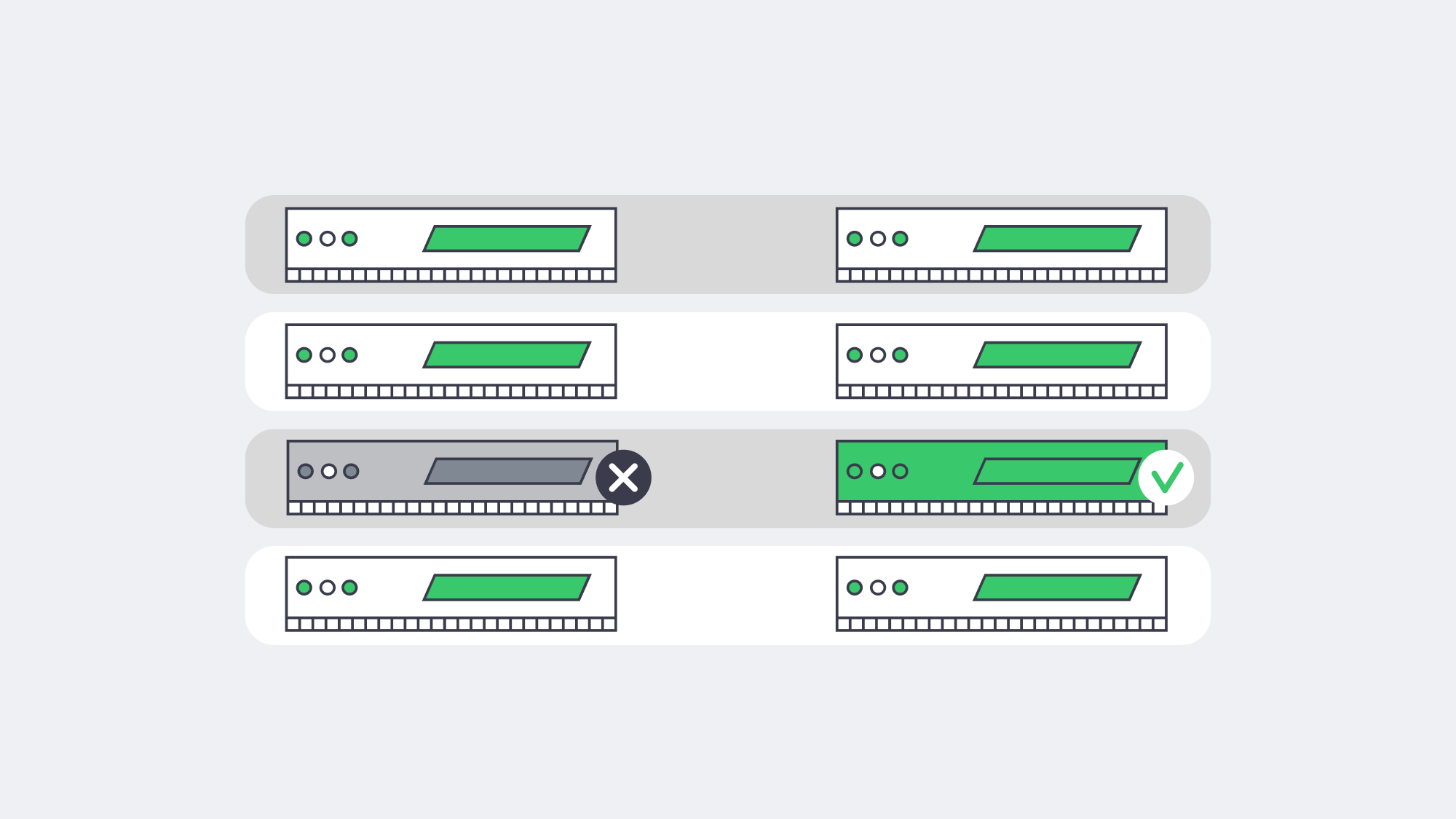
RAID 10 (striped mirror pairs) provides low write overhead and typically faster rebuilds than parity RAID because recovery copies data from the surviving mirror instead of recalculating parity. This shortens—but does not eliminate—the degraded period after a disk failure. RAID 10 can also preserve more predictable write behavior under load. On modern dedicated servers, enterprise SSDs or NVMe drives should be sized for application I/O, replication, rebuild activity, and endurance rather than assumed to provide sufficient headroom automatically.
Synchronous Replication for RPO Zero
Synchronous replication can provide an RPO of zero for writes acknowledged by both replicas, but only within the failure modes the design covers. The surviving node must have current data, the cluster must preserve a single writer through quorum and fencing, and application or filesystem state must be recovered consistently before service resumes.
Size the replication path from measured peak write throughput, resynchronization demand, latency, and safety headroom; there is no universal 10 GbE minimum. A dedicated or VLAN-segregated path can isolate replication and cluster traffic from client traffic. Melbicom dedicated servers can support private networking and VLANs, and global configurations can provide up to 200 Gbps per server. Keep NICs, cabling, and switch paths symmetric, and test latency under the load and failure conditions expected in production.
Two established approaches:
- Block-level replication (DRBD): DRBD replicates block-device writes between nodes. With synchronous Protocol C, a write completes only after local and remote disk writes are confirmed. It is commonly used in active-passive designs in which one node owns and mounts the filesystem while the peer tracks writes and can be promoted after cluster safety checks.
- Replicated file storage (GlusterFS): GlusterFS provides a shared file namespace with replicated volumes and active-active client access. Availability and consistency behavior depend on volume type, quorum, client protocol, and heal state. Before a new deployment, verify current upstream maintenance, distribution support, and the documented upgrade path.
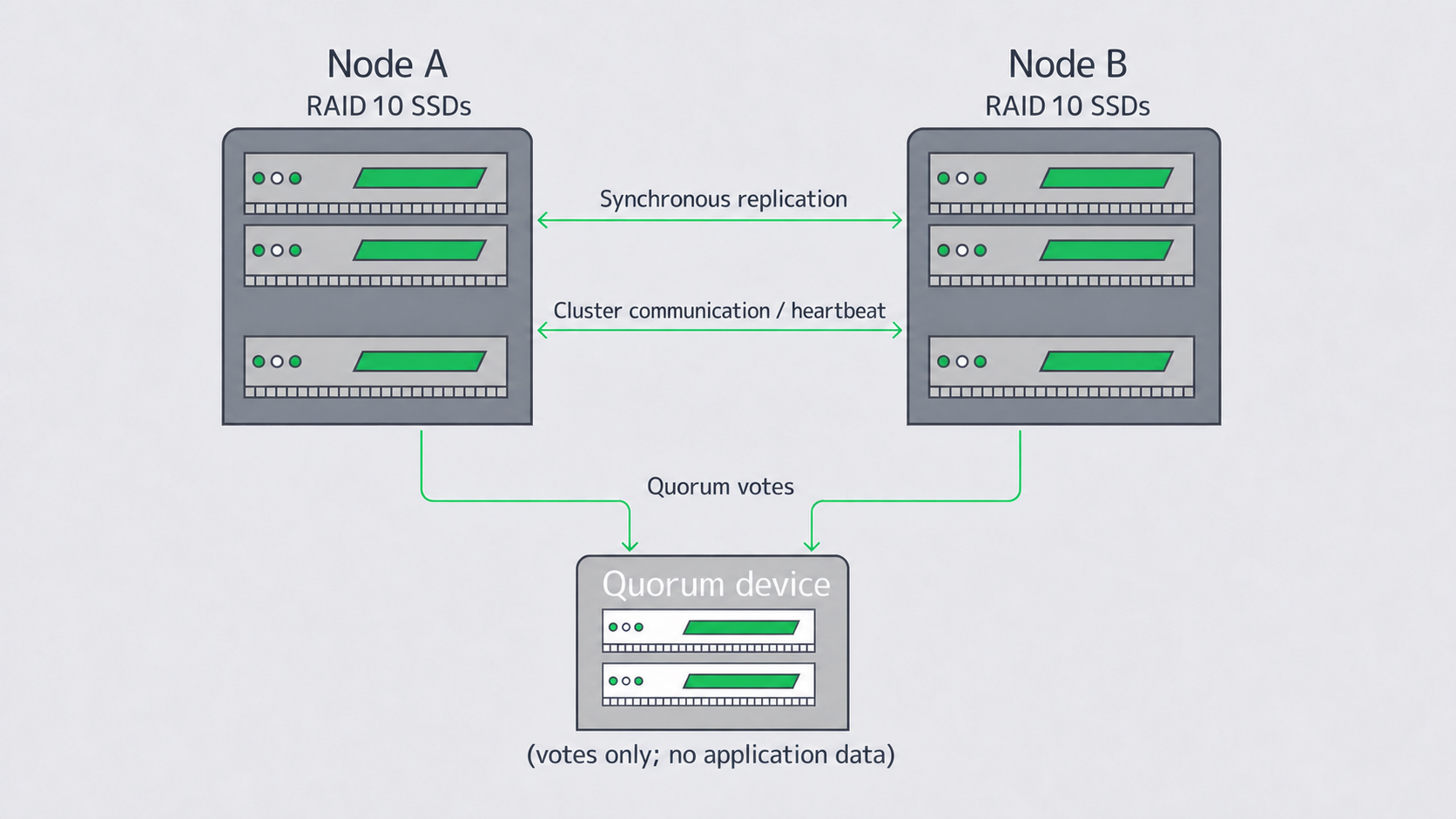
Two-node cluster with synchronous replication and a quorum device
Quorum and Split-Brain Prevention
Split brain occurs when two partitions accept writes independently. Quorum identifies which partition has a majority and may continue under the configured policy, but quorum alone does not fence hardware or guarantee storage integrity. In a two-node Pacemaker/Corosync cluster, add a qdevice or another third vote where supported, and define fencing so only one side can promote the storage resource.
Place the quorum device in an independent failure domain with reliable connectivity to both nodes. It should not store application data, but it remains part of the control plane and must be monitored and secured. For three or more data nodes, design vote distribution and failure behavior from the cluster software’s documented quorum model rather than relying only on an odd-node rule.
Fencing (STONITH) is the required safety mechanism that prevents an untrusted node from continuing to serve or write before a peer is promoted. Use IPMI or another out-of-band method independent of the data network, and test fencing under power, management-plane, and network faults.
Safe Automated Failover and Recovery
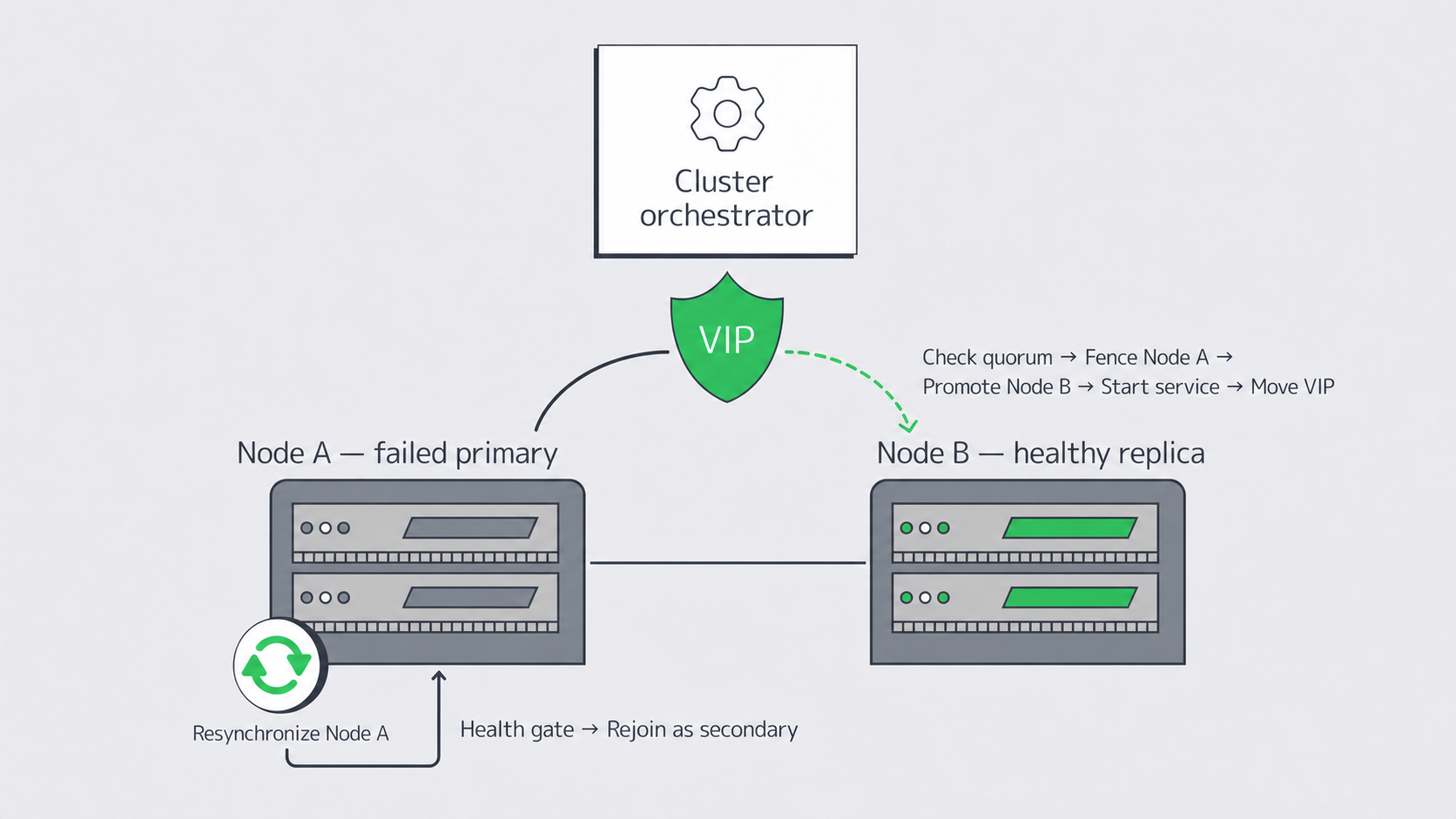
Automated failover should execute a defined sequence only after failure detection, quorum, and fencing checks. Pacemaker with Corosync is a common Linux stack: Corosync provides membership and messaging, while Pacemaker manages resources, ordering, constraints, and recovery actions. Actual RTO depends on detection timeouts, fencing, promotion, filesystem recovery, service startup, endpoint movement, and client retries.
A common DRBD + filesystem + export failover workflow:
- Confirm quorum and fence or isolate the failed primary.
- Promote DRBD on the secondary only when its data state is current.
- Mount the filesystem and start the export service in the defined order.
- Move the service IP or update the load-balancer target; use DNS only when TTL and cache behavior fit the RTO.
Returning nodes must not serve stale data. Use storage-layer resynchronization or healing together with cluster health gates:
- DRBD performs an incremental resynchronization of changed blocks.
- GlusterFS heals file replicas under its configured volume and quorum rules.
Keep orchestration conservative: re-admit a node only after replication, filesystem, service, and cluster checks pass. Codify resource ordering and timeouts to prevent timing races. Measure RTO and RPO during power-loss, NIC, network-partition, and process-failure tests.
DRBD vs. Distributed Storage Maintenance
Both designs can support rolling maintenance, but neither guarantees that every client sees uninterrupted I/O. Choose based on access model, consistency needs, failure domains, client retry behavior, and operational expertise.
| Technology | Best fit | Notes |
|---|---|---|
| DRBD + FS + Export | Block-level replication for single-writer filesystems or services requiring deterministic primary ownership | Active-passive; pair with Pacemaker/Corosync and tested fencing; multi-writer access requires a cluster filesystem and additional coordination |
| GlusterFS (replicated) | Shared file namespace with active-active client access for supported protocols and workload patterns | Verify current release support, volume quorum, client failover, and heal behavior; test small-file and large-file patterns |
| Ceph (optional) | Scale-out object, block, or file storage across multiple nodes and failure domains | Greater operational complexity; strongest when capacity, protocol diversity, and failure-domain-aware placement justify it |
Rolling maintenance considerations
- With DRBD, perform a controlled failover to the secondary, patch and reboot the former primary, resynchronize it, and optionally fail back. Client I/O can pause during the switch, so application retries must be tested.
- With GlusterFS, follow the documented upgrade order and update one node at a time only when replica and quorum state permit it. Verify heal completion and volume health before proceeding.
- With Ceph, use the supported rolling-upgrade path and allow cluster health checks to gate daemon restarts.
Single-controller SANs concentrate maintenance and failure risk in one appliance, but distributed storage is not a universal winner; compare failure domains, upgrade behavior, operational complexity, and application requirements.
Operational Checklist
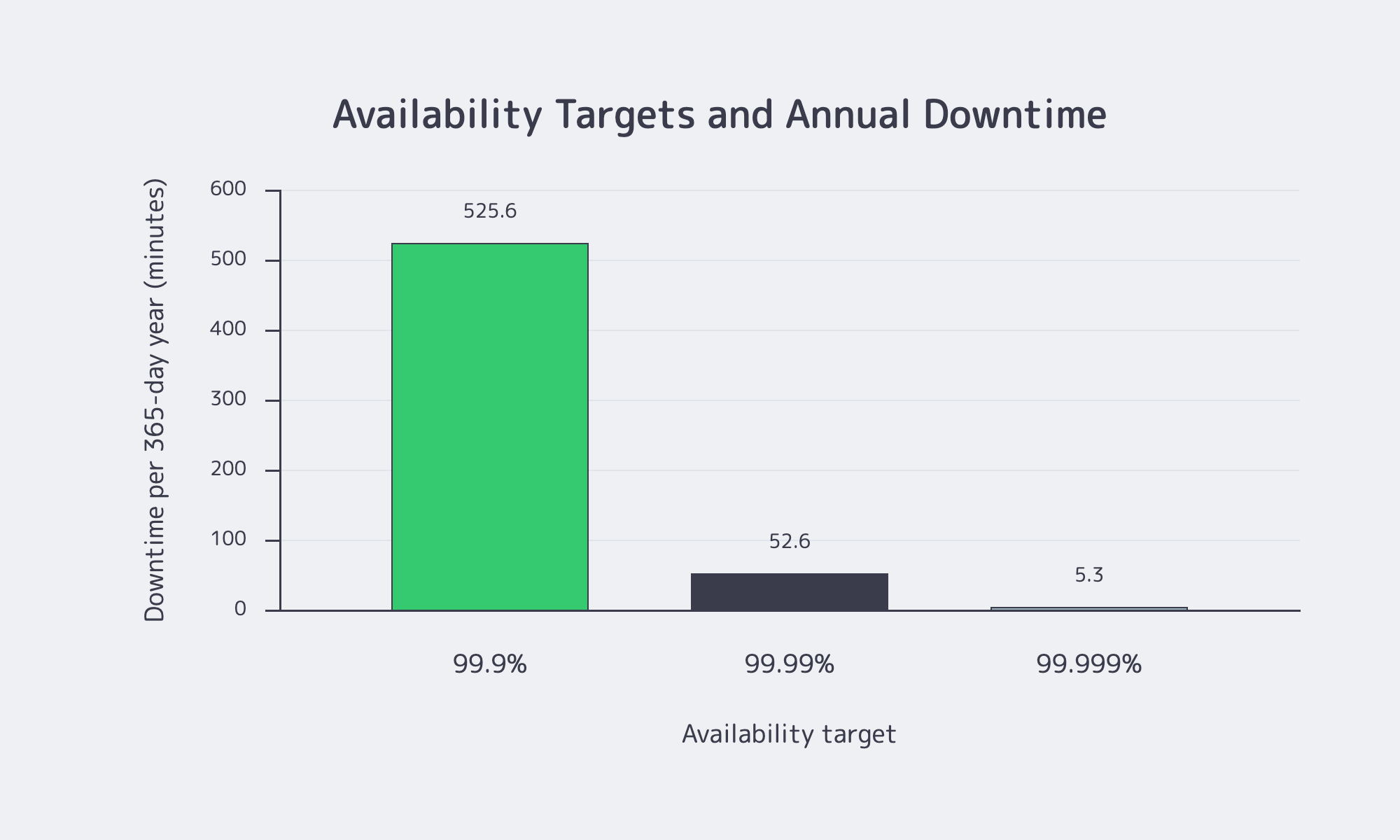
- Validated builds: use identical or compatibility-tested drives, NICs, controllers, firmware, and settings across nodes.
- Replication fabric: size for peak writes, resynchronization, and headroom; isolate where practical; use symmetric paths and redundant links when the failure model requires them.
- Quorum discipline: document vote behavior; place the qdevice or witness in an independent failure domain; test STONITH fencing.
- Health gates: verify replication, filesystem, service, and cluster health.
- Failover drills: test power, NIC, process, and partition faults on a defined schedule; record measured RTO and RPO.
- Security and compliance: isolate cluster traffic; encrypt where required; maintain separate, tested backups, with immutability where the chosen target supports it; consider S3-compatible offsite copies and SFTP backup for suitable workflows.
- Geographic strategy: keep synchronous replicas within a tested latency budget; use asynchronous replication for regional disaster recovery; place the quorum device in an independent failure domain.
Conclusion: Bringing the Parts Together
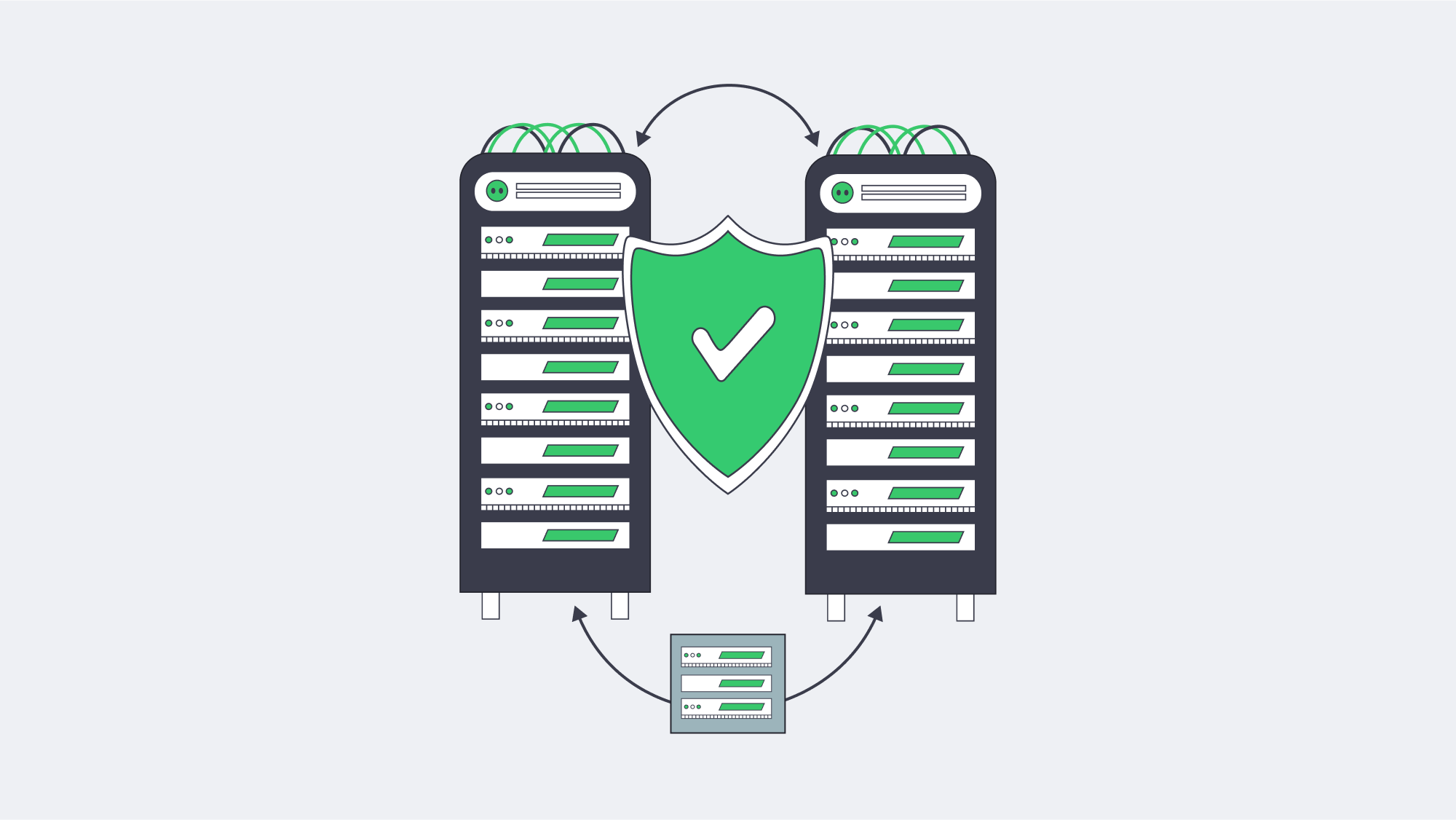
HA storage is not a single technology or a zero-downtime guarantee. A practical design combines local disk resilience, replication selected for the required RPO, quorum and fencing to prevent divergent writers, and orchestrated recovery tested against an explicit RTO. DRBD, GlusterFS, and Ceph address different access and scale models; each requires supported versions, documented failure behavior, and capacity for normal I/O plus recovery work.
If you are planning a refresh, begin with two compatibility-tested servers, a replication path sized from measured writes and resynchronization demand, an independent quorum device where the cluster design requires one, and repeatable failover tests. Expand only after the failure domains, client behavior, and operational load are understood; adding nodes without revisiting quorum and placement rules does not automatically improve resilience.
Launch your HA cluster
Build and test high-availability storage on dedicated servers with controlled failover.
Get expert support with your services
Blog

Dedicated Servers for Blockchain Node Hosting and Staking
Blockchain has long outgrown the playground of hobbyists. Tens of billions of dollars in digital assets ride on the success of not only validators, but of nodes. The margin for error is slim. High-stakes applications demand that networks like Ethereum and Polkadot maintain high availability, achieve low-latency data propagation, and deliver predictable I/O throughput. In that context, blockchain node hosting on dedicated servers moves from “nice to have” to a professional baseline.
Choose Melbicom— 1000+ ready-to-go servers — 21 Tier III & IV data centers — 40 CDN locations worldwide |
|
4 Elements of Success for Blockchain Node Hosting on Dedicated Servers
Dedicated servers, as single-tenant machines hosted in professionally managed data centers, can provide four key wins that translate directly into validator success: exclusive resources, continuous uptime, stronger security and management control, and scalable capacity for blockchain workloads.
Exclusive resources and predictable performance
Consensus participation is a time-critical activity: The processes of proposing, attesting, and voting need to occur on strictly scheduled time intervals. Predictable compute performance requires hardware that is unaffected by other users’ workloads, or by the resource allocation decisions made by hypervisors. A dedicated server grants your node an exclusive CPU, RAM and NVMe I/O path. The resulting stability shows in faster block ingestion, fewer missed attestations, and more predictable catch-up performance after restarts. When execution clients and indexers work on RPC endpoints, they need constant IOPS and memory bandwidth to achieve lower tail latencies in their API responses and prevent backlog issues as mempools grow.
24/7 blockchain uptime
Uptime is not a vanity metric; on proof-of-stake networks it’s revenue preservation. Miss enough duties and rewards erode. Prolonged gaps can even trigger penalties on some chains. Purpose-built facilities reduce those risks with redundant power and cooling, multi-homed transit, and on-site technicians. That’s why many operators host validators in Tier III and Tier IV data centers: the engineering goal is 24/7/365 operation with maintenance performed without downtime. Melbicom’s data center portfolio includes Tier III & IV DCs in Amsterdam; other data centers around the world are also Tier III-rated, all engineered with multiple paths for power, cooling, and networking.
Bandwidth ceilings also play a bigger role than you might think. Initial sync and snapshot restores contribute to sustained throughput, but bursty blocks and heavy state transitions drive traffic spikes. With per-server connectivity up to 200 Gbps where it’s needed, the extra headroom from Melbicom means you’re far less likely to fall behind your peers when surges happen, which means faster time-to-sync and smoother propagation under load.

Security and control for validator server hosting
Validator keys and signing paths should be strictly isolated. On a dedicated server, you get to control the OS hardening, the kernel, the firewalling, the key storage mechanism, and the monitoring stack without any co-tenants to introduce additional risk. Beyond node-level security, there is systemic flexibility: a significant portion of public nodes are on only a few cloud providers, creating large correlated failure surfaces. Distributing your validators between providers and across geographies not only bolsters decentralization but also dilutes shared-fate risks. With 21 global data centers, choosing where to place nodes with Melbicom is easy, making it both resilient and performant.
Scalability without surprises
Networks grow, client footprints expand, and new features such as MEV or PBS tooling introduce background services. Dedicated servers scale in two useful dimensions: vertically (RAM, higher-frequency CPUs, more NVMe) and horizontally (additional servers dedicated to relays, RPC, sentries, indexing, etc.). With 1000+ ready-to-go servers in Melbicom’s portfolio, operators commonly boot a clone node for rolling upgrades or failover, then power down the older server once cutovers are finished. That process preserves continuity without frantic late-night cutovers.
Modern Blockchain Hardware Requirements
The traditional approach of “renting a small VM” or “running a full node on your spare PC” fails to meet modern client requirements or the scale of ledger data. Throughput-optimized newer networks are defined less by a light footprint and more by a shift toward sustained performance. Fast CPUs, generous memory, NVMe SSDs, and reliable bandwidth are the through line across all our target ecosystems, and network interfaces must be fit for purpose to accept and serve sustained ingress/egress without intermittent packet loss.
| Network | Example Operational Footprint |
|---|---|
| Ethereum (PoS, consensus + execution) | 4+ fast CPU cores; 16–64 GB RAM depending on client mix and validator/RPC load; 2+ TB fast SSD/NVMe for full or pruned nodes, with 4–8 TB+ for larger local history or RPC roles; unmetered bandwidth, preferably 1 Gbps for fast syncs and serving peers. |
| Solana (PoS) | 12 cores / 24 threads or more at 2.8 GHz+ with higher clock speed preferred; 256 GB RAM, or 512 GB for all account indexes; separate high-TBW NVMe SSDs for accounts, ledger, and snapshots; 2 Gbps required for staked validators, 10 Gbps recommended. |
| Polkadot (NPoS) | 8 physical cores at ~3.4 GHz; 32 GB DDR4 ECC RAM; ≥2 TB NVMe; ≥500 Mbps symmetric. |
| Cardano (PoS) | Block producer + at least 2 relays; 2+ cores at 2.0 GHz+; 8–24 GB RAM depending on backend; 250 GB storage, with 350 GB recommended for future growth; about 1 GB/hour broadband on a public IPv4 connection. |
Table 1: Sample full/validator node footprints. Fast CPUs, adequate memory, SSD/NVMe storage, and low-loss bandwidth remain common across ecosystems, but exact sizing depends on client mix, pruning/archive policy, RPC load, and whether the node participates in consensus.
A few patterns worth underlining
CPU frequency and single-thread performance matter. Validation, consensus, and block production are latency-sensitive operations; higher per-core clocks keep the critical path short.
RAM cushions instability. As clients, caches, and state grow, memory headroom helps absorb sync work and post-upgrade reorgs.
NVMe is a must-have. Random I/O has a high share for many clients; SATA SSDs and network-attached storage introduce preventable stalls.
Network bandwidth is not just a number. Operators should consider packet loss, micro-bursts, and route quality among the first-class properties of their network connection, rather than focusing solely on nominal bandwidth.
High-throughput chains such as Solana still have the steepest footprint in this comparison: validator guidance emphasizes high-clock CPUs, ECC memory, separate high-TBW NVMe devices for accounts, ledger, and snapshots, and 2–10 Gbps symmetric networking for staked validators. Polkadot’s validator guidance is more moderate but still specific: eight physical cores, ECC memory, local 2 TB NVMe, and 500 Mbps symmetric networking. Ethereum’s baseline full-node requirements are lighter, but professional validators and RPC operators often provision larger NVMe and memory footprints to keep local state responsive and avoid slow remote calls during spikes.
Reliable Crypto Node Infrastructure Design
Place nodes where latency and resilience intersect
The geographic location of your nodes still matters. Validators located close to major Internet exchange points have been observed to exhibit better peer connectivity and lower path variance, on average. Melbicom operates 21 Tier III and Tier IV data centers worldwide to enable operators to strike a balance: place your consensus and relay nodes strategically, near your peers but spread far enough to reduce correlated disruptions.
Prioritize propagation over throughput alone
A 1 Gbps port that never drops packets is superior to a 10 Gbps port with intermittent micro loss. We’ve found that dedicated ports with quality upstreams, ample burst capacity, and fast restoration paths (across diverse providers with shorter downstream routes) are best. We provision per-server bandwidth up to 200 Gbps for special use cases that require it, and a CDN across 40 locations in 35 countries can take public RPC or static requests off your validator network path, where your architecture requires such isolation.
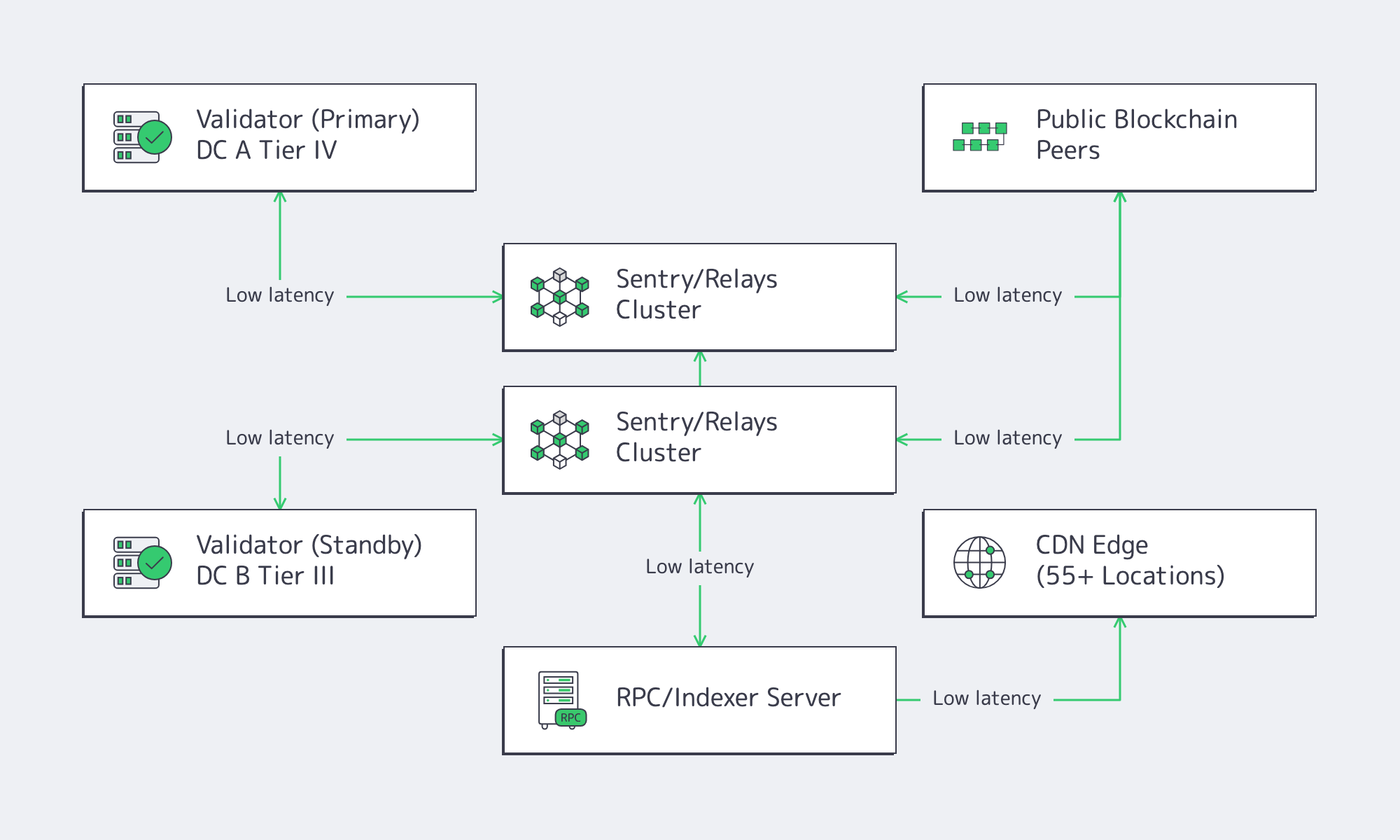
Standardize on modern CPUs, ECC RAM, and NVMe
Validator workloads are jitter-sensitive. Platforms with modern AMD EPYC and Intel Xeon CPUs, ECC memory, and NVMe RAID provide the deterministic behavior the node software demands. For Ethereum-class professional footprints, many operators standardize on 64–128 GB RAM and 4–8 TB NVMe to leave room for client growth, local history, and RPC tasks. For Solana-class footprints, 256–512 GB RAM and separate high-TBW NVMe drives for accounts, ledger, and snapshots are the practical baseline to keep hot state responsive.
Build for continuous operations
Rolling upgrades and fast recovery are part of the plan. The simplest pattern is two like-for-like servers per critical role (validator + hot standby, block-producer + sibling relay). With 1000+ ready-to-go servers, we at Melbicom can mirror your primary build in the same metro or second region, then help you cut over during client upgrades or hardware refreshes. Free 24/7 technical support shortens mean-time-to-repair if a component fails.
Keep RPC and validator roles separate
Mixing public API traffic with consensus work is convenient until it isn’t. A split architecture (validator on one host, RPC/indexing on another) helps isolate unpredictable workloads. On dedicated servers, that separation is cost-effective without sacrificing performance.
Why Outdated Setups Struggle
Consumer gear and oversubscribed VMs underperform for predictable reasons: shared I/O, noisy neighbors, single-ISP exposure, and limited hands-on recovery if hardware fails. Occasional home-lab nodes still have a role in testing and education. But for networks where missed duties lower income, or where your reputation with delegators is on the line, professional, single-tenant servers in Tier III/IV facilities are the cost-effective answer. The calculus is simple: more signed duties, fewer reorg headaches, lower operational risk.
Conclusion
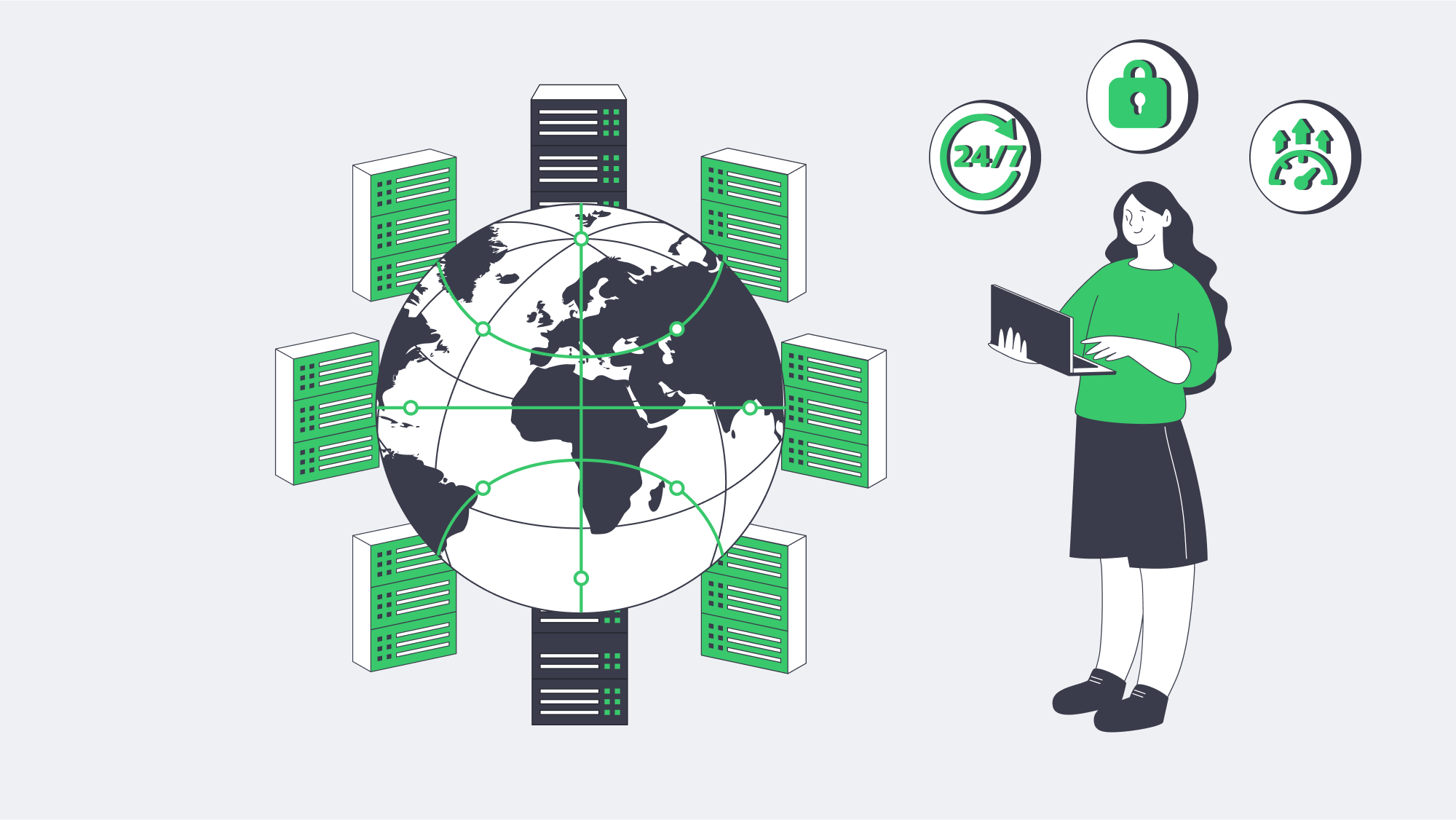
Melbicom’s footprint and network were architected for this moment. With 21 Tier IV and Tier III data centers, per-server connectivity up to 200 Gbps, a CDN with 40 locations across 35 countries, 1000+ servers ready to deploy, and 24/7 support, Melbicom makes professional-grade validator hosting accessible and scalable. If you’re architecting for the next cycle of network growth, the right move is to put your keys on infrastructure engineered for nonstop duty.
Launch Your Dedicated Validator Server
Deploy a Melbicom dedicated server built for blockchain nodes—fast CPUs, NVMe storage, and bandwidth up to 200 Gbps.
Get expert support with your services
Blog
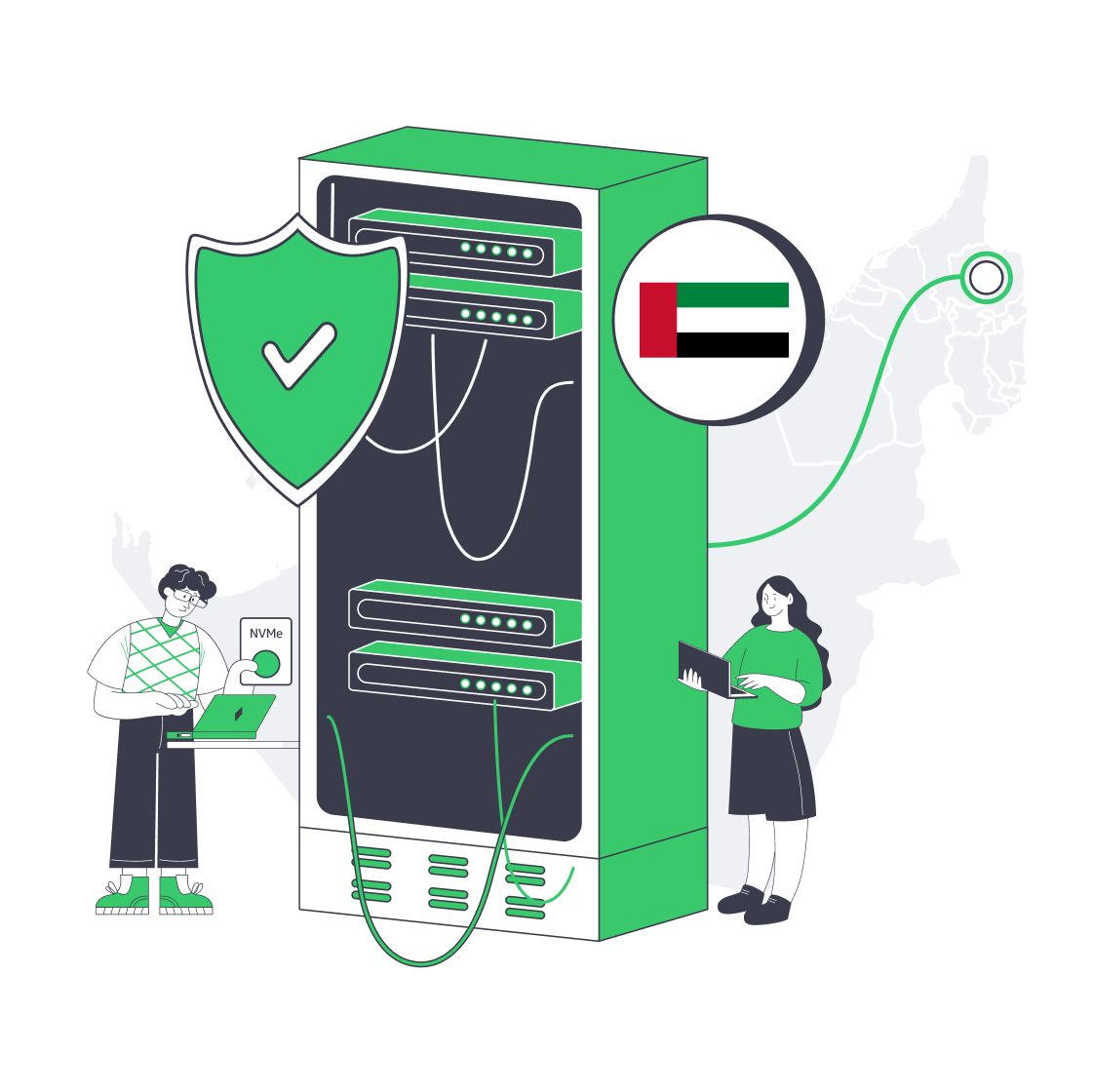
Cheap Dedicated Server Hosting in the UAE: Hidden Risks
Cheap dedicated server offers in the UAE can reduce upfront cost, but the lowest monthly price may hide older hardware, constrained bandwidth, indirect routing, limited support, or rigid upgrade terms. Verify the exact components, facility design, network routes, transfer conditions, support scope, and replacement process before ordering.
A budget UAE server can still be reliable when its specifications match the workload and the provider documents the limits. The goal is to maximize value: choose the lowest-cost configuration that passes production-shaped latency and load tests, provides a clear growth path, and avoids vague fair-use or overage terms.
Choose Melbicom— {{servers_in_stock_fujairah}} ready-to-go servers — Tier III facility in Fujairah — 40 CDN PoPs across 6 continents |
|
The Evolution of UAE Hosting: Why Value Matters More Than Ever
The UAE data center market is projected to grow from $2.38 billion in 2025 to $6.7 billion by 2031, a compound annual growth rate of 18.8%. As capacity grows, buyers have more regional options, but affordable dedicated server hosting in the UAE still needs to be evaluated against hardware, facility, network, and support terms rather than price alone.
The Risks of Cheap Dedicated Servers in the UAE: What Isn’t on the Price Tag
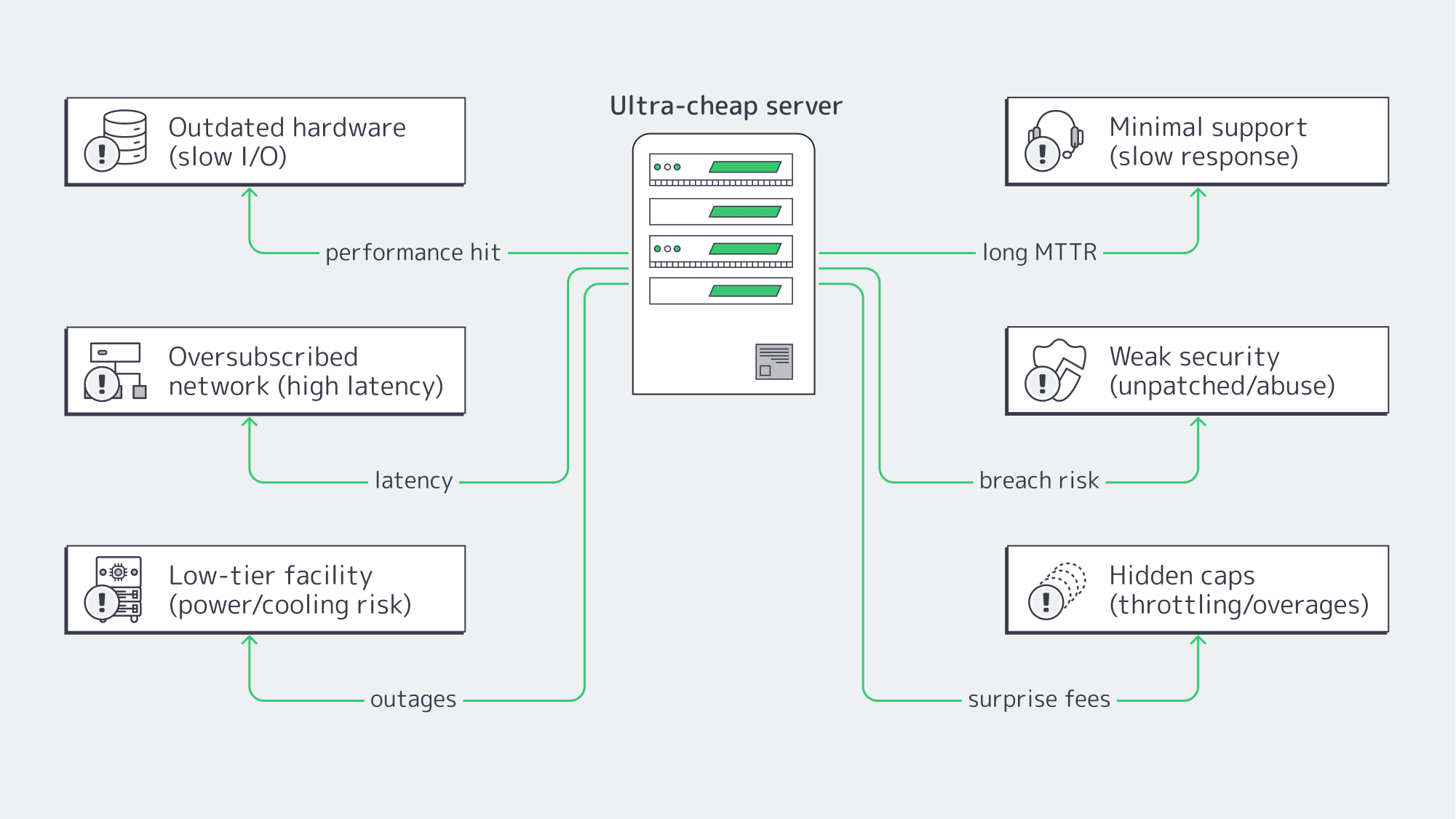
Outdated hardware is hindering performance
Often, ultra-low prices reflect retired or refurbished gear, which can mean older-generation CPUs, spinning HDDs instead of SSD/NVMe, or limited replacement stock. The business impact depends on the workload: underprovisioned CPU, memory, storage, or network capacity can increase response times and reduce concurrency. Judge a cheap server by its exact component models, benchmark results, drive health, and replacement terms rather than price alone.
Latency advantages quashed by thin networks
The main reason to host locally is to shorten round-trip times, but inadequate capacity or peering can erase much of that advantage. A UAE server can reduce path length for Gulf users, yet oversubscribed uplinks and indirect routes can still produce high or unstable latency. Test from the networks your users actually use, at peak and off-peak times, instead of treating geography as proof of performance.
Unreliable uptime forfeits the “discount”
Low-cost plans may rely on facilities with limited redundancy, increasing the risk that maintenance or equipment failures affect service. A Tier III data center is concurrently maintainable, so planned maintenance can occur without shutting down IT operations. Uptime Intelligence’s 2026 outage analysis found that 57% of respondents’ most recent major outages cost more than $100,000, while one in five exceeded $1 million. Those costs put the cheapest offers into perspective.
Support that makes “cheap” expensive
Response time matters during any incident; if you face kernel panics at 3 a.m., you need engineers available, not only a ticket intake line. Some low-cost plans limit support hours or scope, which can prolong outages and force teams to source emergency help. Melbicom provides 24/7 engineering support across dedicated servers for server reboots, OS reinstalls, network troubleshooting, and performance issues.
Accumulating security debt
Low-cost hosting can also shift security work onto the customer without making that boundary clear. The provider should maintain facility, firmware, network, and abuse-handling controls; the customer remains responsible for operating-system patching, access control, workload hardening, and backups unless a managed service explicitly says otherwise. Review IP reputation, DDoS handling, reinstall procedures, and abuse response before deployment.
Other hidden constraints
Other constraints can hide behind a low monthly price. Fixed hardware, limited upgrade paths, vague “fair use” clauses, throttled bandwidth, or high overage fees can turn growth into a forced migration. Organizations may then need a manual cutover and data resynchronization; the resulting service interruption can erase any initial “savings.” When searching for a dedicated server in the UAE, look for clear CPU, RAM, storage, port-speed, transfer, and upgrade terms.
Dedicated Server Hosting in UAE: What to Prioritize on a Budget
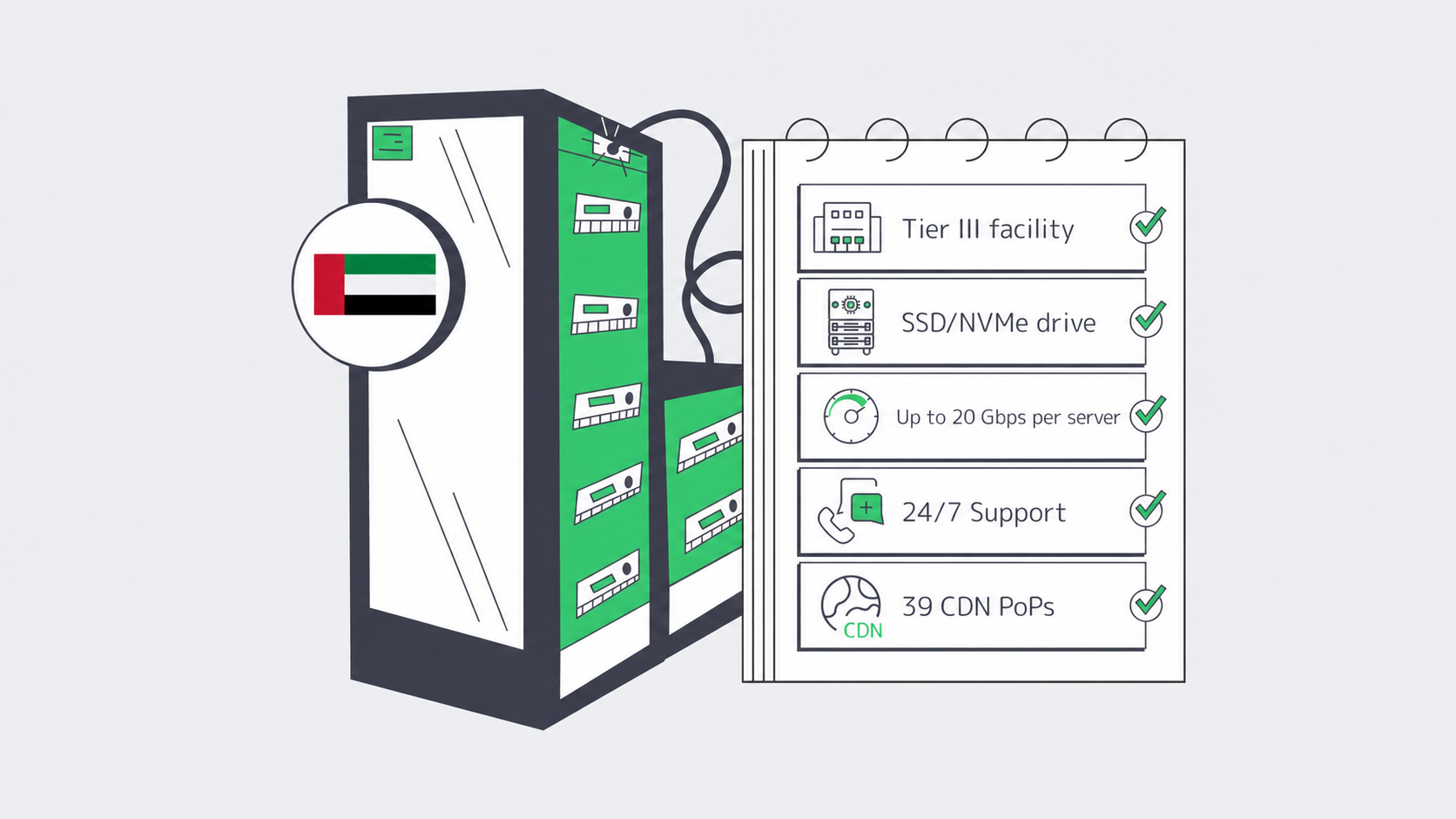
Facility tier and location: Look for redundant power and cooling, documented maintenance topology, and a network suited to the workload. Melbicom’s deployment in Fujairah is a Tier III facility, meaning planned infrastructure maintenance can occur without shutting down IT operations. If a provider will not document the facility tier or equivalent design, treat that as a red flag.
Trustworthy hardware: Compare the exact CPU generation, core count, memory type and capacity, storage media, drive health, and replacement terms. Workload-appropriate CPU capacity, sufficient memory, and SSD/NVMe storage may matter, but newer model numbers do not replace production-shaped testing. Melbicom has dozens of ready-to-go configurations to deploy, keeping costs aligned with the workload.
Network routes and real-world latency: The location is only part of your latency equation. Serving content from the UAE itself shortens path length in the Gulf region, but only if the provider peers and keeps headroom. Melbicom pairs its Fujairah offering with its CDN, which has 40 disclosed PoPs across 35 countries, so static assets can be cached closer to distributed audiences while dynamic requests continue to use the chosen origin.
Support for incidents: Choose a provider that clearly defines support scope and escalation paths. Melbicom engineers are available 24/7 for server reboots, OS reinstalls, network troubleshooting, and performance issues, so incidents can be raised without waiting for business hours.
Bandwidth transparency and growth path: Confirm the port-speed ceiling, included transfer, metered or unmetered terms, and custom upgrade options before deployment. Fujairah supports up to 20 Gbps per server; compare the exact order rather than treating the facility maximum as the default for every configuration.
How Do You Verify UAE Server Latency?
Verify a UAE server by testing production-shaped routes from actual user regions before and after cutover. Measure median and p95 network RTT separately from full transaction time, compare peak and off-peak periods, and confirm the path remains stable under load. A local IP alone does not guarantee a shorter or less congested route.
Test from networks that resemble real users, not only from the provider’s own test host. If your dedicated server is riding on contended links or lacks useful peering, hosting in-region may not improve the user path. Monitor end-to-end response time before and after cutover, and compare p95 application latency during peak and off-peak periods.
Balancing Costs and Quality in Fujairah

Keep things straightforward with the following tips:
- Insist on Tier III as a baseline for engineered resilience: Melbicom’s data centers include Tier III & IV DCs in Amsterdam and Tier III & IV DCs in Frankfurt, among others.
- Match the offered hardware to your expected workloads: SSD/NVMe is useful for I/O-bound apps, while CPU-bound services need sufficient cores, clock speed, and generation-specific performance, and analytics need enough RAM. Melbicom offers a variety of configurations that are ready to deploy, with custom options available.
- Design with low latency as a focus. Start from your users and engineer backwards; make Fujairah your origin, cache front-end static assets via the CDN, and keep latency-sensitive API calls close to Gulf users. Lower p95 latency by keeping stateful services in the UAE when the user distribution supports it and caching static assets globally.
- Don’t underestimate support: Cheap plans without engineering support can prolong incidents. Melbicom provides 24/7 engineering support, reducing the risk that an issue sits unresolved while your team searches for outside help.
- Check the fine print and avoid any lock-ins: Pricing and bandwidth terms should be clear. You should also make sure there are options for straightforward upgrades that don’t require replatforming. Avoid anything vague.
Conclusion: Affordable But Reliable
Choosing at the value end of the UAE dedicated hosting market requires careful comparison. Some “cheap” offers conceal outdated components, use networks that squander the local latency advantage, or rely on ill-equipped facilities. Support may be limited, and rigid plans can force migrations at the worst possible time. Focus on measurable performance, reliability, and growth rather than monthly price.
When budgets are low, spend where it matters most. By making facility tier, network, support, and hardware specifications your priorities, you can keep costs in check and protect your revenue and reputation. Melbicom’s Fujairah deployment combines a Tier III facility, up to 20 Gbps per server, and 24/7 engineering support. The wider footprint spans 21 data centers and 40 disclosed CDN PoPs, giving teams options to place origins and cached content closer to their audiences as they grow.
Deploy a UAE Dedicated Server Today
Launch a Tier III facility-hosted Fujairah server with up to 20 Gbps per server and 24/7 support.
Get expert support with your services
Blog
MongoDB vs. SQL: Choosing the Right Database Hosting
A decade ago, NoSQL-versus-relational debates often treated the choice as winner-takes-all. In practice, many systems combine document and relational databases. The useful question is how each model handles data shape, consistency, query patterns, and scale—then how to host the selected engine on reliable infrastructure that matches the workload.
This guide compares the two models around four pillars—data model, scaling topology, schema philosophy, and feature convergence—and closes with hosting patterns that use Melbicom’s global dedicated-server footprint.
Choose Melbicom— 1000+ ready-to-go servers — 21 Tier III and Tier IV data centers — Up to 200 Gbps per server |
|
What’s the Difference Between Document and Tabular Models?
Relational databases organize data in tables with defined columns, keys, and constraints. SQL engines are well suited to joins and aggregations across related data, but schema changes still require planned migrations and compatibility checks.
Document stores such as MongoDB treat each BSON document as a self-contained record. Documents in one collection can contain different fields, nested arrays can reduce joins, and applications can add fields without an immediate table-wide migration.
| Model | Strengths | Trade-offs |
|---|---|---|
| Tabular (SQL) | ACID transactions, mature join and aggregate engines, defined schemas | Schema evolution requires coordination; multi-node write scaling depends on the engine |
| Document (MongoDB) | Flexible documents, hierarchical reads, built-in replication and sharding options | Cross-document relationships and integrity rules require deliberate modeling |
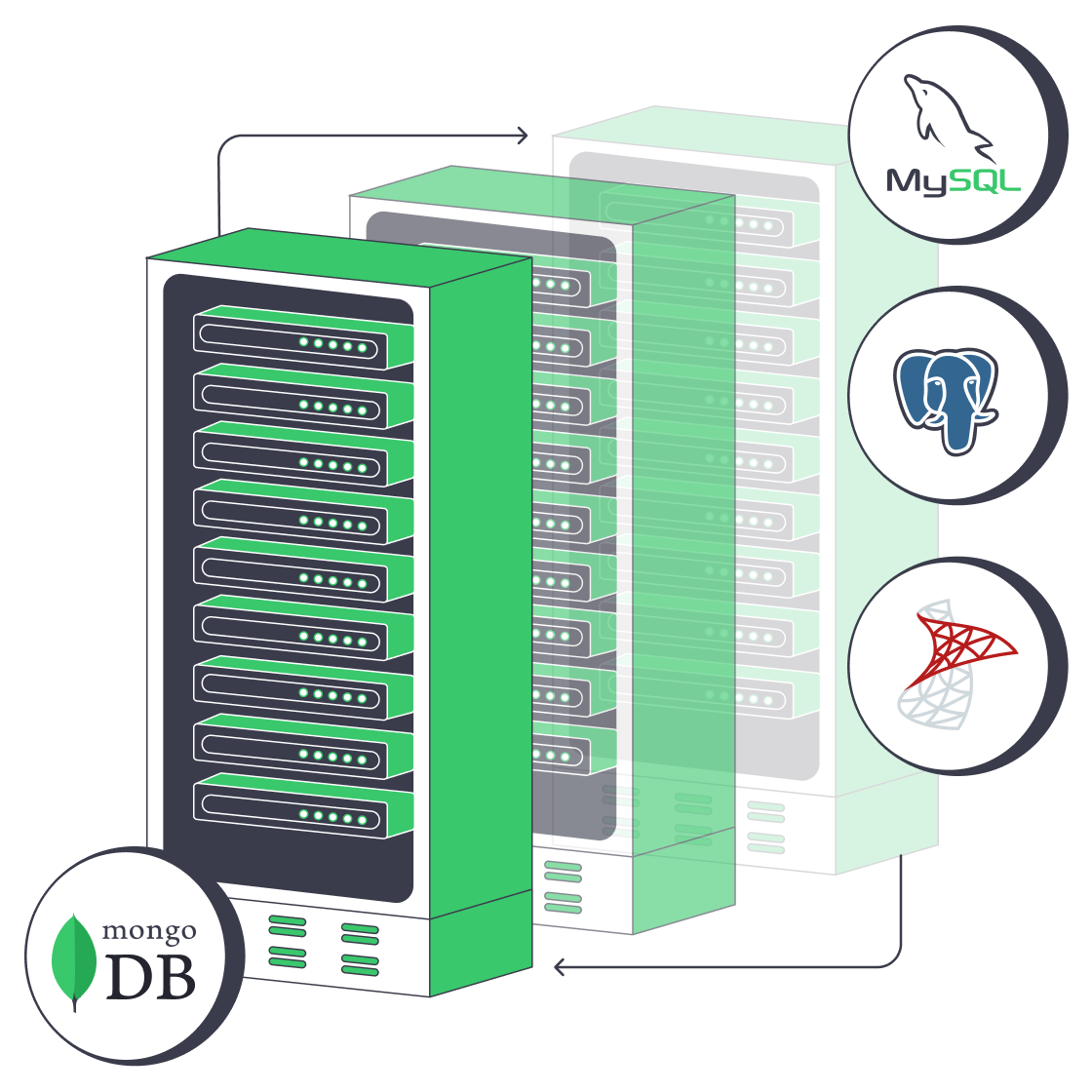
Many production architectures use both models: finance ledgers may remain in PostgreSQL while content metadata lives in MongoDB. This polyglot approach is useful when each dataset has distinct consistency, query, and change requirements.
How Do MongoDB and SQL Scale?
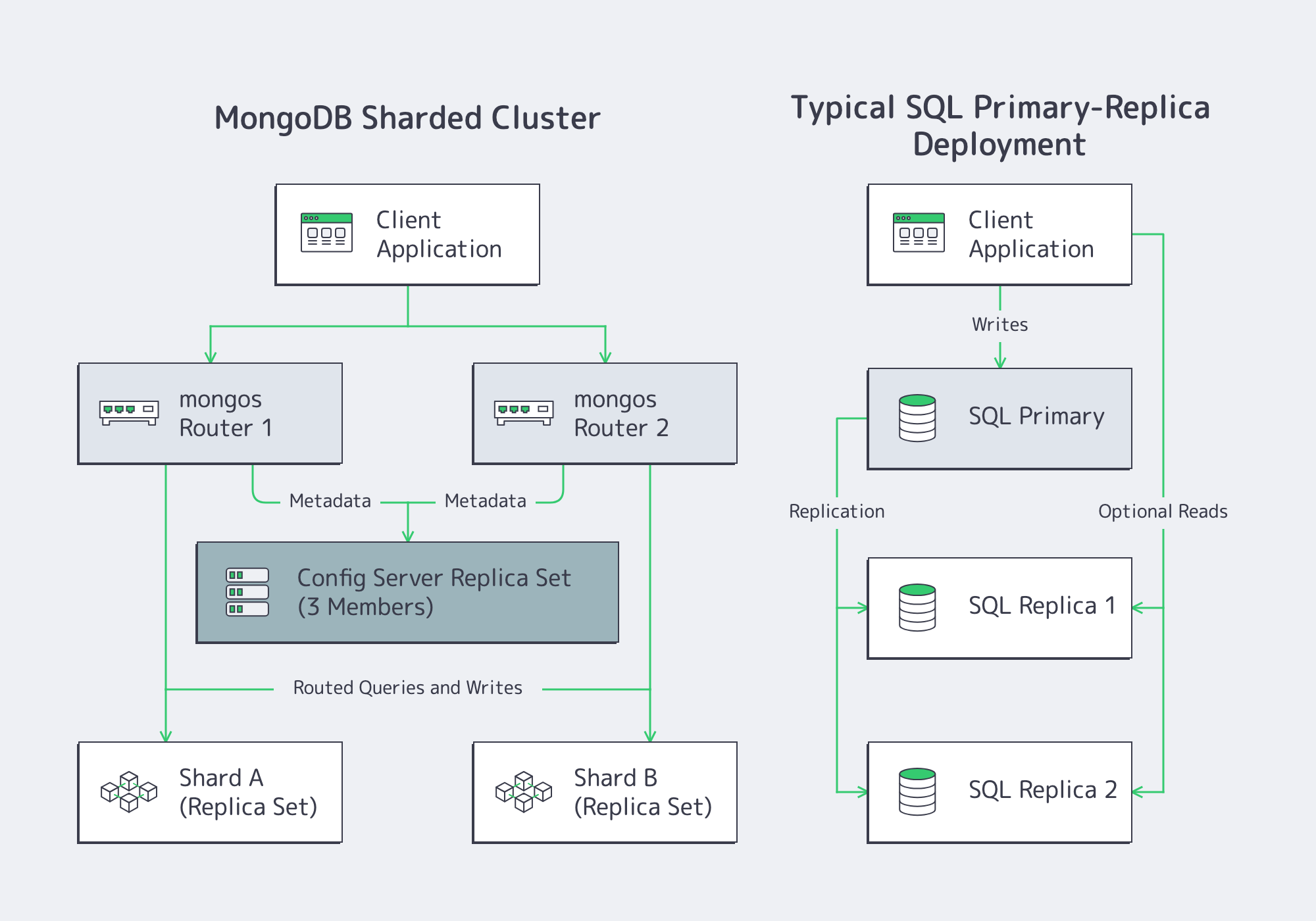
- MongoDB sharding distributes collection data across shards according to a shard key. The shard key and query routing determine whether the cluster can spread writes effectively across servers; production shards and config servers use replica sets, while
mongosprocesses route application requests. - Relational engines can scale vertically, distribute reads through replicas, and partition large tables. Multi-node write scaling depends on the selected engine and architecture; distributed SQL is a separate design choice rather than a default property of SQL.
Topology drives hosting: a production MongoDB sharded cluster includes mongos routers, a config-server replica set, and replica-set-backed shards, while a relational deployment may use a primary with read replicas or standby servers. Compare node count, storage, network traffic, failover targets, and database licensing before sizing either pattern.
Flexible Schemas vs. ACID: Which Fits?
MongoDB’s flexible document model lets applications add fields without an ALTER TABLE operation, but schema flexibility still requires validation, versioning, and migration planning. A MongoDB customer case study reports that OTTO cut product-catalog refresh times from 12 hours to 15 minutes after adopting MongoDB for that workload.
Relational databases can enforce types, keys, and constraints, and transactions can make multi-step changes atomic. The guarantees depend on the engine, schema, and transaction settings, so application-level validation and operational discipline still matter.
MongoDB supports multi-document transactions on replica sets and sharded clusters. Relational platforms such as PostgreSQL, MySQL, and SQL Server also support JSON storage, querying, and indexing, although their data model and operational trade-offs remain relational. Architects can mix strict tables, flexible documents, and application validation according to each workload.
How MongoDB and SQL Converge
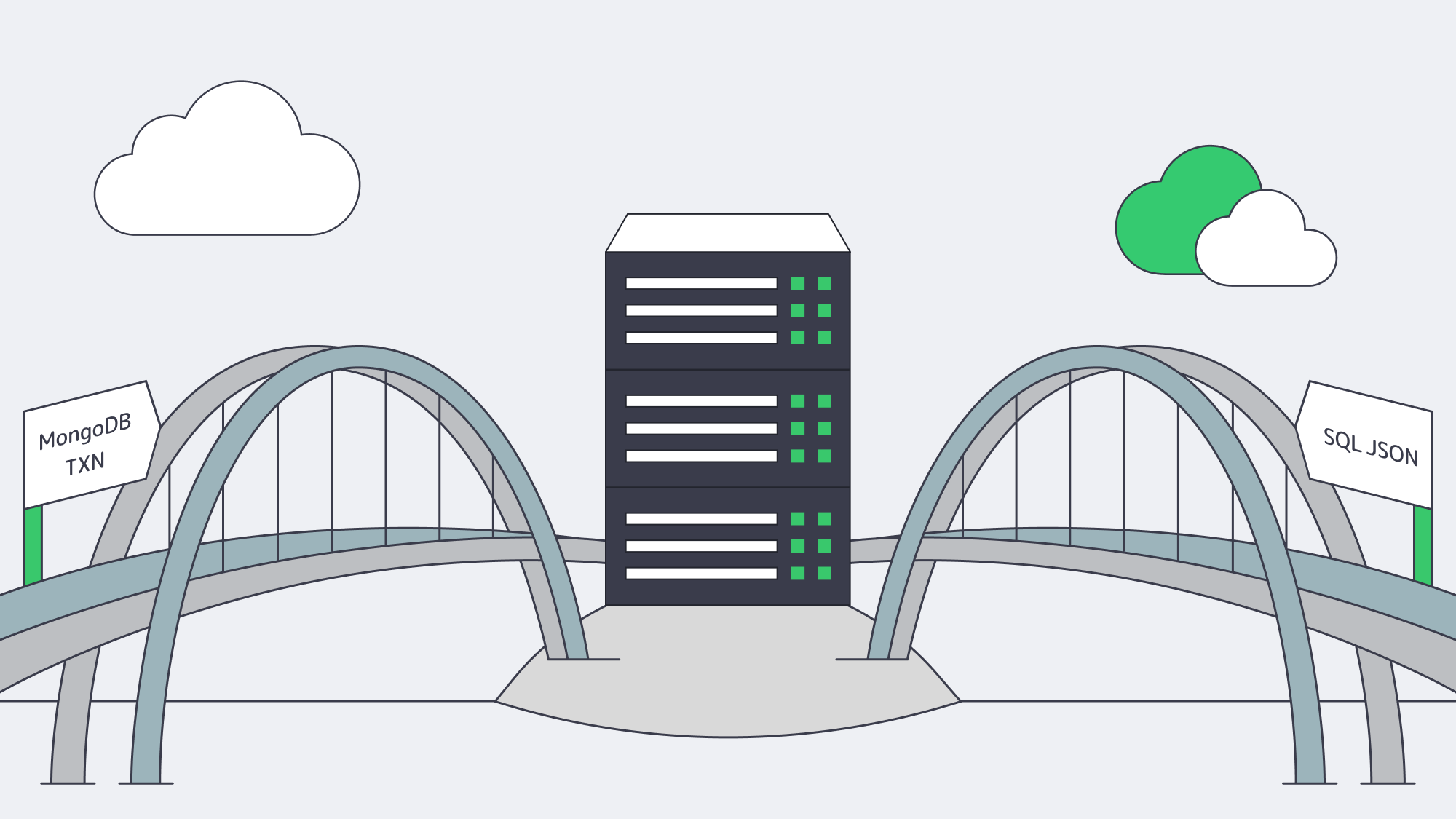
- Analytics in MongoDB –
$lookup, aggregation pipelines, window functions, and time-series collections support more analytical work inside the document database. - JSON in SQL – PostgreSQL, MySQL, and SQL Server can store, query, and index JSON data, although syntax and index behavior differ by engine and version.
- Vector search – PostgreSQL can add vector similarity search through extensions such as pgvector, while MongoDB offers separate search and vector-search components for supported deployments.
- Replication and failover – Both ecosystems offer replication, but election, consistency, and failover behavior depend on the selected engine and configuration.
Selection is therefore less about whether a feature exists and more about how it behaves under the application’s query mix, consistency requirements, and operational constraints.
How Should You Choose MongoDB or SQL?
Choose MongoDB when data is naturally document-shaped, schemas change often, and access patterns avoid complex joins. Choose SQL when relationships, constraints, and multi-row transactions dominate. Before either choice, test representative queries, failure recovery, growth, and licensing.
| Criterion | Lean Document | Lean Relational |
|---|---|---|
| Data shape | Polymorphic, nested | Highly normalized or relationship-heavy |
| Query profile | Document lookups and bounded aggregations | Multi-table joins and ad hoc analysis |
| Consistency model | Per-document atomicity, multi-document transactions, and tunable concerns | Multi-row constraints and transactions |
| Growth | Shardable access and write patterns | Vertical scale, replicas, partitioning, or distributed SQL |
| Licensing | SSPL or commercial subscription | Open-source or commercial licensing |
| Operations | Document modeling, replica-set, and shard-key skills | Schema, query, transaction, and replication tuning |
MongoDB Database Hosting: Why Do Dedicated Servers Matter?
Dedicated servers matter for MongoDB database hosting when workload isolation, root-level tuning, predictable resources, or local storage control outweigh shared-cloud elasticity. They remove cross-tenant CPU and memory contention, but teams must still benchmark storage, design replication, test restores, and plan growth capacity.
- Local NVMe can provide high-throughput, low-latency storage without a shared network-volume layer; benchmark the actual drive, filesystem, and RAID layout.
- Dedicated CPU resources reduce contention from unrelated tenants, but query stability still depends on workload shape, NUMA layout, and database tuning.
- Root access enables kernel, filesystem, huge-page, and I/O-scheduler tuning when the database and operating system support it.
Melbicom offers 1000+ ready-to-go dedicated servers across 21 data centers, with up to 200 Gbps per server. Teams can place MongoDB shards or SQL replicas in supported locations and choose CPU, RAM, storage, and bandwidth around measured database requirements. Melbicom provides 24/7 support; database teams should still plan configuration, replication, backups, and failover separately from hardware support.
Dedicated vs. Cloud Database Costs
Storage capacity, IOPS, snapshots, data transfer, and software licensing all affect database cost. Cloud services often meter these line items separately. A dedicated-server configuration makes the selected CPU, RAM, and local storage explicit, while bandwidth and optional services still depend on the plan. Compare the full bill at the same redundancy and retention targets.
For teams asking how much Microsoft SQL Server costs, the answer depends on edition, licensing model, core count, and support terms. Before choosing hardware, verify the supported SQL Server release and licensing rules for the planned operating system and core layout; do not size an out-of-support edition only because an old license is available.
Separately from database traffic, Melbicom’s CDN has 40 disclosed PoPs across 35 countries and can cache eligible application assets at the edge. It does not reduce database replication, backup, or query traffic, so size those flows against the selected server bandwidth plan and the actual placement of replicas.
Operational Playbooks and Tooling
Dedicated-server operations can be automated, but the available control plane matters. Configuration-management tools such as Ansible can standardize database packages and operating-system settings; infrastructure-as-code support depends on the provider API and the team’s tooling. Before committing, confirm how provisioning, remote console access, power control, reinstallations, IP management, monitoring, and data-center hardware replacement are handled. Database teams should separately automate backups, restore tests, certificate renewal, metrics, alerts, and failover procedures.
Hosting Patterns at a Glance
| Pattern | Typical Nodes | Best For |
|---|---|---|
| Relational Primary and Replicas | Primary plus standby or read replicas | Relational transactions, joins, and read scaling |
| MongoDB Sharded Cluster | mongos, config-server replica set, replica-set-backed shards |
Horizontal partitioning across shards |
| Polyglot Deployment | Separate SQL and document clusters | Applications with distinct data-model needs |
Conclusion: Choose the Model, Then Size It
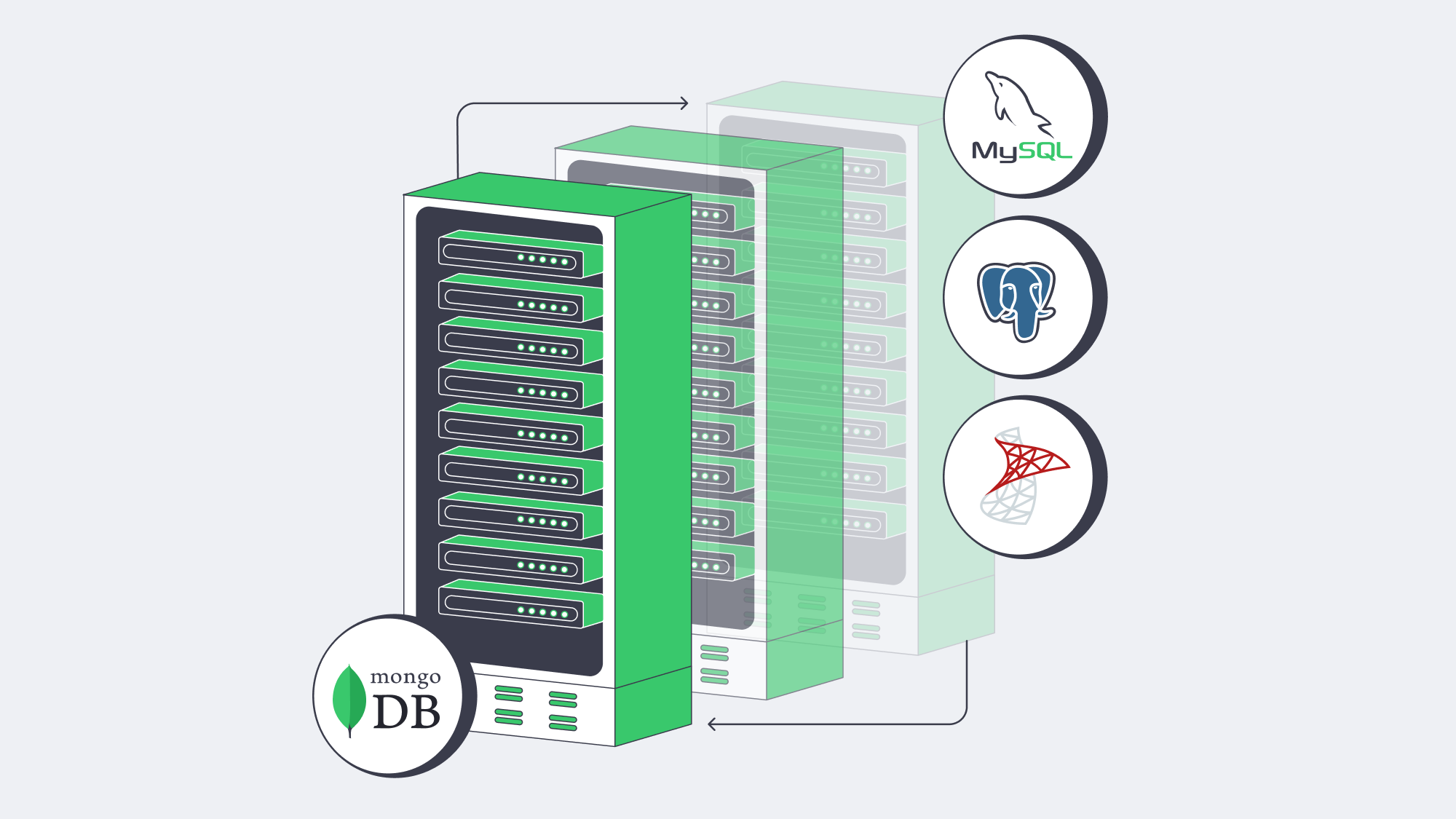
Modern database engineering is about trade-offs. MongoDB can simplify development for evolving, document-shaped data, while relational engines provide mature constraints, transactions, and joins. Feature convergence softens the extremes, but the engines remain operationally different. Choose with representative queries and failure tests, then size infrastructure for the measured CPU, memory, storage, and network profile.
Deploy dedicated servers today
Choose from 1000+ ready-to-go servers or request a custom server delivered in 3–5 business days.
Get expert support with your services
Blog
Dedicated Servers for Video Streaming at Scale
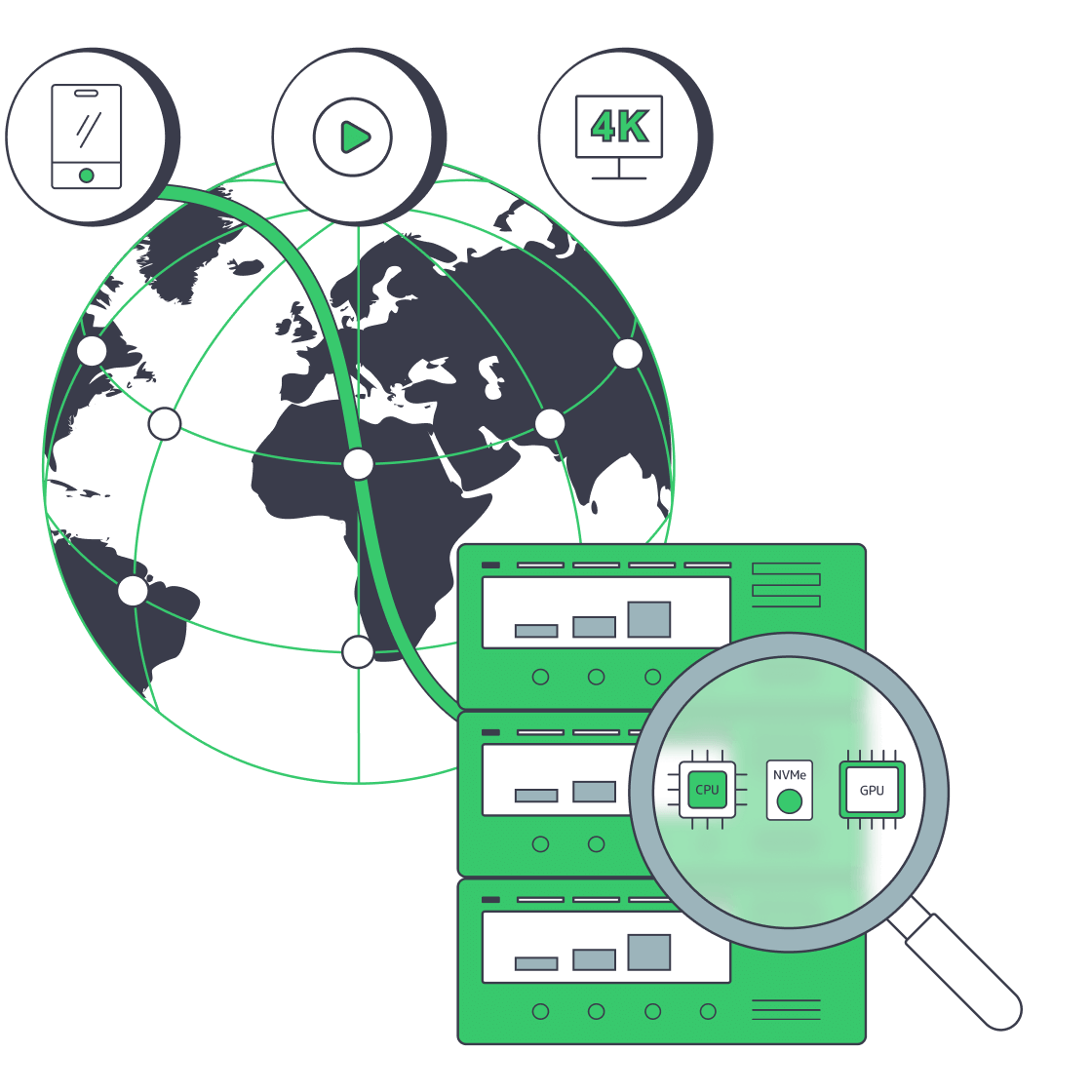
Video drives a large share of internet traffic. Audiences expect fast starts, crisp 4K playback, and minimal buffering.
That expectation collides with physics and infrastructure: Netflix reported a 65 million concurrent-stream peak for the Jake Paul–Mike Tyson event. At 20 Mbps, one 4K stream transfers about 9 GB per hour. Multiply by thousands—or millions—of viewers and the arithmetic becomes unforgiving.
Choose Melbicom— 1000+ ready-to-go servers — 21 Tier III & IV data centers — 40 PoP CDN across 6 continents |
|
Choosing the right dedicated server is no longer about generic CPU and a 1 Gbps port. It’s about bandwidth headroom, predictable performance under concurrency, CPU/GPU capacity for real-time encoding, and storage I/O sized to keep the network fed. This piece lays out the modern requirements for video streaming hosting, trims legacy considerations to context only, and shows where dedicated infrastructure—paired with a global CDN—gives you smoother playback and room to scale.
Modern Video Streaming Server Hosting
Four pillars define streaming-ready servers today:
- Network throughput and quality. Size port capacity against peak bitrate, viewers, CDN offload, and failover rather than assuming one minimum. Melbicom operates a 14+ Tbps global backbone and provides up to 200 Gbps per server.
- Compute for encoding/transcoding. HD, 4K, and AV1 workloads can consume substantial CPU. Use high-core processors plus GPU offload when benchmarked channel density or latency targets justify it.
- Fast storage and I/O. NVMe SSDs remove mechanical seek latency and can sustain multi-gigabyte-per-second reads. Hybrid tiers (NVMe + HDD) can work for large libraries, while hot content is usually best placed on flash.
- Distributed reach via CDN. Even a well-sized origin cannot compensate for a long path to users. A CDN with dozens of global PoPs puts cacheable segments closer to users and offloads origin bandwidth. Melbicom’s CDN spans 40 PoPs across 35 countries; operators can use custom headers, Origin Shield, and Secure Link access controls.
Everything else—kernel tuning, congestion control variants, packaging tweaks—adds incremental value only if these pillars are sized correctly.
Dedicated Servers vs. Cloud
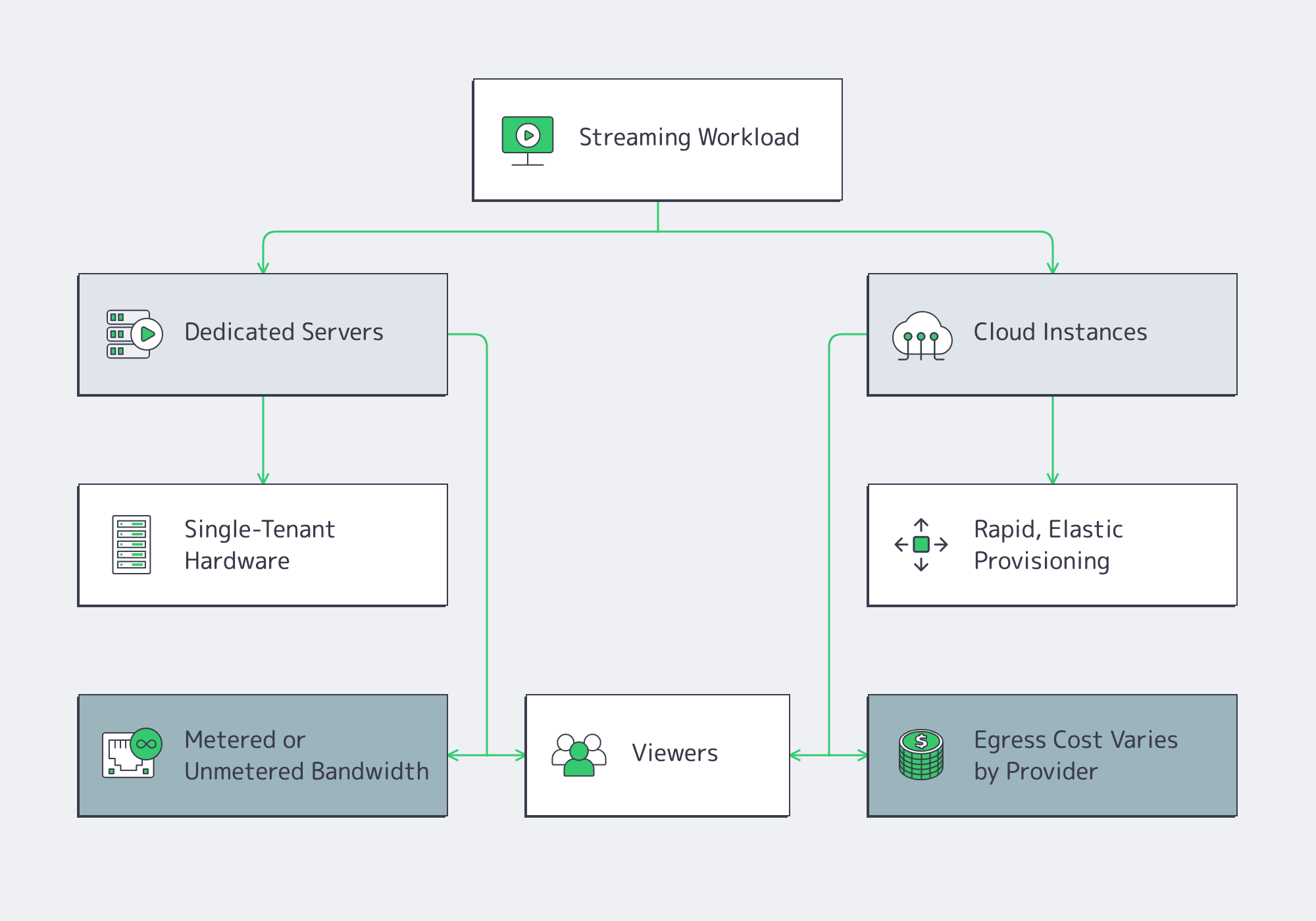
Cloud advantages. Fast time-to-first-instance and elasticity are real benefits. If you’re validating a format or riding unpredictable bursts, cloud can bridge the gap.
Cloud trade-offs for streaming. Video is egress-heavy, and provider, region, service tier, and committed volume all affect the bill. At petabyte scale, even a few cents per gigabyte can become tens of thousands per month. Shared instances can also add resource and network variability. Dedicated-host and higher-bandwidth options alter that trade-off.
Dedicated advantages. You get exclusive hardware: full CPU cores, RAM, and NICs, plus a defined metered or unmetered bandwidth plan. That can stabilize resource availability as concurrency climbs and improve cost predictability at steady high utilization. Dedicated servers also give you full-stack control: CPU model, GPU option, NICs, NVMe layout, kernel version, and I/O schedulers—all tunable for media workloads.
A pragmatic strategy. Many teams run steady state on dedicated for performance and cost efficiency, then keep cloud capacity for edge cases. Melbicom supports this path with 1000+ ready-to-go servers across 21 Tier III & IV data centers for rapid provisioning of the right shape at the right place.
How Much Bandwidth Does Video Streaming Server Hosting Need?
Video streaming server hosting needs enough sustained throughput for peak concurrent viewers, average delivered bitrate, protocol overhead, and failover headroom. Multiply peak viewers by expected average bitrate, add overhead, account for CDN offload, and divide the remaining traffic across origins. A 1 Gbps port may suit smaller origins; large live events can require 10–200 Gbps per server.
Using illustrative delivered bitrates, the math is:
- 10,000 × 1080p at ~5 Mbps ≈ 50 Gbps sustained.
- 10,000 × 4K at ~20 Mbps ≈ 200 Gbps sustained.
A 1 Gbps port transfers roughly 324 TB over a 30-day month if saturated continuously. The right starting point may be 1 Gbps, 10 Gbps, or higher, depending on measured traffic and CDN offload; 40/100/200 Gbps options become relevant where concurrency or bitrate warrants. The interface is only part of the story; you also need:
- Committed throughput and transfer model. Confirm whether capacity is dedicated or shared and whether traffic is metered or unmetered.
- Good routes and peering. Closer, cleaner paths reduce retransmits and startup delay.
- Redundancy. Dual uplinks and diverse routing reduce single points of failure.
Melbicom’s network combines up to 200 Gbps per server with a 14+ Tbps backbone, 23 transit providers, and 29 IXPs. Streaming teams should still validate sustained throughput, routing, and failover for each target region before a live event.
Compute: CPU and GPU for Real-Time Encoding and Packaging
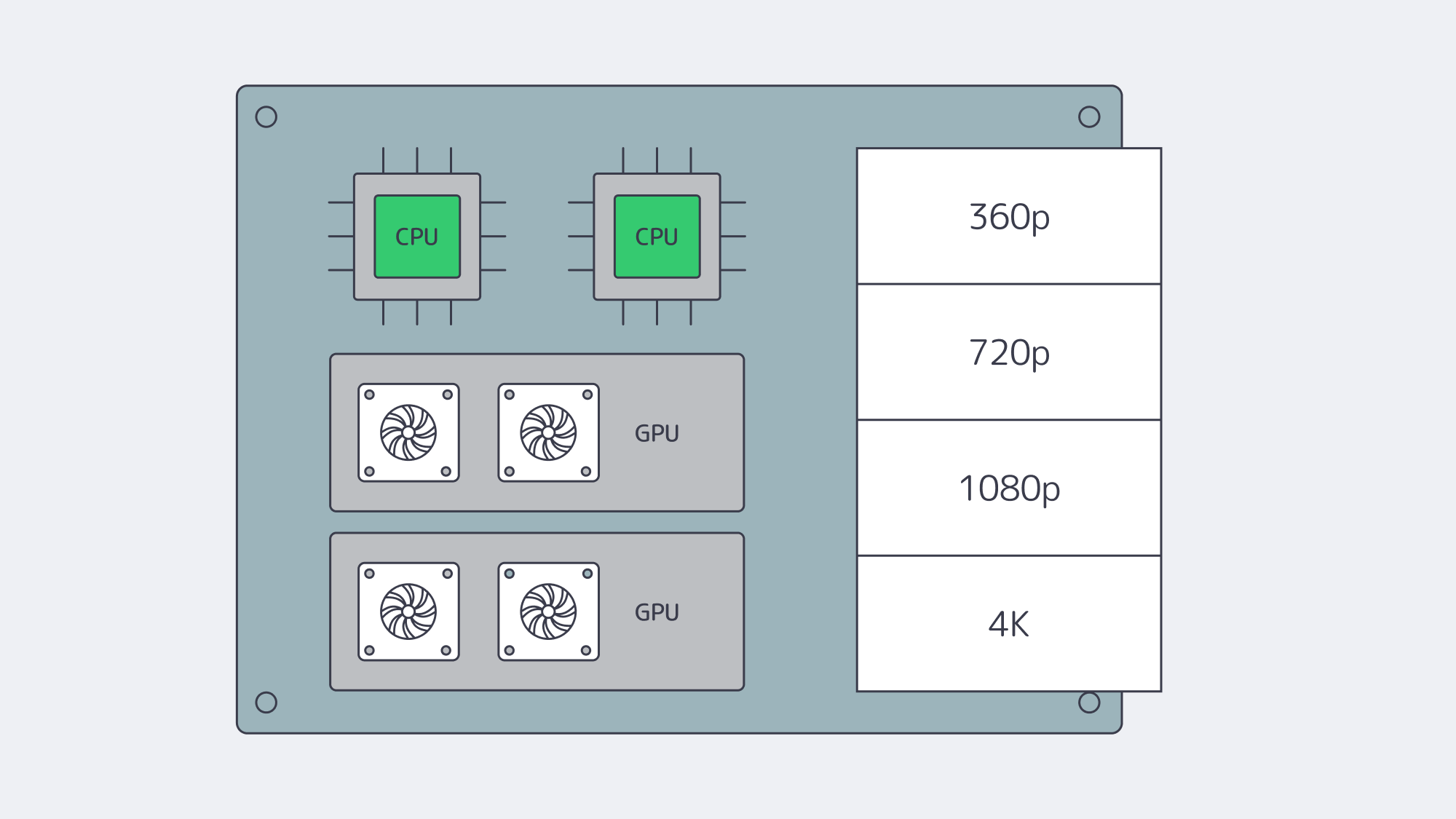
Software encoders for H.264/H.265 consume substantial CPU, and AV1 demand varies with preset and quality target. Size high-core CPUs from measured encode speed, ladder count, and latency targets rather than a generic core count. As workflows scale, GPU acceleration can improve channel density, but throughput varies by codec, resolution, frame rate, preset, and GPU generation. Benchmark the exact ladder and quality settings before assigning channels per card, while reserving CPU for packaging, DRM, timers, and I/O.
A few practical notes when sizing:
- Match encoders to business logic. Each additional rendition increases work; hardware encoders can raise channel density, but quality and latency settings still need testing.
- Use the right instruction set. AVX2/AVX-512 can help software encoders; benchmark the actual encoder build and CPU generation.
- Right-size RAM. Treat 32–64 GB as a starting point for many origins and packagers; live transcoders may need more for buffers and queues.
Melbicom offers dedicated systems with CPU-dense footprints and GPU options for media workloads. We’ll help you align codec plans, density targets, and cost per channel.
Storage and I/O: NVMe and Hybrid Tiers
Video delivery can be sequential, but production origins also handle concurrent segment requests, seeks, and popular timestamps. Those patterns add random I/O and queue depth that a single HDD handles poorly. For hot content, NVMe SSDs are often the safer default:
- Throughput. A single NVMe drive can sustain several GB/s of sequential reads; arrays vary with PCIe lanes, RAID, filesystems, and workload.
- Latency. Low-latency storage reduces wait during cache misses and segment fan-out, but startup time also depends on player, network, and CDN behavior.
- Concurrency. High IOPS helps keep per-stream fetches responsive under heavy fan-out.
For large libraries, pair NVMe (hot tier) with HDD capacity (cold tier). Software caching (filesystem or application-level) keeps the working set on flash, while HDD arrays hold the long tail. For a direct-serving origin, verify that aggregate storage throughput can feed planned NIC throughput under the actual access pattern. A 40 Gbps port fed by a single HDD will not reach line rate; multiple NVMe drives or a wide HDD array may be needed. Melbicom offers dedicated servers with NVMe-first storage so storage can be sized not to limit an otherwise capable high-bandwidth network path.
Global Reach, Low Latency: Origins in the Right Places, CDN at the Edge
You cannot fight the speed of light. The farther a user is from your origin, the higher the startup delay and the larger the buffer required to hide jitter. Best practice is twofold:
- Multi-region origins. Place dedicated servers near major exchanges in your key audience regions—e.g., Amsterdam/Frankfurt, Atlanta/Los Angeles, Singapore/Tokyo—so CDN origin fetches are short and reliable. Melbicom’s footprint spans 21 data centers in 19 cities.
- CDN everywhere your users are. A 40 PoP footprint like Melbicom’s CDN can shorten delivery paths and offload origin traffic. With sound cache rules, the CDN serves viewers while origins handle cache fill, authorization, and long-tail content.
Routing features—peering with local ISPs, tuned congestion control, and judicious use of anycast or GeoDNS—can trim further milliseconds. For live formats such as LL-HLS, low-latency DASH, or WebRTC, these choices help reduce glass-to-glass delay when the full pipeline is tuned.
Concurrency at Scale: Predictable Performance when it Counts
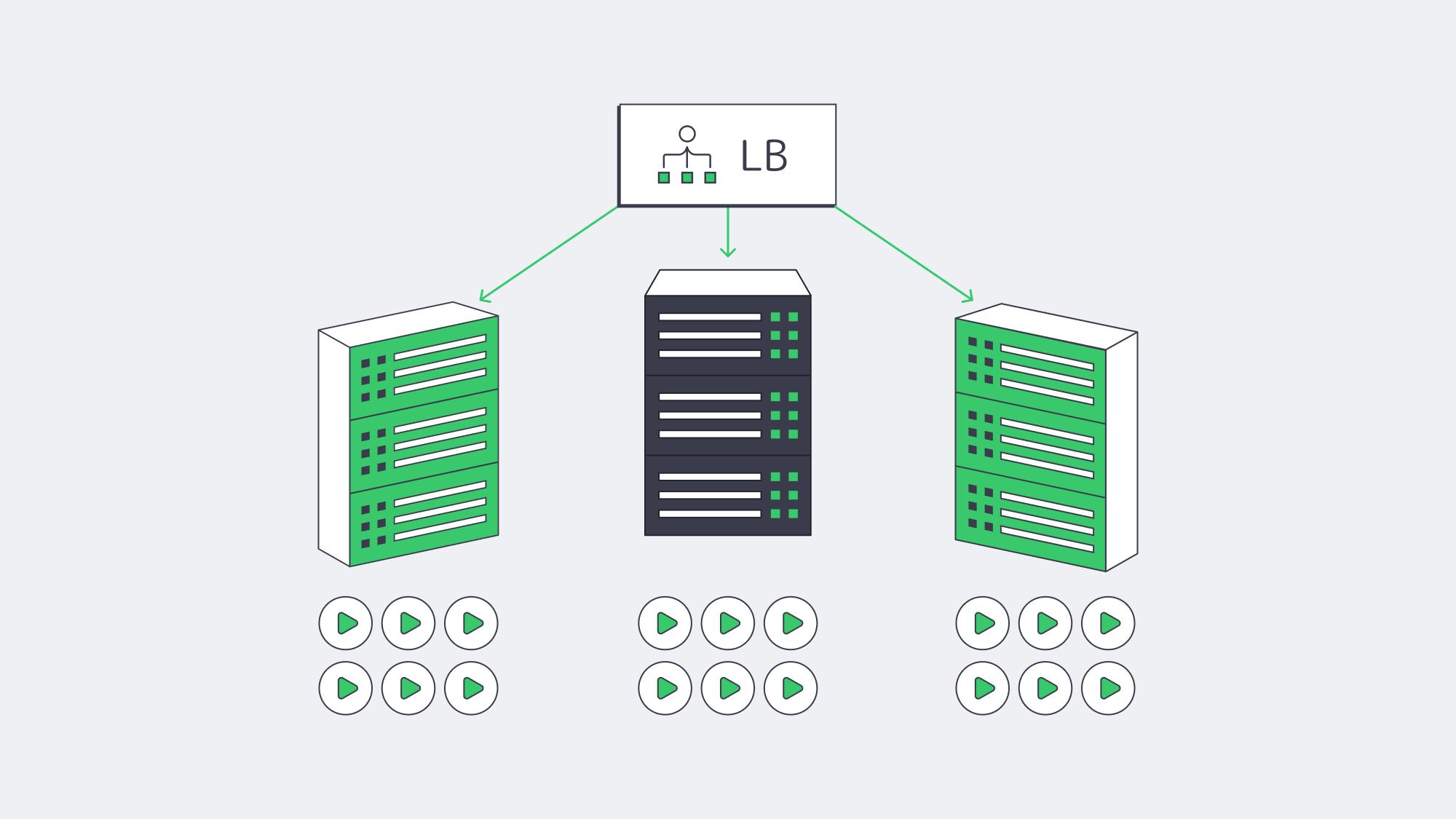
Smooth playback under high concurrency is where dedicated servers can repay the decision. Without hypervisor contention, dedicated servers provide a defined CPU, memory, and NIC budget for each origin. Packet pacing, queueing, and throughput still depend on kernel, application, and network configuration, so load-test the full path before peak events. This defined resource envelope also simplifies capacity planning:
- Estimate your peak simultaneous viewers and average ladder bitrate.
- Convert to Gbps/headroom targets per origin.
- Add elasticity with either more origins (horizontal scale) or higher-capacity ports (vertical scale).
With a defined bandwidth plan, teams can reserve headroom for spikes without relying on per-request scaling during the event.
Future-Proofing: Codecs, Bitrates, Growth
Codec transitions such as AV1 and richer formats such as HDR, high frame rates, and 8K in select use cases can increase bitrate or compute demand. Build with headroom:
- Network. Start from measured peak demand and keep an upgrade path through 10/40/100/200 Gbps as required.
- Compute. Favor CPU families with strong SIMD, and keep a path to GPU-accelerated encoding.
- Storage. Plan NVMe for latency-sensitive hot sets; scale horizontally with sharding or caching as libraries grow.
- Placement. Add regions as your audience map changes; test performance regularly.
Melbicom’s model combines configurable dedicated servers across 19 cities, an integrated 40 PoP CDN, and high-bandwidth options that scale with viewership.
Video Streaming Server Hosting Checklist
- Bandwidth & routing. Calculate peak throughput from viewers and bitrate; verify committed capacity, transfer terms, and peering quality. Keep an upgrade path to 40/100/200 Gbps where needed.
- CPU/GPU. Use high-core CPUs for software encodes; GPUs can raise channel density when benchmarks support the selected codec and quality settings.
- Storage. Use NVMe for hot read paths and hybrid tiers for cost control. Verify that aggregate storage can feed the NIC under concurrency.
- CDN. Use it for cacheable segments and assets. Match the footprint to your audience; configure Origin Shield and sane cache keys for segments.
- Regions. Place origins near user clusters and IXPs; plan failover across regions.
- Costs. Model egress carefully. Dedicated servers with defined metered or unmetered plans can improve cost predictability at steady high utilization.
- Operations. Monitor CPU, NIC, and disk saturation; tune kernel and socket buffers; automate capacity adds before events.
Build for Smooth Playback, Scale for Spikes

The core job of a streaming platform is simple to say and hard to do: start quickly and minimize rebuffering. That demands large, reliable network paths, compute engineered for codecs, and NVMe-class I/O—backed by a CDN that puts cacheable content closer to viewers. Dedicated servers can provide defined resource capacity under concurrency and improve cost discipline at high sustained egress. When each origin has measured bandwidth headroom, benchmarked encoding capacity, and storage that can feed the delivery path, viewers feel the difference—especially during peak moments.
If you’re mapping next steps—migrating off the cloud for economics, preparing for a rights-holder’s audience surge, or adopting AV1 at scale—the blueprint is consistent: place origins where they make sense, pair them with a broad CDN, and size network/compute/storage for tomorrow’s ladders, not yesterday’s.
Stream-ready dedicated servers
Deploy high-bandwidth servers across 21 Tier III and Tier IV data centers and size capacity for your streaming workload.
Get expert support with your services
Blog

Choosing Between Object and Block Storage for Your Workloads
Designing a dedicated server environment inevitably raises a core storage decision. The answer is rarely either/or; it depends on access patterns, latency and consistency requirements, scale, and operating model. Block storage suits fine-grained updates through a host-mounted device, while object storage suits API-accessed datasets that benefit from object-level metadata and distributed capacity. The sections below compare architecture, metadata, scalability, consistency, and performance, then map each model to workloads and hybrid strategies, including S3-compatible gateways.
Choose Melbicom— 1000+ ready-to-go servers — 21 Tier III & Tier IV data centers — 40 CDN PoPs on 6 continents |
|
Object and Block Storage Architecture
Block storage exposes a raw device to the OS. Data is split into fixed-size blocks, addressed by offset. The storage layer itself carries no content metadata; meaning and structure come later from the file system or database engine. This model supports fine-grained reads and writes and lets the host file system or database control layout, making block storage a common fit for transactional systems, VM disks, and stateful workloads.
Object storage treats data as objects in a typically flat namespace, each with a unique key and metadata such as content type, tags, retention attributes, and checksums. Access is usually through HTTP APIs (commonly S3-compatible) rather than a mounted block device. Metadata supports classification and lifecycle policies, while large-scale discovery may still require an external catalog or index.
Implications for dedicated deployments:
- Block volumes (local NVMe/SSD/HDD or SAN-backed LUNs) mount directly to a dedicated server. They favor in-place updates (e.g., 4K rewrites), host-controlled ordering and flushes, and tight OS integration.
- Object stores typically run as a separate service or cluster accessed over the network. They favor whole-object operations, bulk ingestion, and distribution across nodes or sites, with metadata policies governing retention and access.
Scaling and Consistency by Storage Type
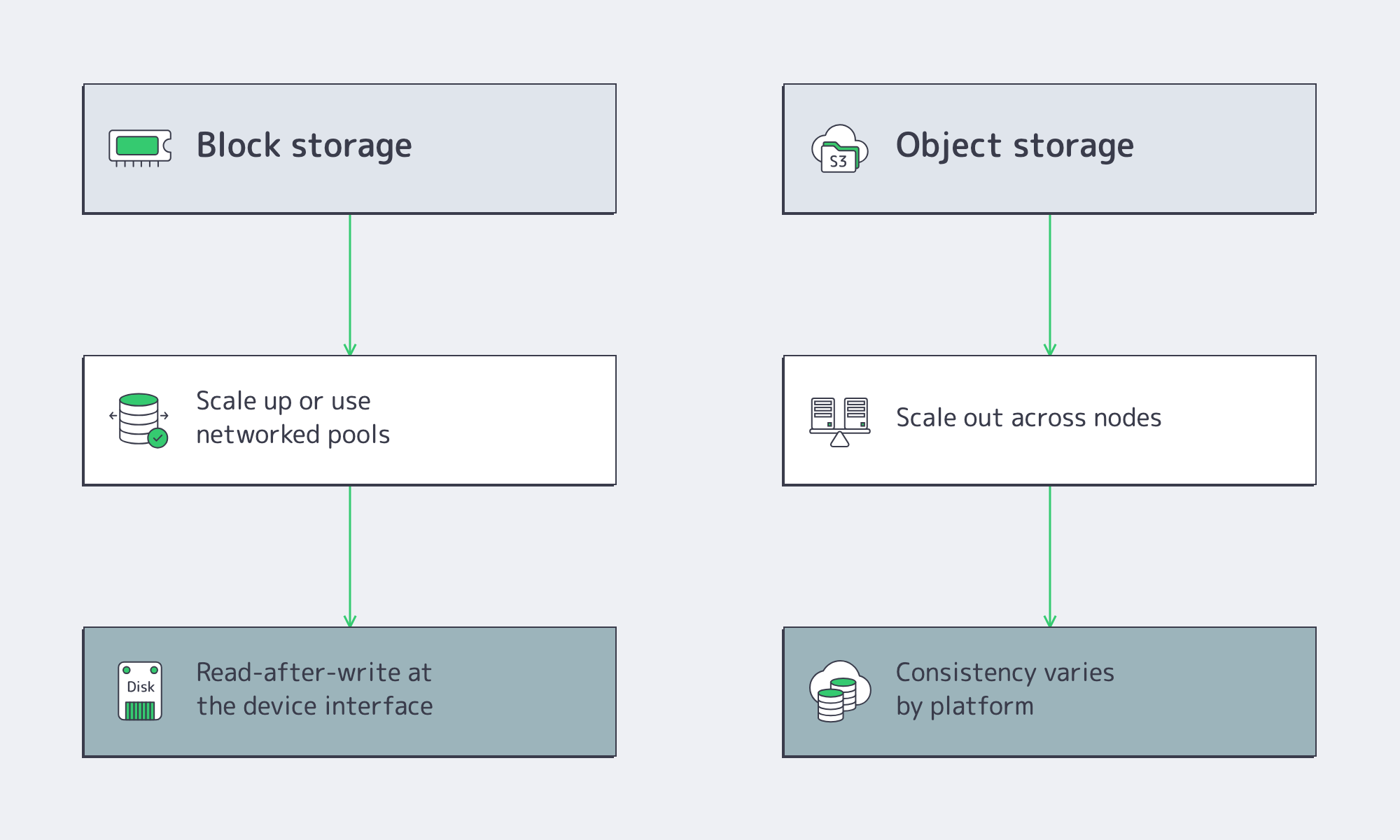
Scalability ceilings. Object storage is commonly designed to scale out by adding nodes and distributing objects across the cluster. Applications address objects by key, so capacity can grow without exposing disk or LUN placement to the client. Block storage can scale up within a server or array and can also scale out through distributed block systems or networked pools, but hosts still consume volumes with defined capacity and performance characteristics.
Durability model. Object platforms may use replication or erasure coding across disks, nodes, or sites, but durability depends on the configured redundancy, failure domains, monitoring, and repair process. Block storage relies on equivalent design choices—RAID or mirroring, snapshots, replication, and independent backups—rather than gaining durability from the block interface itself.
Consistency. Block storage gives the host read-after-write behavior at the device interface, while persistence still depends on caches, flushes, the file system, and application settings. Object-storage consistency varies by platform and operation: many current systems provide strong read-after-write behavior, while cross-site replication or specific metadata operations may be asynchronous. Choose by update granularity, latency, API semantics, and failure model—not by assuming object storage is always eventually consistent.
Latency, Throughput, and IOPS
Latency. Local block storage—especially NVMe—usually avoids the network and HTTP path involved in object access, so it is the more natural fit for latency-sensitive small I/O. Actual latency varies with media, controller, queueing, durability settings, network path, object size, and concurrency; benchmark the full application path rather than relying on a generic threshold.
IOPS. Block storage is well suited to small random I/O and in-place updates, but achieved IOPS depend on the drive, queue depth, read/write mix, durability settings, and CPU. S3-style object APIs generally create or replace complete objects; multipart upload assembles a new object from parts rather than providing ordinary in-place block updates.
Throughput. For large sequential transfers, both models can use high-bandwidth links. Object storage can increase aggregate throughput with parallel requests across nodes, while block throughput depends on the device or pool, controller, host, and fabric. Measure object size, request concurrency, read/write mix, and client behavior before treating either model as the faster option.
Two canonical scenarios:
- Relational or NoSQL database on a dedicated server. These workloads usually benefit from low-jitter access and in-place updates. Keep active data and logs on local NVMe or shared block volumes. Object storage can still hold database archives, snapshots, and cold backups.
- Media delivery or data-lake analytics. Store originals and derived assets as objects, read them through parallel requests, and cache delivery through a CDN. Object storage simplifies shared API access and lifecycle handling, while CDN caching can reduce repeated origin reads.
Best-Fit Workloads by Storage Type
Object storage fits immutable datasets accessed by API, including backups, media, logs, and analytics inputs. Block storage fits low-latency workloads that need fine-grained updates through a host-mounted device, including databases, VM disks, and stateful volumes. Many dedicated environments use both.
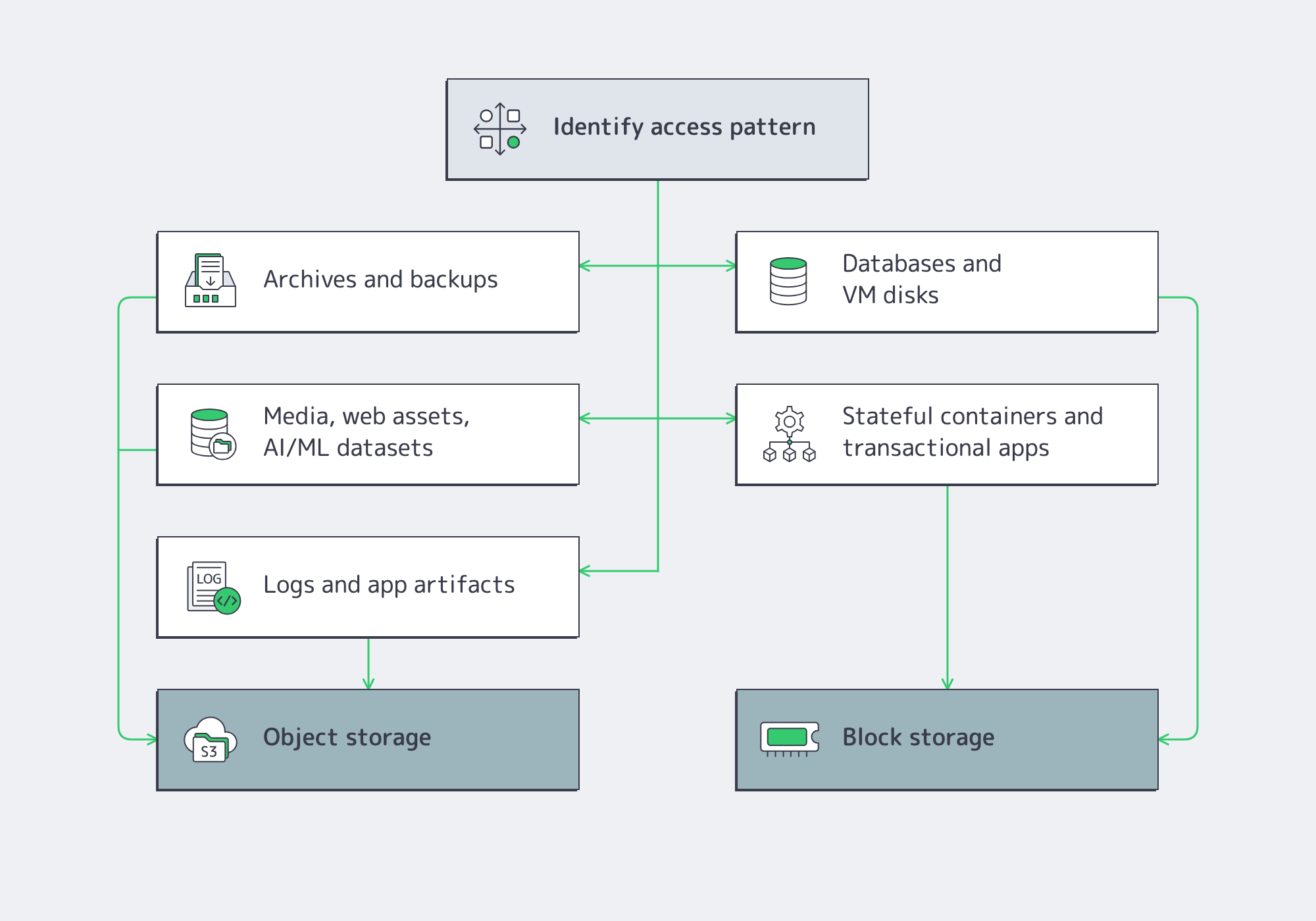
Object storage excels at:
- Archives and backups. Write-once/read-many access, versioning, retention controls, and lifecycle policies can support long-term storage and recovery workflows where the platform provides them.
- Media, web assets, AI/analytics inputs. Parallel reads, API access, and object-level metadata make object storage a common fit for images, video, clickstreams, and ML datasets.
- Application artifacts and logs. S3 APIs suit build artifacts, user uploads, logs, and service-to-service data without a mounted volume.
Block storage is the default for:
- Databases and VM disks. Low-latency, fine-grained updates, host-visible volumes, and controlled flush semantics fit database data files, transaction logs, and virtual disks.
- Stateful containers and enterprise apps. Persistent volumes, high-IOPS scratch capacity, and controlled flush semantics fit stateful services, message queues, ERP/CRM systems, and build pipelines.
Decision Matrix: Cost, Compliance, Operations, and Hybrid Readiness
Cost. Object storage often lowers capacity cost for large, mostly immutable datasets, but the comparison must include redundancy overhead, API requests, data transfer, minimum capacity, and operating labor. Block storage may cost more per usable terabyte—especially on NVMe—but it can be the cheaper choice when low latency or high small-block I/O avoids application workarounds. Compare total cost against the same retention, performance, and recovery requirements, including the role of object storage for backups.
Compliance and security. Many object platforms support versioning, retention policies, object lock or WORM modes, and bucket-level access controls. Those features can help with audit logs, legal holds, and long-term records, but they must be configured and validated against the applicable requirement. Block environments use volume encryption, OS permissions, snapshots, replication, and independent backups to build equivalent controls.
Operations. Object clusters can expand by adding nodes, but operators still need capacity headroom, failure-domain design, rebalancing controls, monitoring, and tested upgrades. Block storage requires its own planning for RAID or pool layout, queueing, snapshots, replication, and volume growth. Operational simplicity depends on the implementation and team, not only the access model.
Hybrid readiness. S3-compatible gateways can present NFS or SMB access to object storage, but a gateway is not automatically a full POSIX file system; test locking, rename, permissions, cache behavior, and concurrent access. NVMe-over-Fabrics extends block access across a network fabric, with latency and throughput determined by the transport, target, and host stack.
Comparison at a Glance
| Factor | Object Storage | Block Storage |
|---|---|---|
| Architecture | Network service accessed by object APIs such as S3; objects are addressed by key. | Host-visible volumes accessed locally or through SAN, iSCSI, or NVMe-oF. |
| Metadata | Object-level metadata supports policy and classification; search may require an index. | None at the block layer; context comes from the file system or app. |
| Scalability | Commonly scales out by adding nodes and redistributing objects. | Scales up in a server or array and can scale out through distributed or networked block systems. |
| Durability | Replication or erasure coding can span disks, nodes, or sites; configuration determines durability. | Built from RAID or mirroring, replication, snapshots, and independent backups. |
| Consistency | Varies by platform and operation; many current systems provide strong read-after-write behavior. | Read-after-write at the device interface; durable persistence depends on caches and flushes. |
| Latency | Usually higher than local block because requests traverse a network and API stack. | Local NVMe can be very low latency; shared or network block adds fabric and target overhead. |
| Throughput | Can scale aggregate throughput across nodes with parallel requests and sufficient network capacity. | High within a device or pool; scaling depends on the host, controller, fabric, and storage architecture. |
| IOPS | Best for whole-object operations; multipart upload does not provide ordinary in-place block updates. | Well suited to small random I/O; achieved IOPS depend on workload and queueing. |
| Workloads | Archives, backups, media, logs, artifacts, data lakes, and analytics inputs. | Databases, VM disks, stateful containers, enterprise apps, and scratch space. |
| Cost/Ops | Often efficient for large immutable datasets; include redundancy, requests, transfer, and cluster operations. | May cost more per usable terabyte, but can avoid workarounds for latency-sensitive I/O. |
Hybrid Strategies and the Road Ahead
The architecture that wins is the one that matches storage type to data behavior and keeps migration paths open. A pragmatic pattern:
- Hot tier on block. Keep transactional databases, VM disks, and build/test scratch on local NVMe or shared block volumes. Set workload-specific latency, IOPS, and durability targets, then benchmark them under expected concurrency.
- Warm/cold tiers on object. Move static content, logs, and historical datasets to object buckets with lifecycle policies. Use supported versioning, retention, or object lock as required. Model retrieval and transfer costs before choosing a tier.
- Integrate with S3-compatible gateways. Use a file gateway only after testing required file semantics, cache behavior, and concurrent writers. For analytics, process directly from S3 endpoints when tools support object-native access.
- Design for convergence. Some platforms expose file, block, and object interfaces over a shared backend, while NVMe-oF extends NVMe commands across network fabrics. Validate each interface’s failure handling, performance, and operational boundaries before sharing storage across dedicated fleets.
In dedicated environments, place data according to measured access patterns, automate lifecycle movement only when the target tier preserves required recovery behavior, and use open interfaces such as S3, POSIX file access, and NVMe-oF to keep migration paths available.
Conclusion: Match Storage to the Workload
Object and block storage solve different problems by design. Block provides fine-grained, host-visible storage for databases, VM disks, and stateful services. Object storage provides API-based access, object-level metadata, and scale-out capacity for archives, media, logs, and analytics inputs. Many dedicated environments combine both: block for latency-sensitive update paths and object storage for data that benefits from distribution, retention policies, or shared API access.
When planning a refresh or new deployment, inventory request sizes, read/write mix, update granularity, consistency requirements, recovery objectives, data growth, and network paths. Put fine-grained transactional I/O on block when tests show it is the better fit. Put bulk or mostly immutable datasets on object storage when API access and horizontal growth help. Test gateways and NVMe-oF in the actual failure and concurrency model. The result is a storage design that meets current performance and recovery targets while preserving migration options as datasets grow.
Launch Your Dedicated Server
Choose from 1000+ ready-to-go servers, with NVMe options and bandwidth up to 200 Gbps per server.