
Blog

CDN and Core Web Vitals: What It Can and Cannot Improve
Core Web Vitals measure three different aspects of website performance: Largest Contentful Paint (LCP) tracks loading, Interaction to Next Paint (INP) measures responsiveness, and Cumulative Layout Shift (CLS) measures visual stability. Google’s “good” thresholds are LCP ≤2.5 seconds, INP ≤200 milliseconds, and CLS ≤0.1, evaluated at the 75th percentile (p75) of visits.
A CDN can improve network delivery, but it cannot automatically fix JavaScript execution or unstable layouts.
For ecommerce teams, the question is not whether a CDN makes websites faster. It’s which part of the performance bottleneck a CDN can actually remove.
CDN for Ecommerce– Edge caching for shared assets – Flexible HTTP header controls – Real-time analytics and raw logs |
 |
Core Web Vitals and Their Bottlenecks
A CDN reduces the distance between shoppers and cacheable content, potentially improving response and transfer times. But it cannot control when browsers discover images, how JavaScript executes, or whether dynamic elements shift the page.
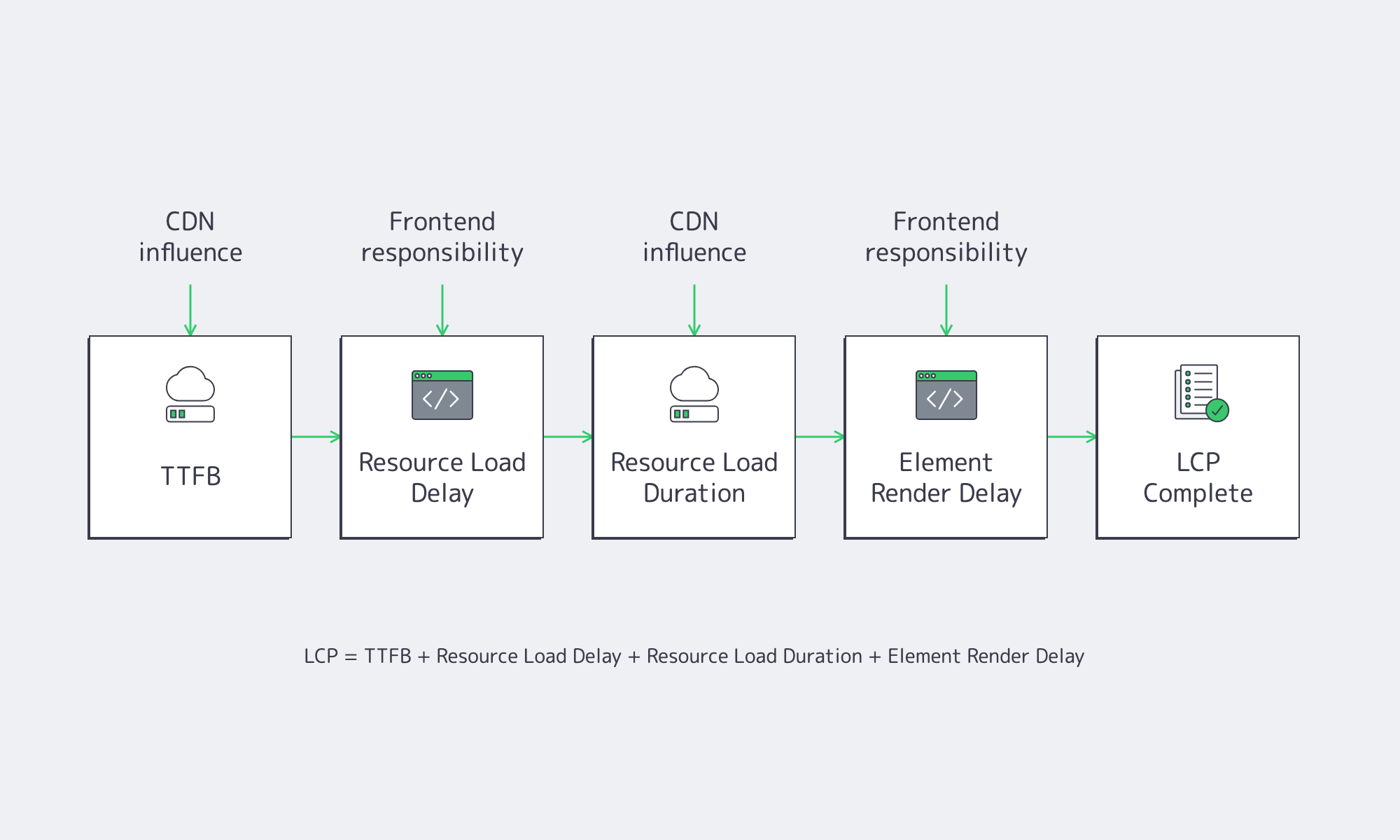
Google divides LCP into four components:
LCP = TTFB + resource load delay + resource load duration + element render delay
Each component has a different optimization path:
- Time to First Byte (TTFB): A CDN can reduce latency by serving cacheable responses from nearby edge locations.
- Resource load delay: Frontend changes, including earlier resource discovery and prioritization, usually matter more.
- Resource load duration: CDN delivery and smaller assets can shorten downloads.
- Element render delay: Render-blocking resources, JavaScript execution, and client-side rendering generally require application changes.
Google’s LCP optimization guidance emphasizes that reducing transfer time does not necessarily improve LCP when rendering remains blocked.
When Can a CDN Improve Ecommerce LCP?
A CDN can improve LCP when real-user measurements identify high TTFB, prolonged resource transfers, or repeated origin requests as major contributors. Edge caching is particularly useful for geographically distributed shoppers requesting shared assets. However, when resource discovery or browser rendering dominates LCP, frontend changes will deliver more meaningful improvements than CDN adoption.
Where Edge Caching Helps
Consider an ecommerce store with application infrastructure in one region and shoppers across several continents. Without edge caching, product imagery may repeatedly travel from the distant origin.
A CDN can serve cached assets closer to shoppers, reducing distance and origin requests.
Cache configuration matters equally. Inefficient cache keys, short freshness periods, and unnecessary query parameters can increase cache misses. Google recommends appropriate shared-cache directives, including s-maxage, to control response freshness.
However, personalized account pages, carts, checkout responses, and inventory-sensitive content require careful cache policies. Google’s TTFB guidance warns that authenticated content may still require origin processing.
For shared product images and other cacheable assets, Melbicom’s CDN provides edge caching, geographic request routing, and HTTP header controls. Teams can configure freshness and route requests through edge locations serving their audience.
How to Improve LCP by Reading the Four Subparts
Google’s LCP optimization guidance recommends examining the contribution of each subpart rather than treating the total LCP value as a single bottleneck.
Consider a hypothetical product page with 3.2-second LCP.
If TTFB consumes 1.3 seconds, infrastructure should investigate network latency, cache misses, and origin processing. Navigation Timing and Server-Timing can help separate these contributors.
If the image request starts one second after HTML arrives, the problem is probably resource discovery. The frontend team should expose the image in initial HTML, avoid lazy-loading the LCP element, and consider fetchpriority=”high”.
Image size matters too. Google’s responsive-image guidance notes that desktop-sized images delivered to mobile devices can consume two to four times more data than necessary. Responsive sizing and format selection therefore belong alongside CDN delivery in an LCP optimization plan.
Finally, if 1.1 seconds of the hypothetical 3.2-second LCP is render delay, delivering the image faster may achieve little. The browser still needs to finish rendering work.
Faster delivery does not guarantee earlier paint.
Why INP and CLS Can Stay Poor With a CDN
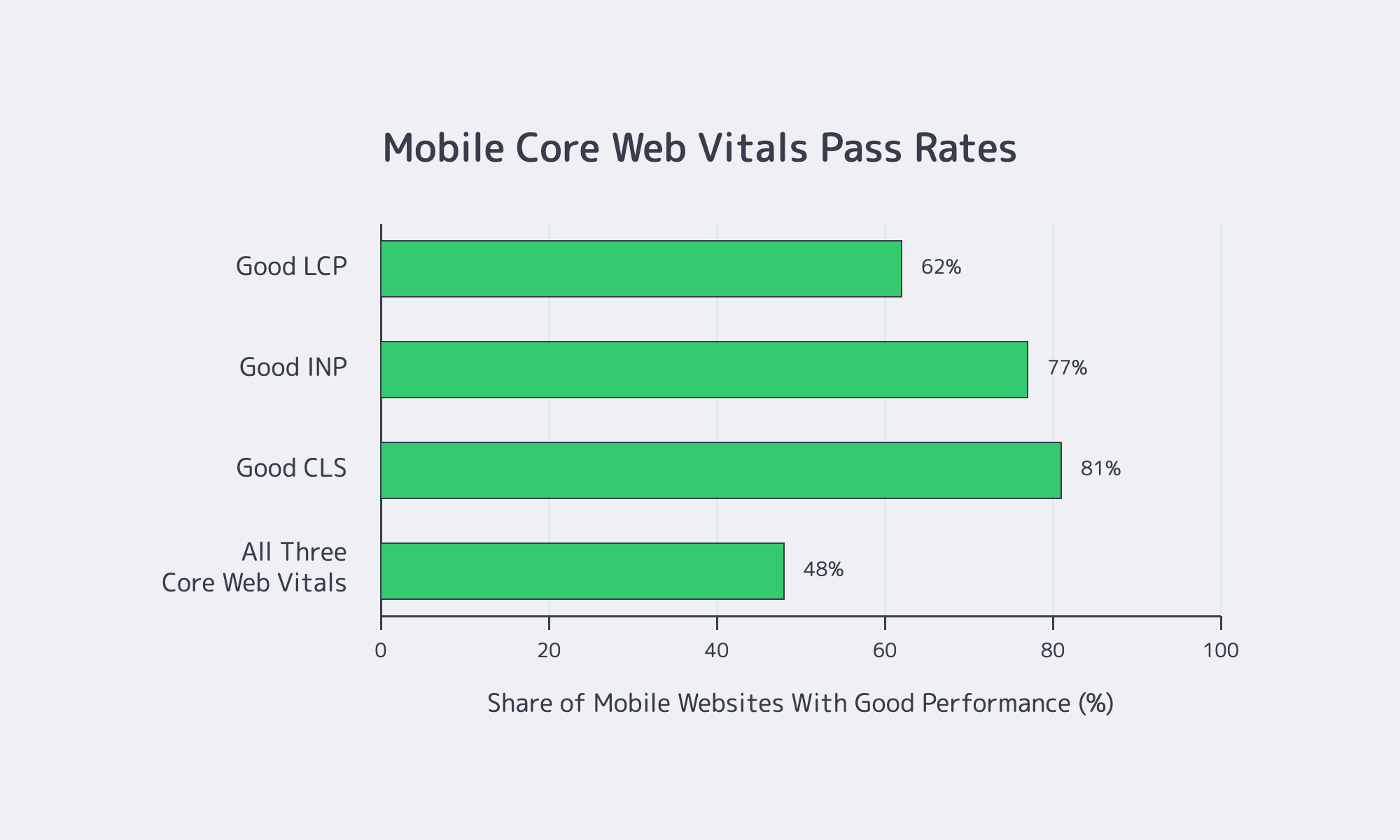
INP and CLS can remain poor because CDN optimization primarily affects network delivery, not browser execution or layout stability. INP exceeds its good threshold above 200 milliseconds when interactions involve excessive processing or rendering. CLS exceeds 0.1 when images, fonts, or dynamically inserted components unexpectedly move content, regardless of delivery speed.
Why INP Remains a Frontend Problem
INP measures three phases: input delay, event-handler processing, and presentation delay.
Suppose an ecommerce variant selector records 30 milliseconds of input delay, 230 milliseconds of JavaScript processing, and 40 milliseconds of presentation delay.
Moving its JavaScript bundle to a nearby CDN does not eliminate the 230 milliseconds of work triggered by the interaction.
Frontend engineers must instead simplify event handlers, defer unnecessary operations, break up long tasks, and reduce rendering work. Google’s INP optimization guidance recommends minimizing callback work and yielding to the main thread.
A CDN can indirectly improve startup responsiveness by delivering resources earlier, but downloaded JavaScript still requires parsing, compilation, and execution.
Why CLS Needs Layout Fixes
CLS commonly results from missing image dimensions, late-inserted banners, unreserved widget space, and font swaps.
A CDN may deliver an image sooner, but missing width, height, or aspect-ratio information can still cause layout movement.
Google recommends reserving space for asynchronous content and managing font geometry using appropriate fallback fonts and CSS metric overrides.
CDN Limits: What Stays in the Browser
A CDN changes arrival times. Core Web Vitals also measure browser work.
For INP, real-user monitoring must capture actual interactions such as opening carts, selecting variants, or changing quantities. Google’s field interaction guidance recommends recording interaction targets and latency phases.
For CLS, post-load shifts may occur during scrolling, personalization, or dynamic content insertion. A page-load-only laboratory test can miss them.
How Should Diagnostics Guide Infrastructure and Frontend Fixes for Core Web Vitals?
Core Web Vitals diagnostics should identify the slowest phase before assigning remediation work. Start with p75 field measurements, segment results by device, geography, and page type, then reproduce the issue in laboratory tools. Infrastructure should address delivery and origin bottlenecks; frontend teams should address resource discovery, JavaScript execution, rendering, and unstable layouts.
Measure Field Performance First
Chrome UX Report (CrUX) provides real-user performance measurements using a rolling 28-day aggregation window updated daily. Its API also exposes LCP resource information and image-LCP subparts.
That window is useful for sustained performance assessment but insufficient for immediate deployment feedback.
First-party real-user monitoring (RUM) can segment performance by geography, release, device, and page template. Chrome DevTools can then help reproduce LCP timing, interaction latency, and layout shifts.
A useful CDN experiment has a measurable hypothesis: reduce mobile product-page p75 LCP in a specific region by shortening TTFB and image transfer time without changing frontend code.
Melbicom’s CDN analytics and raw logs can help examine delivery behavior alongside browser RUM and origin monitoring.
Improve LCP with Clear Team Ownership
| Diagnostic signal | Infrastructure / CDN responsibility | Website development responsibility |
|---|---|---|
| High LCP TTFB | Investigate cache misses, routing, origin latency, redirects, and capacity | Reduce server-side rendering and application processing |
| High resource load delay | Check connection setup where relevant | Expose LCP assets in HTML; remove lazy loading; prioritize requests |
| High resource load duration | Optimize caching, regional routing, and origin fetches | Reduce image sizes; implement responsive formats |
| High element render delay | Confirm delivery is not the bottleneck | Remove render blockers and excessive main-thread work |
| Poor INP | Investigate delivery-related startup contention | Optimize event handlers, long tasks, JavaScript, and rendering |
| Poor CLS | Investigate avoidable late resource arrivals | Reserve layout space; control fonts and dynamic content |
Ownership should follow measured bottlenecks, not metric names.
For example, infrastructure might reduce an image transfer by 250 milliseconds while application initialization still delays its visibility by 700 milliseconds. Network performance improves, but LCP may barely change.
Frontend engineers may remove image discovery delays, then expose a slow transfer from a distant origin. CDN optimization becomes the next step.
Origin performance also matters. A cache miss still reaches the origin, so teams need to examine application latency, database behavior, queue pressure, and resource saturation alongside cache performance.
Use a CDN to Improve LCP Where the Waterfall Says It Will

CDN adoption works best as a targeted response to measured network bottlenecks. Edge caching and shorter delivery paths can improve LCP when TTFB or resource transfer dominates. INP usually requires JavaScript and rendering optimization, while CLS depends on stable layout geometry.
Measure before and after deployment, separating cached and uncached responses and tracking regional p75 performance. The objective is not simply faster delivery, but a measurable improvement in what shoppers experience.
For the next performance rollout, use these findings to make the work actionable:
- Define the failing cohort: Identify the affected page template, device class, and geography before selecting an optimization.
- Measure the critical path: Record LCP subparts, relevant interaction phases, and layout-shift attribution rather than relying on a single performance score.
- Control the comparison: Separate cache hits from misses, keep unrelated frontend changes out of the test, and verify personalized content remains correct.
- Assign the next bottleneck: Recheck field performance after each change and transfer ownership when the limiting phase shifts between delivery and browser execution.
Where Melbicom CDN Fits
Use Melbicom CDN edge caching, geographic routing, and delivery analytics to address measured delivery bottlenecks. Compare results with browser and origin monitoring to guide the next performance change.