
Month: August 2025
Blog
How Dedicated Server Hosting Supports Infrastructure Reliability
Digital presence and revenue go hand in hand in the modern world, and uptime is no longer simply a technical metric; it is a business KPI. For workloads that need a clear hardware boundary, dedicated server hosting can improve reliability by isolating resources and giving operators direct control over capacity and recovery design. Availability still depends on redundancy, monitoring, backups, failover, and tested recovery procedures.
Choose Melbicom— 1000+ ready-to-go servers — 21 Tier III/IV data centers — CDN across 35 countries |
 |
Multi-tenant environments can introduce performance variability when host resources are oversubscribed or isolation controls are insufficient. Dedicated hardware removes cross-tenant contention at the physical host and can make bottlenecks easier to attribute, but it does not make a service immune to hardware failure, software defects, network problems, or operational error. The reliability advantage comes from combining isolation with deliberate redundancy, monitoring, failover, backup, and recovery design.
How Dedicated Servers Reduce Contention
Dedicated servers assign the physical host’s CPU, memory, and storage controllers to one customer, removing cross-tenant contention on that machine. Application processes can still compete with one another, and network paths may remain shared, so consistent performance still depends on capacity planning, workload controls, and measurement under representative load.
In shared or virtualized environments, resource limits, scheduling, and overcommit policies determine how strongly one tenant can affect another. Bursty workloads can increase I/O wait or latency when the host is oversubscribed, which is a material risk for latency-sensitive databases and applications.
A dedicated server removes cross-tenant competition for the host’s CPU, RAM, and storage-controller capacity. It does not eliminate contention inside the customer’s own stack, but it gives the team a clearer capacity boundary and makes performance pressure easier to measure and attribute.
Predictability as a Foundation
Performance predictability supports reliability for real-time processing, financial systems, and critical SaaS backends because throughput and latency need to remain within operating targets. Dedicated hardware can reduce cross-tenant variability, but smooth operation still depends on workload sizing, software behavior, storage design, and network conditions.
Virtual machines (VMs) add a hypervisor and virtualized I/O path, but the practical overhead varies by platform, device model, and workload and can be small on modern systems. Dedicated servers remove that abstraction at the host boundary, which can simplify performance attribution; they do not automatically prevent application or storage bottlenecks.
Direct hardware access from dedicated servers can suit latency-sensitive trading, database, and analytics workloads when isolation and predictable capacity matter. The server alone does not determine latency; software design, storage behavior, traffic patterns, and the end-to-end network path remain part of the result.
Resilient Hardware: The Foundation of Uptime
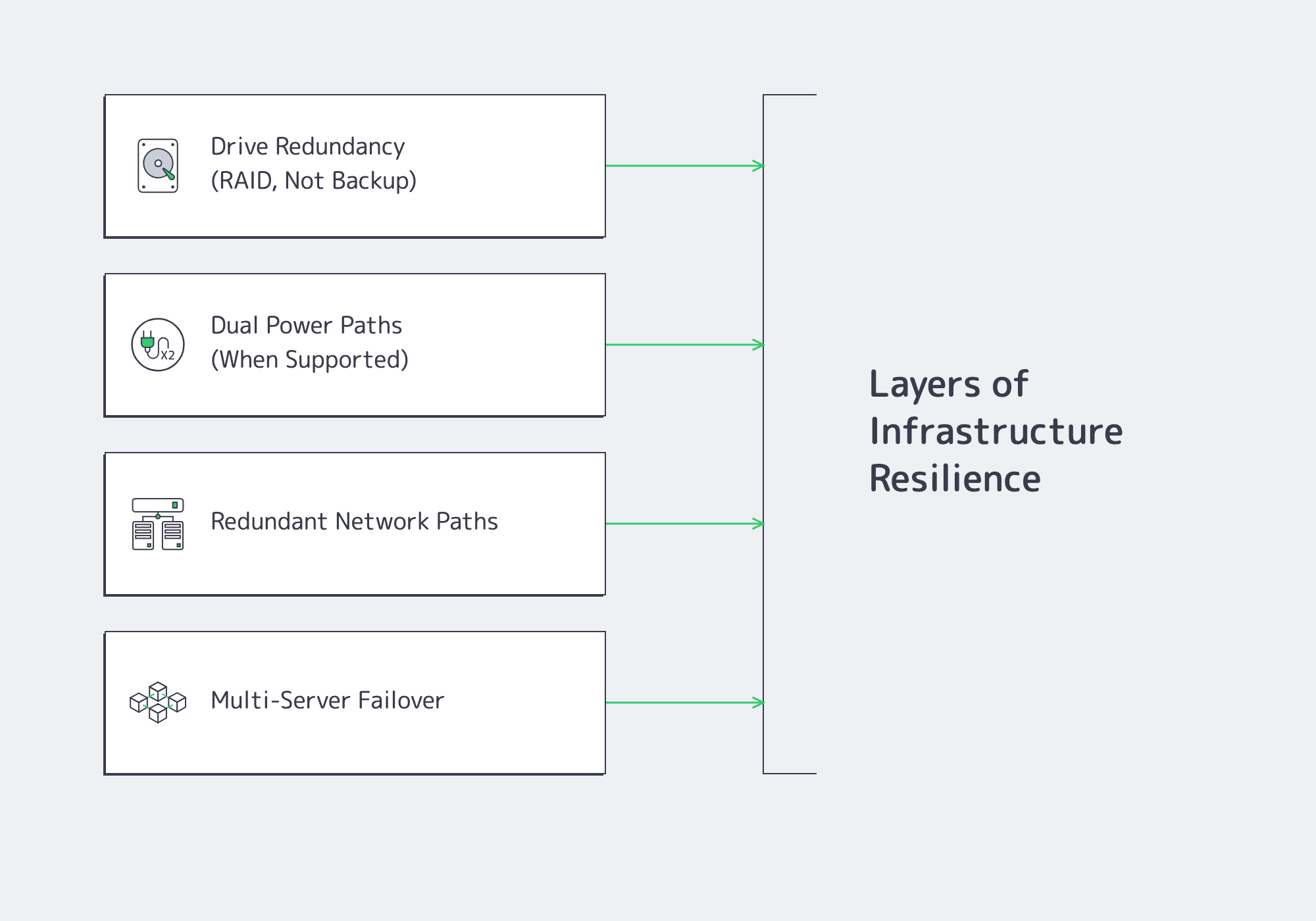
Reliable infrastructure is engineered in layers. A dedicated server provides a controllable hardware boundary, while the selected server configuration and data center determine which storage, power, and network redundancy options are available. Each layer must be verified rather than assumed.
RAID for Drive Redundancy
A single-drive failure can cause downtime or data loss when no redundant copy is available. RAID combines drives to tolerate selected hardware failures or improve I/O characteristics, depending on the level, but RAID does not replace independent backups, restore testing, or application-level data protection.
When the server has the required drive count and controller or software support, two common options are:
- RAID 1 (Mirroring): Writes identical data to two or more drives. If one member fails, the array can continue operating in a degraded state while the failed drive is replaced and the mirror is rebuilt. RAID 1 provides drive redundancy, not backup.
- RAID 10 (Stripe of Mirrors): Stripes data across mirrored pairs, combining redundancy with the potential for higher parallel I/O than a single mirror. It suits write-intensive databases when its capacity overhead and rebuild profile fit.
The appropriate RAID level depends on drive count, usable capacity, read/write pattern, rebuild time, failure tolerance, and backup strategy.
Reducing Power and Network Single Points of Failure
Drive redundancy does not cover power or network failures. Where the chosen server and facility support it, operators can reduce those risks with independent power and network paths:
- Dual Power Paths: Two PSUs connected to independent power feeds or PDUs can keep a compatible server powered if one path fails. Both the chassis and facility design must support true path independence.
- Redundant Networking: Multiple NICs or ports help only when bonding or routing, switch diversity, and upstream paths are configured to fail over. A second interface on the same failure path is not full redundancy.
These features are architecture choices, not automatic properties of every dedicated server. Melbicom offers dedicated infrastructure across 21 global Tier III and Tier IV data centers; the exact power, network, and server options should be confirmed for the selected configuration and location.
Continuous High Availability Architecture
High availability starts by treating one server as a failure domain. Running a service across more than one dedicated server can preserve availability after a server failure only when health checks, failover orchestration, data replication, routing, and recovery procedures are configured and tested.
Common deployment models include active-passive and active-active:
Active-Passive: One node serves traffic while a standby receives the state or data it needs to take over. Failover requires health detection, orchestration, a safe way to isolate the failed node where applicable, and a tested method for moving traffic or service addresses.
Active-Active: Multiple nodes serve traffic at the same time, usually behind load balancing or routing logic. Availability depends on health checks, state and session handling, data consistency, and enough remaining capacity to absorb traffic when a node is removed.
These designs require direct hardware and network control, which dedicated server hosting can provide, but high availability is not exclusive to bare metal. Reliability comes from the complete topology, failure-domain separation, observability, and tested operating procedures.
Building Reliable Infrastructure with Melbicom
Dedicated server hosting can provide an isolated capacity boundary and clearer hardware-level control for workloads that need predictable resource ownership. That foundation becomes reliable only when teams size the workload, choose appropriate storage and network paths, separate failure domains, maintain backups, monitor the service, and test failover and recovery. A dedicated server reduces cross-tenant host contention; it does not eliminate every bottleneck or replace high-availability design.
Deploy Your Dedicated Server Today
Choose from 1000+ ready-to-go servers across 21 Tier III & Tier IV data centers worldwide.
Get expert support with your services
Blog
Application Hosting Market: Four Forces Driving Growth
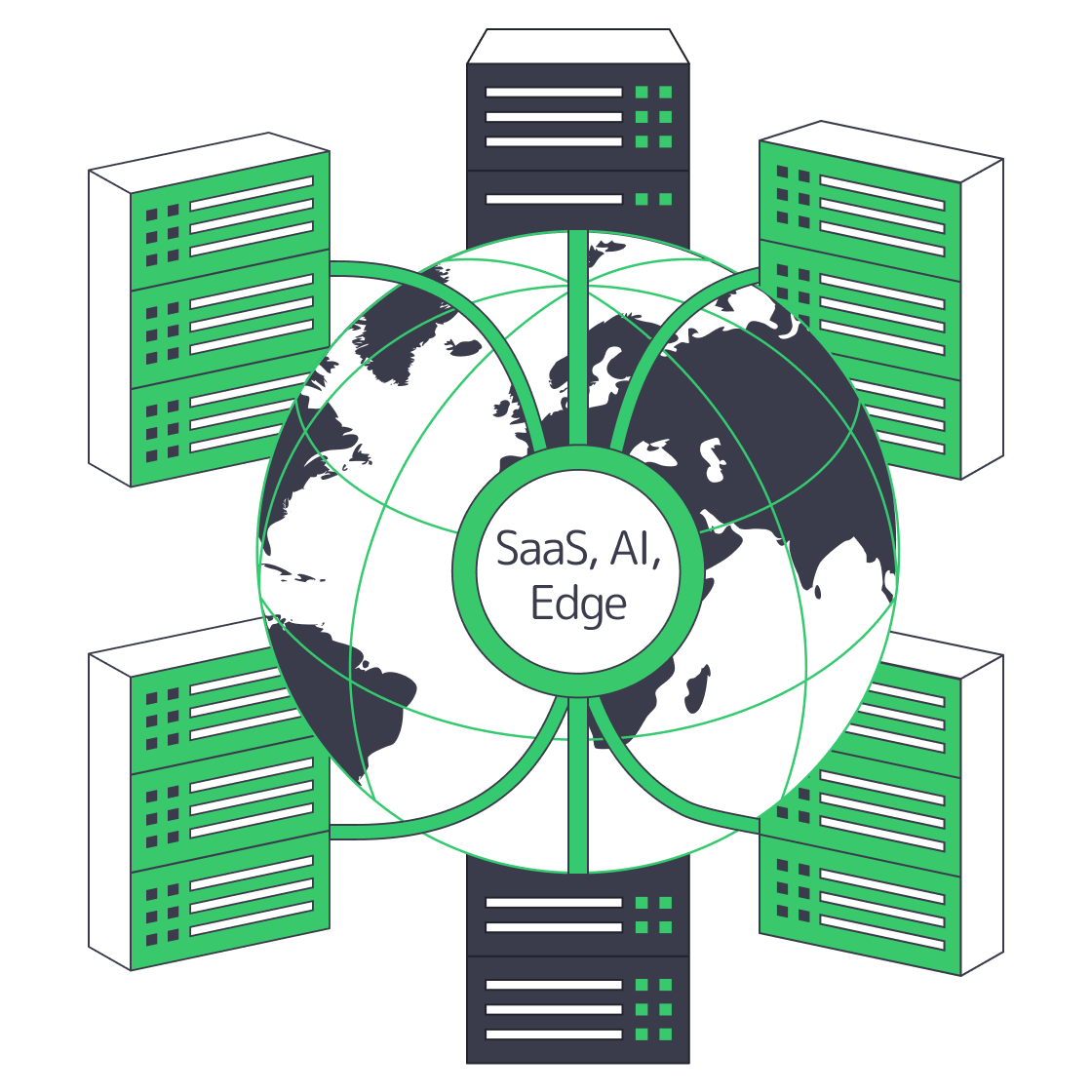
A 2025 market forecast estimates the application hosting market at USD 79.16 billion in 2024 and projects a 12.6 percent CAGR from 2025 to 2034, reaching USD 259.35 billion. (Research and Markets) The four drivers examined here—SaaS growth, AI infrastructure demand, edge deployment, and tighter data-governance requirements—continue to shape where businesses host critical applications.
Choose Melbicom— 1000+ ready-to-go servers — 21 global Tier IV & III data centers — 40 CDN PoPs in 35 countries |
 |
Application Hosting Market Growth Drivers
SaaS Demand Keeps Surging to New Heights
The global SaaS market was estimated at USD 408.21 billion in 2025 and is projected to reach USD 465.03 billion in 2026, with a 12.85 percent CAGR through 2035. (Precedence Research) That scale translates directly into backend capacity requirements: providers must support large tenant populations with high availability and low latency.
AI Workloads Reshape Infrastructure Economics
McKinsey projects demand for AI-ready data-center capacity to rise at an average 33 percent a year from 2023 to 2030, with around 70 percent of total capacity demand tied to facilities equipped for advanced-AI workloads by 2030. (McKinsey & Company) High-density GPUs and CPUs raise power, cooling, and network requirements, increasing interest in single-tenant servers where hardware can be tuned without hypervisor overhead.
Edge Computing Stretches the Network Perimeter
Grand View Research estimates the edge AI market at USD 30.0 billion in 2026 and projects USD 118.7 billion by 2033, a 21.7 percent CAGR. (Grand View Research) Physics matters: light in fiber adds roughly 10 milliseconds of round-trip propagation time for every 1,000 kilometers before routing and processing delays. Enterprises are therefore placing latency-sensitive components closer to users and pairing regional infrastructure with globally distributed CDN capacity.
Compliance Becomes an Architecture Constraint
Compliance increasingly influences workload placement, but the requirement depends on sector, data type, and jurisdiction. Eurostat reports that 52.74 percent of EU enterprises with at least 10 employees used paid cloud computing services in 2025. (Eurostat) The practical result is not “cloud versus no cloud” but deliberate choices about data location, service providers, transfer mechanisms, and auditability.
U.S. and European Hosting Patterns
U.S. and European application-hosting patterns cannot be compared with a single cloud-adoption percentage because surveys measure different populations and services. A U.S.-weighted 2026 cloud survey found hybrid architectures dominant, while Eurostat measured paid-cloud purchases by EU enterprises. Workload placement should therefore be compared by cost, latency, data location, transfer rules, and portability.
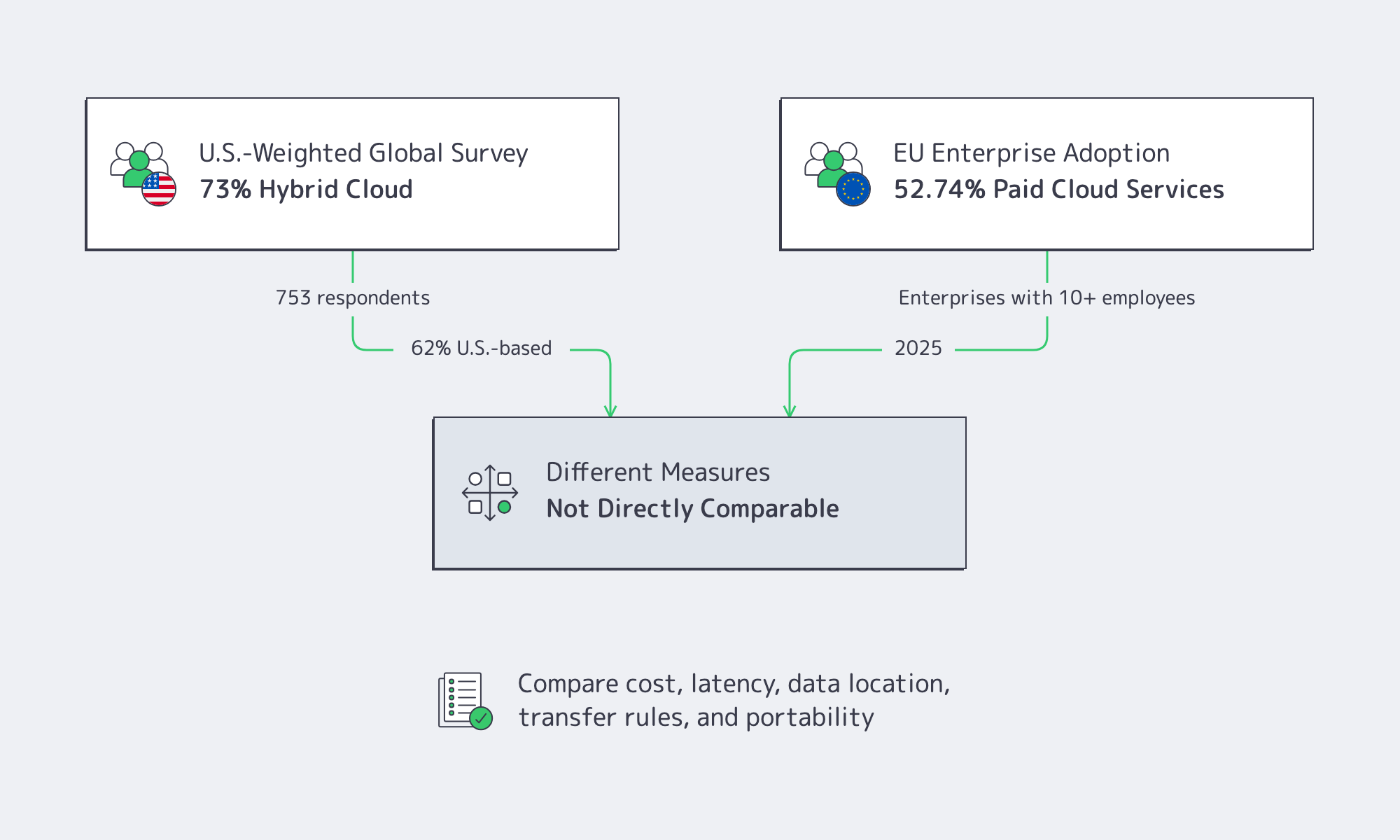
Flexera’s 2026 survey of 753 cloud decision-makers and users, 62 percent of them U.S.-based, found that 73 percent of organizations operate hybrid cloud estates and that enterprises run 54 percent of workloads in public cloud. (Flexera) These results show deep public-cloud use without supporting a cloud-only U.S. default.
Europe is not cloud-light. Eurostat reports that 52.74 percent of EU enterprises with at least 10 employees used paid cloud services in 2025, rising to 84.67 percent among large enterprises. (Eurostat) Those figures measure purchased services, not workload share, so they should not be compared directly with architecture surveys.
European designs also face explicit transfer and portability rules. GDPR conditions apply to personal-data transfers outside the EEA, while the EU Data Act has applied since September 12, 2025 and includes cloud-switching and interoperability requirements. (European Data Protection Board, European Commission)
Result: architects in both regions increasingly operate hybrid and multi-provider estates, but European projects often require more explicit decisions about data location, transfer mechanisms, provider jurisdiction, and exit paths.
Provider Segments in Flux
| Segment | Core Value | Growth Signal |
|---|---|---|
| Hyperscalers | Massive on-demand scalability and bundled managed services | Public-cloud workload shares continue to rise while 73 percent of organizations operate hybrid estates (Flexera) |
| Colocation & Dedicated | Fixed-fee economics, single-tenant control and custom hardware | The colocation market is projected to grow from USD 104.2 billion in 2025 to USD 204.4 billion by 2030, a 14.4 percent CAGR (Research and Markets) |
| Edge & CDN Nodes | Proximity and cached delivery | The edge AI market is projected to grow at a 21.7 percent CAGR from 2026 to 2033 (Grand View Research) |
Today, providers differentiate on connectivity, jurisdictional fit, power density, hardware choice, and operational support. That shift leaves room for specialists, especially in dedicated servers.
Why Are Dedicated Servers Back in the Application Hosting Mix?
Dedicated servers are returning to application-hosting designs because steady, high-utilization workloads often need predictable monthly cost, single-tenant performance, hardware-level control, or jurisdiction-specific placement. They do not replace cloud elasticity; they complement it inside hybrid architectures where each workload is placed according to cost, latency, compliance, and operational requirements.

Hybrid cloud is now the dominant architecture: 73 percent of organizations in Flexera’s 2026 survey operate hybrid estates. (Flexera) Within those environments, dedicated hardware remains relevant for workloads with stable utilization, specialized hardware, strict tenancy boundaries, or predictable throughput:
- Performance & Cost – Fixed-capacity applications such as high-traffic web services and large databases can cost less on monthly dedicated capacity than on consumption-priced cloud when utilization stays high, while single-tenant physical servers remove noisy-neighbor contention.
- AI Training & Inference – Reserving an entire GPU server lets teams tune drivers and frameworks and avoid shared-resource contention; the cost advantage depends on utilization, hardware availability, and contract terms.
- Compliance & Sovereignty – Single-tenant hardware can simplify access control and evidence collection, but compliance still depends on configuration, processes, contracts, and lawful data-transfer mechanisms.
- Predictable Throughput – Dedicated ports and fixed bandwidth commitments can reduce contention; Melbicom supports per-server bandwidth up to 200 Gbps.
Melbicom supports this placement model with dedicated servers in 21 Tier III/IV data centers, including Amsterdam and Frankfurt, and a CDN in 40 PoPs across 35 countries. Teams can combine single-tenant compute, regional deployment, and edge delivery through one provider while keeping cloud services for workloads where elasticity is the priority.
Market Snapshot
| Segment | Reported Base-Year Size (USD) | Forecast CAGR |
|---|---|---|
| Application hosting (overall) | 79.16 B (2024) | 12.6 % (2025–2034) (Research and Markets) |
| SaaS software | 408.21 B (2025) | 12.85 % (2026–2035) (Precedence Research) |
| Data-center colocation | 104.2 B (2025) | 14.4 % (2025–2030) (Research and Markets) |
| Edge AI | 24.9 B (2025) | 21.7 % (2026–2033) (Grand View Research) |
Dedicated Opportunity in a Hybrid World
Cloud elasticity remains valuable for variable loads, while steady workloads may favor predictable monthly capacity. Finance teams compare committed cloud spend, egress, and dedicated-server fees; engineers may need hardware-level control; risk teams may prefer clearer tenancy boundaries. As AI power density and edge deployment grow, dedicated servers can serve as one layer in a hybrid application-hosting design, especially in regional Tier III/IV facilities with 24/7 support.
Melbicom offers 1000+ ready-to-go servers across 21 data centers, with per-server bandwidth up to 200 Gbps and custom configurations delivered in 3–5 business days. Customers can select hardware, location, and bandwidth for the workload, then combine regional dedicated infrastructure with CDN delivery where appropriate. The result is a hybrid option that pairs fixed-capacity infrastructure with regional reach while cloud services remain available for bursts and managed-service needs.
Strategic Takeaways

The application hosting market continues to expand as SaaS, AI, edge processing, and governance requirements increase infrastructure demand. The regional picture is no longer a simple U.S. cloud-first versus European hybrid-first split: hybrid architectures are widespread, and European projects add more explicit data-transfer, switching, and sovereignty considerations.
IT leaders are increasingly combining hyperscaler elasticity with dedicated-server control and edge delivery to meet cost, latency, and governance goals. The right mix depends on workload utilization, user geography, data classification, portability requirements, and the team’s operational capabilities.
Teams should evaluate application hosting platforms by workload fit rather than category labels: measurable latency, predictable cost at target utilization, hardware and tenancy requirements, regional availability, transfer and audit obligations, and a practical exit path.
Deploy Dedicated Servers Today
Launch customizable dedicated servers in any of our 21 global data centers and tap up to 200 Gbps bandwidth with 24×7 support.
Get expert support with your services
Blog

Choosing the Right Infrastructure for iGaming Success
iGaming platforms operate in milliseconds; for anyone looking to run an online casino, poker room, or sportsbook, delay cannot be treated as a minor issue. With thousands of live wagers, latency or outages can damage revenue, user trust, and regulatory standing. The global online gambling market was valued at USD 88.0 billion in 2025 and is projected to grow from USD 97.7 billion in 2026 at an 11.0% CAGR through 2033, according to Grand View Research. With the stakes so high, infrastructure decisions are vital. Both customer trust and regulatory standing hang in the balance, and so it is important to make the right choices early on. Today, we will compare cloud and dedicated servers and discuss where each excels, calculate the total costs in conjunction with the performance, and weigh in on the emerging hybrid models.
Choose Melbicom— 1000+ ready-to-go servers — 21 Tier IV & III data centers — 40 CDN PoPs in 35 countries |
|
The Key Differences Between Cloud and Dedicated Servers for iGaming
| Factors | Cloud Hosting | Dedicated Server Hosting |
|---|---|---|
| Scalability | Instant elasticity; you can spin up nodes in minutes and scale down after events. | Capacity fixed per box; new hardware requires a provisioning cycle (hours to days). |
| Performance Consistency | Good average latency, but virtualization and noisy neighbors cause jitter. | Low, stable latency and predictable throughput because resources aren’t shared. |
| Cost Model | Pay-as-you-go; attractive for bursts but pricey at steady high load (egress fees add up). | Fixed monthly/annual fees; lower TCO for stable, high-traffic workloads. |
| Control & Compliance | Shared-responsibility security, limited hardware visibility, and data may traverse regions. | Full root access, single-tenant isolation, and easier compliance with data-sovereignty rules. |
| Time-to-Market | Launch in a new jurisdiction overnight through regional cloud zones. | Requires a host with a local data center; lead time shrinks when ready-to-go inventory is available, as provided by Melbicom. |
Reliable Infrastructure Performance When Milliseconds Matter
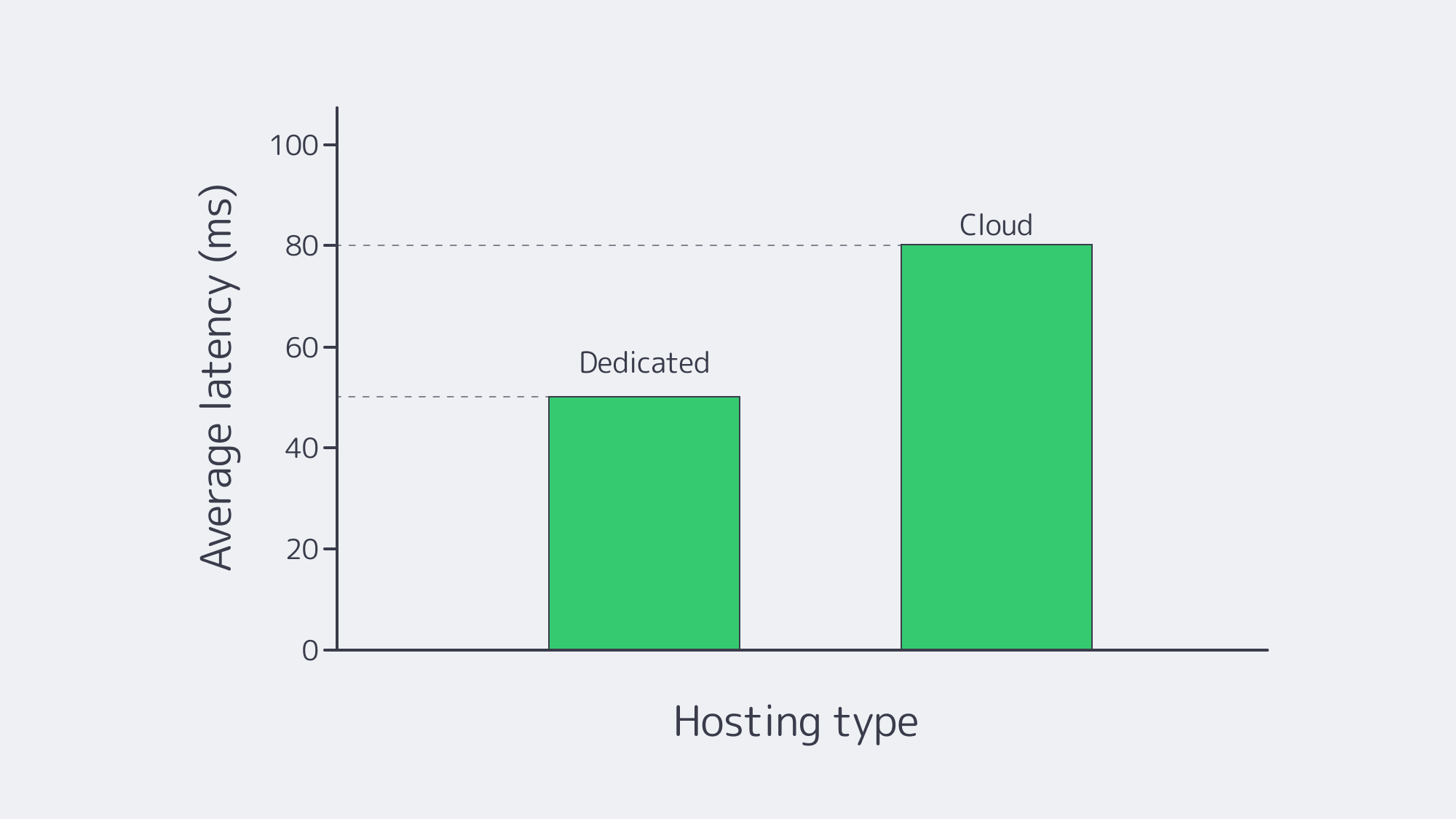
- Cloud server strengths: many top-tier cloud servers have NVMe storage and can provide <2 ms intra-zone latency, which is ample for back-office microservices.
- Cloud server weaknesses: there can be a lot of jitter with hypervisor overheads and lack of sole tenancy, potentially causing odds suspensions, which can lead to backlash on social media, etc.
- Dedicated server strengths: noise from neighbors is eliminated with single-tenant boxes, which helps stabilize latency for live betting, streaming, and payment flows. Melbicom offers per-server bandwidth up to 200 Gbps across 21 Tier IV/III data centers worldwide, giving operators dedicated headroom for sustained traffic when capacity is planned in advance.
- Dedicated server weaknesses: resilience and redundancy must be designed manually, because provider zones do not make them automatic.
With the strengths and weaknesses apparent, it is easy to see why the best modern practice is to pair a redundant cluster of dedicated machines (for odds, RNG, payment) with cloud-hosted stateless front ends. That way, you retain control of critical path processes while the web tier floats elastically.
Scalability: Elasticity Versus Predictability
Cloud Server Advantages
- Auto-scaling groups handle instant surge capacity changes.
- Cloning takes minutes, making QA or A/B sandbox creation a breeze, helping with development and testing.
- Nodes can be dropped in a freshly regulated state while licensing paperwork clears, which facilitates global pop-ups.
The Evolution of Dedicated Server Setups
The gap has been narrowed by modern server providers. At Melbicom, for example, we keep 1000+ ready-to-go servers that can be deployed in under two hours, with custom builds delivered in 3–5 business days. That inventory is supported by a management API, can be planned against architects’ forecasts for Super Bowl or Euro finals loads, and lets hardware be booked days ahead rather than months.
Going Hybrid
A pattern is emerging among iGaming and streaming providers that combine the two options by keeping the baseline on dedicated hardware and leaving bursts to the cloud. At Melbicom, gaming and casino sector clients can configure dedicated clusters to keep normal load below saturation, then use Kubernetes HPA to scale stateless services or Cluster Autoscaler to add cloud nodes when demand exceeds planned headroom.
Economics: Pay-As-You-Go vs. Fixed Power
Cloud Server Cost Dynamics
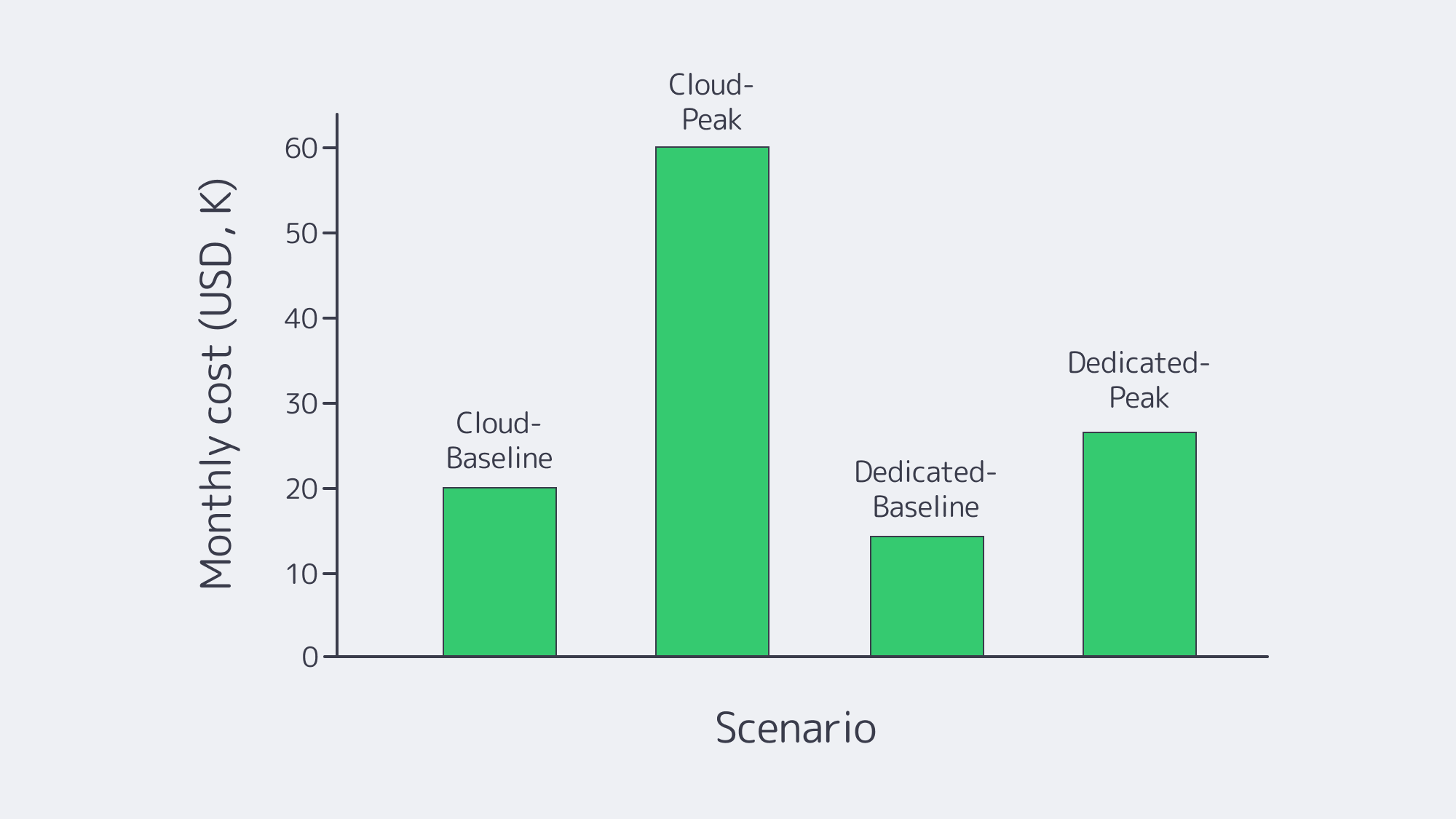
- OpEx freedom, appealing to startups and those piloting new markets.
- Hidden costs, data-egress fees, unexpected premiums for high-clock CPUs, and surcharges for managed databases.
- Higher waste, estimated wasted IaaS and PaaS cloud spend reached 29% in Flexera’s 2026 State of the Cloud Report. Often, in the bid to protect latency, over-provisioning is the default, which can be costly.
Dedicated Server Cost Dynamics
- The billing is flat and predictable, the price includes reserved capacity, making it easier for CFOs to forecast costs during viral promos or traffic spikes.
- Lower at-scale unit costs once bandwidth is factored in. For a steady 24/7 poker network, equivalent dedicated racks can undercut cloud compute when utilization is high and egress is heavy, but the exact break-even point depends on location, redundancy, and bandwidth profile.
Modern Trends
As baseline demand stabilizes, many operators reassess which workloads belong in public cloud and which belong on fixed infrastructure. This is selective, not a wholesale cloud retreat.
An EE Times summary of Barclays and IDC survey data framed repatriation as a cost-control move, while Flexera’s 2026 State of the Cloud Report reports that 73% of organizations still operate hybrid cloud environments.
Control, Compliance, and Single-Tenancy
- Cloud: While some providers offer ISO 27001 and PCI zones, physical-host opacity remains an issue; many gaming authorities insist on disk-level auditability, and some even request data hall entry.
- Dedicated: Audits are simple with single-tenant servers; hardware serials, sealed racks, and local key storage are easily verifiable. Regulations differ from region to region, but with Melbicom, cross-border data-sovereignty challenges can be addressed by deploying in Tier III facilities across Europe and North America, with Tier III & IV DCs in Amsterdam.
- Security posture differences: Hypervisor patching is offloaded by the cloud’s shared-responsibility model, but perfect IAM hygiene is needed. With dedicated hardware, the OS and firmware must be patched, but this enables custom HSMs or proprietary anti-fraud sensors. It is now becoming common to encrypt databases with on-server HSMs and mirror anonymized analytics to the cloud.
Hybrid Architecture: Best of Both Worlds
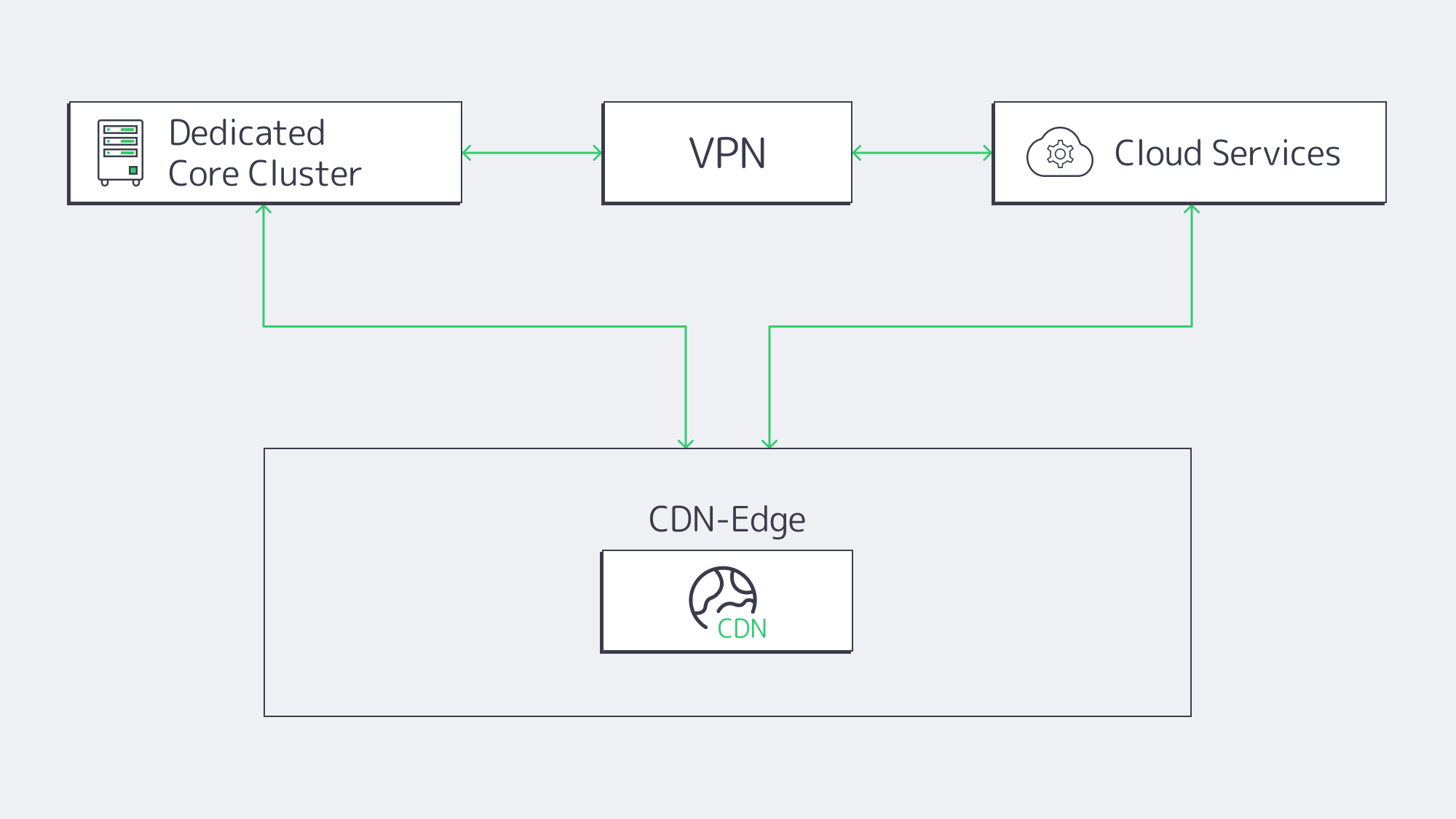
- Dedicated Core, Cloud Edge Leverage dedicated clusters near the main user base for real-money game logic, RNGs, and payment gateways while utilizing low-latency cloud regions for stateless APIs, UIs, and CRM microservices.
- Cloud Burst Operating via six high-spec servers for baseline needs, with behind-the-scenes auto-scaling cloud containers ready to spring into action when triggered by a surge that dissolves post-match.
- Dev in Cloud, Prod on Dedicated Spinning up test environments with CI/CD pipelines, running tests, and deploying approved builds to hardened dedicated servers to shrink time-to-market without the associated multi-tenant exposure risks.
- Splitting for Geo Compliance Use Melbicom dedicated nodes to process bets locally while sending anonymized aggregates to a central cloud data lake for BI and ML, an ideal pattern where data must stay in-country.
How the Debate Has Shifted Over Time
The ideological fight that was in full swing just a decade ago has reached a stalemate. Cloud emergence once promised to “kill servers,” and the loyalists waved latency graphs in defense and exasperation. Then Moore’s Law slowed, and providers added premium SKUs, and the cloud prices plateaued. Dedicated automation also changed the argument with IPMI APIs, and inventories that can be deployed in an instant, bringing better agility to dedicated servers.
Final Word: A Winning Infrastructure Hand

The choice between cloud and dedicated is ultimately workload-specific; each has its merits. If uncertainty is high or the need is urgent, the cloud earns its keep, especially in situations where experimentation drives revenue. For stable high-throughput workloads, dedicated infrastructure can deliver stronger long-term cost control, deterministic performance, and the isolation that regulators look for. For iGaming demands, adaptability is key to keep up with shifting traffic and adhere to rules without losing budget control.
A forward-thinking solution is to structure your architecture around the best of both worlds. Keep latency-critical engines on high-bandwidth single-tenant servers for compliance and stability, then use cloud elasticity for spikes, peripheral microservices, experiments, and new markets.
Deploy Dedicated Servers Now
Deploy ready-to-go single-tenant nodes in under two hours and give players low-latency performance.
Get expert support with your services
Blog

Database Server Acquisition: Should You Buy or Rent?
Buying a database server, installing it in a rack, and depreciating it over several years was once the default. That model can still work, but scaling it requires capital, facilities, and procurement lead time. Renting dedicated or cloud capacity offers a different tradeoff, so the right choice depends on the workload and operating model.
Compare the capital-expense (CapEx) path of owning hardware with the operating-expense (OpEx) model of renting dedicated or cloud-hosted capacity. The better choice depends on utilization, staffing, software licensing, deployment speed, refresh plans, and how often capacity or location needs change. This guide compares those factors without treating either model as automatically cheaper.
Choose Melbicom— 1000+ ready-to-go servers — 21 Tier III/IV data centers — 40 CDN PoPs |
|
The True Cost of Buying a Database Server
How much is a database server? There is no reliable single figure. A purchase quote depends on CPU count, memory, storage, redundancy, support, and software licensing. Ownership also adds power, cooling, rack space, spare parts, and staff time; rental quotes vary by location, configuration, bandwidth, and term.
Compare both options over the same planning horizon and service level. For buying, include hardware, warranties, facilities, network, licenses, maintenance, migration, and residual value. For rented dedicated hardware, include setup, monthly server and traffic charges, remote hands where applicable, and exit or migration costs. For public cloud, include compute, storage, data transfer, managed services, and discounts.
Renting lowers the upfront cash commitment, but it does not always mean per-second billing. Dedicated servers are commonly billed for a fixed period, while public cloud resources are more elastic. Over three to five years, either model can be cheaper depending on utilization, labor, power, licensing, and refresh requirements.
Accounting treatment also depends on the contract and jurisdiction. Capital purchases normally enter asset and depreciation workflows; service and lease arrangements may be treated differently. Finance and procurement teams should confirm the treatment before using CapEx or OpEx labels as the deciding factor.
The Economics At A Glance
| Dimension | Buy (CapEx) | Rent Dedicated or Cloud (OpEx) |
|---|---|---|
| Up-front outlay | High (hardware and setup) | Low to moderate (setup and first billing period) |
| Accounting | Capital asset; depreciation rules apply | Service or lease expense; treatment depends on contract |
| Flexibility | Specification and location stay fixed until replacement | Cloud can resize quickly; rented bare metal changes in server-sized steps |
| Refresh cycle | Buyer-managed around warranty, support, and economics | Provider owns the physical lifecycle; the customer still plans workload migration |
Refresh Cycles: Avoiding the Inevitable Treadmill
Hardware refresh decisions should be based on workload performance, energy use, support status, failure risk, and migration cost—not on a fixed annual efficiency assumption. Uptime Intelligence notes that work delivered per unit of energy can improve substantially across four- to five-year technology cycles, but the benefit depends on utilization, consolidation, and workload fit.
Renting changes who owns the physical refresh; it does not eliminate database migration work. The provider handles the hardware lifecycle and failed components, while the customer still needs to validate compatibility, benchmark the new platform, replicate data, test failover, schedule cutover, and retire the old node.
On-premises refreshes can add procurement, shipping, installation, cabling, and power or cooling work. Melbicom ready-to-go servers can be activated in two hours in Tier III or Tier IV facilities, and custom configurations are delivered in 3–5 business days. That shortens infrastructure lead time, but workload migration and acceptance testing still need a plan.
Workload Utilization and Burst Capacity
Utilization is workload-specific. A purchased server and a rented dedicated server can both sit idle because each reserves a fixed machine for one customer. Public cloud improves elasticity by allowing resources to be added or removed on demand, while rented bare metal scales in server-sized steps and on the provider’s provisioning and billing cycle.
During a launch or seasonal surge, replicas or higher-IOPS nodes can be added. Cloud resources can usually be removed quickly; dedicated rentals require planning around activation and billing terms. Melbicom offers 1000+ ready-to-go servers across 21 global Tier III and Tier IV data centers, including Los Angeles, Singapore, Amsterdam, and Mumbai. Bandwidth options are available up to 200 Gbps per server, but actual latency must be measured from the users and systems that matter.
Steady workloads can still be oversized. Renting reduces capital lock-in and makes replacement or relocation easier, but it does not remove the need for telemetry, load testing, and capacity planning. Right-size CPU, memory, storage IOPS, and network headroom against sustained and peak demand.
Understanding Operational Overheads: Who Does the Heavy Lifting?
With owned hardware, your team is responsible for the facility, physical components, firmware, and replacement logistics. With a rented dedicated server, the provider handles the data center and failed hardware, while the customer still manages the operating system, database, backups, monitoring, access controls, and incident response unless a separate managed service says otherwise.
That division of responsibility should be written into the contract. Confirm who patches firmware and the operating system, replaces failed drives, manages backups, monitors hardware, and responds to incidents; do not assume a dedicated-server rental includes database administration or managed services.
Dedicated servers provide single-tenant isolation and can support customer-controlled encryption keys, but neither renting nor dedicated hardware makes a workload compliant by itself. Compliance depends on facility certifications, data location, contractual controls, logging, encryption, identity and access management, backup and retention policies, and audit evidence.
Subscription Growth Favors Hybrid Models
Service-based infrastructure continues to expand, but the practical outcome is often hybrid rather than a complete replacement of owned hardware. Gartner reported that the worldwide IaaS market grew 22.5% in 2024, reflecting sustained demand for flexible infrastructure. Organizations still choose different ownership models for different workloads.
Hybrid deployment is often the practical landing zone. Dedicated rentals with predictable monthly costs suit steady, latency-sensitive transactional databases, while temporary analytics, development and test environments, and variable front ends are better suited to cloud infrastructure that can scale independently.
Software licensing should be modeled separately from hardware ownership. Microsoft’s current SQL Server pricing guidance includes license-purchase, subscription, and pay-as-you-go options, so the lowest-cost licensing path can differ between owned hardware, rented dedicated servers, and cloud instances.
Contract terms vary by provider and service. Renting can make it easier to adopt a newer CPU generation or change location without disposing of owned assets, but application compatibility, data-residency requirements, licenses, and migration plans still determine whether a move is feasible.
When to Buy or Rent Database Servers
Buy a database server when utilization is stable, the hardware will remain useful for several years, and your organization already has the facilities and staff to operate it. Rent when faster deployment, easier relocation, lower upfront cost, or the ability to replace capacity without owning residual hardware matters more.
Ownership can make sense for stable, high-utilization workloads when the organization already operates suitable facilities, expects a long service life, needs specialized hardware, or has policies that require owned equipment. Renting is often stronger when demand, location, or technology changes faster than the procurement and depreciation cycle.
Compare both scenarios using the same performance target, availability design, and time horizon. Include utilization, power, cooling, network, staff, support, software licenses, downtime risk, migration, and exit costs. Neither model is automatically cheaper: a rented server can be wasteful when oversized, and a purchased server can be economical when fully utilized and kept within support.
Conclusion: Agility Over Ownership

Renting dedicated servers or cloud resources is usually the lower-friction choice when deployment speed, geographic choice, refresh flexibility, or limited upfront capital are priorities. Buying can be rational for stable, high-utilization workloads where facilities, staff, and a long service life are already in place. The decision should come from workload-specific TCO and operational risk, not a blanket rule.
Whether you run PostgreSQL, Oracle Database, or Microsoft SQL Server, size CPU, memory, storage, network, licensing, backups, and recovery together. Revisit the assumptions before each refresh or contract renewal because the cheaper acquisition model can change as utilization, energy prices, software licensing, and location requirements change.
Ready to Deploy Your Database Server?
Choose from 1000+ ready-to-go dedicated servers and have your database server online in hours.
Get expert support with your services
Blog
Milliseconds Matter: Build a Fast German Dedicated Server
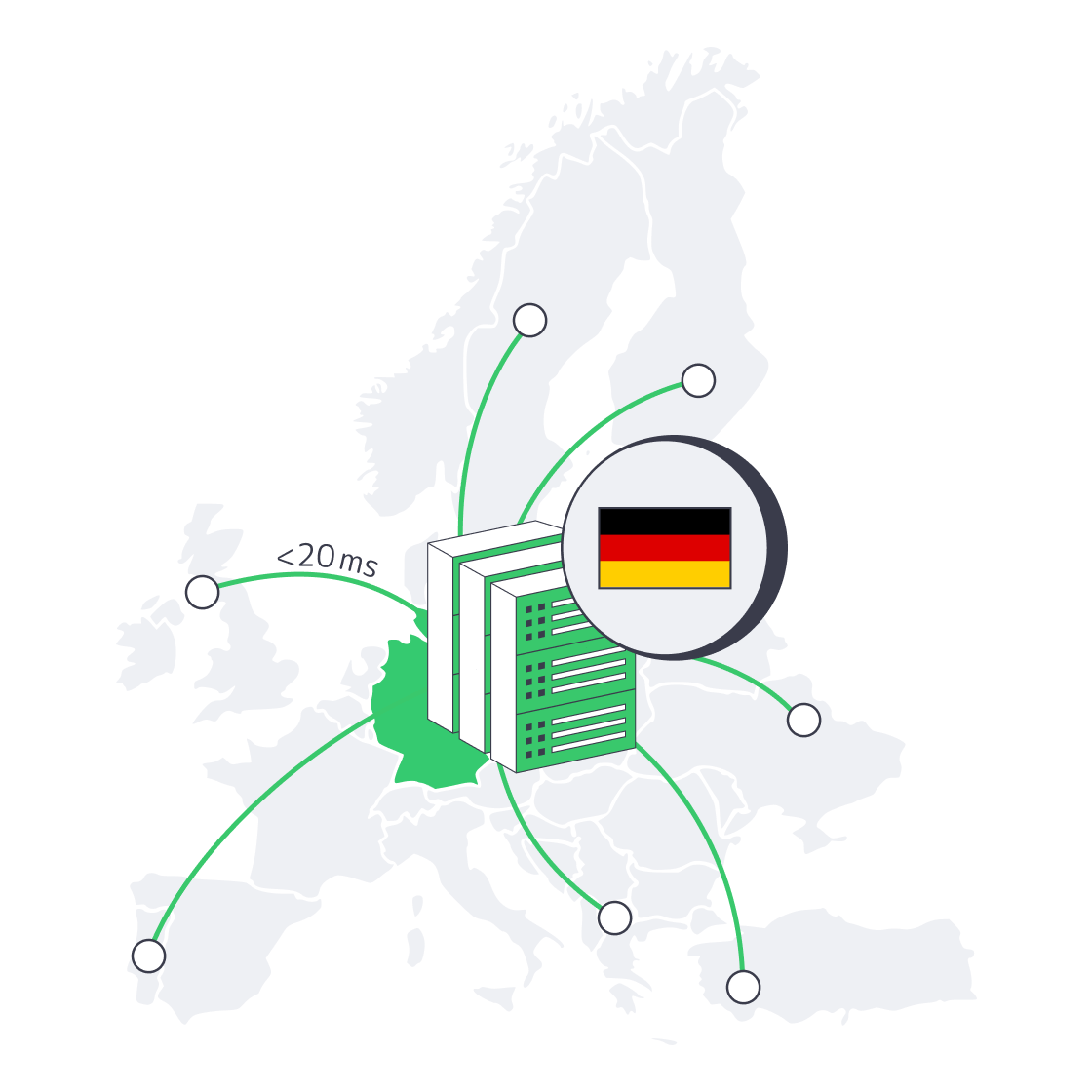
Modern European web users measure patience in milliseconds. If your traffic surges from Helsinki at breakfast, Madrid at lunch, and LA before dawn, every extra hop or slow disk seek shows up in conversion and churn metrics. Below is a comprehensive guide on putting a dedicated server in Germany to work at peak efficiency. It zeroes in on network routing, edge caching, high-throughput hardware, K8 node tuning, and IaC-driven scale-outs.
Choose Melbicom— 200+ ready-to-go servers — Tier III & IV DCs in Frankfurt — 40 CDN PoPs across 6 continents |
|
How Does Frankfurt’s DE-CIX Cut Latency for Dedicated Servers in Germany?
Frankfurt’s DE-CIX cuts latency for a dedicated server in Germany by putting the origin near the world’s leading Internet exchange, where more than 1,000 networks exchange traffic and peak load exceeds 18 Tbit/s. The practical gain is fewer long transit paths, lower hop counts, and cleaner routes to European users.
For Melbicom deployments, Tier III & IV DCs in Frankfurt provide up to 200 Gbps per-server network capacity. Melbicom also maintains direct peering relationships with major Internet exchanges and global carriers, so teams can validate real paths with traceroute and synthetic probes before putting latency-sensitive traffic into production.
Carrier Diversity and Smart BGP
A single peering fabric is not enough. Melbicom combines 23 transit partners and 29 IXP peering hubs with multi-path BGP policies, so route choices are not locked to one upstream. If a path congests or a carrier has maintenance, traffic can reconverge through an alternate route. Validate failover targets and convergence time for critical workloads.
Edge Caching for Line-Speed Delivery
Routing is half the latency story; geography still matters for static payloads. That’s where Melbicom’s 40-PoP CDN enters. Heavy objects—imagery, video snippets, JS bundles—cache at the edge, often a metro hop away from the end user. Instead of assuming a fixed page-load gain, track cache-hit ratio, TTFB, and LCP before and after moving static payloads off the Frankfurt origin.
Which Hardware Choices Make a Dedicated Server in Germany Fast?
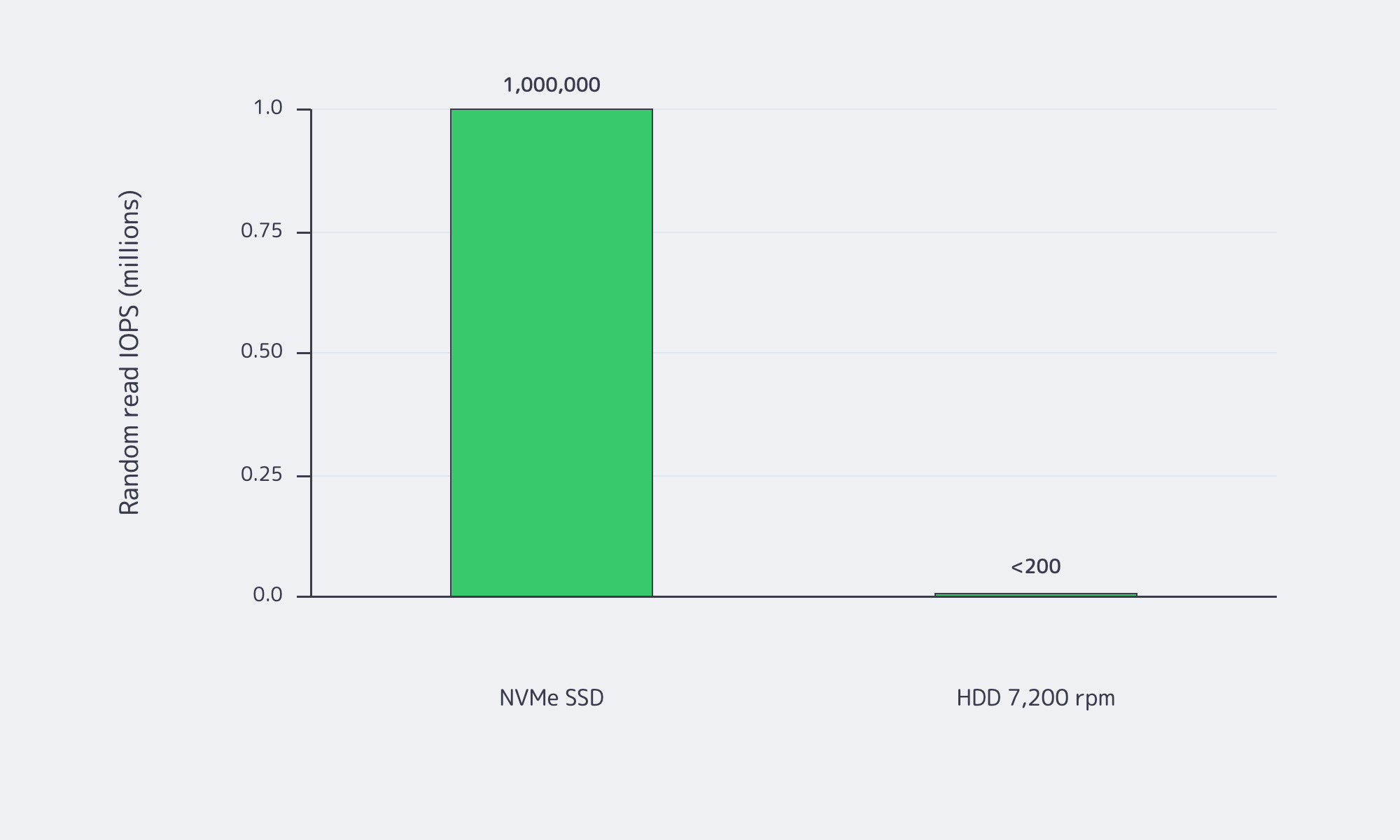
Packet paths are useless if the server stalls internally. In Melbicom’s German configurations today, the choice starts with workload fit: Frankfurt inventory includes 200+ ready-to-go servers with Intel and AMD CPU options, 16–768 GB RAM, and up to 200 Gbps per-server network capacity. For hot databases, search indexes, and media pipelines, choose NVMe rather than HDD where low I/O latency matters most.
PCIe 4.0 NVMe: The Disk That Isn’t
Spinning disks top out near ~200 MB/s and < 200 random IOPS. High-end PCIe 4.0 x4 NVMe drives can sustain ~7 GB/s sequential reads and scale to ~1 M random-read IOPS with tens of microseconds access latency. Database checkpoints, search-index builds, and media exports finish before an HDD hits stride, while NVMe removes tail-latency spikes from checkout APIs and chat messages.
| Metric | NVMe (PCIe 4.0) | HDD 7,200 rpm |
|---|---|---|
| Peak sequential throughput | ~7 GB/s | ~0.2 GB/s |
| Random read IOPS | ~1,000,000 | < 200 |
| Typical read latency | ≈ 80–100 µs | ≈ 5–10 ms |
Table. PCIe 4.0 NVMe vs HDD.
DDR4: Memory Bandwidth that Still Delivers
DDR4-3200 provides 25.6 GB/s per channel (8 bytes × 3,200 MT/s | DDR4 overview). On 6–8 channel Xeon servers, that translates to ~150–200+ GB/s of aggregate bandwidth—ample headroom for in-memory caches, compiled templates, and real-time analytics common to high-traffic web stacks.
CPU Compute: Core Count, Cache, and Turbo Headroom
For Germany builds, match the CPU to the workload instead of assuming one processor family is always best. Melbicom’s Frankfurt inventory includes Intel and AMD options; Intel Xeon Scalable CPUs can provide strong per-core turbo, large caches, and built-in accelerators such as AVX-512 where the selected SKU supports them (Intel Xeon Scalable family). For WebSocket fan-out, Node.js services, and analytics workers, validate both single-thread latency and total core count before ordering.
Kubernetes Node Tuning for Low Latency
Running containers on a dedicated server beats cloud VMs for raw speed, but only if the node is tuned like a racecar. Three adjustments yield the biggest gains:
- CPU pinning via the CPU Manager — Use the static policy for Guaranteed pods with integer CPU requests so latency-critical containers get exclusive CPU affinity. Keep system daemons on reserved CPUs to avoid noisy-neighbor interruptions.
- NUMA-aware placement — Use the Topology Manager and, where needed, Memory Manager to align CPU and memory allocations on as few NUMA nodes as possible. This reduces cross-socket memory trips, but capacity fragmentation can cause pod admission failures, so test requests against real node topology.
- HugePages for mega-buffers — Kubernetes supports pre-allocated HugePages, including 2 MiB pages on common x86 systems. Use them only for applications that explicitly benefit from huge pages, then measure query latency and throughput before making the setting a platform default.
Spinning-disk bottlenecks vanish automatically if the node boots off NVMe; keep an HDD RAID only for cold backups. Likewise, allocate scarce IPv4 addresses only to public-facing services; internal pods can run dual-stack and lean on plentiful IPv6 space.
How to Use IaC for Just-in-Time Scale-Out
Traffic spikes rarely send invitations. With Infrastructure as Code (IaC) you script the whole server lifecycle, from bare-metal provisioning through OS hardening to Kubernetes join. Need a second dedicated server Germany node before tonight’s marketing blast? Model one of the 200+ ready-to-go Frankfurt servers in Terraform, inject SSH keys through the provisioning workflow, and hand the node to Ansible for post-boot tweaks. Ready-to-go delivery is listed at two hours, and templates make each node reproducible, reducing the “snowflake-server” drift that haunts manual builds.
IaC also simplifies multi-region redundancy. Because a Frankfurt root module differs from an Amsterdam one only by a few variables, expanding across Melbicom’s global footprint becomes a pull request, not a heroic night shift. The same codebase can version-control IPv6 enablement, swap in newer CPUs, or roll back a bad driver package in minutes.
Avoid Spinning Disks and IPv4 Scarcity
Spinning disks still excel at cheap terabytes but belong on backup tiers, not in hot paths. IPv4 addresses cost real money and are rationed; architect dual-stack services now so scale-outs aren’t gated by address scarcity later. That’s it—legacy mentioned.
Why Frankfurt Is a Smart Choice for Dedicated Server Hosting in Germany

Germany’s position at the crossroads of Europe’s Internet, coupled with the sheer gravitational pull of DE-CIX, makes Frankfurt an obvious home for latency-sensitive applications. Add in carrier diversity, edge caching, NVMe storage, memory bandwidth, and Intel or AMD compute options, then wrap the stack with Kubernetes node tuning and IaC automation, and you have an infrastructure that meets modern traffic head-on. Milliseconds fall away where the routing and hardware choices match the workload, throughput rises, and scale-outs become code commits instead of capital projects. For teams that live and die by user-experience metrics, that difference shows up in retention curves and revenue lines.
Order a German Dedicated Server Now
Deploy in Frankfurt today: 200+ servers, up to 200 Gbps, 24/7 support.
Get expert support with your services
Blog
Blueprint for High-Performance Backup Server Solutions
Backup performance depends less on a single hardware label than on the recovery objective, protected-data volume, change rate, concurrency, retention policy, and the slowest stage in the path. Purpose-built backup server solutions can combine parallel compute, enough memory for the selected backup software, storage pools designed for the required failure tolerance, object storage for an off-site or capacity tier, and network capacity sized from measured backup and restore tests. Backup copies should be isolated from production access and recovery procedures tested regularly, consistent with CISA guidance. The sections below map the essential design decisions.
Choose Melbicom— 1000+ ready-to-go servers — 21 global Tier IV & III data centers — Up to 200 Gbps per server |
|
Backup Server Specs That Matter
High-performance backup servers should be sized from concurrent backup and restore jobs, compression, encryption, deduplication, catalog activity, and the throughput of the storage and network path. Benchmark the selected backup software with representative data, then add headroom for restores that must run while new backups continue.
High-Core CPUs for Parallel Compression
Modern backups may run concurrent jobs with compression, encryption, checksums, or deduplication. Zstandard supports multithreaded compression, but end-to-end scaling depends on the data, compression level, software, core count, storage, and network limits. For a backup dedicated server, benchmark the actual workflow and add cores only while they measurably improve throughput.
RAM as the Deduplication Fuel
Catalogs, block indexes, filesystem caches, and concurrent jobs all consume memory. For OpenZFS deduplication specifically, current OpenZFS guidance says to plan for at least 1.25 GiB of RAM per 1 TiB of stored data, with actual needs depending on block size and duplication. Other backup products use different sizing rules, so measure peak memory during full backups and restores rather than treating 128 GB or 4 GB per core as universal.
How Do 25–40 GbE Links Cut Restore Times for Backup Servers?
Treat Line-Rate Math as an Upper Bound
At 1 Gbps, the theoretical minimum time to transfer 10 TB of decimal data is about 22 hours 13 minutes; at 10 Gbps, it is about 2 hours 13 minutes. These figures assume continuous nominal throughput and exclude protocol, filesystem, compression, encryption, disk, and application overhead.
| Nominal Network Throughput | Theoretical Minimum for 10 TB |
|---|---|
| 1 Gbps | 22 h 13 m |
| 10 Gbps | 2 h 13 m |
| 25 Gbps | 53 m |
| 40 Gbps | 33 m |
| 100 Gbps | 13 m |
Redundant uplinks can protect against a single cable, NIC, or switch path, but redundancy does not automatically aggregate throughput; bonding mode and network design determine behavior. Melbicom offers bandwidth up to 200 Gbps per server, depending on location and configuration. Size the ordered port from measured restore demand and confirm that the selected data center and configuration support it.
Disk Pools Built to Survive
RAID-Z: Modern Parity Without the Drawbacks
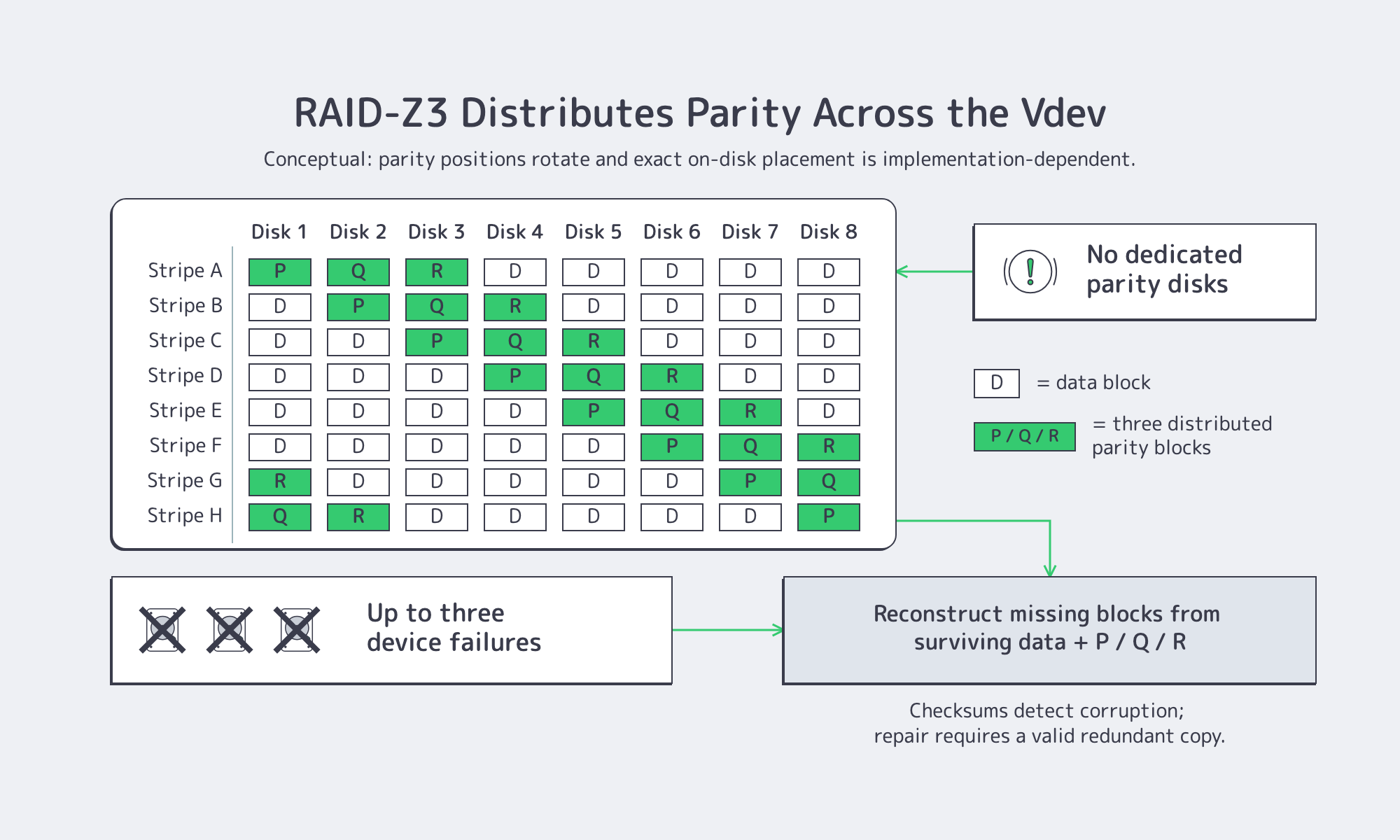
OpenZFS RAIDZ supports single, double, or triple parity; RAID-Z2 and RAID-Z3 can tolerate two or three device failures, respectively. OpenZFS also uses checksums and can repair damaged data when a valid redundant copy is available. Vdev width, record size, drive performance, capacity, and workload determine the usable-space and I/O tradeoffs, so 8+2 or 8+3 layouts should not be treated as universal defaults.
Note: RAID-Z on dedicated servers requires disks to be presented individually to ZFS. OpenZFS advises against hardware RAID controllers for ZFS; confirm that an HBA/JBOD or IT/pass-through mode is available before ordering. Provisioning and operation remain administrator responsibilities through the operating system and out-of-band console.
Erasure Coding for Dense, Distributed Repositories
Erasure coding can reduce capacity overhead in multi-node or multi-chassis repositories, but the exact data-plus-parity scheme, failure-domain behavior, rebuild traffic, and CPU cost are properties of the backup or storage software. A 10+6 layout can tolerate six missing fragments only when that scheme is actually configured; it is not a general recommendation for every backup server.
Tiered Pools for Hot, Warm, and Cold Data
Fast NVMe mirrors or RAID 10 can serve recent restore points, while larger HDD pools retain longer windows. Retention tiers should follow measured restore frequency, recovery objectives, legal requirements, and the cost of keeping each tier online. Move older copies off-site only after verifying integrity, encryption, access separation, and the destination’s retention controls.
Object Storage for Backups
S3-class object storage fits as an off-site or capacity tier when the backup software supports the S3 API, multipart transfers, integrity checks, and the destination’s retention controls. S3 compatibility alone does not guarantee Object Lock, immutability, cross-region replication, or free egress, so verify those features and prices before relying on them.
Verify Immutability Instead of Assuming It
WORM or Object Lock can prevent protected objects from being changed or deleted during a retention period, but only when the destination supports the feature and the correct mode, retention, permissions, and lifecycle rules are configured. Treat immutability as a tested configuration requirement, not a default S3 feature.
Bandwidth & Budget Considerations
Initial seeding can be slower than daily incremental transfers because the first copy contains the full selected dataset. Estimate transfer windows from changed-data volume, measured compression or deduplication ratio, protocol overhead, and available WAN throughput. Melbicom S3 Object Storage supports the AWS S3 API and free ingress; confirm current storage, request, and egress charges before finalizing the retention budget.
Backup Architecture Checklist
- Compute: Size cores from measured compression, encryption, deduplication, and concurrency; reserve restore headroom.
- Memory: Follow the selected backup software and repository guidance; measure peak catalog, cache, and deduplication use.
- Network: Calculate theoretical transfer time, then benchmark end-to-end throughput with protocol and storage overhead.
- Disk Landing Tier: Choose NVMe mirrors, RAID 10, or RAID-Z to meet resilience needs.
- Capacity Tier: Define retention, rebuild exposure, and failure domains before choosing RAID-Z or erasure coding.
- Off-Site Tier: Keep isolated, encrypted copies and verify Object Lock/WORM support and egress terms.
- Automation: Use policy-based aging, checksums or scrubs, monitoring, and regular restore tests.
With those controls, server data backup solutions can be validated against recovery point and recovery time objectives instead of relying on nominal component specifications.
Why Dedicated Hardware Still Matters
Dedicated hardware can isolate backup I/O, firmware, and maintenance from production workloads, making bottlenecks and failure domains easier to attribute. It also gives administrators direct control of disk presentation, filesystem, backup software, encryption, and network configuration. Those benefits do not replace off-site copies, access separation, monitoring, or restore testing.
Melbicom offers 1000+ ready-to-go dedicated servers across 21 Tier III and Tier IV facilities, with per-server bandwidth up to 200 Gbps depending on location and configuration, plus 24/7 support. Storage layouts, drive counts, HBA/JBOD availability, and delivery timing vary by configuration; request a custom build when a ready-to-go system does not match the repository design.
Backup Servers: Windows or Linux?
- Linux (ZFS, Btrfs, Ceph): Often chosen for OpenZFS/RAID-Z and broad open-source tooling. Match the filesystem and repository design to the backup application; ZFS requires direct disk visibility for software-managed parity.
- Windows Server (ReFS + Storage Spaces): Fits environments that depend on Windows-native backup agents, VSS application-consistent snapshots, ReFS, or Storage Spaces. Verify feature support in the selected Windows Server edition and backup product.
- Mixed estates may use separate proxies or repositories for Linux and Windows workloads. Keep application-consistent snapshot requirements, credentials, networking, storage, and cloud tiers explicit; these do not automatically remain identical across platforms.
Should Backup Servers Replace Tape?
Tape is not obsolete. LTO-10 lists a 400 MB/s native data rate and 30 TB native cartridge capacity. Offline media can support long-term retention and cyber-recovery designs by remaining disconnected from production networks. Disk and object storage usually simplify frequent restores and automation, but they need deliberate isolation, retention controls, and tested recovery procedures.

The comparison should be operational, not ideological. Tape can provide an offline copy and long-term retention, but retrieval may require media handling and sequential reads. Disk can accelerate restores but needs redundant design and active maintenance. A cloud object store can simplify off-site copies, yet retention controls, availability, request costs, and egress terms must be verified for the chosen service.
Backup Server Deployment Steps
Start with recovery requirements: define recovery point and recovery time objectives, protected-data volume, daily change rate, retention, acceptable failure domains, and the restores that must run concurrently. Benchmark the backup software on representative data, verify end-to-end throughput rather than port speed alone, isolate administrative access, keep an off-site copy, and test recovery regularly. Use the network speed, storage, compute, and cloud tiers results to size the final server.
Blueprint for Next-Gen Backups
High-core processors, large RAM pools, faster links, RAID-Z, erasure coding, and object storage are options—not a universal blueprint. A defensible design ties each component to measured backup and restore demand, explicit failure tolerance, retention controls, and tested recovery procedures. Dedicated hardware can provide a clear operating boundary while the customer remains responsible for the backup software, security, monitoring, and recovery process.
Order Your Backup Server Now
Choose from 1000+ ready-to-go dedicated servers with per-server bandwidth up to 200 Gbps, or request a custom build delivered in 3–5 business days.