
Blog
Dedicated Windows Server: Guide for RDP, ASP.NET, and MSSQL Workloads
A Windows dedicated server is not simply a larger VPS. It changes the operating model by giving one organization exclusive control over processor resources, memory, storage, Windows configuration, remote access, and application deployment. That control improves predictability only when it is backed by measured workload data, clear licensing, secure administration, and tested recovery procedures. The right purchase starts with evidence from the existing environment—not hardware specifications alone.
Windows Servers– 1100+ ready-to-go servers – 21 Tier III/IV data centers – 24/7 infrastructure support |
 |
Dedicated Window Server Search Intent
A search for “dedicated window server” almost always means a Windows dedicated server for RDP, IIS, ASP.NET, or SQL Server. The correct buying trigger is sustained workload pressure: repeated CPU saturation, memory pressure, storage latency, RDP delays, or application tail latency during normal peak operation—not hardware alone.
Performance isolation is the primary advantage. Dedicated hardware removes cross-tenant resource contention and provides complete operating-system control, but it does not fix inefficient SQL queries, poorly tuned applications, storage bottlenecks, or distant deployment locations. Microsoft’s SQL Server troubleshooting guidance recommends diagnosing storage, application behavior, and query design before blaming hardware.
Administrative control is equally important. Teams often require specific Windows roles, IIS modules, .NET runtimes, SQL Server features, certificates, scheduled tasks, and security policies. A dedicated server allows those components to be managed consistently while we provide infrastructure operations such as server reinstallation, dashboard management, IPMI/KVM access, and 24/7 support. Windows architecture, applications, backups, monitoring, and recovery remain the customer’s responsibility unless managed services are explicitly agreed.
Choose the Windows Server version before choosing the processor. Application compatibility—not hardware marketing—should determine whether Windows Server 2025 or Windows Server 2022 is appropriate.
Windows Dedicated Server Versus VPS for RDP, ASP.NET, and SQL Server
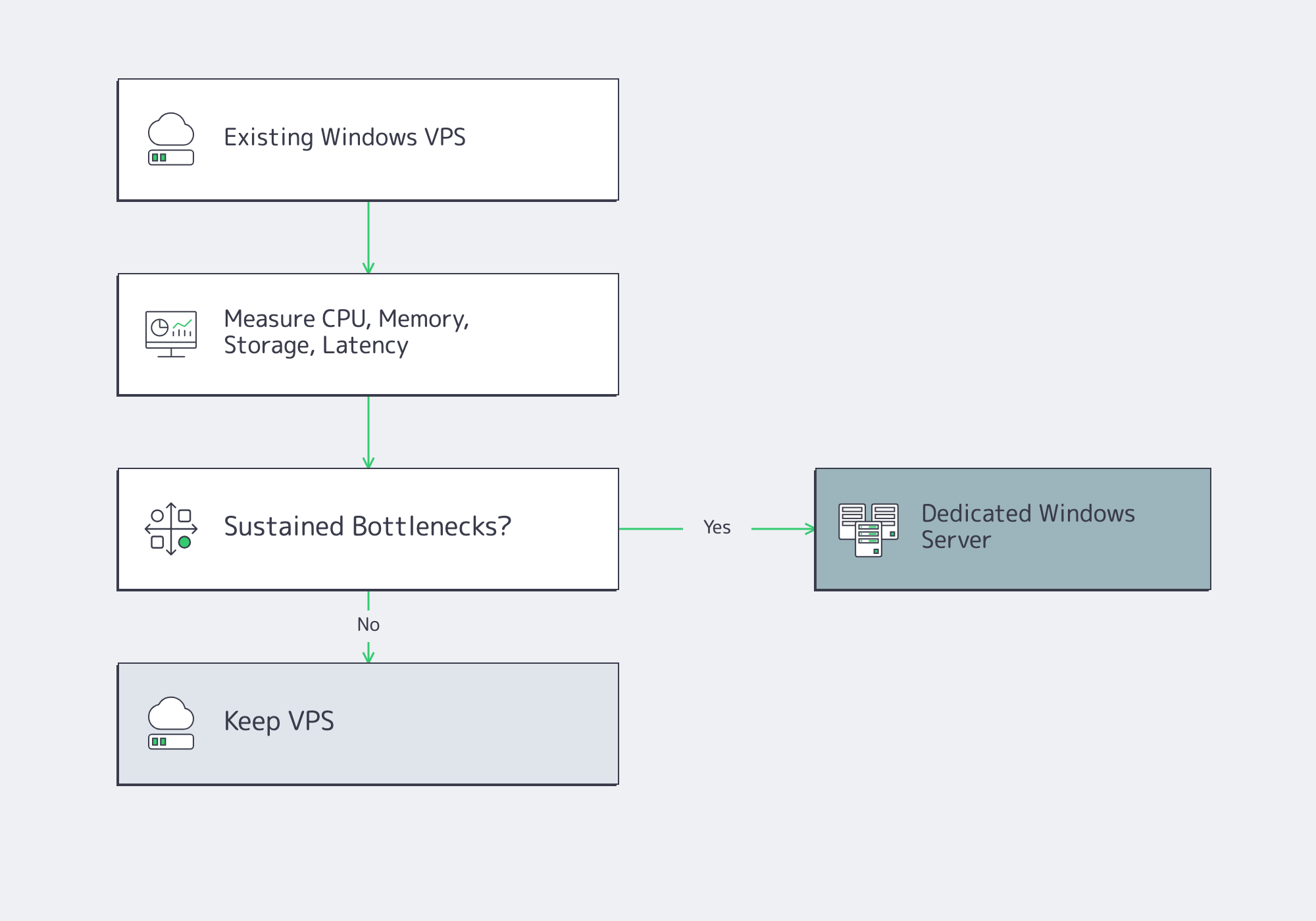
A VPS remains sensible when utilization is modest, rapid resizing is valuable, and occasional performance variation is acceptable. A dedicated server becomes the better option when sustained production workloads repeatedly exceed performance objectives despite tuning.
| Decision Area | VPS Remains Suitable | Dedicated Server Becomes Appropriate |
|---|---|---|
| Compute | Low or intermittent utilization | Sustained CPU or memory pressure |
| SQL Server | Stable storage latency | Persistent storage waits after tuning |
| RDP | Small administrative workload | Many concurrent interactive users |
| ASP.NET | Light or distributed workloads | Large applications requiring full OS control |
| Operations | Fast scaling is priority | Predictable performance and hardware control matter |
RDP Is a User-Density and Latency Problem
RDP capacity should be planned around peak concurrent users rather than total employee count. Measure real application behavior, working memory, login performance, storage activity, and interactive latency during business peaks, not generic sizing formulas.
Location matters as much as server size. Microsoft’s Azure Virtual Desktop guidance recommends keeping round-trip latency below approximately 150 ms where practical for interactive workloads. Test from actual office and remote-user locations rather than from an administrator’s connection.
Licensing must also be separated from performance. Windows Server permits two administrative remote sessions, while multi-user desktop environments require Remote Desktop Session Host together with the appropriate RDS CALs.
Size ASP.NET by Application Profile
ASP.NET applications should be sized using realistic production traffic, authentication, logging, caching, encryption, and database activity rather than synthetic benchmarks.
Benchmark throughput alongside p95 and p99 latency, CPU utilization, garbage collection, memory growth, request queues, and runtime counters. Microsoft provides dotnet-counters to collect live application metrics, making measured profiling more reliable than processor specifications alone.
Higher clock speed benefits workloads dominated by serial execution, while additional cores help when multiple requests execute simultaneously. The application profile—not CPU branding—should determine processor selection.
SQL Server Hardware and Licensing
SQL Server frequently drives the move to dedicated infrastructure because performance depends on CPU scheduling, memory available to the buffer pool, storage latency, tempdb behavior, transaction logs, concurrency, and backup throughput.
Start with measurements rather than hardware assumptions:
- Current database size and projected growth
- Peak concurrent connections
- CPU utilization
- Memory pressure
- SQL wait statistics
- Storage latency
- Backup and restore duration
Memory often delivers greater performance gains than indiscriminately adding processor cores because larger buffer pools reduce physical disk reads.
Licensing complicates processor selection. SQL Server may be licensed per core, making a smaller number of faster cores financially preferable to many slower cores for some workloads. Finalize the SQL licensing model before selecting processor hardware.
Sizing a Windows Dedicated Server
Successful sizing produces an acceptance test rather than a shopping list.
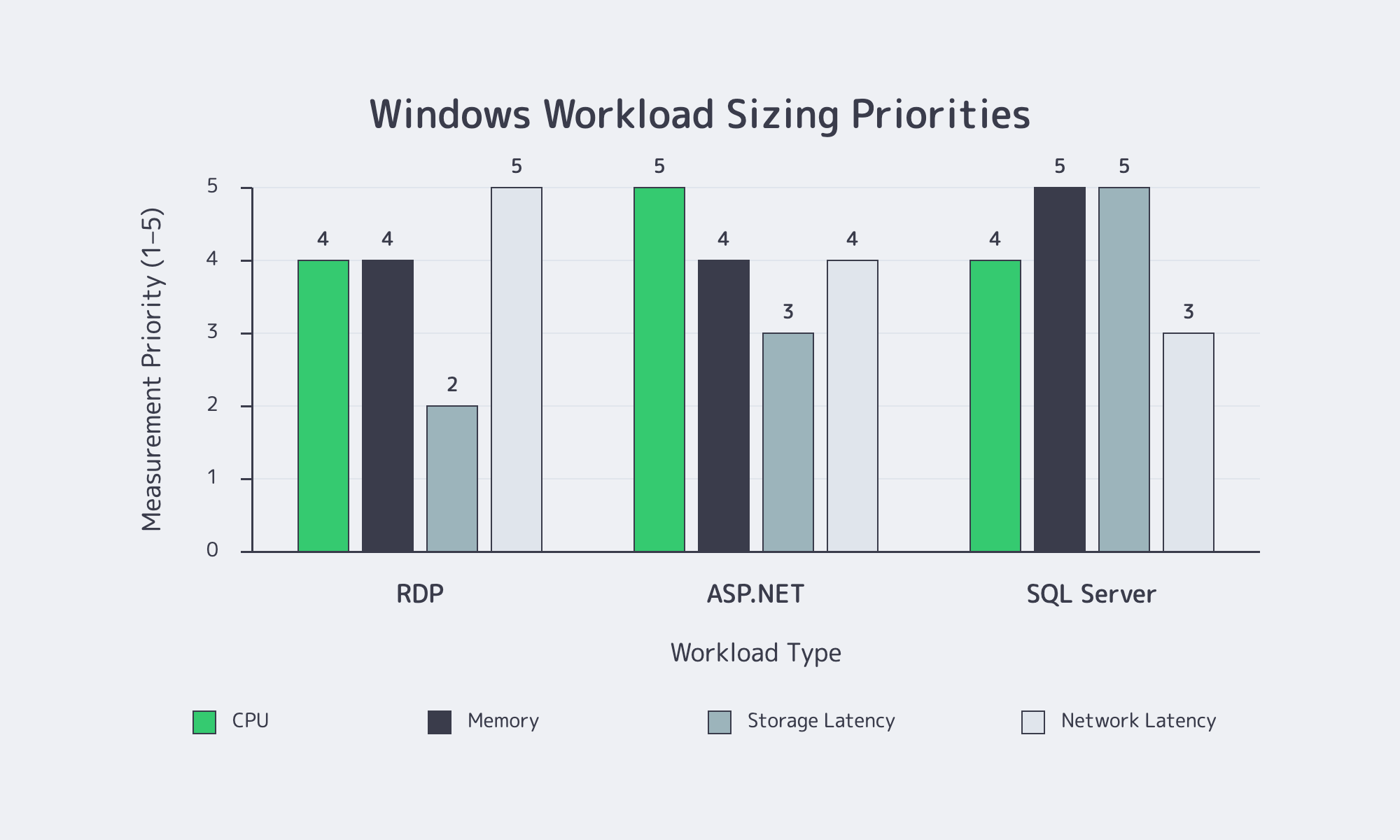
For RDP, measure realistic concurrent sessions, application launches, profile loading, and interactive responsiveness.
For ASP.NET, test realistic production traffic long enough to expose memory growth, garbage collection, scheduled jobs, and storage behavior.
For SQL Server, collect measurements across complete business cycles, not isolated peaks.
When evaluating hardware:
- Match processor characteristics to measured bottlenecks.
- Size memory from observed working sets instead of arbitrary ratios.
- Select storage according to latency, endurance, redundancy, and recovery requirements.
- Place infrastructure close to users and dependent systems because bandwidth cannot compensate for physical distance.
Melbicom offers 1100+ ready-to-go dedicated server configurations, custom configurations delivered in 3–5 business days, infrastructure across 21 Tier III and Tier IV data centers, up to 200 Gbps per-server bandwidth, and IPMI/KVM access. Those options allow Microsoft workloads to be matched to processor, memory, storage, and location requirements without assuming one hardware profile fits every deployment.
Licensing, Security, Backup, and Remote Access Checks Before Buying
Before purchasing, require a written bill of materials identifying:
- Windows Server edition and version
- Physical processor cores
- Windows CALs
- RDS CALs
- SQL Server licensing
- Backup responsibilities
- Restore procedures
- Out-of-band management
A quotation stating only “Windows included” is insufficient.
Windows Server licensing depends on physical cores, edition, virtualization design, and deployment model. SQL Server licensing should be documented separately, including edition, version, licensing model, failover rights, and disaster-recovery considerations.
Remote administration deserves the same attention as production applications. RDP should not be exposed directly to the public Internet. CISA recommends placing remote administration behind VPNs or zero-trust gateways, requiring MFA, limiting administrative access, enabling logging, and protecting privileged accounts.
Out-of-band IPMI/KVM access solves different problems from RDP because it remains available even when Windows itself is unavailable. It should therefore be protected with equally strong authentication and access controls.
Backups are only complete after successful restoration. Define recovery objectives before designing backup schedules, keep recovery copies separate from the production server, and regularly restore into isolated environments to verify application functionality rather than simply validating backup files.
Migrating From a Windows VPS Without Importing Its Bottlenecks
Migration is an opportunity to rebuild the environment rather than clone existing problems.
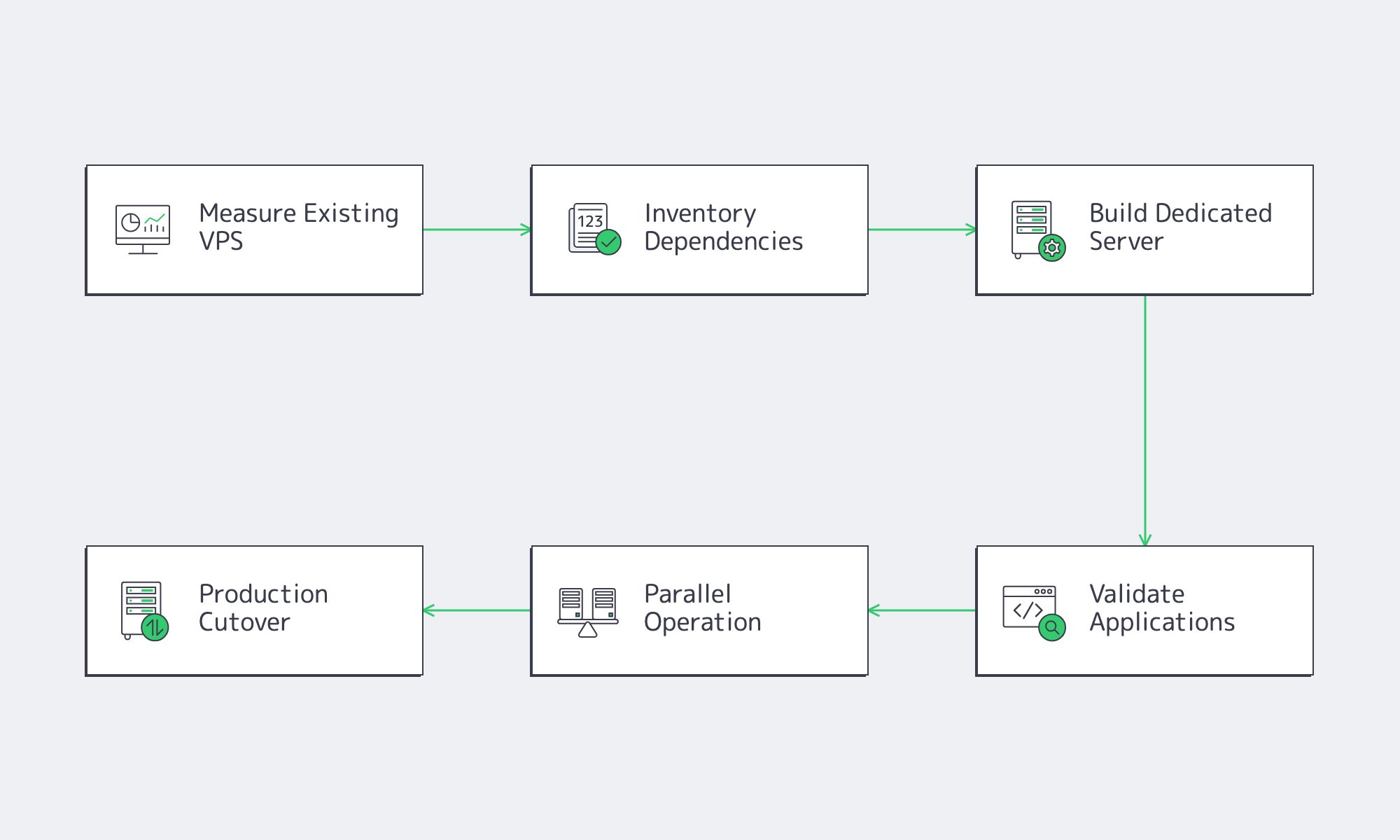
Start by collecting a baseline covering: CPU utilization, memory usage, storage latency, SQL wait statistics, ASP.NET latency, RDP concurrency, backup duration, restore duration.
Next, inventory every dependency, including Active Directory integration, certificates, service accounts, IIS configuration, SQL components, scheduled tasks, firewall rules, monitoring, backup software, and external integrations.
Build the dedicated server from a supported Windows installation, apply updates, establish monitoring and security baselines, verify remote management, then deploy applications from controlled release artifacts rather than copying existing installations.
Run VPS and dedicated environments in parallel whenever possible, synchronize changing data, validate production workloads, and define rollback criteria before migration.
The Purchase Decision: Control, Measured Headroom, and a Recoverable System
A Windows dedicated server should be purchased as a production platform rather than an oversized VPS. Hardware decisions should be tied directly to measured workloads, licensing should be documented before deployment, security controls should protect every management interface, and recovery should be demonstrated through successful restoration exercises.
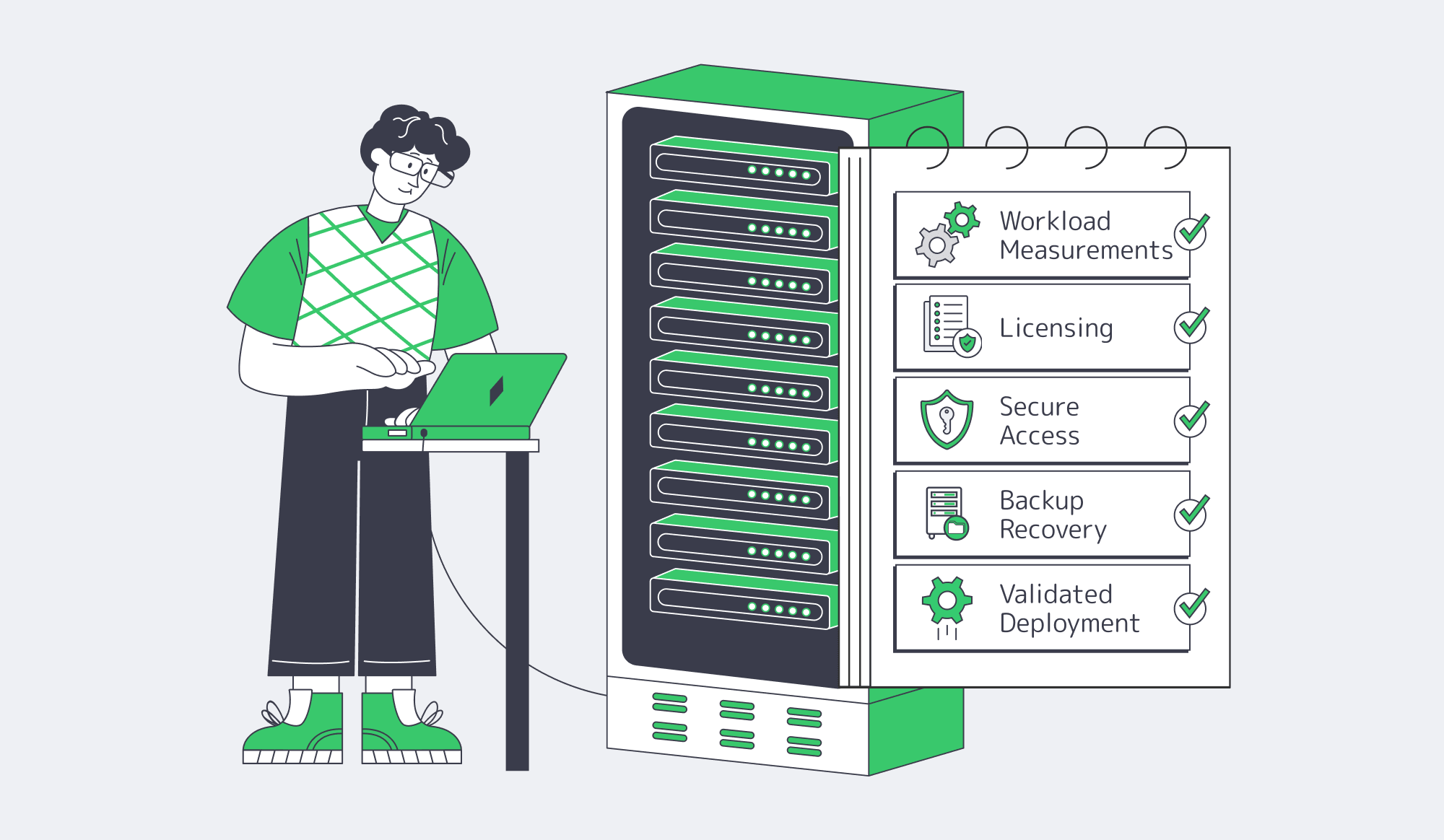
Before approving the purchase, confirm these migration gates:
- Peak production workload has been measured over representative periods.
- Candidate hardware passes load testing with documented headroom.
- Windows, RDS, and SQL licensing are documented in writing.
- RDP and out-of-band management use protected access paths.
- Backup restoration has been successfully tested.
- Data-center location has been validated from real user locations rather than administrative tests alone.
Practical Evaluation Priorities
Before comparing providers or hardware, focus on the engineering questions that have the greatest long-term impact:
- Measure workload behavior before selecting CPU, memory, or storage.
- Validate latency from user locations, not only from the data center.
- Treat Windows, RDS, and SQL Server licensing as separate procurement decisions.
- Verify backup restoration, not just backup completion.
- Keep infrastructure sizing, application tuning, and operational ownership separate.
Explore Dedicated Windows Server Options
Match Windows workloads to 1100+ ready-to-go server configurations, custom builds, 21 data centers, and up to 200 Gbps per-server bandwidth.