
Every origin fails eventually: a bad deploy, a full disk, a crashed database, a traffic spike it cannot absorb. What matters is what your visitors see while it happens, and that part is your choice. With Cache Use Stale, the CDN keeps answering with the cached copies it already holds instead of relaying the failure.
Cache Use Stale serves cached content even after it has expired whenever the origin is unreachable or returning errors, keeping the site up from your visitors’ perspective. This guide turns it on and walks through each failure condition it can cover, with a recommendation for every one.
Prerequisites
- A CDN resource already created. See Add your first CDN resource.
- Your domain pointed at the CDN and serving traffic through it, so the edge holds cached copies to fall back on. See Point your domain at the CDN.
- Client Area access to the package.
Why turn this on before you need it
- Visitors see pages, not error screens: while your origin is down, the CDN serves the copy it already has, even past its expiry. Most visitors never learn there was an incident.
- It covers more than hard downtime: the editor has a condition tile for each origin failure mode: unreachable, 5xx errors, 404s and 429 rate limiting. You choose which ones to cover.
- No extra infrastructure: the fallback copies already sit at the edge, so there is no standby server or failover DNS to operate. Enabling it is a toggle and a Save.
Step 1: Open the advanced General page
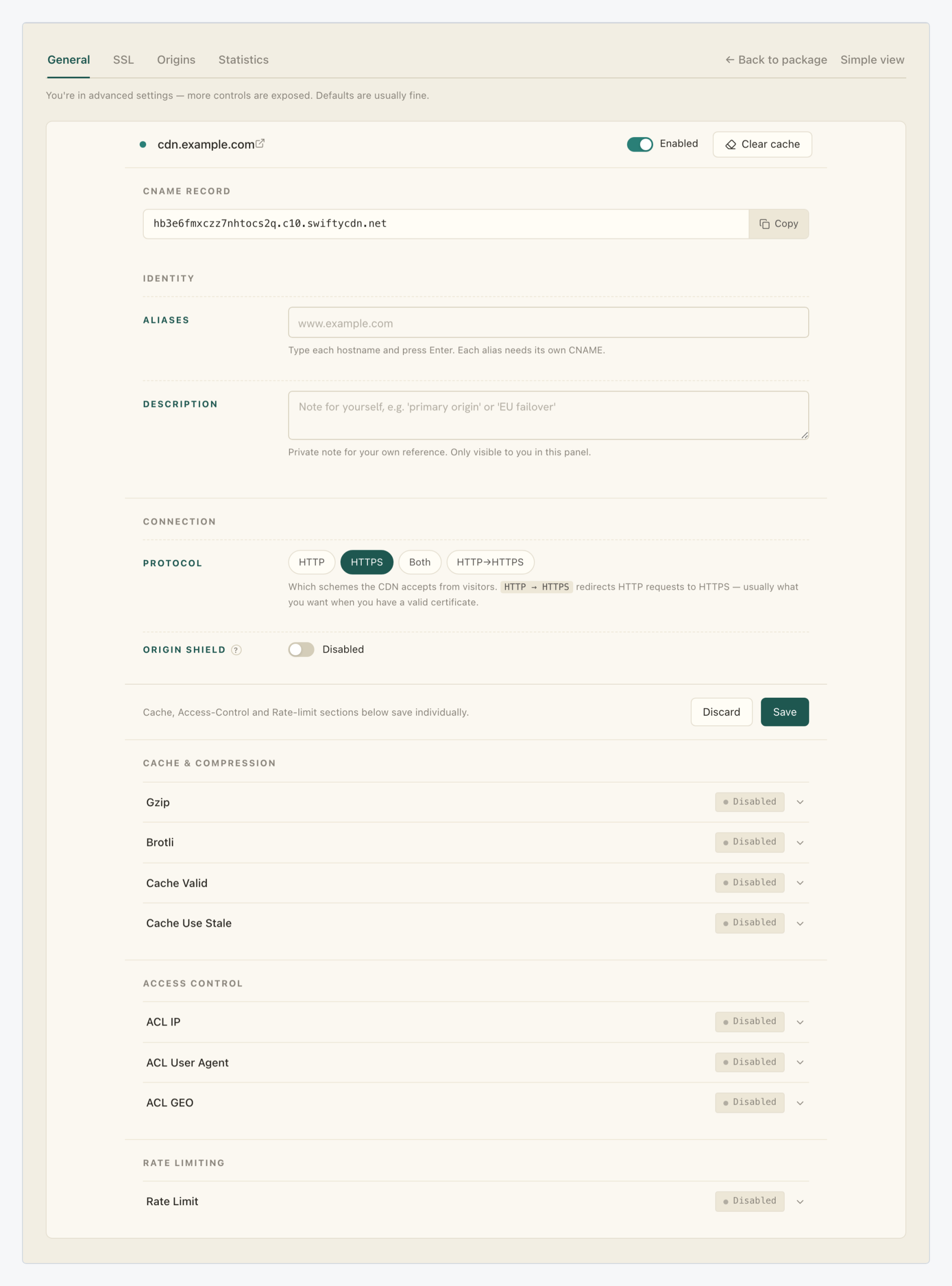
In the Resources table of your package, click the gear icon (Edit resource settings) on the resource’s row, then click Advanced settings. The advanced General page stacks the feature groups below the resource form: Cache & Compression, Access Control and Rate Limiting.
Step 2: Expand the Cache Use Stale row
The Cache & Compression section holds four collapsed rows: Gzip, Brotli, Cache Valid and Cache Use Stale, each with a status pill (Disabled on a fresh resource) and a chevron. Click the Cache Use Stale row to expand its editor; expanding changes nothing on the resource.

These rows are the same per-section editors used for Gzip and Brotli compression: each one saves individually through its own Save button, independent of the resource form above.
Step 3: Turn on Enable Cache Use Stale
The expanded editor opens with everything off: the Enable Cache Use Stale toggle, four unchecked failure condition tiles, an Advanced disclosure and the section’s Save button.

Switch the toggle on. The row’s pill keeps reading Disabled while the change is only staged; the section’s Save button is what applies it, and you still have conditions to pick first.
Step 4: Tick the failures to cover
The toggle alone names no failures; the four tiles below it decide when a stale copy may substitute for your origin. None is ticked by default:
| Condition | Covers |
|---|---|
| Origin unreachable | Connection error, timeout. The server is gone or not answering. |
| Origin returns server error | 5xx responses (500, 502, 503, 504). The server answers, but with a failure. |
| Origin returns 404 | Not Found responses. |
| Origin rate-limits us | 429 Too Many Requests responses. |
Our recommendation: tick the first two for every site. Origin unreachable and Origin returns server error are what real downtime looks like, and a stale page is always better than a connection error or a 502.
The other two depend on your site. Origin returns 404 also covers a bad deploy that deletes files, but it hides genuinely removed pages, so leave it off when a 404 carries meaning (an API, a stock checker). Origin rate-limits us is the right choice whenever a 429 from your origin is a capacity symptom rather than a policy you want passed through.

The Advanced disclosure below the grid adds two protocol-level conditions, both off by default:
| Condition | When it serves stale |
|---|---|
| Invalid response header | The origin answers, but with a response header the CDN cannot accept. |
| Cache is being updated | An expired object is being refreshed; visitors get the previous copy instead of waiting on the fetch. |
Keep both off unless you have a reason: the four tiles above cover the downtime cases. Then click the section’s Save to apply your staged choices.
What you’ve built
A fallback built from copies the edge already holds. The next time your origin goes down or starts returning 5xx errors, the edge keeps serving the pages it cached, and for most visitors the incident never existed.
Two habits complete the pattern. Monitor your traffic statistics so you learn about origin failures your visitors no longer report, and avoid purging your whole cache during an incident: those cached copies are exactly what Cache Use Stale serves from. When you want to go further, Origin Shield addresses the other side of the problem by cutting how much traffic reaches your origin in the first place.