
Some content should only be reachable through links you issued: paid downloads, expiring media, private files. The CDN covers this with Secure Link, a per-location setting on the Origins tab. It requires a signed token in every URL and answers 403 to visitors without a valid one.
This tutorial shows where the setting lives and how to enable it. For adding locations and their per-path overrides, see Route and configure a specific URL path on your CDN.
Prerequisites
- A CDN resource already created. See Add your first CDN resource.
- Client Area access to the package.
Step 1: Open the location’s Security section
In the Resources table of your package, click the gear icon (Edit resource settings) on the resource’s row, then Advanced settings, then the Origins tab. Click a location’s row to expand its card.
Secure Link protects the paths matching that location, so pick the one that serves the protected content. On a fresh resource, the catch-all / is the only one. At the bottom of the card, the Security group holds a single collapsed row, Secure Link, with its status pill (Disabled until you enable and save it).
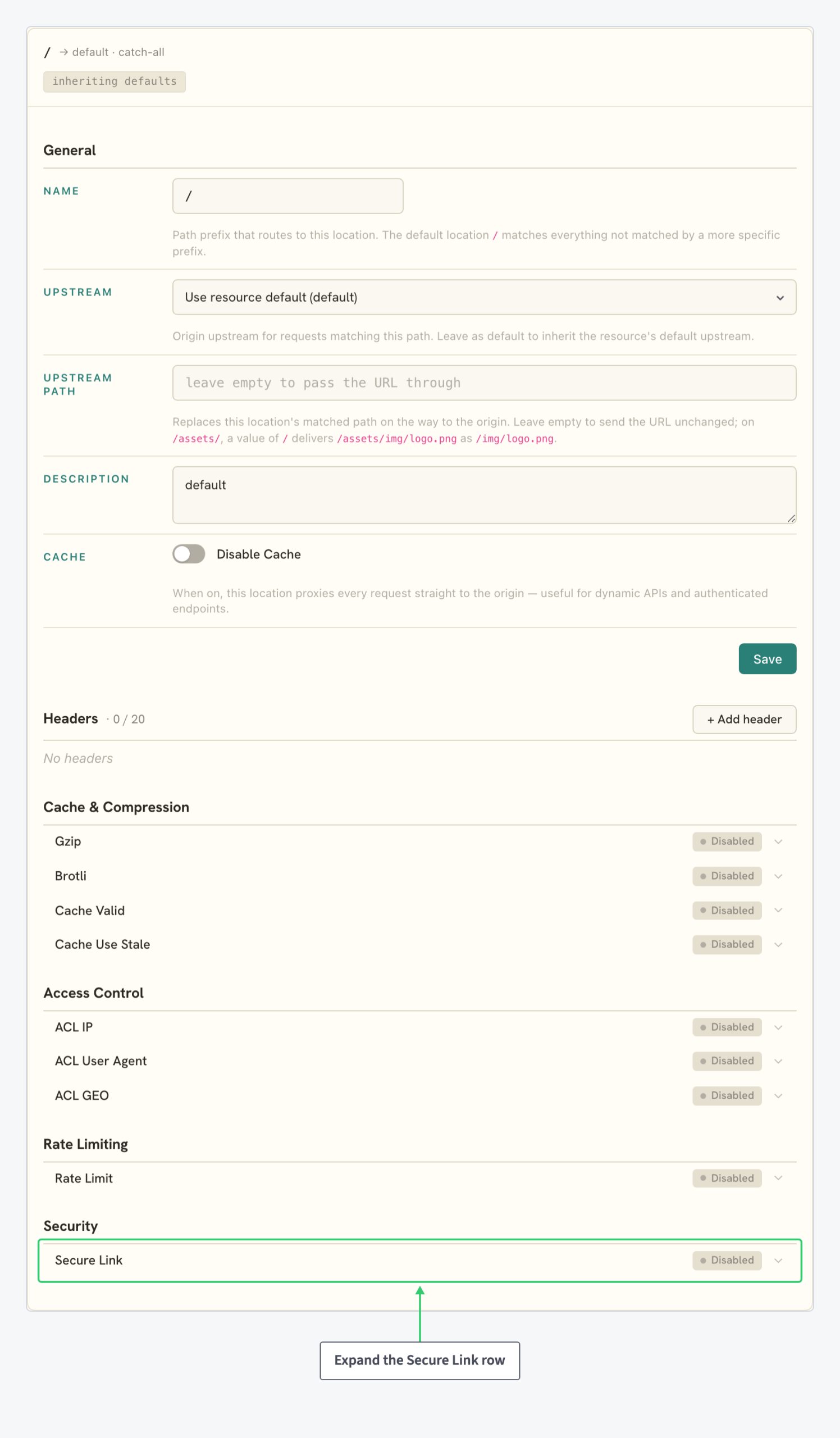
Step 2: Turn on Enable Secure Link
Expand the row to open the editor: the enable toggle, two hardening toggles, the signing secret and the section’s Save button:
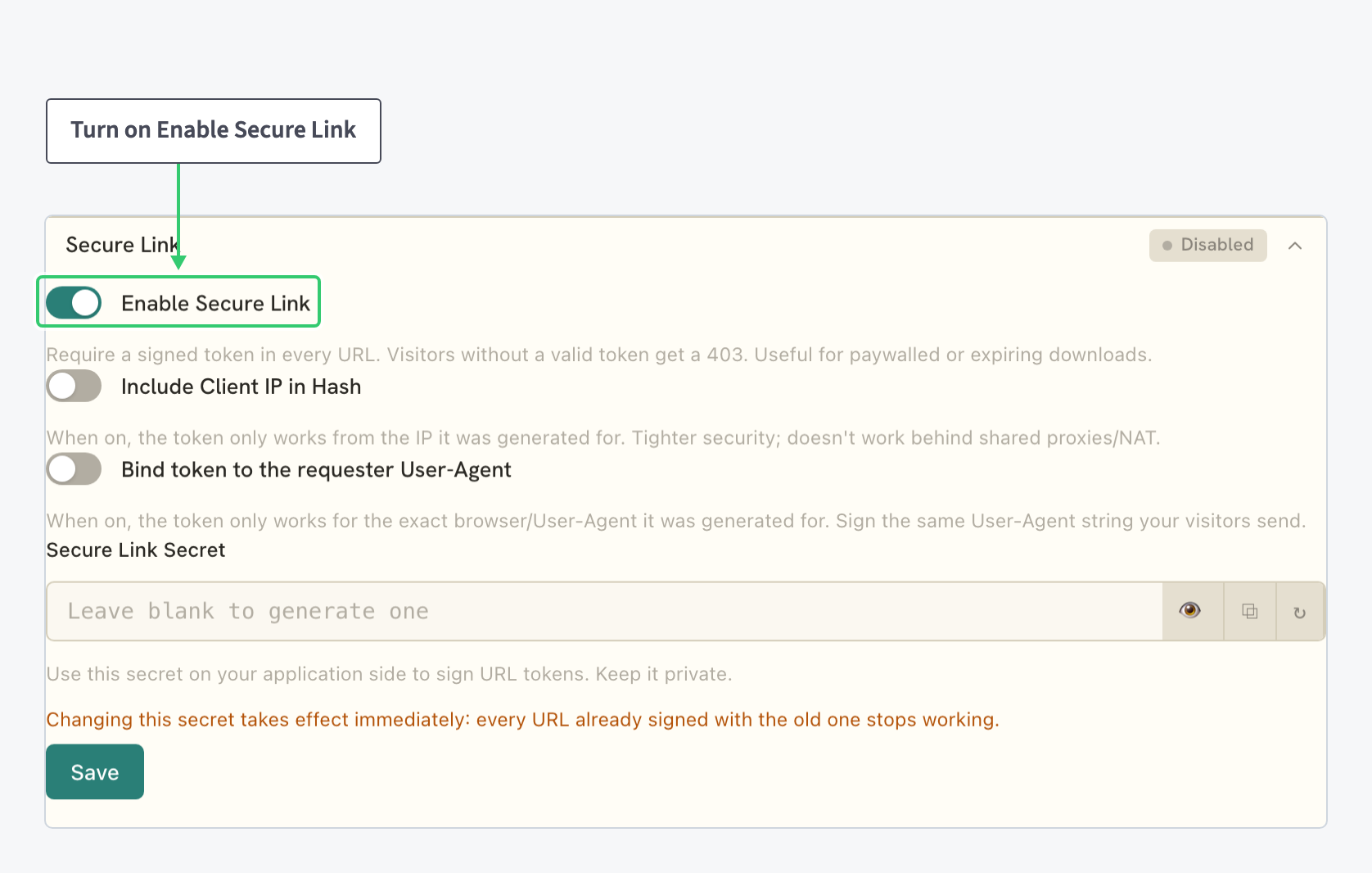
| Setting | Value |
|---|---|
| Enable Secure Link | The on/off toggle for the requirement. Every URL under the location must carry a signed token; visitors without a valid one get a 403. The setting for paywalled or expiring downloads. |
| Include Client IP in Hash | An optional hardening toggle. When on, the token only works from the IP it was generated for: tighter security, but it fails behind shared proxies and NAT. |
| Bind token to the requester User-Agent | A second optional binding. When on, the token only works for the exact browser or User-Agent string it was generated for, so your application signs the same User-Agent string the visitor sends. |
| Secure Link Secret | The secret your application uses to sign URL tokens. Leave it blank and Save to have one generated; the field’s controls show, hide, copy and regenerate it. Keep it private. |
Switch on Enable Secure Link, decide on the two bindings, and click the section’s Save. Like every per-section editor in this panel, changes stage in the form until Save applies them, and the row’s pill reflects the saved state.
Leave Include Client IP in Hash off if your visitors sit behind carrier NAT, corporate proxies or anything else that shares or changes their public IP: a token generated for one address stops working from another.
Step 3: Take the Secret and Sign URLs on Your Side
Copy the Secure Link Secret into your application’s configuration, typically the service that renders the download page. Every URL under the location must then carry a token computed from that secret: Secure Link validates tokens, your application creates them.
Rotate the secret with Regenerate when it may have leaked. The new value stays staged in the editor until you Save, which gives you the cutover window.
Click Regenerate, copy the new secret, deploy it to your application, and only then click Save. The change takes effect immediately on Save: every URL still signed with the old secret stops working at that moment.
What you’ve protected
Every request matching the location now has to present a valid token, and everything else gets a 403. Hotlinking stops working, and shared links can be locked to the visitor’s IP or browser. The rest of your resource keeps serving normally, because the rule is scoped to the location you enabled it on.
Secure Link is one of several per-path controls a location carries. For the others, from headers to access lists, see Route and Configure a Specific URL Path on Your CDN (linked above) and Restrict Access to Your CDN by IP, User Agent or Country.