
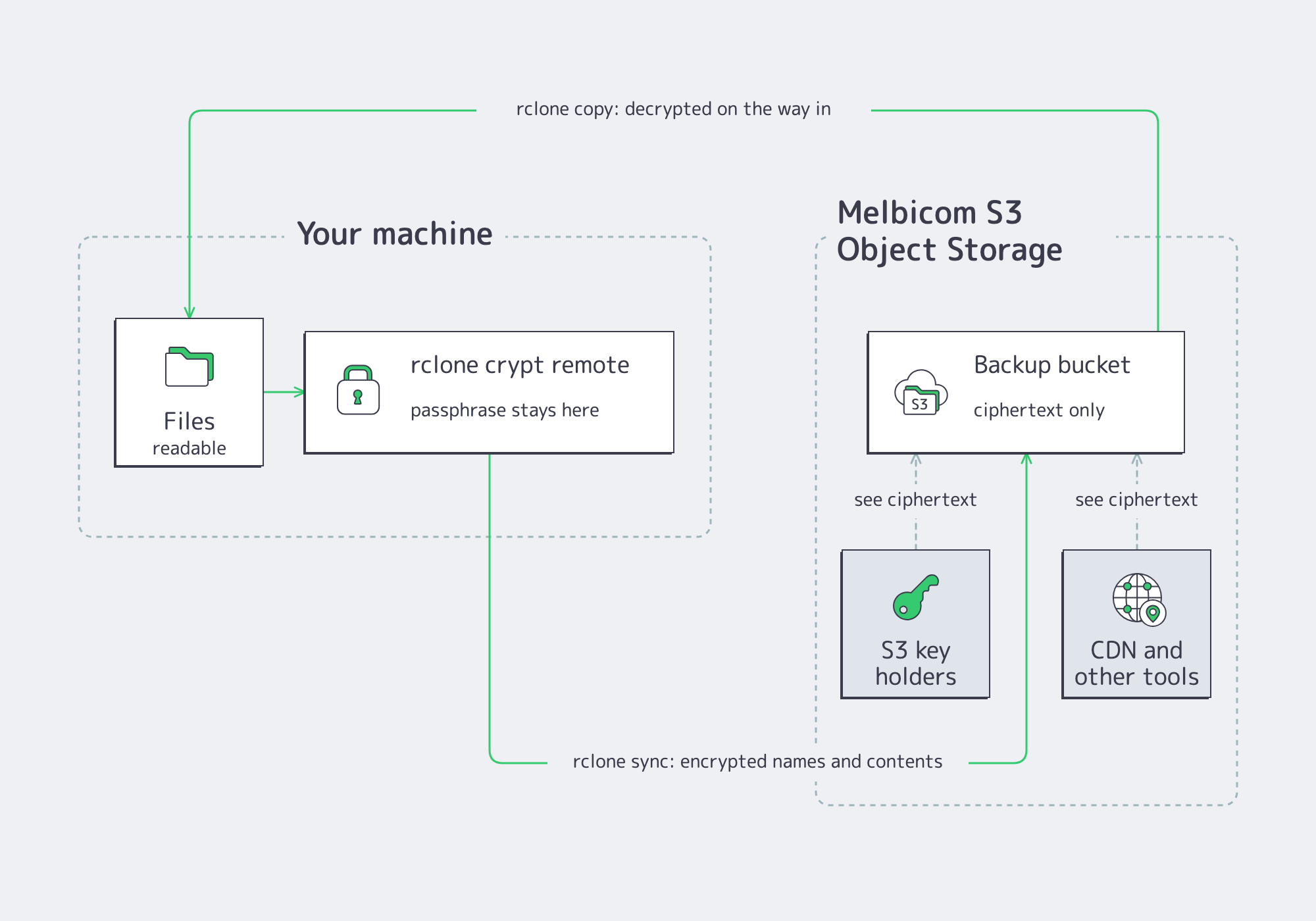
Backups are kept for years, so they belong on the cheapest durable storage, which is object storage. What must not be stored there is readable data: a leaked key or a misconfigured policy then exposes everything. rclone’s crypt remote solves this before upload: files and their names are encrypted on your machine, your Melbicom S3 Object Storage stores only ciphertext, and a restore is an rclone copy in the other direction. This guide sets it up end to end.
Prerequisites
- A Melbicom S3 service with a bucket for backups and an access key pair for it (Create Melbicom S3 Access Keys with Limited Permissions).
- rclone installed on the machine holding the data.
- A password manager entry for the encryption passphrase: without it, the backups are unrecoverable by design.
Why Encrypt on the Client
- Nothing readable leaves your machine: contents and file names are encrypted before upload, so the storage, its operators and anyone holding your S3 keys see only ciphertext.
- The passphrase never travels: it stays in your rclone configuration; no key material is shared with the service.
- Everything else stays plain S3: versioning, object lock, lifecycle rules and the CDN keep working on the encrypted objects.
Step 1: Define the S3 Remote
rclone reaches your storage through a named remote. Create the configuration with rclone config, or write it directly; the endpoint is your service’s host on port 9000, and the keys are the access key pair for the backup bucket:
[melbicom]
type = s3
provider = Minio
endpoint = https://s3-ams.swiftycdn.net:9000
access_key_id = YOUR_ACCESS_KEY
secret_access_key = YOUR_SECRET_KEY
region = us-east-1
Confirm the remote sees your buckets:
rclone lsd melbicom:Step 2: Wrap It in a Crypt Remote
The crypt remote is a layer on top of the S3 remote: it points at a bucket path and holds the passphrase. Generate the obscured passphrase value with rclone obscure (or let rclone config prompt for it), then add the section; the bucket name carries your account prefix:
[secure]
type = crypt
remote = melbicom:100-00-1000-100-backups/encrypted
filename_encryption = standard
password = OBSCURED_PASSPHRASE
filename_encryption = standard encrypts names as well as contents, so even the directory listing reveals nothing. Store the passphrase in your password manager now: rclone cannot recover it, and neither can anyone else.
Step 3: Back Up and Verify
The first backup has to prove two things: the storage holds only ciphertext, and you can still read your files through the crypt remote. Copy a folder into the crypt remote; rclone encrypts each file on the way out. Then list the same path both ways: through the crypt remote you see your files, through the plain remote you see the ciphertext the storage actually holds:
rclone copy /var/backups/db secure:db/
rclone ls secure:db/
rclone ls melbicom:100-00-1000-100-backups/encrypted/
The second listing shows names and sizes you recognise; the third shows opaque names such as eodqf0e640l4q3f2f1ipduh28g/dc6b2abu8dh5go5rfph14hghrg, slightly larger than the originals because of the encryption overhead.
For a recurring backup, replace copy with sync, which also removes remote files that no longer exist locally. Schedule it with crontab -e and add one line that runs it nightly:
0 2 * * * rclone sync /var/backups/db secure:db/ --log-file /var/log/rclone-backup.logStep 4: Restore
A restore is the same copy in the other direction, decrypted on the way in. Any machine with the same two remote definitions and the passphrase can do it:
rclone copy secure:db/ /restore/db/
rclone cat secure:db/latest.sql.gz | gunzip | head
Test the restore once when you set the backup up, and again whenever the passphrase or the keys change: a backup that has never been restored is an assumption.
What You’ve Built
A backup pipeline whose confidentiality does not depend on the storage: the bucket can be listed, copied or handed to a CDN without exposing a byte of your data, and the only secret that matters is the passphrase in your own vault. Pair it with a bucket created with Create a Melbicom S3 Bucket with Object Lock and the backups become both unreadable and undeletable for the retention period you choose.