
Author: Melbicom
Blog

Dedicated Hosting Server: a Path to Greater Control
Modern jurisdictional boundaries continue to put increasing pressure on data transmission and storage. Many organizations were quick to jump on the “cloud-everything” bandwagon only to realize it simply doesn´t suffice for latency critical workloads, resulting in a shift back to physically located infrastructure. Hence we are seeing dedicated hosting servers with their endless tweakability, ideal for the most rigorous of audits.
IDC’s late-2024 workload-repatriation pulse found that 48 % of enterprises have already shifted at least one production system away from hyperscale clouds, and 80 % expect to do so within two years.
Choose Melbicom— 1,300+ ready-to-go servers — 21 global Tier IV & III data centers — 55+ PoP CDN across 6 continents |
 |
Market spending is also following suit; the estimated total revenue according to Gartner’s Dedicated Server Hosting Market Guide is projected to be $80 billion by 2032. The majority of the capital is used by providers to work on integrating cloud-like automation with single-tenant hardware. Which is exactly what we do at Melbicom. We use that revenue flow to provide customers with over 1,300 ready-to-go configurations in 21 Tier III and Tier IV data centers, delivering 200 Gbps of bandwidth per server. Procurement is a painless online process that can be up and running in less than two hours, and is easily managed via API.
Melbicom infrastructure is founded on five fundamentals that address data sovereignty and control anxieties; root access, bespoke software stacks, custom security, compliance tailoring, and hardware-level performance tuning.
Repatriation and Sovereignty Fuelling the Return to Dedicated Server Solutions
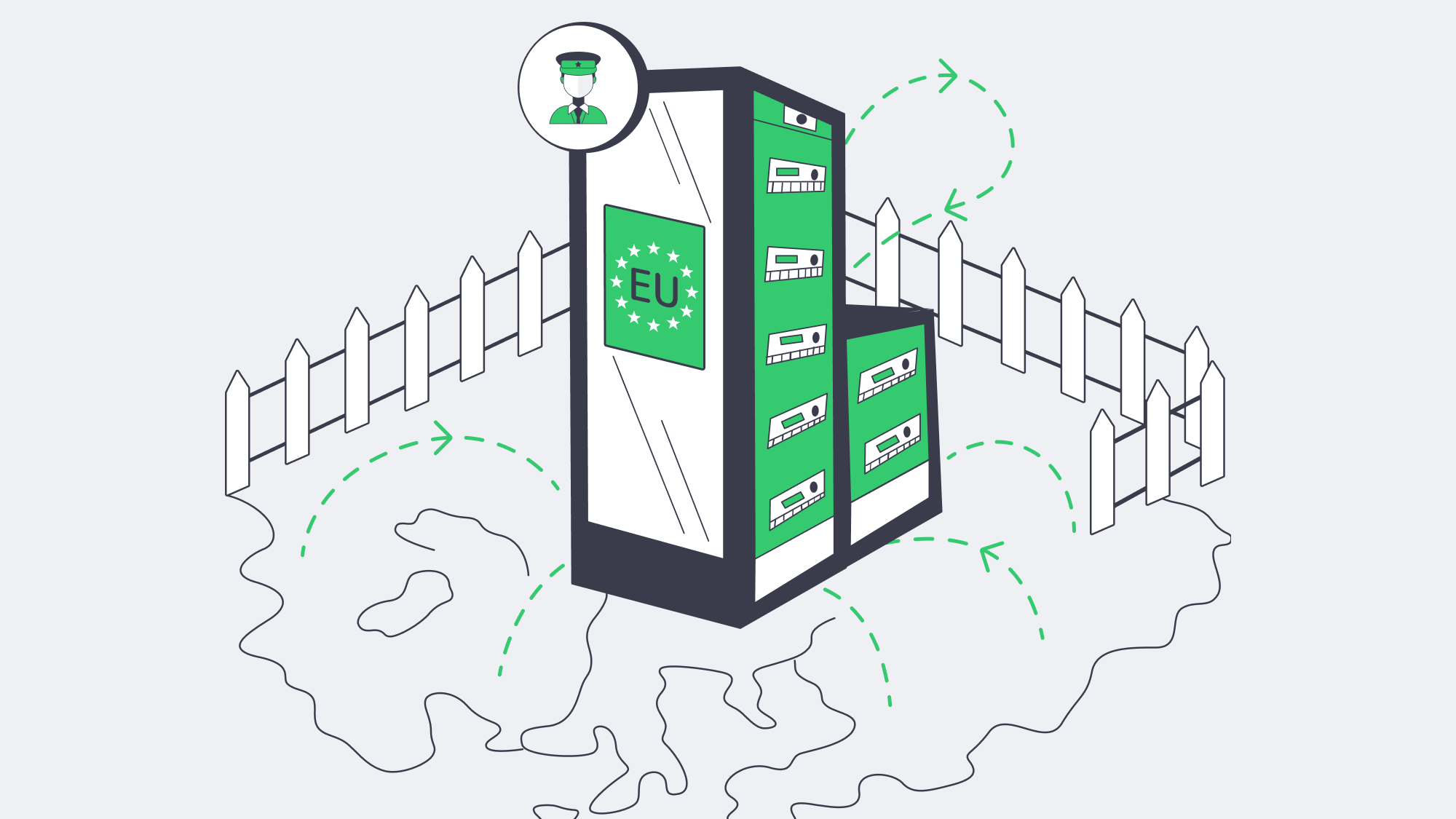
Across the board, data residency has become a genuine concern, state privacy statutes have tightened considerably and Europe has Schrems II in place. Following this data shift in focus, data sovereignty is now a top buying criteria for 72 % of European enterprises and 64 % of North-American firms. Regionally pinned public-cloud VMs can help with proof of sovereignty to an extent but with a dedicated server, every byte is accounted for, better satisfying auditors. sits on hardware you alone occupy. With Melbicom, our clients can show hardware tenancy proving they alone occupy whether it is by positioning analytics nodes in Amsterdam’s Tier IV hall to adhere to GDPR demands, or anchoring U.S. customer PII inside our Los Angeles facility.
A dedicated server also provides more clarity of sovereignty demonstrating where control boundaries lie. With VMs the root is exposed from within its guest but there are many invisible elements at play such as firmware patches, hypervisor policy, and out-of-band management. With dedicated hosting everything from BIOS to application runtime is sovereign. Intel SGX can be toggled via the BIOS flag for enclave encryption and management traffic can be locked to an on-prem VPN by simply binding the BMC to a private VLAN. Compliance language demands “demonstrable physical isolation,” and with single-tenant hosting you can demonstrate beyond doubt that nobody else is using your server or resources.
Root Access Liberation
Arguably one of the biggest benefits of hosting with a dedicated server is the advantage of full root access for engineers. microsecond deterministic trading is possible by recompiling the kernel with PREEMPT_RT, you can follow packets at nanosecond resolution by dropping in eBPF probes and rapidly deploy a hardened Gentoo build with ease. Kubernetes can be run directly on the host, via physical CPU cores in place of virtual slices, and strip jitter is significantly reduced helping with latency-sensitive microservices.
Workflows are cleanly translated in terms of infrastructure as code and you can PXE-boot, image, and enroll just as easily as a cloud VM using Terraform or Ansible on a physical host. With sole tenancy, the blast radius is contained should an experiment brick the kernel, only your sandbox alone is affected lowering systemic risk. There are also no hypervisor guardrails dictating rescue procedures giving full autonomy and accelerating iteration.
How Does Root Access Unlock Bespoke OS and Software Stacks?
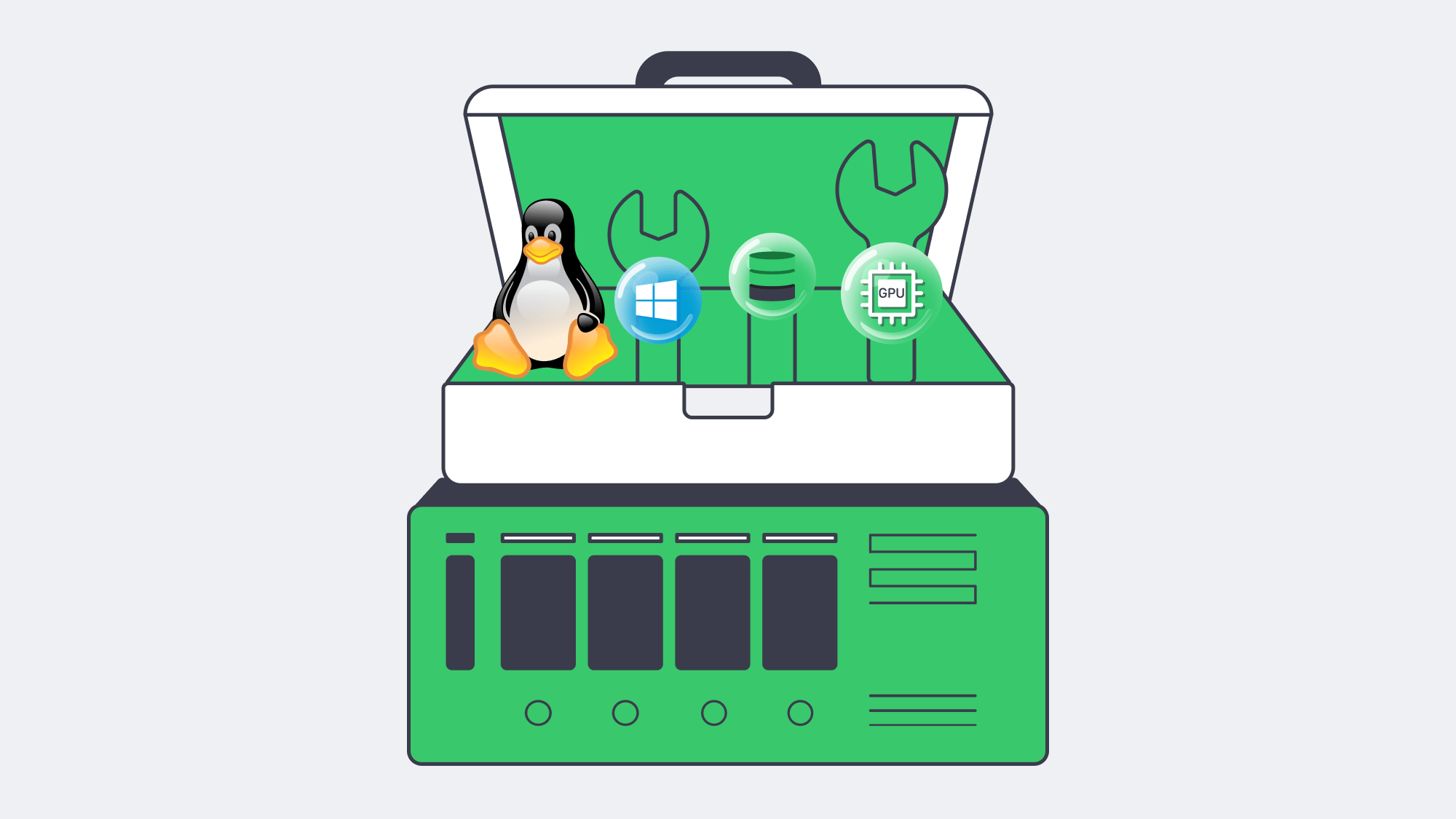
Public clouds often limit OS and software stacks forcing organizations to find a workaround rather than load what they prefer to use. With sole tenancy and full root access the operating system is customizable to your needs. Those in media can optimize their network speeds using FreeBSD, for example, whereas fintech teams requiring certified crypto libraries might load CentOS Stream. The latest CUDA drivers can be placed on Rocky Linux with AI lab, whatever image you want can be tested and then copied to other machines.
You only have to look to open-source databases to understand the upside. Marketplace defaults are usually layered upon virtualized disks and typically have less sustained writes than a self-compiled PostgreSQL tuned for huge pages and direct I/O which routinely delivers 25–40 % more. With a dedicated server there is nothing forcing snapshots or stealing cache lines and so, even a low cost setup often beats the performance of a pricy multi-tenant option.
How Does a Dedicated Hosting Server Clarify Security and Compliance?
A dedicated server provides a very clear attack surface with crisp boundaries far more transparent environment provided by multi-tenant environments and preferred by CISOs for their black-and-white nature. There is physical separation whether disk encryption keys reside in an on-board TPM or are harbored on an external hardware security module reached over a private fiber cross-connect. Air Gapping separates packet captures en route to SOC appliances and they are allowed or blocked by firewalls operating within your own pfSense chain.
The clarity of separation provided by a dedicated hosting server satisfies PCI DSS, HIPAA, and GDPR demands. Single tenant, audits are a doddle, the hardware is tagged and cables are traced. The posture is further strengthened at Melbicom through optional private VLANs and we are also capable of replacing hardware within a four-hour window further satisfying regulators. Essentially, Melbicom takes care of the plumbing, freeing up your security teams to enforce policies.
Hardware‑Level Performance Engineering
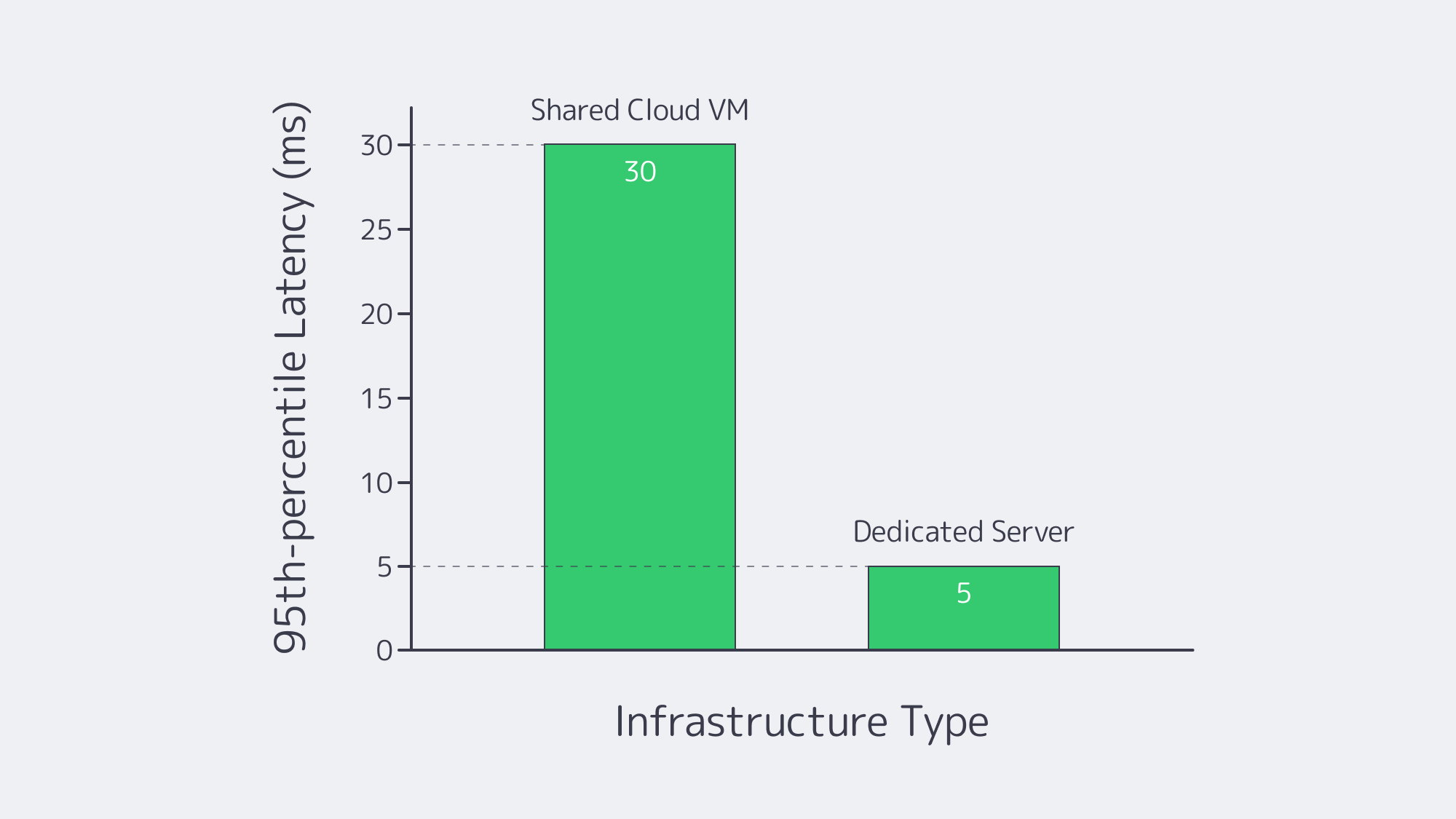
Performance goes beyond merely raw speed, with VMs engineers have to architect with unfriendly neighbors in mind but this statistical multiplexing is avoided through a dedicated server. With single tenancy you have worst-case predictability because CPU cycles, cache lines, and NVMe interrupts are yours exclusively. This shrinks long-tail latency and improves performance dramatically.
You also unlock performance preferences, be it 56-core Intel Xeon processors for parallel analytics or a front end burst focus with fewer but higher-GHz cores. With Melbicom choices are readily available to you. With a dedicated 200 Gbps throughput per server, without the throttling often experienced with noisy neighbors real-time video or massive model-training pipelines are easily supported and sustained. We also offer flexible storage tiers; NVMe RAID-10 for OLTP, spinning disks, or Ceph surfaced hybrid pools.
These capabilities are afforded to the SKUs of even our most economic options. Our dedicated servers are fully transparent and also benefit from SMART telemetry and provide full IPMI access. That way if a disk trending toward failure is spotted engineers can request a proactive swap.
Performance Levers on Dedicated vs. Shared Hosting at a Glance
| Layer | Shared Cloud VM | Dedicated Hosting Server |
|---|---|---|
| CPU | Noisy-neighbor risk | 100 % of cores, NUMA control |
| Disk | Virtual, snapshot overhead | Raw NVMe/SAS with custom RAID |
| NIC | Virtual function, capped bandwidth | Physical port, up to 200 Gbps |
A Familiar Story: Historical Vendor Lock-In
Historically, the industry is all too familiar with the promises of frictionless scalability touted by proprietary databases and serverless frameworks. Promises that were dashed by egress fees, licensing traps, and deprecations. Architects learned the hard way that anchoring critical data on hardware they can relocate was necessary for a smoother exit. Fortunately, the PostgreSQL provided by a dedicated hosting server is portable, Kafka is upstream, and it is more or less painless to move Kubernetes clusters. All of which makes it a great middle ground solution should history repeat itself strategies shift in the years to come. With a dedicated server moving data from one center or provider to another is possible without rewriting fundamental services, something which will undoubtedly pique the interest of CFOs.
How to Make Infrastructural Autonomy Your New Baseline
Without the assurance of how stacks cope under pressure and a guarantee on where the data lives, fast features are ultimately worthless. Leveraging a dedicated server for hosting solves both issues. The hardware is transparent, ensuring latency is predictable and this hand in hand with highly customizable security keeps regulators happy in terms of data sovereignty and compliance. Unrestricted roots leave space for innovation, bespoke software performs better, and cloud elasticity is retained lending a competitive advantage ideal for experiments.
Ready to Order?
Get yourself the perfect blend of control and convenience by opting for a dedicated server with Melbicom. We have multiple Tier III/IV locations on three continents, housing an inventory of over 1,300 configurations for easy deployment in less than two hours.
Get expert support with your services
Blog

Finding the Right Fit: MySQL Database Hosting Service
The majority of the world’s busiest applications rely on the relational database powers of MySQL. While it has many merits that have earned it its global popularity, hosting and scaling it effectively is no easy feat, and the heavier the load, the harder the task.
Your basic single-instance setups that use a solitary machine running one are pretty outdated for modern needs. These setups lack failover, and scaling them horizontally is limited. Moreover, the downtime can be catastrophic should the lone server fail.
Choose Melbicom— 1,300+ ready-to-go servers — 21 global Tier IV & III data centers — 55+ PoP CDN across 6 continents |
|
A flexible, distributed architecture that can deliver speed is required to cope with the demands of high-traffic workloads.
So let’s discuss and compare the respective advantages and disadvantages of the three leading infrastructure models for a MySQL database hosting service: managed cloud, containerized clusters, and dedicated servers. By focusing on performance, scaling replicas, automated failover, observability, and cost as key aspects, the strengths and drawbacks of each soon become clear.
What Are the Key Requirements for a MySQL Database Hosting Service?
Performance
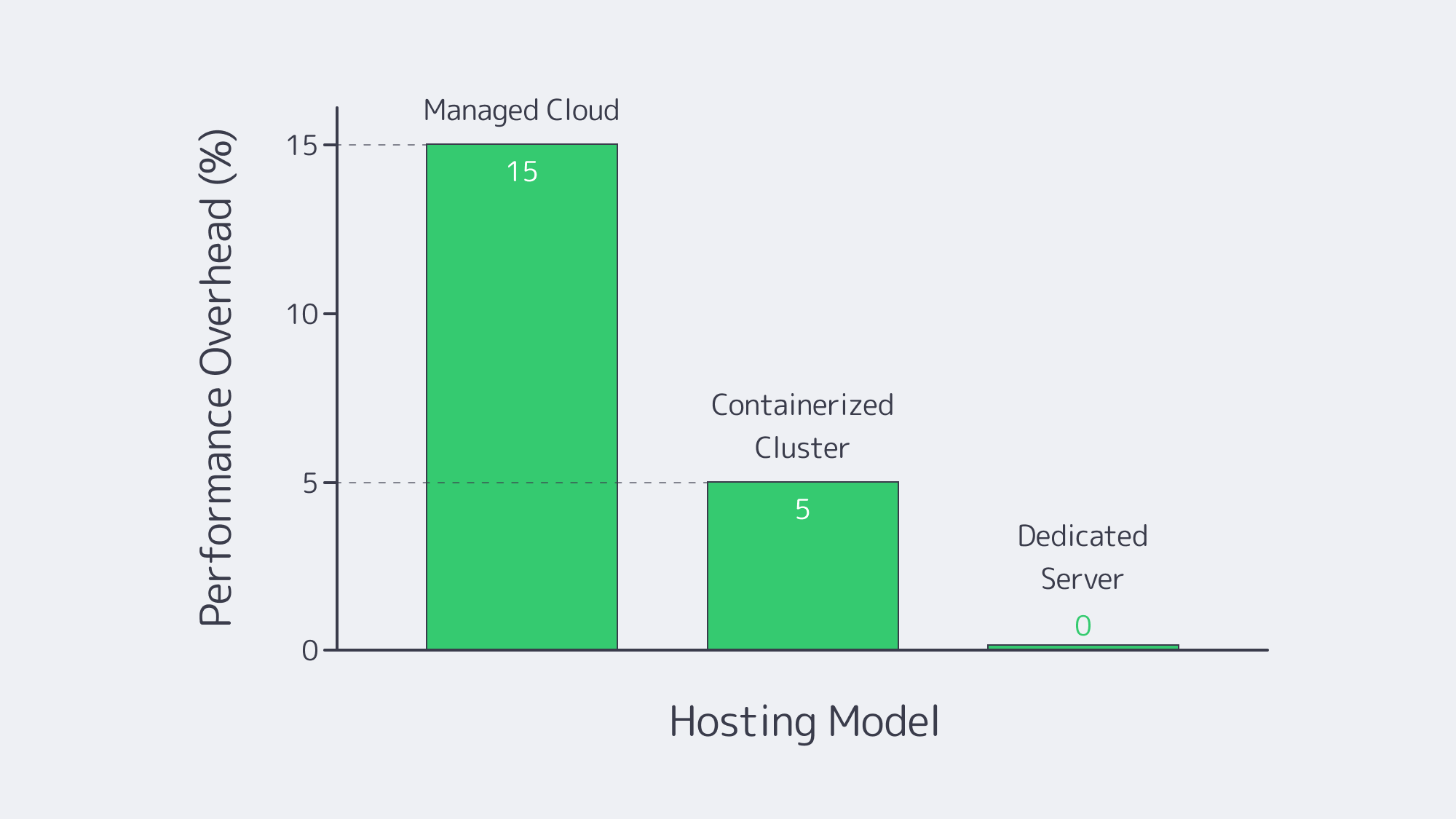
Low latency and sustained throughput are needed for adequate performance during peak loads in high-traffic environments, and the performance boils down to the infrastructure in place. When compared against physical hardware, virtualized MySQL implementation typically has a 5–15% overhead, which grows concurrently. Dedicated servers, on the other hand, eliminate the use of virtualization layers, granting access to all CPU and I/O resources. Although they perform well, containerized clusters such as Kubernetes throw extra variables in the mix to consider. They require more in terms of platform setup, such as storage drivers and network overlay.
Scaling Replicas
MySQL deployments use read replicas to deal with large query volumes. This replication is simplified by cloud providers through the use of point-and-click. Similarly, container-based clusters can be scaled using Kubernetes operators. However, multi-primary, large shard counts, and other specific topologies typically require some manual work. For real freedom, dedicated infrastructure offers the best scaling because you can just deploy more physical nodes as needed. This means there is no imposed hard limit on replica counts, and advanced replication patterns are no trouble.
Automated Failover
Downtime can result in less than favorable UX and ultimately means a loss in revenue, making failover extremely important. The architecture behind modern managed cloud MySQL deployments, such as Amazon RDS or Google Cloud SQL, can switch to standby instances automatically. This is typically completed within 60–120 seconds of downtime. Container platforms like Percona, Oracle MySQL Operator leverage orchestrators or specialized MySQL operators to detect node failures and promote replicas. However, the Orchestrator or MySQL Group Replication tackles failovers in seconds when hosted via a dedicated server solution, so long as redundancy and monitoring are in place.
Observability
Sophisticated monitoring is needed to successfully run MySQL at scale. It is important to observe CPU, RAM, and disk server metrics as well as query insights such as latency, locks, and replication lag. Often, dashboards are provided by managed services, but they often only display common metrics for those with low-level access. Container-based setups provide granular data through robust stacks like Prometheus or Grafana, but if your in-house expertise isn´t up to scratch may be tricky to maintain. With a dedicated server, you have total control over the OS, which means you can install any monitoring system, such as Percona’s PMM, ELK stacks, or custom scripts for a detailed overview.
Cost Modelling
As with any business decision, cost is often a major deciding factor. Opting for a managed service means less work in terms of maintenance and requires little to no knowledge, but you can expect premium rates for CPU, memory, and I/O, plus bandwidth and storage fees. While it can be beneficial for smaller workloads, for anyone sustaining high traffic, the costs are going to rack up quickly. Surveys in recent years have uncovered that almost half of the cloud users’ costs have been far higher than initially expected. These overheads can be potentially reduced for operations sharing resources across multiple apps if you opt for container-based MySQL, but only if they run on existing Kubernetes clusters. The underlying nodes still require outlay, and you have many other components at play that all incur costs of their own. To avoid unexpected charges, a dedicated server with a predictable monthly or yearly rate can prevent nasty surprises. Renting or owning hardware works out the most economical in the long run at scale; there are no cloud markups or data egress fees to contend with.
What Is Managed Cloud MySQL Hosting and When Should You Use It?
Choosing a managed cloud service (also referred to as DBaaS) to host MySQL databases can simplify the process significantly. These platforms handle OS patching, backups, software updates, and have basic failover automation in place.
So if you don´t have extensive DBA or are lacking DevOps resources, then a managed cloud service on such as platforms like Amazon RDS or Google Cloud SQL, can be a lifesaver. A simple API call adds replicas with ease, and you can enable high availability by just checking a box.
Managed Cloud Performance: Regardless of how powerful the hardware it must be noted that these services share a virtualized environment and many vendors have parameter limits in place. You may also find that specialized configurations are not permitted. In benchmark testing, raw overhead has been shown to degrade throughput by up to 15% where workloads are demanding.
Scaling Replicas: While creating multiple read replicas is allowed, multiple primary replicas and custom topologies might not officially be supported. So, depending on how heavy your read-only workload is, managed clouds may or may not be right for you. Amazon RDS supports up to 15 for MySQL, which could well be sufficient for some.
Automated Failover: The biggest advantage that managed cloud options have to offer is a swift automated failover. Standby replicas in different zones maintain synchronicity, taking roughly a minute or two, meeting the majority of SLAs.
Observability: The dashboards offered by the top managed cloud solutions might not give O-level access, but they do provide basic metrics and are easy to track. Deep kernels and file system tweaks are unavailable, but users still get access to slow query logs.
Cost: Most of these platforms operate in a pay-as-you-go manner, which is attractive to new users and convenient, but costs can soon mount. Add to that storage IO, data transfer, and backup retention, and like the majority of organizations leveraging these services, you could be in for a shock. Those with consistently heavy traffic will ultimately find that renting a physical machine saves them money collectively in the long run.
What Are the Trade-Offs of Hosting MySQL in Containerized Clusters?
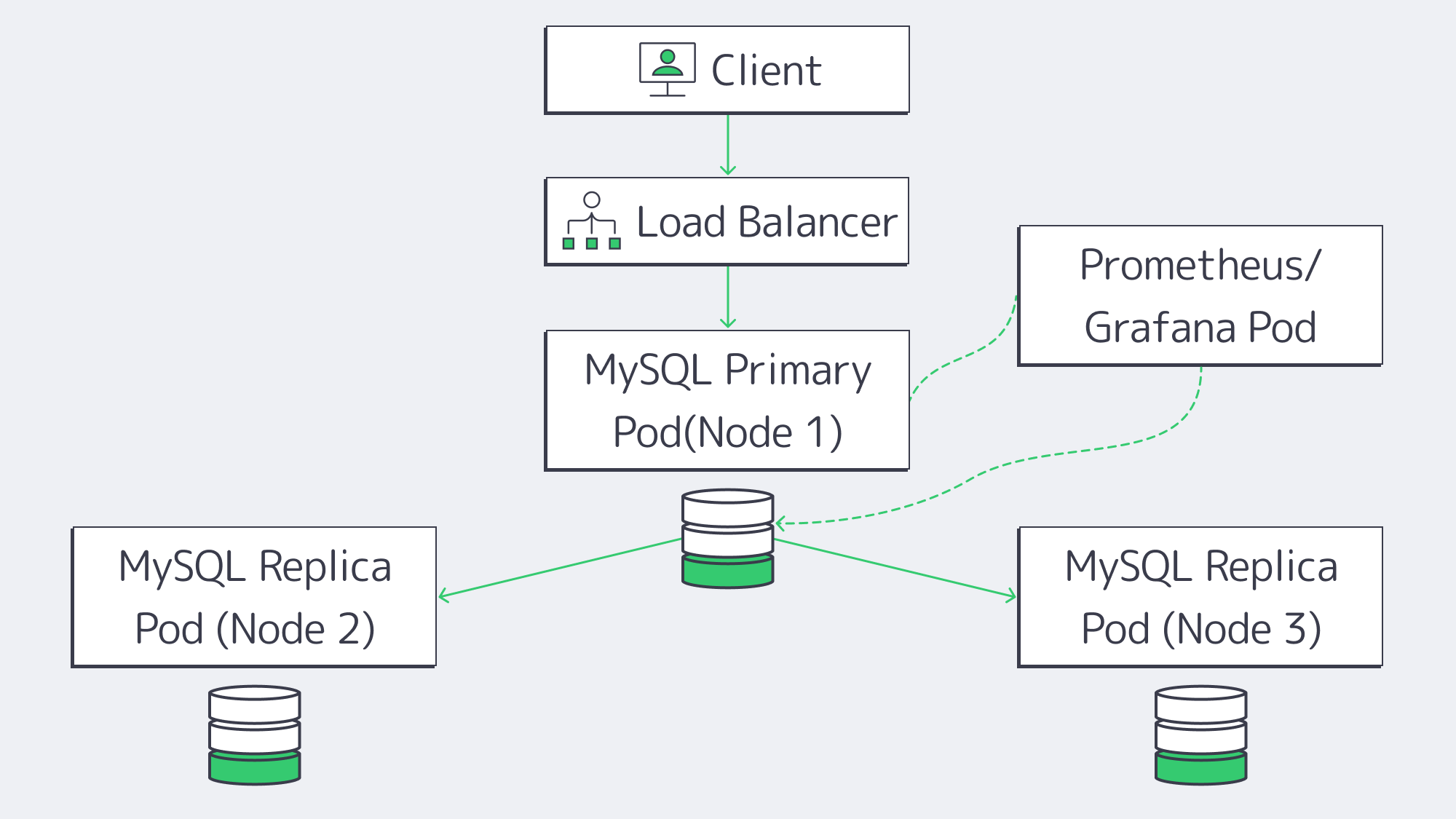
Containerized clusters are considered a good middle ground option, and for those already operating with other microservices, it can be the most sensible solution. Orchestration platforms like Kubernetes can help automate replicas and backups, helping considerably with MySQL management.
Containerized Performance: The typical overhead with container operation is often less than full VMs, but you have to consider that if Kubernetes itself sits on virtual nodes, then abstraction comes into the picture, adding complexity to the performance situation. As does the network itself and any storage plugins.
Scaling Replicas: With a MySQL operator, you can handle replication set-up and orchestrate failovers. They can spin up and remove rapidly, but large multi-primary or geo-distributed clusters need customizing, which could be out of your wheelhouse.
Automated Failover: Failed pods are quickly identified and restarted, and a replica can be converted to primary automatically, but fine-tune readiness checks are needed to make sure everything is in sync, which can harm reliability. Without the right checks in place, split-brain scenarios are possible.
Observability: Logging stacks and granular monitoring tools such as Prometheus or Grafana can be easily integrated with Kubernetes, giving plenty of metrics. However, the node networks must be monitored in addition to keep track of cluster health properly.
Cost: Those with Kubernetes in place for other operations will find they can cost-effectively piggyback MySQL onto an existing cluster, so long as resources are available. If you are starting totally from scratch and just want Kubernetes to cover your MySQL needs and nothing else, then, in all honesty, it is probably overkill. The infrastructure outlay will set you back, and managing the cluster adds further complexity.
Why Choose Dedicated Servers for MySQL Database Hosting?
If you have high-traffic needs and require control, then the raw power on offer from a dedicated server often makes it the best MySQL database hosting service choice. Through Melbicom, you can rent physical servers housed in our Tier III or Tier IV data centers situated worldwide. This gives you unrestricted access to single-tenant hardware without hypervisor overhead.
Dedicated Server Performance: As there is no virtualization, users get full CPU, memory, and disk I/O. When compared directly with cloud VMs benchmarks, dedicated server solutions demonstrate performance gains of around 20–30%. Query latency for I/O-heavy workloads is also dramatically reduced when local NVMe drives are hosted on dedicated machines.
Scaling Replicas: Read replicas are unlimited, and advanced MySQL features such as Group Replication, multi-primary setups, or custom sharding are unrestricted depending on how many servers are deployed.
Automated Failover: With open-source tools like Orchestrator, MHA, or Group Replication, you can configure your failover however you choose. With the right configuration, failover matches any cloud platform, and multi-datacenter replication is globally available.
Observability: With dedicated server hosting, you have full OS-level access, meaning you can use any stack, be it Percona PMM or ELK, etc. This allows you to monitor a better variety of aspects, such as kernel tuning, file system tweaks, and direct hardware metrics.
Cost: Dedicated infrastructure has an initial outlay, but it remains predictable; there are no nasty surprises, regardless of any unexpected spikes. Those with a substantial workload will find that the total is generally far lower than equivalent cloud bills. Melbicom offers large bandwidth bundles with generous allowances up to 200 Gbps per server. We also provide 24/7 support as standard with any of our plans.
Trade-Offs: The only real caveat is that OS patches, security, backups, and capacity planning need to be handled on your end, but most find it an acceptable overhead considering the performance, control, and TCO predictability benefits that a dedicated server presents.
MySQL Hosting Models Compared: Cloud vs. Containers vs. Dedicated
Take a look at the following table for a concise comparative overview of each model:
| Model Type | Advantages | Disadvantages |
|---|---|---|
| Managed Cloud | – Simple startup- Integrated HA & backups | – Virtualization overhead- Limited configurations available- Costs can mount |
| Containerized (K8s) | – Portable across clouds- Automated with operators- Good union if you use K8s already | – Requires previous expertise- Storage/network complexities- Fluctuating overhead |
| Dedicated Servers | – Unbeatable raw performance- Full control, no hypervisor- Costs are predictable | – In-house management needed- Can’t be scaled instantly- Requires hands-on setup |
How to Choose the Best MySQL Database Hosting Service

Ultimately, to choose the best MySQL database hosting for your needs, you need to consider your workload, budget, and in-house expertise. Each of the top three models has benefits and drawbacks. A managed cloud might be convenient, but it can be costly to scale. If teams are already invested, then containerization provides sufficient automation, but may not handle complex needs. For reliable performance, a dedicated server is a powerful, dependable, cost-effective solution that won´t let you down.
When it comes to high-traffic applications that hit resource ceilings or cost ceilings, the blend of speed, control, and predictable expenses that a dedicated server solution brings to the table is unbeatable. With a dedicated server running MySQL, organizations can avoid premium charges and cloud lock-ins resiliently with the right failover configurations in place for truly dependable, scalable, managed services.
Ready for Faster MySQL Hosting?
Deploy your MySQL on high-performance dedicated servers with predictable pricing.
Get expert support with your services
Blog

Dedicated Server Cheap: Streamlining Costs and Reliability
When it comes to tech startups or newly opened businesses, a tight budget is often a factor when choosing hosting infrastructure. It’s true—cloud platforms do offer outstanding flexibility, still traditional hosting remains a go‑to option for more than 75% of workloads, with dedicated servers being that golden middle offering benefits of both worlds.
In this article, we explore how to rent reliable yet affordable dedicated servers by choosing the right CPU generations, storage options, and bandwidth options. We also briefly recall the 2010s “low‑cost colocation” times and explain why hunting for low‑end prices without considering an SLA could be a risky practice, creating more headaches than savings.
Choose Melbicom— 1,300+ ready-to-go servers — 21 global Tier IV & III data centers — 55+ PoP CDN across 6 continents |
|
A Look Back: Transition from Low‑Cost Colocation to Affordable Dedicated Servers
In the 2010s, the most common scenario for an organization seeking cheap hosting was simply choosing the cheapest shared hosting, VPS, or no‑frills dedicated server options. Considering this philosophy, providers were building their strategies around using older hardware located in basic data center facilities and cutting costs on support. Performance guarantees were considered some sort of luxury, while frequent downtime issues were considered normal.
Today, the low‑cost dedicated server market still treats affordability as a cornerstone, yet many providers combine it with modern hardware, robust networks, and data center certifications. Operating at scale, they can offer previous‑gen CPUs, fast SSDs, or even NVMe drives with smart bandwidth plans. The result is happy customers who get reliable hosting solutions and providers that make a profit by offering great services on transparent terms.
How to Select Balanced CPU Generations
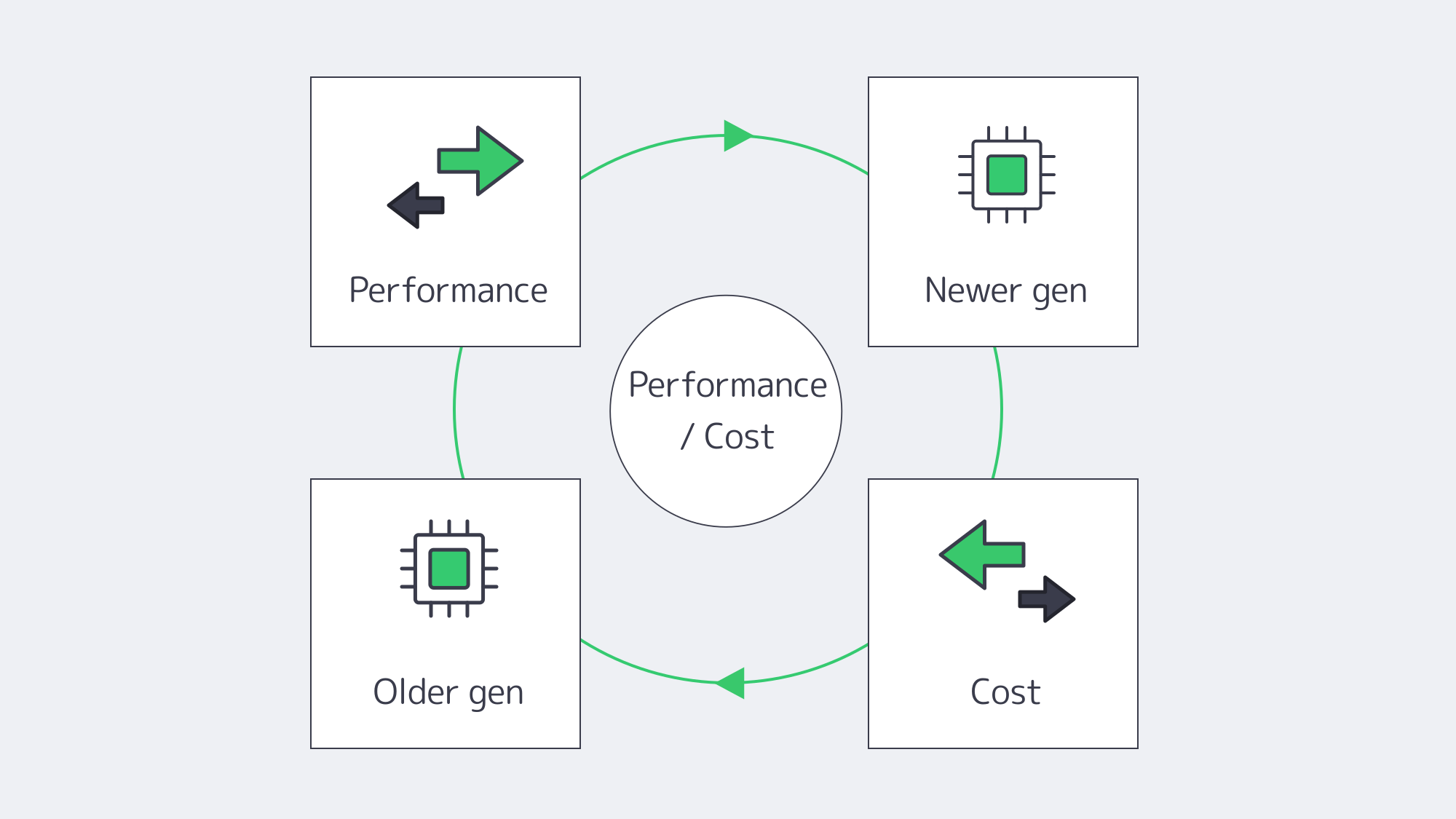
Here is the reality—when looking for cheap dedicated servers, forget about cutting‑edge CPU generations. Some still remember the days when every new generation offered double the performance. Well, those days are gone, and now to get 2x the performance takes more than five years for manufacturers. This means that choosing a slightly older CPU of the same line can cut your hosting costs, still delivering 80–90% of the performance of the latest flagship.
Per‑core / multi‑core trade‑offs. Some usage scenarios (e.g., single‑threaded applications) require solid per‑core CPU performance. If that’s your case, look for older Xeon E3/E5 models with high‑frequency values.
High‑density virtualization. If your organization requires isolated virtual environments for different business services (e.g., CRM, ERP, database), a slightly older dual‑socket Xeon E5 v4 can pack a substantial number of cores at a lower cost.
Avoid outdated features. We recommend picking CPUs that support virtualization instructions (Intel VT‑x/EPT or AMD‑V/RVI). Ensure your CPU choice aligns with your RAM, storage, and network needs.
Melbicom addresses these considerations by offering more than 1,300 dedicated server configurations—including a range of Xeon chips—so you can pinpoint the best fit for your specific workloads and use cases.
How to Achieve High IOPS with Fast Storage
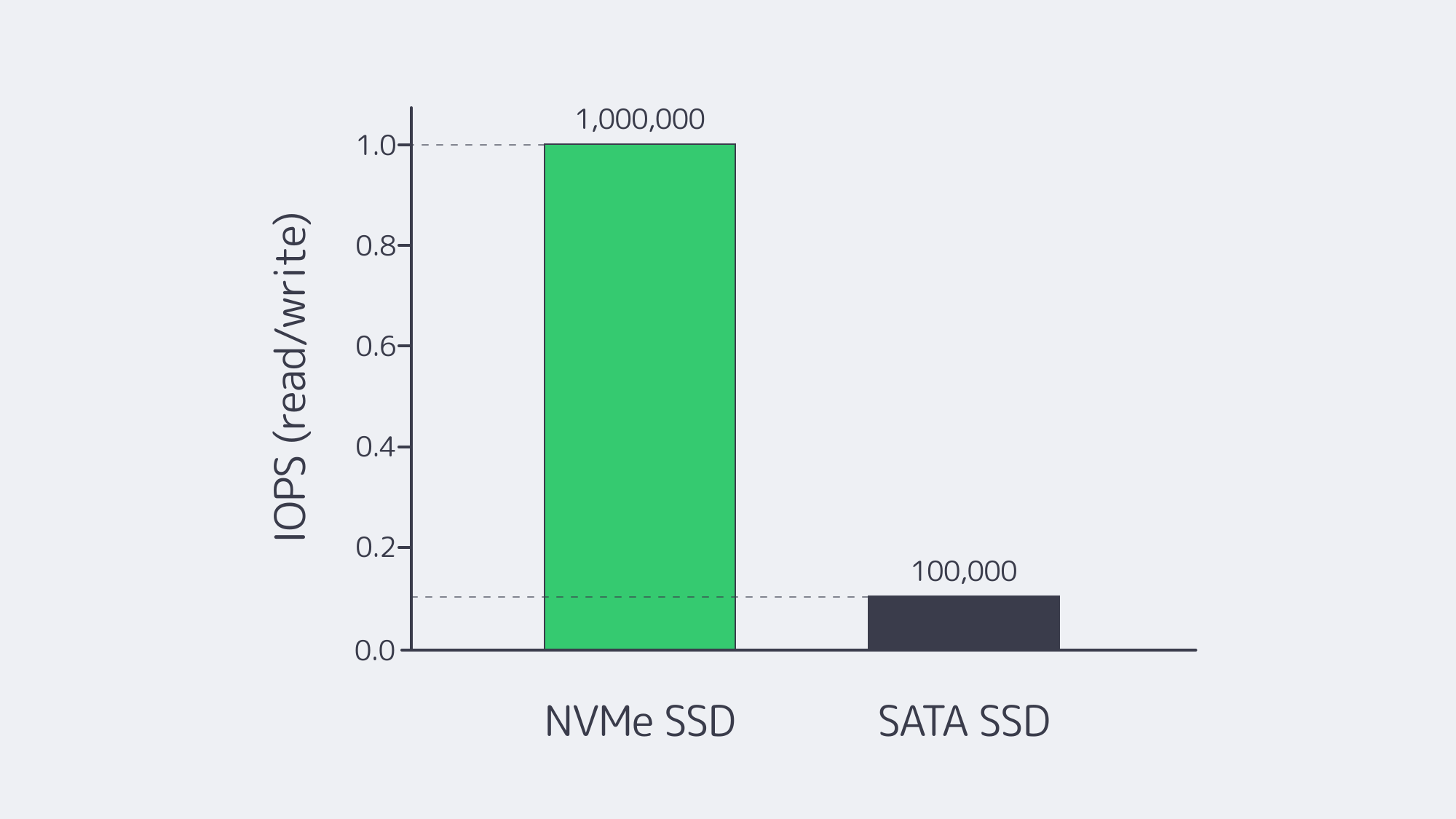
Picking the right storage technology is critical as slow drives often play a bottleneck role in the entire service architecture. Since 2013, when the first NVMe (Non‑Volatile Memory Express) drives reached the market, they’ve become a go‑to option for all companies looking for the fastest data readability possible (e.g., streaming, gaming).
NVMe drives reach over 1M IOPS (Input/Output Operations Per Second), which is far above SATA SSDs with 100K IOPS. They also offer significantly higher throughput—2,000–7,000+ MB/s (SATA drives give only 550–600 MB/s).
| Interface | Latency | IOPS / Throughput |
|---|---|---|
| SATA SSD (AHCI) | ~100 µs overhead | ~100K IOPS / 550–600 MB/s |
| NVMe SSD (PCIe 3/4) | <100 µs | 1M+ IOPS / 2K–7K MB/s |
SATA and NVMe performance comparison: NVMe typically delivers 10x or more IOPS.
Let’s say you are looking for a dedicated server for hosting a database or creating virtual environments for multiple business services. Even an affordable option with NVMe will deliver drastically improved performance. And if your use case also requires larger storage, you can always add on SATA SSDs to your setup to achieve larger capacity at low cost.
Controlling Hosting Expenses with Smart Bandwidth Tiers
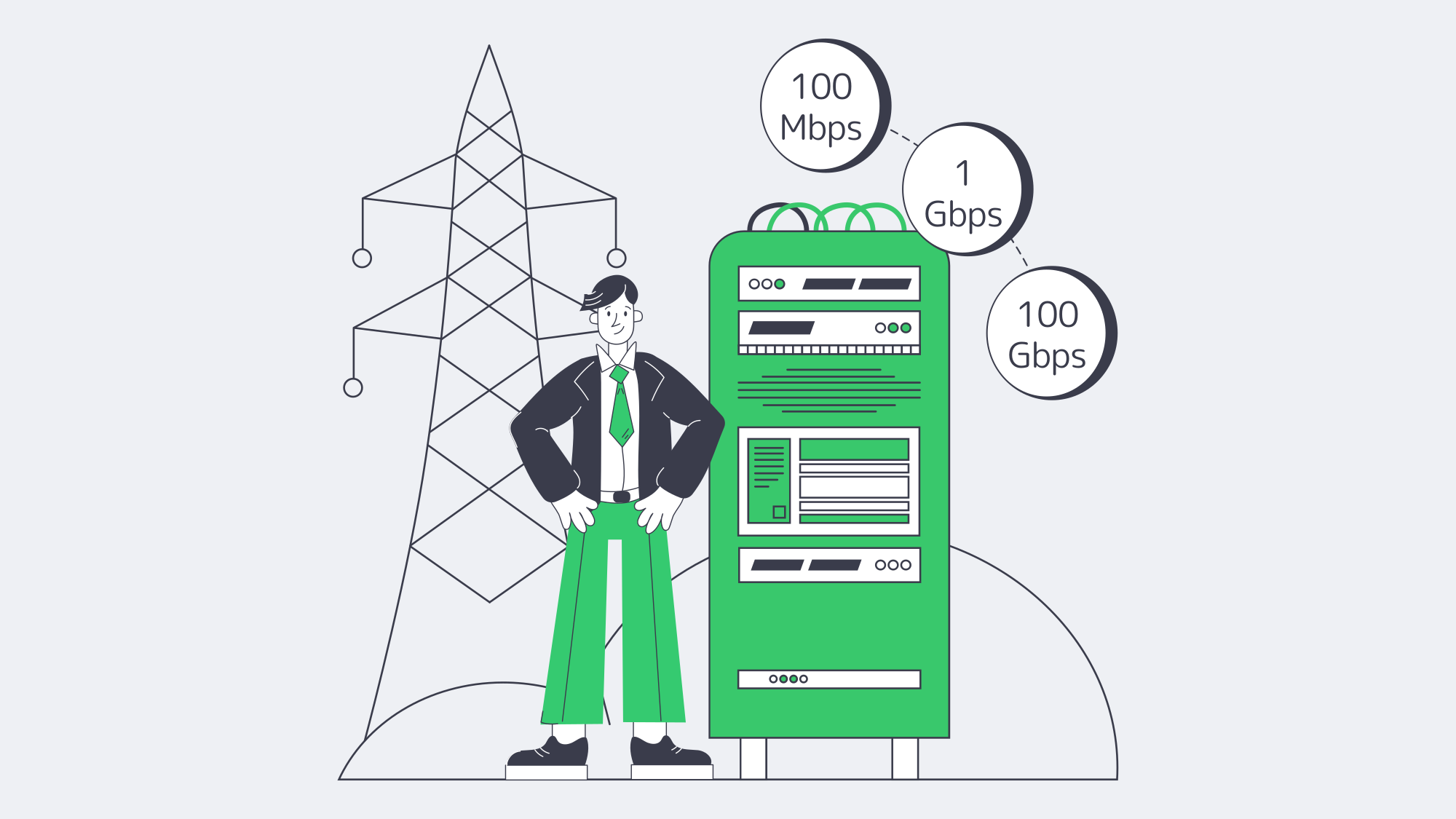
Things are quite simple here: choosing an uncapped bandwidth plan with the maximum data‑transfer speeds could be very time‑saving in planning, but not cost‑saving (to put it mildly). To reduce hosting bills without throttling workloads, it’s important to allocate some time for initial consideration of what plan to choose: unmetered, committed, or burstable, as well as the location(s) for optimal content delivery.
Burstable bandwidth. A common scenario for providers offering this option is to bill on a 95th percentile model, discarding the top 5% of client traffic peaks. This allows short spikes in bandwidth consumption without causing extra charges.
Unmetered bandwidth. What could have been considered a provider’s generosity in the beginning, in reality might turn into good old capacity overselling. In some cases, you will experience drops in bandwidth caused by other clients; in others it will be you who causes such troubles.
Location matters. Sometimes placing your server closer to your clients can better help you meet the ultimate goals of delivering data to your audiences, reducing network overheads.
With Melbicom, you can choose the most convenient data center for your server from among 21 options located worldwide. We offer flexible bandwidth plans from affordable 1 Gbps per server connectivity options up to 200 Gbps for demanding clients.
Why Choose Providers That Operate in Modern Data Centers
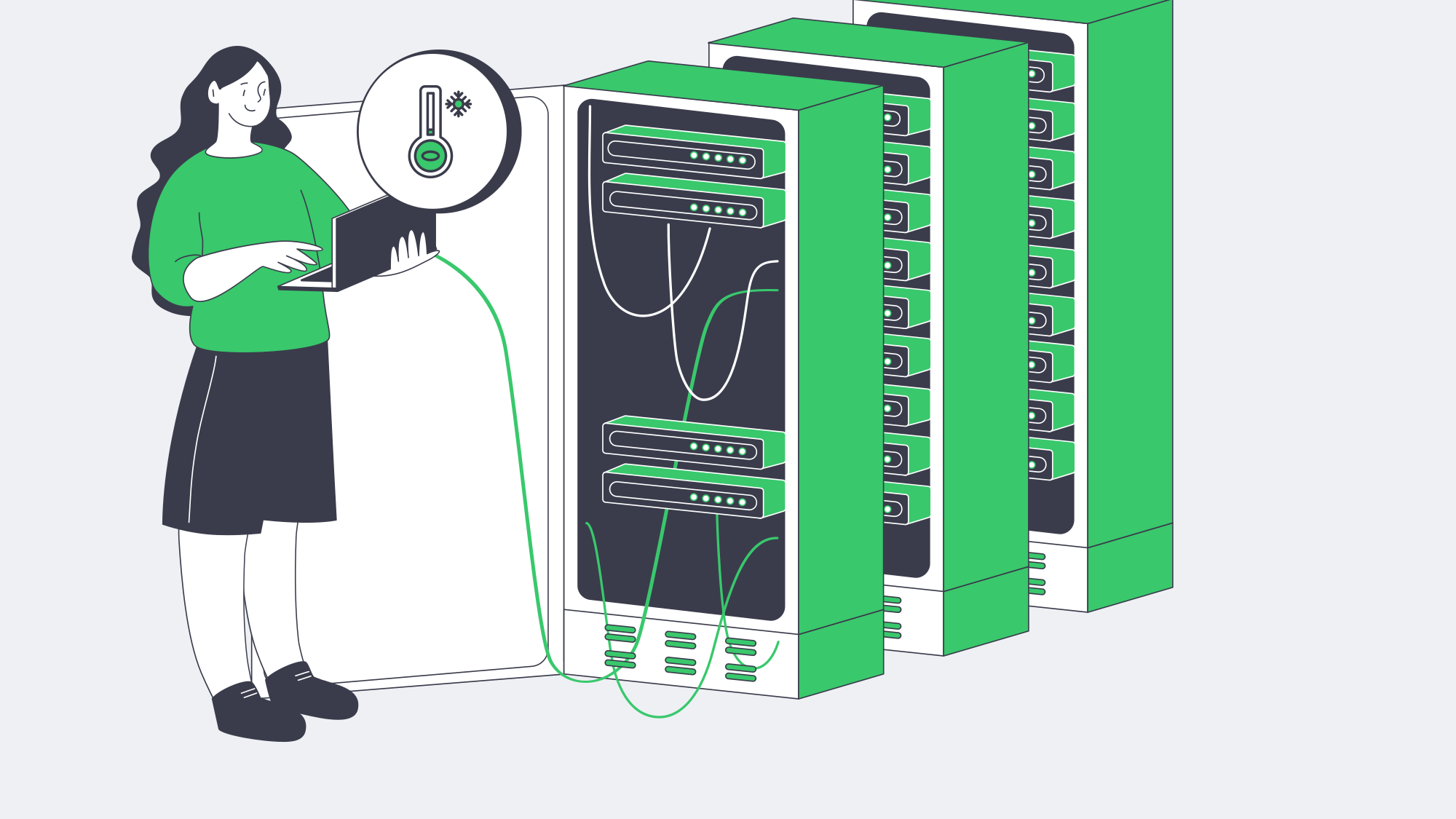
Tier I/II data centers aren’t necessarily bad—in some rare scenarios (read: unique geographical locations), they could be the only options that are available. But in most scenarios, you will be able to choose the location. And since electricity often represents up to 60% of a data center’s operating expenses, we recommend avoiding lower‑tier facilities. Efficient hardware and advanced cooling lead to lower overhead for data center operators. They in turn pass savings to hosting providers that leverage this factor to offer more competitive prices to customers.
Melbicom operates only in Tier III/IV data centers that incorporate these optimizations. Our dedicated server options only include machines with modern Xeon CPUs that use fewer watts per unit of performance than servers with older chips and support power‑saving modes. This allows us to offer competitive prices to our customers.
How to Streamline Monitoring to Lower TCO
We are sure you are familiar with the concept of total cost of ownership. It’s not only important to find dedicated servers with a well‑balanced cost/performance ratio; it’s also crucial to establish internal practices that will help you keep operational costs to a minimum. It doesn’t make a lot of sense to save a few hundred on a dedicated server bill and then burn 10x‑30x of those savings in system administrators’ time spent on fixing issues. This is where a comprehensive monitoring system comes into play.
Monitor metrics (CPU, RAM, storage, and bandwidth). Use popular tools like Prometheus or Grafana to reveal real‑time performance patterns.
Control logs. Employ ELK or similar stacks for root‑cause analysis.
Set up alert notifications. Ensure you receive email or chat messages in cases of anomaly detections. For example, a sudden CPU usage spike can trigger an email notification or even an automated failover workflow).
With out‑of‑band IPMI access offered by Melbicom, you can manage servers remotely and integrate easily with orchestration tools for streamlined maintenance. This helps businesses stay agile, keep infrastructure on budget, and avoid extended downtime, which is especially damaging when system administrator resources are limited.
Why Avoid Ultra-Cheap Providers When Selecting a Dedicated Server?
Many low‑end box hosting providers use aggressive pricing to acquire cost‑conscious customers, but deliver subpar infrastructure or minimal support. The lack of an SLA is a red flag, as without it, you expose yourself to ongoing service interruptions, delays in response, and no legal protection when the host fails to meet performance expectations. Security remains a major concern because outdated servers do not receive firmware updates and insecure physical data center facilities put your critical operations and data in danger.
Support can be equally critical. A non‑responsive team or pay‑by‑the‑hour troubleshooting might cause days of downtime. The investment of slightly more money for providers that offer continuous support throughout 24 hours is essential for any business. For instance, we at Melbicom provide free 24/7 support with every dedicated server.
Conclusion: Optimizing Cost and Performance
Dedicated servers serve as essential infrastructure for organizations that require both high performance and stable costs along with complete control. The combination of balanced CPU generations with suitable storage/bandwidth strategies, as well as monitoring automation allows you to achieve top performance at affordable costs.
The era of unreliable basement‑level colocation has ended because modern, affordable dedicated server solutions exist. They combine robustness with low cost, especially when you select a hosting provider that invests in quality infrastructure as well as security and support.
Why Choose Melbicom
At Melbicom, we offer hundreds of ready-to-go dedicated servers located in Tier III/IV data centers across the globe with enterprise-grade security features at budget-friendly prices. Our network provides up to 200 Gbps per-server speed, and we offer NVMe-accelerated hardware, remote management capabilities, and free 24/7 support.
Get expert support with your services
Blog

Effective Tips to Host a Database Securely with Melbicom
One does not simply forget about data breaches. Each year, their number increases, and every newly reported data breach highlights the need to secure database infrastructure, which can be challenging for architects.
Modern strategies that center around dedicated, hardened infrastructure are quickly being favored over older models.
Previously, in an effort to keep costs low and simplify things, teams may have co-located the database with application servers, but this runs risks. If an app layer becomes compromised, then the database is vulnerable.
Shifting to dedicated infrastructure and isolating networks is a much better practice. This, along with rigorous IAM and strong encryption, is the best route to protect databases.
Choose Melbicom— 1,300+ ready-to-go servers — 21 global Tier IV & III data centers — 55+ PoP CDN across 6 continents |
|
Of course, there is also compliance to consider along with monitoring and maintenance, so let’s discuss how to host a database securely in modern times.
This step-by-step guide will hopefully serve as a blueprint for the right approach to reduce the known risks and ever-evolving threats.
Step 1: Cut Your Attack Surface with a Dedicated, Hardened Server
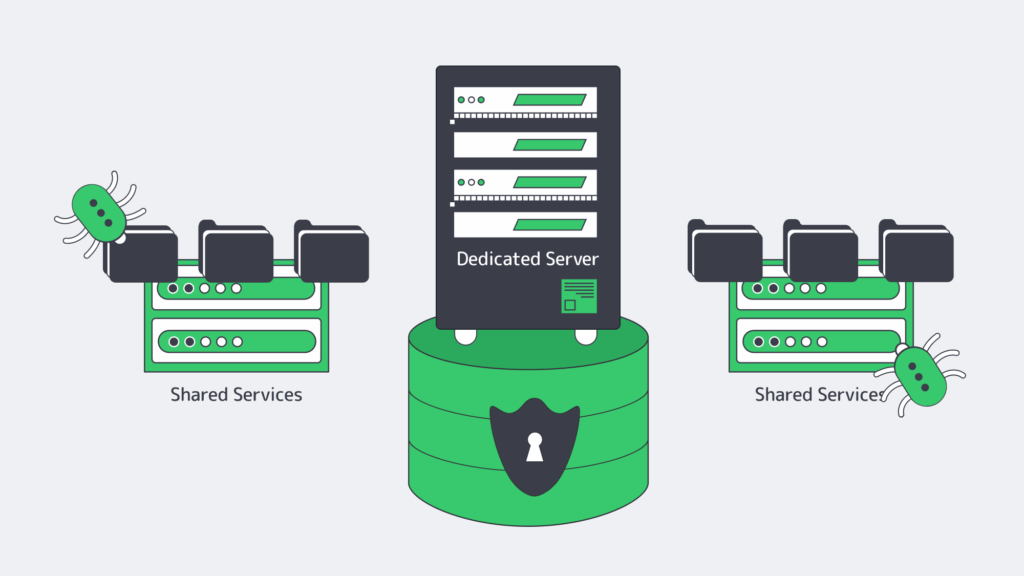
While a shared or co-located environment might be more cost-effective, you potentially run the risk of paying a far higher price. Hosting your database on a dedicated server dramatically lowers the exposure to vulnerabilities in other services.
By running your Database Management System (DBMS) solely on its own hardware, you can prevent lateral movement by hardening things at an OS level. With a dedicated server, administrators can disable any unnecessary services and tailor default packages to lower vulnerabilities further.
The settings can be locked down by applying a reputable security benchmark, reducing the likelihood that one compromised application provides access to the entire database.
A hardened dedicated server provides a solid foundation for a trustworthy, secure database environment. At Melbicom, we understand that physical and infrastructure security are equally important, and so our dedicated servers are situated in Tier III and Tier IV data centers. These centers operate with an overabundance of resources and have robust access control to ensure next-level protection and reduce downtime.
Step 2: Secure Your Database by Isolating the Network Properly
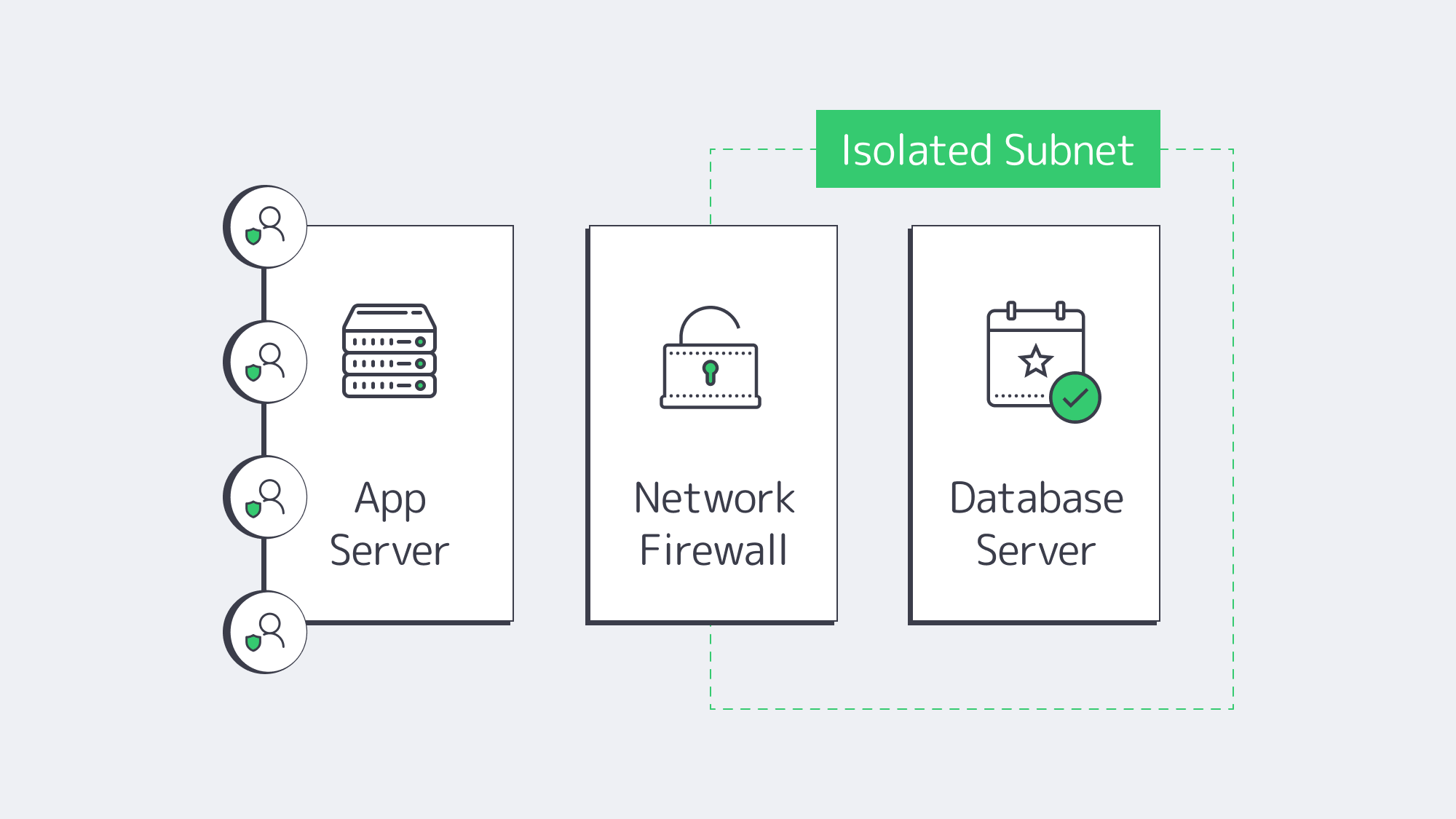
A public-facing service can expose the database unnecessarily, and therefore, preventing public access in addition to locking your server down is also crucial to narrowing down the risk of exploitation.
By isolating the network, you essentially place the database within a secure subnet, eliminating direct public exposure.
Network isolation ensures that access to the database management system is given to authorized hosts only. Unrecognized IP addresses are automatically denied entry.
The network can be isolated by tucking the database behind a firewall in an internal subnet. A firewall will typically block anything that isn’t from a fixed range or specified host.
Another option is using a private virtual local area network (VLAN) or security grouping to manage access privileges.
Administrators can also hide the database behind a VPN or jump host to complicate gaining unauthorized access.
Taking a layered approach adds extra hurdles for a would-be attacker to have to bypass before they even reach the stage of credential guessing or cracking.
Step 3: At Rest & In-Transit Encryption
Safeguarding databases relies heavily on strong encryption protocols. With encryption in place, you can ensure that any traffic or stored data intercepted is inaccessible, regardless.
Encryption needs to be implemented both at rest and in transit for full protection. Combining the two helps thwart interception attempts on packets and prevent stolen disks, which are both major threat vectors:
It can be handled at rest, either with OS-level full-disk encryption such as LUKS, via database-level transparent encryption, or by combining the two approaches.
An ideal tool is Transparent Data Encryption (TDE), which automatically encrypts and is supported by commercial versions of MySQL and SQL Server.
For your in-transit needs, enabling TLS (SSL) on the database can help secure client connections. It disables plain text ports and requires strong keys and certificates.
This helps to identify trusted authorities, keeps credentials protected, and prevents the potential sniffing of payloads.
Depending on the environment, compliance rules may demand cryptographic controls. In instances where that is the case, separating keys and data is the best solution.
The keys can be regularly rotated by administrators to further bolster protection. That way, should raw data be obtained, the encryption, working hand in hand with key rotation, renders it unreadable.
Step 4: Strengthen Access with Strict IAM & MFA Controls

While you might have hardened your infrastructure and isolated your network, your database can be further secured by limiting who has access and restricting what each user can do.
Only database admins should have server login; you need to manage user privileges at an OS level with strict Identity and Access Management (IAM).
Using a key where possible provides secure access, whereas password-based SSH is a weaker practice.
Multi-factor authentication (MFA) is important, especially for those with higher-level privileges. Periodic rotation can help strengthen access and reduce potential abuse.
The best rule of thumb is to keep things as restrictive as possible by using tight scoping within the DBMS.
Each application and user role should be separately created to make sure that it grants only what is necessary for specific operations. Be sure to:
- Remove default users
- Rename system accounts
- Lock down roles
An example of a tight-scope user role in MySQL might look something like: SELECT, INSERT, and UPDATE on a subset of tables.
When you limit the majority of user privileges down to the bare minimum, you significantly reduce threat levels. Should the credentials of one user be compromised, this ensures that an attacker can’t escalate or move laterally.
Ultimately, only by combining local or Active Directory permissions with MFA can you reduce and tackle password-based exploitation.
Step 5: Continually Patch for Known Vulnerabilities
More often than not, data breaches are the result of a cybercriminal gaining access through a known software vulnerability.
Developers constantly work to patch these known vulnerabilities, but if you neglect to update frequently, then you make yourself a prime target.
No software is safe from targeting, not even the most widely used trusted DBMSs.
You will find that from time to time, software such as PostgreSQL and MySQL publish urgent security updates to address a recent exploit.
Without these vital patches, you risk exposing your server remotely.
Likewise, operating with older kernels or library versions can give root access as they could harbor flaws.
The strategy for countering this easily avoidable and costly mistake is to put in place a systematic patching regime. This should apply to both the operating system and the database software.
Scheduling frequent hotfix checks or enabling automatic updates helps to make sure you stay one step ahead and have the current protection needed.
Admins can use a staged environment to test patches without jeopardizing production system and stability.
Step 6: Automate Regular Backups
Your next step to a secure database is to implement frequent and automated backups. Scheduling nightly full dumps is a great way to cover yourself should the worst happen.
If your database changes are heavy, then this can be supplemented throughout the day with incremental backups as an extra precaution.
By automating regular backups, you are protecting your organization from catastrophic data loss. Whether the cause is an in-house accident or hardware failure, or at the hands of an attack by a malicious entity.
To make sure your available backups are unaffected by a local incident, they should be stored off-site and encrypted.
The “3-2-1 rule” is a good security strategy when it comes to backups. It promotes the storage of three copies, using two different media types, with one stored offsite in a geographically remote location.
Most security-conscious administrators will have a locally stored backup for quick restoration, one stored on an internal NAS, and a third off-site.
Regularly testing your backup storage solutions and restoration shouldn’t be overlooked.
Testing with dry runs when the situation isn’t dire presents the opportunity to minimize downtime should the worst occur. You don’t want to learn your backup is corrupted when everything is at stake.
| Strategy | Frequency | Recommended Storage Method |
| Full Dump | Nightly | Local + Offsite |
| Incremental Backup | Hourly/More | Encrypted Repository, Such as an Internal NAS |
| Testing-Dry Run | Monthly | Staging Environment |
Remember, backups contain sensitive data and should be treated as high-value targets even though they aren’t in current production. To safeguard them and protect against theft, you should always keep backups encrypted and limit access.
Step 7: Monitor in Real-Time

The steps thus far have been preventative in nature and go a long way to protect, but even with the best measures in place, cybercriminals may outwit systems. If that is the case, then rapid detection and a swift response are needed to minimize the fallout.
Vigilance is key to spotting suspicious activity and tell-tale anomalies that signal something might be wrong.
Real-time monitoring is the best way to stay on the ball. It uses logs and analytics and can quickly identify any suspicious login attempts or abnormal spikes in queries, requests, and SQL commands.
You can use a Security Information and Event Management (SIEM) tool or platform to help with logging all connections in your database and tracking any changes to privileges. These tools are invaluable for flagging anomalies, allowing you to respond quickly and prevent things from escalating.
The threshold setting can be configured to send the security team alerts when it detects one of the following indicators that may signal abuse or exploitation:
- Repeated login failures from unknown IPs
- Excessive data exports during off-hours
- Newly created privileged accounts
The logs can also be analyzed and used to review response plans and are invaluable if you suffer a breach. Regularly reviewing the data can help prevent complacency, which can be the leading reason that real incidents get ignored until it’s too late.
Step 8: Compliance Mapping and Staying Prepared for Audits
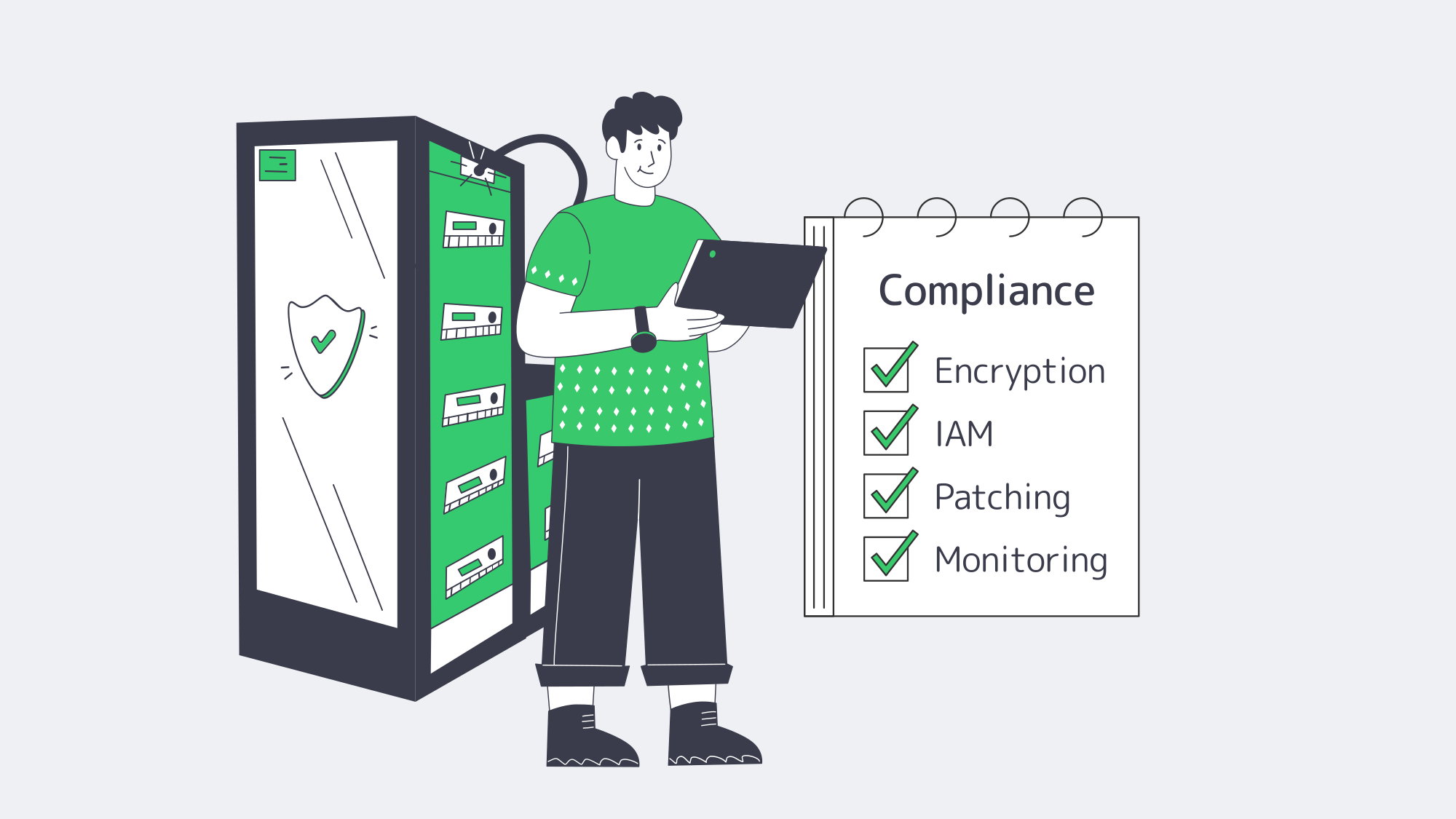
Often, external mandates are what truly dictate security controls, but you can make sure each of the measures you have in place aligns with compliance obligations such as those outlined by PCI DSS, GDPR, or HIPAA, with compliance mapping.
Isolation requirements are met by using a dedicated server, and confidentiality rules are handled with the introduction of strong encryption.
Access control mandates are addressed with IAM and MFA, and you manage your vulnerabilities by automating patch updates. By monitoring in real time, you take care of logging and incident response expectations.
The logs and records of each of the above come in handy as evidence to back up the security of your operations during any audits because they will be able to identify personal or cardholder data, confirm encryption, and demonstrate the privileged access in place.
It also helps to prepare for audits if you can leverage infrastructure certifications from your hosting provider. Melbicom operates with Tier III and Tier IV data centers, so we can easily supply evidence to demonstrate the security of our facilities and network reliability.
Secure Database Hosting: Key Takeaways and Next Steps

Co-locating is a risky practice. If you take security seriously, then it’s time to shift to a modern, security-forward approach that prioritizes a layered defense.
The best DBMS practices start with a hardened, dedicated server, operating on an isolated secure network with strict IAM in place.
Strategies such as patch updates and backup automation, as well as monitoring help you stay compliant and give you all the evidence you need to handle an audit confidently.
With the steps outlined in this guide, you now know how to host a database securely enough to handle any threat that a modern organization could face. Building security from the ground up transforms the database from a possible entry point for hackers to a well-guarded vault.
Why Choose Melbicom?
Our worldwide Tier III and Tier IV facilities house advanced, dedicated, secure servers that operate on high-capacity bandwidth. We can provide a fortified database infrastructure with 24/7 support, empowering administrators to maintain security confidently. Establish the secure foundations you deserve.
Get expert support with your services
Blog

Best Dedicated Server Builds for Streaming Services
Video streaming services face relentless pressure to deliver top-notch content worldwide. Whether it’s live events, training sessions, or on-demand shows, viewers expect zero buffering, minimal latency, and effortless scalability—especially at peak times.
Dedicated servers provide the performance and reliability to meet these high demands. Unlike shared environments that could often slow down under heavy loads, dedicated server clusters consistently handle demanding streaming workloads with ease.
Choose Melbicom— 1,300+ ready-to-go servers — 21 global Tier IV & III data centers — 55+ PoP CDN across 6 continents |
|
What Are the Pitfalls of Non-Dedicated Streaming Infrastructure?
Without dedicated servers, video streaming services could face a number of serious issues that can negatively impact your viewers and your bottom line.
Buffering and Latency
Buffering and latency are among the most universal headaches in video streaming, especially in shared environments. High viewer traffic can overwhelm shared resources, causing delays in data transfer. Repeated pauses and loading screens lead to user frustration, decreased watch times, and lower viewer retention rates. This issue becomes particularly acute during live events, where even small delays can disrupt the real-time experience and tarnish your reputation.
Resource Competition
In a shared environment, multiple tenants vie for limited CPU, RAM, and bandwidth, creating a constant tug-of-war for essential computing resources. When viewer traffic increases, these contested resources can quickly become bottlenecks, causing service interruptions or degraded video quality. This unpredictability makes it difficult to plan for peak usage, forcing streaming providers to scramble for contingency solutions at the worst possible moments.
Resource Contention
Beyond mere competition, resource contention in shared setups introduces latency across the board. A sudden surge in usage by one tenant can hog CPU cycles or network bandwidth, leaving everyone else at a standstill. This directly translates into stutters, pixelation, and dropped frames for your video streams. In many cases, frustrated viewers abandon the service or switch to competitors offering smoother playback.
Technical Debt
Managing in-house streaming operations can accumulate technical debt over time. Outdated hardware, legacy software, and the constant need to implement performance upgrades stretch internal teams thin. This often results in spiraling maintenance costs and a lack of agility in adopting new technologies. The strain on engineering resources can slow feature rollouts and hamper the overall growth of your streaming platform.
How to Deliver Top-Notch Video Streaming with Dedicated Servers
By contrast, dedicated servers provide a robust foundation that addresses the pitfalls outlined above. Below are key benefits that make dedicated servers indispensable for streaming services.
Seamless Performance with Exclusive Resources
With dedicated servers, you have exclusive access to CPU, RAM, and bandwidth—no more competing with other tenants for vital resources. This translates directly into smoother video streams with fewer buffering incidents and stable playback even during audience surges. The ability to optimize server performance for your specific encoding and decoding needs ensures consistently high-quality output.
Low Latency and Network Optimization
Dedicated servers often come equipped with network optimization technologies like BBR (Bottleneck Bandwidth and Round-trip Propagation Time). These optimizations help reduce round-trip times and minimize packet loss, vital for live events and real-time interactions such as sports broadcasts, Q&A sessions, and online gaming streams. The result is an immersive viewer experience with minimal lag or delay.
Enhanced Security with Dedicated Environments
In a dedicated hosting scenario, you maintain complete control over the server environment. This includes the ability to customize firewalls, intrusion detection systems, and other security protocols to safeguard your video content. With no co-tenants sharing the same hardware, the risk of breaches originating from adjacent workloads is significantly lower, further protecting your brand and user data.
Easy Scalability to Adapt to Growing Demand
Scaling dedicated resources is straightforward—adding more CPU cores, RAM, or increasing network capacity can be done seamlessly. This flexibility ensures you can handle increases in viewer traffic, special events, or rapid audience growth without sacrificing stream quality. The ability to respond quickly to market demands makes dedicated servers a future-proof investment for any streaming operation.
Which Dedicated Server Specs Matter for Video Streaming?
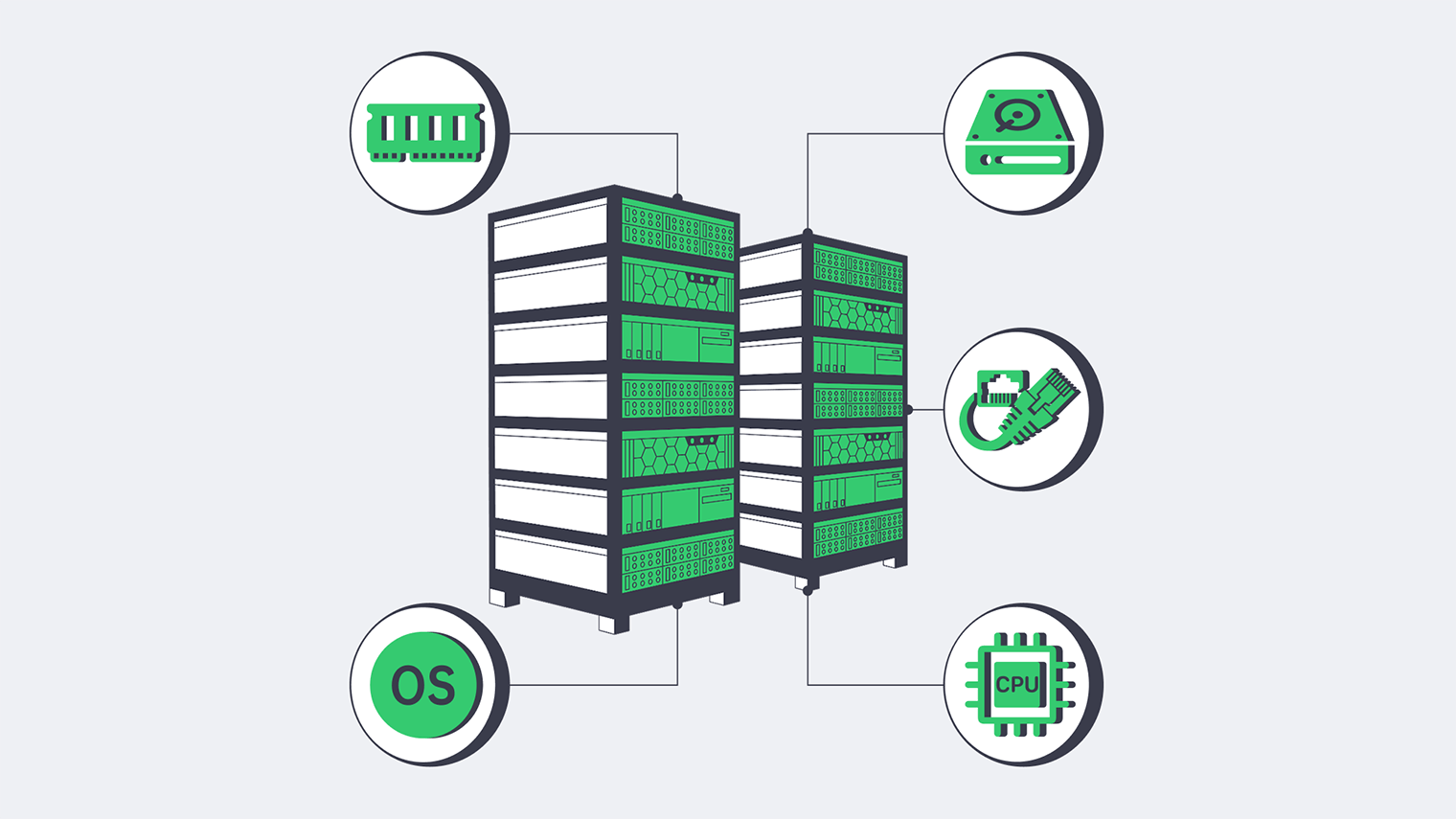
Every streaming platform faces unique hurdles when delivering video content—from managing massive bandwidth demands to minimizing latency and downtime. That’s why a hosting provider that truly understands these challenges is essential. With 1,300+ servers ready for activation in under two hours, a global presence across 21 data centers, plus guaranteed bandwidth and DDoS protection, Melbicom offers the reliable infrastructure you need for seamless streaming. Below are our general recommendations to guide your dedicated server decisions.
| Component | Recommendation |
|---|---|
| CPU | Multi-core processors like Intel Xeon with 16+ cores for effective video encoding and decoding |
| RAM | Minimum 64 GB, ideally more for handling multiple streams simultaneously |
| Storage | NVMe SSDs for rapid data access and smooth video delivery |
| Bandwidth | 1 Gbps to 20 Gbps, depending on audience size and quality needs |
How to Get Started with a Dedicated Server for Video Streaming
Dedicated servers are the secret sauce to delivering a flawless, high-quality streaming experience, and Melbicom makes it effortless to get started. With dedicated servers strategically located in data centers across the globe, you can count on low latency and top-tier performance for your viewers, no matter where they are. Melbicom’s powerful and scalable solutions keep your streaming service running smoothly, helping you create an experience your audience will love—and keep coming back for.
Rent your dedicated server for video streaming network at Melbicom and give your audience the flawless experience they expect and deserve.
Get expert support with your services
Blog
Rent Database Server: Dedicated Hosting for Performance & Control
Databases are the core of modern business ops, handling everything from customer records to financial transactions. As companies expand, their database needs grow, demanding a robust and high-performance hosting solution. In an era where data-driven decisions and stringent compliance regulations are paramount, selecting the right hosting infrastructure becomes essential. Dedicated servers deliver the reliability, efficiency, and control required for seamless database hosting, ensuring your data remains accessible and secure. Whether you’re running MySQL, MongoDB, or PostgreSQL, dedicated servers are designed to meet your needs.
Choose Melbicom— 1,300+ ready-to-go servers — 21 global Tier IV & III data centers — 55+ PoP CDN across 6 continents |
|
What Are the Drawbacks of Non-Dedicated Database Hosting?
Relying on shared infrastructure introduce several issues that can compromise the performance and security of critical databases
Resource Contention
In shared environments, databases must compete with other users for CPU, memory, and bandwidth. This can lead to severe performance bottlenecks, especially during peak periods, when resources are stretched thin. For businesses running high-demand applications, this lack of dedicated resources can result in slower response times and frustrated users.
Moreover, unpredictable resource availability can disrupt database operations, causing query delays or timeout errors. This inconsistency is a significant risk for enterprises that depend on uninterrupted database performance to meet their operational needs.
Limited Control
Shared infrastructure comes with standardized configurations that limit customization options. Businesses may struggle to optimize server settings for specific database needs, such as MySQL, which requires tailored my.cnf tuning, or MongoDB, which performs best with Linux and specific file systems like XFS.
The inability to modify the environment to suit these requirements often results in suboptimal performance. For organizations relying on custom database configurations, this limitation can hinder efficiency and scalability.
Security Risks
Sharing server resources means sharing vulnerabilities. A security incident affecting one user could potentially impact all users on the same server. For businesses handling sensitive data, such as customer information or financial records, this lack of isolation is a serious concern.
Furthermore, compliance with data protection regulations like GDPR or HIPAA becomes challenging in shared environments. Without full control over server security measures, businesses face increased risks of breaches and regulatory penalties.
How Do Dedicated Servers Improve Database Hosting?
Consistent High Performance
With a dedicated server, your database enjoys exclusive access to CPU, RAM, and storage. This ensures consistent, high-performance operations without the disruptions caused by resource contention. For example, dedicated resources allow for faster query execution and reduced latency during peak workloads.
Additionally, the ability to fine-tune hardware and software configurations means you can optimize your setup for specific database workloads. Whether it’s MySQL, MongoDB, or PostgreSQL, dedicated servers provide the flexibility needed to maximize performance and operational efficiency.
Enhanced Security and Control
Dedicated servers offer unparalleled security by isolating your database from other users. This isolation minimizes the risk of external vulnerabilities affecting your operations. Businesses can implement custom firewalls, encryption protocols, and access controls tailored to their specific needs.
For industries like banking and healthcare, where data protection is critically important, dedicated servers ensure compliance with stringent regulatory requirements. With full control over your infrastructure, you can establish robust security measures that safeguard sensitive information.
Scalability and Reliability
Dedicated servers provide a scalable foundation for growing businesses. Whether you need to store massive datasets or support a high volume of concurrent users, dedicated infrastructure can handle the load without compromising performance.
In addition, reliability is a key advantage. With dedicated hardware, you can configure redundancy systems and backups to ensure data availability even in the event of hardware failures. This level of dependability is essential for mission-critical database applications.
What Are the Technical Requirements to Buy a Database Server?
Every organization grapples with unique challenges when hosting databases—from managing massive data throughput to ensuring compliance with regulatory standards and minimizing downtime. A hosting provider that understands and addresses these challenges is essential. Melbicom offers a robust infrastructure tailored to meet these needs. With 1,300+ servers ready for activation within two hours, a global presence spanning 21 data centers, and added features like guaranteed bandwidth and DDoS protection, you can count on a solid foundation for seamless database operations. Below, we share general recommendations to guide your database hosting decisions.
| Component | Recommendation |
|---|---|
| CPU | Multi-core processors like Intel Xeon for handling complex database queries |
| RAM | Minimum 64 GB to support efficient database performance and reduce query response times |
| Storage | NVMe SSDs for rapid data access, or HDDs with RAID configurations for added redundancy |
| Bandwidth | High bandwidth (1 Gbps or more) for smooth data access for multiple concurrent users |
Dedicated servers offer a secure and scalable platform for database hosting while allowing complete customization to suit your specific requirements. From handling massive datasets to implementing advanced redundancy systems, dedicated servers provide the versatility needed for optimal database management. If you’re searching for the best MySQL hosting service or planning to invest in a reliable server for your database, Melbicom offers best dedicated servers from industry-leading vendors to ensure exceptional performance and reliability.
Looking for the perfect server to host your databases? Melbicom has you covered with a wide range of dedicated server solutions designed to meet your specific needs.
Get expert support with your services
Blog

Dedicated Servers for Data Backups
Backing up your data is no longer optional. No matter how large or small a business is, having a reliable strategy to protect critical information is essential. Why? Because the stakes are high. Ransomware incidents have surged in recent years, and a single attack can grind your operations to a halt. That’s why dedicated servers are so valuable—they let you take complete command of your backup process. In contrast to shared environments, they’re faster, more dependable, and far more secure.
Choose Melbicom— 1,300+ ready-to-go servers — 21 global Tier IV & III data centers — 55+ PoP CDN across 6 continents |
|
What Are the Drawbacks of Non-Dedicated Backup Solutions?
Without a dedicated backup infrastructure, businesses often rely on shared solutions—such as VPS or on-site storage (e.g., NAS devices, RAID arrays, or local servers)—that carry notable risks.
Security Vulnerabilities
In partial infrastructure environments, your backups sit alongside other users’ data, exposing your organization to vulnerabilities stemming from their potential security missteps. Meanwhile, on-site storage systems may not offer sufficient protection against external attacks, physical damage, or theft, further endangering critical information.
The absence of dedicated hardware also limits your ability to implement strict access controls, custom firewalls, and comprehensive encryption. A single misconfiguration by another user can create security loopholes that jeopardize your data, making it far more challenging to uphold the high security standards demanded by modern businesses.
Unpredictable Performance
Resource contention is another major hurdle. In a shared infrastructure, multiple users compete for CPU power, memory, and storage bandwidth, leading to unpredictable performance—particularly during peak periods. As a result, backup jobs may take longer than planned or fail to complete on time, putting crucial restore points at risk.
Meeting RPOs (Recovery Point Objectives) and RTOs (Recovery Time Objectives) becomes increasingly difficult when backup operations are slowed by fluctuating network speeds and storage constraints. In the event of a disaster, these unstable conditions can result in extended downtime, undermining productivity, customer satisfaction, and your organization’s reputation.
Limited Customization and Compliance Hurdles
Many shared solutions impose strict constraints on software installations, server configurations, and advanced security features. This lack of flexibility prevents you from customizing encryption, firewalls, or specialized backup applications to meet specific requirements, often forcing organizations to settle for less robust solutions.
Compliance obligations can complicate matters if the hosting provider won’t let you explicitly specify the data center’s geo location. For businesses under data sovereignty regulations, this limitation can lead to non-compliance, risking legal consequences. With limited options to ensure data residency, aligning infrastructure with regulatory expectations becomes more difficult.
How Do Dedicated Backup Servers Improve Security, Performance & Compliance?
Robust Security
Opting for dedicated servers grants you unparalleled control over your backup environment. You can implement specialized firewalls, end-to-end encryption, and other defense mechanisms tailored to the sensitivity of your data. This level of customization significantly lowers the risk of unauthorized access, data breaches, or other security incidents that could harm your operations.
Another advantage of dedicated hosting is the ability to maintain redundant storage solutions, such as RAID configurations, for extra data protection. This ensures that backups remain intact even if hardware components fail. With full oversight of the server’s security framework, you can create a multi-layered defense strategy designed around your specific threat landscape, giving you comprehensive peace of mind.
Performance and Scalability
Dedicated servers eliminate resource-sharing bottlenecks by reserving computing power, memory, and storage capacity solely for your backup processes. Predictable performance allows you to plan and execute backups within set windows, making it easier to stay on schedule and maintain the level of data integrity your business demands.
Because the server’s resources belong exclusively to you, scaling is straightforward as data volumes increase or business objectives evolve. You can expand your storage capacity or upgrade CPU and RAM without shifting to a completely different hosting solution. This streamlined approach to growth ensures that your backup infrastructure can adapt quickly to changing needs, all while maintaining consistent reliability.
Compliance and Customization
Dedicated servers empower you to create an environment specifically tailored to meet industry standards, security protocols, and evolving data protection requirements. This control is particularly vital for companies operating under strict regulations that demand strong encryption, thorough logging, or rigorous auditing procedures. Since you oversee every layer of the server setup, you can ensure no compromises are made in the pursuit of full regulatory compliance.
Additionally, you can often select from multiple data center locations worldwide when using dedicated servers. This freedom of choice helps address data sovereignty laws that mandate local storage or prohibit certain cross-border data transfers. The result is a highly secure backup environment that meets all functional needs while satisfying legal and regulatory commitments.
Which Specifications Matter for a Dedicated Backup Server?
Every organization grapples with unique challenges—massive data throughput, regulatory complexities, uptime demands. A hosting provider that can adapt to these needs is vital.
Melbicom offers an infrastructure designed for flexibility. With 900+ servers ready for activation within two hours, global coverage across 15 data centers, and extras like guaranteed bandwidth and DDoS protection, you have a strong foundation to keep backups running smoothly.
| Component | Recommendation |
|---|---|
| CPU | Multi-core processors like Intel Xeon for efficient handling of backup workloads |
| RAM | Minimum 64 GB to ensure smooth data transfer and handle large datasets effectively |
| Storage | Use NVMe SSDs for fast read/write speeds, or HDDs with RAID for cost-effective redundancy |
| Bandwidth | High bandwidth (1 Gbps or more) to support timely backups without network congestion |
How to Choose the Best Dedicated Server Hosting for Backups
Dedicated servers give you a rock-solid, secure, and scalable foundation for managing your data backups. They also let you shape your environment exactly how you need it. Whether you’re storing huge datasets or building complex redundancy systems, you’ve got the tools to create a solution that fits your business perfectly.
Not using dedicated servers for your backups yet? Melbicom is here to back you up with top-tier dedicated server solutions from the most trusted vendors in the industry.
Get expert support with your services
Blog

Dedicated Servers for SaaS: Fast and Secure Application Hosting
For modern product teams and their DevOps workflows, microservices and containers have become the standard. But the real question is: what are the best hosting options for the job? What do on-premises, SaaS, and mobile app hosting servers really need to deliver?
For those seeking to maximize performance and control costs, dedicated servers offer a compelling answer. Unlike virtual private servers (VPS) or shared environments, dedicated servers deliver raw power and complete customization, ensuring optimal performance.
Choose Melbicom— 1,300+ ready-to-go servers — 21 global Tier IV & III data centers — 55+ PoP CDN across 6 continents |
|
What Challenges Do Product Teams Face with Non-Dedicated App Hosting?
Relying on VPS for application hosting introduces significant limitations that can hinder performance, control, security, and scalability—essential factors for delivering a seamless and reliable user experience.
Resource Contention
In shared environments, CPU, memory, and disk I/O resources are distributed among multiple users, leading to unpredictable performance during peak times or when neighboring tenants demand high resources. This inconsistency disrupts workflows and creates bottlenecks, frustrating developers and degrading the end-user experience.
Performance Issues
Shared infrastructure struggles with the demands of complex or high-traffic applications, leading to latency, slower response times, and reduced throughput. These performance issues negatively impact user satisfaction and engagement, making VPS hosting unsuitable for applications requiring high availability or reliability.
Security Risks
Operating in a shared environment exposes applications to vulnerabilities such as cross-tenant data breaches and limited control over security measures. This lack of isolation increases the risk of compliance failures and jeopardizes sensitive data, making VPS hosting ill-suited for proprietary or mission-critical applications.
Benefits of Dedicated Servers for Cloud Application Hosting
Complete Control and Enhanced Security
Dedicated servers grant product teams full authority over the entire hosting environment. This flexibility enables custom configurations that align with unique business requirements, from optimizing specific software settings to deploying highly tailored firewalls and advanced intrusion detection systems. Such measures substantially reduce the risk of breaches, safeguarding sensitive data while maintaining strong compliance standards across industries.
Consistent, Predictable Performance
Dedicated servers redefine the hosting experience by eliminating the limitations often found in virtual environments. With exclusive access to hardware resources, they deliver steady, reliable performance—a crucial advantage for product teams running applications. By fine-tuning server settings, teams can achieve low latency, high availability, and the reliability necessary to keep mission-critical services running smoothly.
Seamless Scalability
Scalability stands out as another major benefit of dedicated servers. Whether expanding CPU power, memory, or storage, you can scale up effortlessly to meet changing application demands. Even in scenarios with complex architectures or large-scale workloads, additional nodes can form clusters, adeptly managing heavy traffic or intricate processes. From accommodating seasonal surges to supporting long-term growth, dedicated servers serve as a dynamic foundation that grows alongside your product ambitions.
Which Additional Services Strengthen App Hosting on Dedicated Servers?
Monitoring and Management Tools
Effective server monitoring ensures optimal performance and quick response to potential issues. Tools like Nagios, Zabbix, and Datadog provide real-time analytics, alerting administrators to resource bottlenecks, security threats, or downtime. Proactive management minimizes disruptions and keeps your applications running smoothly.
Backup and Disaster Recovery
Data loss can have devastating consequences for SaaS providers or on-premises applications. Dedicated servers support robust backup solutions, including automated daily backups and snapshot-based recovery. Disaster recovery options, such as off-site replication, ensure minimal data loss and rapid restoration in case of a failure, protecting both your data and your reputation.
Security Features
Dedicated servers offer advanced security features, tailored for SaaS and on-premises applications, such as:
- Custom Firewalls: Configured to meet specific application needs.
- DDoS Protection: Safeguards against distributed denial-of-service attacks.
- Encryption Protocols: Ensures data remains secure during transmission and storage.
- Access Controls: Limits access to authorized personnel only.
What Are the Technical Requirements for Dedicated Servers for SaaS?
When hosting applications, the specific requirements will vary based on factors like scalability needs, performance demands, and security considerations. Melbicom’s infrastructure is designed to support a wide range of use cases, providing flexibility and reliability. With 900+ dedicated servers ready for activation within two hours, global data center coverage, and features like guaranteed bandwidth and affordable DDoS protection, Melbicom offers an ideal starting point for evaluating your hosting needs.
| Component | Recommendation |
|---|---|
| CPU | Multi-core processors like Intel Xeon |
| RAM | Preferably 64 GB or more for better stability |
| Storage | NVMe SSD for fast read/write operations |
| Bandwidth | Minimum 1 Gbps, preferably 10 Gbps for high traffic |
| Data Centers | Choose providers with Tier III data centers as a minimum; for SaaS, consider a diversified data center network to distribute load across PoPs and improve performance for users in various locations |
Best Dedicated Server for Your Application Hosting
In the competitive landscape of SaaS and on-premises applications, infrastructure matters. Dedicated servers provide the performance, security, and scalability to meet the growing demands of modern applications. With providers like Melbicom offering tailored solutions, businesses can confidently scale, innovate, and deliver exceptional user experiences.
Ready to take your application hosting to the next level? Explore Melbicom’s dedicated server options and discover how they can empower your applications to thrive.
Get expert support with your services
Blog

Dedicated Servers for High-Traffic Ecommerce Websites
In the relentless hustle of e-commerce, where milliseconds define success, websites must operate like well-oiled machines. Customers demand seamless experiences, fast checkouts, and uninterrupted service—and they demand it now. An unreliable or sluggish website can spell disaster, driving potential buyers straight into the arms of competitors. Enter dedicated servers, the unsung heroes behind high-performing ecommerce platforms. These technological powerhouses offer unmatched speed, scalability, and security, serving as the backbone of businesses that refuse to compromise on quality.
Choose Melbicom— 1,300+ ready-to-go servers — 21 global Tier IV & III data centers — 55+ PoP CDN across 6 continents |
|
What Hosting Challenges Do Ecommerce Websites Face?
Ecommerce websites face numerous challenges that can hurt business operations and customer satisfaction if not addressed effectively.
Performance Issues
When running on a shared server, your ecommerce site competes with other websites for CPU, RAM, and bandwidth. This competition can lead to slow page loads, particularly during high-traffic events like flash sales. A delay of even a few seconds can frustrate potential customers, increase bounce rates, and result in lost sales opportunities. For an ecommerce business, maintaining fast page load times is critical to customer retention and revenue generation.
Security Risks
Shared hosting environments are inherently riskier because vulnerabilities in one site can affect others on the same server. Cyberattacks, such as hacking attempts or data breaches, are significant threats to ecommerce sites that handle sensitive customer information like payment details. Without robust security measures, your business risks both financial losses and damage to its reputation.
Scalability Constraints
Ecommerce businesses often experience growth over time, whether through product expansion, increased traffic, or new marketing campaigns. Shared servers lack the flexibility to scale resources quickly, meaning your website might struggle to keep up with demand. This inability to expand as needed can result in poor user experiences and missed opportunities to capitalize on growth.
Seasonal Traffic Spikes
Seasonal events like Black Friday or holiday shopping seasons bring significant surges in traffic. For websites on insufficient infrastructure, this can lead to slow load times, crashes, or outages during critical sales periods. Such disruptions not only reduce revenue but also harm customer trust and loyalty.
How Do Dedicated Servers Improve Ecommerce Performance and Security?
Dedicated servers address these challenges head-on, offering tailored solutions to meet the demands of a growing ecommerce business.
Enhanced Performance
Dedicated servers allocate exclusive resources to your website, ensuring consistent and fast performance. Unlike shared hosting, there’s no competition for bandwidth or processing power, meaning your pages load quickly, transactions process efficiently, and customers enjoy a seamless experience. Fast load times also reduce bounce rates and contribute to higher conversion rates.
Robust Security
With a dedicated server, your website benefits from advanced security configurations designed to protect sensitive customer data. Features like firewalls, intrusion detection systems, and regular security patches help guard against cyberattacks. Additionally, compliance with standards like PCI DSS ensures your site meets industry requirements for handling payment information securely.
Scalability and Flexibility
Dedicated servers provide the flexibility to scale your resources as your business grows. Whether you’re adding new product lines, launching marketing campaigns, or preparing for seasonal events, you can easily upgrade CPU, RAM, or storage without experiencing downtime or performance issues. This adaptability ensures your site stays operational and efficient, regardless of demand.
Reliability During Seasonal Spikes
Dedicated servers handle sudden traffic surges with ease. Load balancing distributes traffic evenly, preventing slowdowns or outages during high demand. This reliability ensures customers shop without interruptions, boosting sales and satisfaction.
Which Additional Services Can Strengthen Your Ecommerce Hosting?
Monitoring and Management Tools
Effective server monitoring ensures optimal performance and quick response to potential issues. Tools like Nagios, Zabbix, and Datadog provide real-time analytics, alerting administrators to resource bottlenecks, security threats, or downtime. Proactive management minimizes disruptions and keeps your website running smoothly.
Backup and Disaster Recovery
Data loss can be catastrophic for ecommerce businesses. Dedicated servers support robust backup solutions, including automated daily backups and incremental backups. Disaster recovery options, such as off-site replication and snapshot-based recovery, ensure minimal data loss and rapid restoration in the event of an issue. This safeguards your business against data breaches, hardware failures, or accidental deletions.
Content Delivery Networks (CDNs)
CDNs work in tandem with dedicated servers to enhance website performance. By distributing website content across multiple servers worldwide, CDNs reduce latency and ensure faster load times for users, regardless of their location. For businesses looking for a high-performance CDN solution, Melbicom’s CDN services offer a powerful combination of global reach, lightning-fast delivery, and seamless integration with dedicated servers.
Security Features
Dedicated servers offer advanced security features, including:
- SSL Certificates: Encrypt data transfers, ensuring customer data remains private.
- Firewalls: Protect against unauthorized access and cyberattacks.
- DDoS Protection: Safeguard against distributed denial-of-service attacks that could disrupt site availability.
- Two-Factor Authentication (2FA): Adds an extra layer of security for admin access.
What Are the Technical Requirements for an Ecommerce Server?
Every e-commerce project comes with unique demands, from handling high traffic to ensuring data security and quick load times. Choosing a hosting provider that can cater to these diverse needs is crucial. Melbicom offers a flexible infrastructure designed to adapt to the specific requirements of your business. With 1,300+ servers ready for activation within two hours, global coverage through 21 data centers, and options like guaranteed bandwidth and affordable DDoS protection, Melbicom ensures your site operates smoothly and reliably, no matter the challenge.
| Component | Recommendation |
|---|---|
| CPU | Multi-core processors like Intel Xeon |
| RAM | Minimum 64 GB for efficient processing |
| Storage | NVMe SSD for fast data read/write |
| Bandwidth | High bandwidth to handle peak traffic |
How to Choose the Best Dedicated Server for Your Ecommerce Website
Ecommerce is not just a business—it’s a battleground where only the fastest, most secure, and most reliable survive. Dedicated servers stand at the forefront of this digital revolution, empowering businesses to rise above challenges and deliver exceptional customer experiences. With their unmatched performance, robust security, and unparalleled scalability, they are the cornerstone of success in a competitive online marketplace.
Elevate your ecommerce website to its fullest potential. Explore Melbicom’s dedicated servers and ensure your website is ready to meet the demands of tomorrow’s customers.
Get expert support with your services
Blog

Dedicated Servers for Virtualization and VMs Hosting
In today’s digital landscape, virtualization is more than a technical convenience—it is the engine that powers modern enterprise operations. From development and testing environments to complex systems like ERP and CRM, virtual machines (VMs) have become indispensable. However, as organizations increasingly rely on virtualized infrastructures, the need for a robust, secure, and high-performing foundation has never been more critical.
Dedicated servers offer the precision, control, and scalability necessary to transform a standard IT environment into a dynamic, future-ready platform. With a dedicated architecture, every aspect of virtualization—from resource allocation to security protocols—is optimized for excellence.
Choose Melbicom— 1,300+ ready-to-go servers — 21 global Tier IV & III data centers — 55+ PoP CDN across 6 continents |
|
Navigating the Challenges of Virtualization
As companies embrace the benefits of virtualization, they inevitably encounter several obstacles that can impede efficiency and elevate risk. Below, we examine the key challenges that organizations must overcome to fully realize the potential of advanced virtual environments.
Security Vulnerabilities and Data Isolation Risks
In virtualized environments, the security of your data starts with control over the very foundation your virtual machines run on. When you rent a VPS in a multi-tenant setup, you are just one tenant among many, sharing the same physical hardware that you don’t control. Although software-based isolation attempts to keep each virtual instance separate, its protections are inherently limited. For organizations that depend on robust and secure virtual infrastructures, having control over the foundation is not merely an option—it’s essential for safeguarding every aspect of your digital environment.
Unpredictable Performance
When you rent a VPS—especially one based on OpenVZ virtualization—you’re buying into a multi-tenant environment where resource allocation is managed by the provider. In such setups, resources like CPU, memory, and bandwidth may be oversold and distributed unevenly, meaning that a surge in demand from another tenant might siphon off resources from your VPS. This results in erratic performance and increased latency. In contrast, when you control your virtual environment on a dedicated server using robust KVM virtualization and fixed resource allocation, you get stable, predictable performance, ensuring that every virtual machine operates at its peak efficiency.
Hidden Costs and Inefficient Resource Allocation
Budgeting for IT infrastructure is a complex task, made even more challenging by hidden costs associated with virtualization on shared platforms. When resources are oversold or allocated inefficiently, businesses may find themselves paying for capacity they do not fully utilize. This misalignment not only results in wasted expenditure but also forces organizations to invest further when unexpected surges in demand occur. The financial unpredictability stemming from such environments can derail long-term strategic planning and lead to a continual cycle of reactive spending.
How Do Dedicated Servers Solve These Virtualization Challenges?
Dedicated servers provide a refined approach to virtualization, offering tailored solutions that directly address the common challenges. By shifting to a dedicated infrastructure, organizations gain a competitive edge through enhanced security, reliable performance, and cost efficiency.
Enhanced Security and Robust Data Isolation
Dedicated servers establish a secure, isolated environment where each virtual machine benefits from exclusive access to hardware resources. This physical segregation minimizes the risk of cross-contamination between VMs and allows for the implementation of custom security measures. Organizations can deploy tailored firewall rules, advanced intrusion detection systems, and granular network segmentation to safeguard their digital assets. With dedicated servers, every layer of the infrastructure is fortified, ensuring that sensitive data remains protected even in the face of sophisticated cyber threats.
Consistent High Performance
Performance consistency is paramount in any modern IT infrastructure. Dedicated servers eliminate the unpredictability of shared environments by providing exclusive access to critical resources—CPU, RAM, and storage—ensuring that every VM operates at optimal efficiency. This dedicated resource allocation guarantees minimal latency and high-speed responsiveness, even during periods of peak demand. The predictable performance not only enhances internal processes but also delivers a superior end-user experience, supporting real-time applications and demanding workloads without compromise.
Cost Efficiency and Transparent Resource Management
While the initial investment in dedicated servers may be higher than that of shared solutions, the long-term benefits in cost efficiency and resource management are substantial. With dedicated hardware, organizations have complete control over resource allocation, eliminating the need for over-provisioning and reducing the risk of unexpected expenses. This transparency allows IT managers to precisely budget and scale resources in alignment with actual usage, optimizing every dollar spent on infrastructure. The resulting clarity in financial planning supports sustainable growth and positions the organization for future success.
Which Dedicated Server Specs Matter for Virtualization?
Every organization faces unique challenges in managing virtual machines, making it imperative to choose a hosting provider that can address diverse needs. Melbicom offers a flexible infrastructure designed to adapt to the specific requirements of your business. With over 1,300 servers ready for activation within two hours, Melbicom ensures that your platform for creating and managing Virtual Machines operates smoothly and reliably, regardless of the challenges you encounter.
Every organization faces unique challenges in managing virtual machines, making it imperative to choose a hosting provider that can address diverse needs. Melbicom offers a flexible infrastructure designed to adapt to the specific requirements of your business. With over 1,300 servers ready for activation within two hours, Melbicom ensures that your platform for creating and managing Virtual Machines operates smoothly and reliably, regardless of the challenges you encounter.
| Component | Recommendation |
|---|---|
| CPU | Multi-core processors such as Intel Xeon, capable of handling concurrent workloads with precision. |
| RAM | A minimum of 64 GB, expandable to accommodate additional virtual machines and increased load. |
| Storage | NVMe SSDs, recommended for their rapid read/write operations, essential for data-intensive applications. |
| Bandwidth | High bandwidth connectivity to support multiple VMs concurrently, ensuring uninterrupted performance. |
This comprehensive framework not only meets current virtualization demands but also provides the scalability and flexibility necessary for future growth. By investing in a robust, dedicated infrastructure, organizations can confidently pursue innovative strategies and maintain a competitive edge in today’s fast-paced digital world.
Get Started with Dedicated Server Virtualization Now
Virtualization is no longer a luxury—it is a strategic imperative in an increasingly competitive and digitally driven market. Organizations that harness the full potential of dedicated servers benefit from unparalleled performance, ironclad security, and the agility to scale resources in real time. These advantages translate directly into improved operational efficiency, enhanced customer experiences, and sustainable growth.
Melbicom’s dedicated server solutions break through conventional barriers to offer a resilient platform for virtual innovation. Whether you’re fine-tuning your current infrastructure or launching a bold new digital initiative, our environment ensures every virtual machine operates at peak performance.