
Month: October 2025
Blog

Cheap Dedicated Servers in Singapore: The Hidden Costs of Going Low-End
Ultra-cheap dedicated servers in Singapore promise a shortcut to regional presence: low monthly fees, local IPs, and the cachet of hosting in one of the world’s best-connected hubs. But the economics of Singapore’s high-cost, high-quality data center market are unforgiving. When a plan looks improbably cheap, the discount is usually paid back later—in performance bottlenecks, outages, throttled bandwidth, or slow support at the worst possible moment. For budget-conscious startups and small businesses, the question isn’t “How low can I go?” It’s “What hidden costs am I taking on, and how quickly could they erase my savings?”
Choose Melbicom— 130+ ready-to-go servers in SG — Tier III-certified SG data center — 55+ PoP CDN across 6 continents |
 |
Why Are Cheap Singapore Dedicated Servers so Tempting?
Singapore combines political stability, world-class connectivity, and proximity to Southeast Asia’s fastest-growing internet markets. The data center sector is sizable and expanding at a steady clip, supported by dozens of submarine cables and dense regional peering. As capacity has grown, more “affordable” plans have appeared. The allure is obvious: a cheap dedicated server option in Asia with local latency and a familiar legal environment.
Yet Singapore is also one of the most expensive places to operate a facility—real estate, power, staffing, and compliance all carry premiums. When a plan’s price drops to the floor, corners get cut: older hardware, thinner networks, minimal staff, or a low-tier site. Those choices shift cost and risk to you.
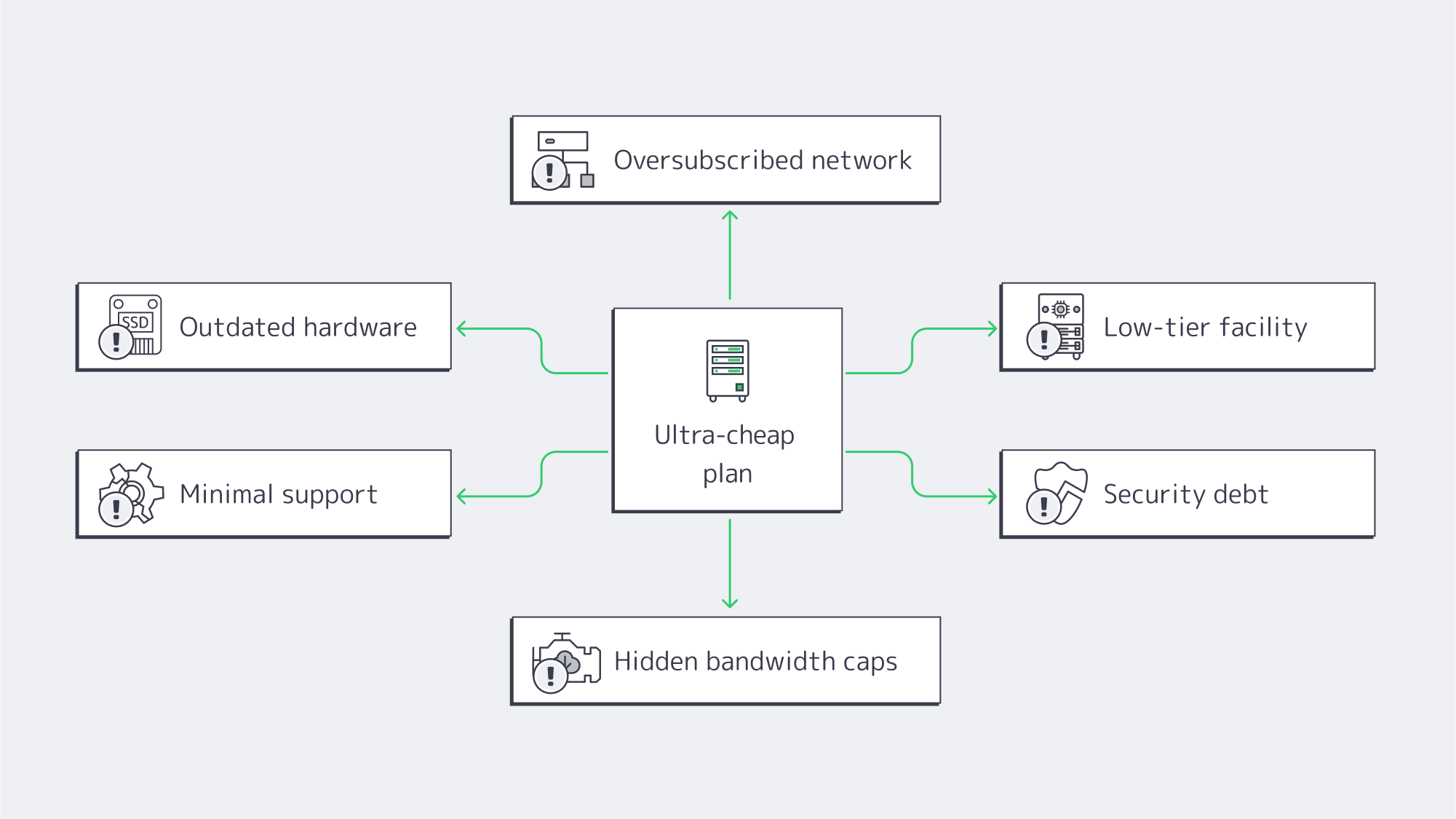
Cheap Dedicated Servers in Singapore: What Hidden Costs Should You Expect?
- Outdated hardware → slow I/O, higher failure rates, painful concurrency ceilings.
- Oversubscribed networks → latency spikes, jitter, and packet loss at peak.
- Low-tier facilities → more incidents, longer repairs, avoidable power/cooling events.
- Thin support → long response times, prolonged outages, higher mean time to recovery.
- Security debt → unpatched systems, “bad-neighborhood” IPs, collateral damage.
- Fine-print bandwidth → throttling after a threshold, overage fees, hidden caps.
How does outdated hardware tax your revenue?
One hallmark of Singapore cheap dedicated server deals is retired or refurbished gear: legacy CPUs, HDDs instead of SSD/NVMe, and smaller memory footprints. Performance penalties show up in user behavior. Nearly half of users expect pages to load in ~2 seconds; by ~4 seconds, conversion rates can sink toward ~1%. Sluggish servers turn marketing spend into abandoned carts and churn. Older components also fail more often, multiplying incidents. Modern enterprise hardware (current-gen CPUs, ECC RAM, NVMe) isn’t just faster; it’s more predictable—critical when every outage dents brand trust.
We at Melbicom design configurations to avoid this trap. In Singapore, 130+ ready-to-go server configs let you dial in the right core counts, RAM, and storage tier without paying for capacity you don’t need—or getting stuck on gear that can’t keep up as traffic climbs.
Why can a thin network easily erase Singapore’s latency advantage?
You pick Singapore to be close to users. Real-world differences are stark: think ~12 ms from Singapore to Jakarta versus ~69 ms if serving Jakarta from farther afield. But if a provider runs a lean backbone, limited peering, or oversubscribed uplinks, you’ll see congestion and circuitous routes. The result: a “local” server that sometimes behaves like it’s overseas.
Melbicom’s Singapore footprint is built to preserve the latency dividend: up to 200 Gbps per-server bandwidth and transparent port speeds, with the option to pair origin delivery with our CDN in 50+ locations for global offload. That combination keeps dynamic workloads snappy locally while cached assets ride a nearby edge.
What is the uptime risk with low-tier facilities?
Data center tiering isn’t marketing polish; it’s engineering intent. A Tier III-certified site is designed for ~99.982% availability—roughly 1.6 hours of annual downtime under design assumptions. Cut-rate plans are often hosted in facilities that don’t reach that standard, inviting power and cooling events that last longer and happen more often. In Singapore’s tight market (where colocation vacancy has been around ~1.4% in recent reporting), quality providers lock space in resilient buildings; bargain operators may not.
Downtime is where “cheap” turns expensive fast. Industry surveys routinely peg an hour of critical outage in the hundreds of thousands of dollars for many organizations, with some reporting single-hour losses well into the millions. Even at small scale, a few hours of missed orders, refunds, or customer churn can outstrip a year’s worth of savings from a low-end plan.
Melbicom’s servers in Singapore run in a Tier III-certified facility, precisely to minimize incident frequency and duration.
How do technical support gaps turn a discount into an emergency?
On paper, you can self-manage a server and save money. In practice, incidents arrive at impolite hours. Singapore’s dedicated server cheap offers often come with email-only queues, slow triage, or metered “priority” tickets. Each delay pushes your recovery further out—and your costs up. Many teams end up paying external consultants or burning internal cycles to fill the gap.
Melbicom includes free 24/7 technical support. When something happens at 3 AM, engineers are on the line. Lower mean time to recovery is a cost line many buyers overlook—until the first bad night.
Which security risks lurk in budget server deals?
Security debt accumulates when systems go unpatched, firmware lags, or abuse on the provider’s network isn’t policed. Land in a “bad neighborhood” IP range and your emails start hitting spam folders; share congested routes and your packets take the heat for someone else’s traffic. The average recovery cost for SMB cyber incidents routinely lands between $120,000 and $1.24 million once you tally response, restoration, and lost business. A bargain host with lax hygiene transfers that tail risk to you.
What bandwidth and scalability limits trigger surprise bills?
Beware the promise of dedicated servers in Singapore with unlimited bandwidth. In ultra-cheap plans, “unlimited” often hides fair-use clauses, throttles (e.g., dropping to 100 Mbps after a quota), or punitive overage fees. That’s fine—until your growth or a campaign succeeds. Then the meter spins.
Scalability is the second half of the fine print. Fixed, old-gen specs can’t be cleanly upgraded; you’re forced into forklift migrations just to add memory or move to faster storage. A few days of migration and testing can cost more than a year of “savings.”
Melbicom publishes real port speeds (from 1 Gbps up to 200 Gbps per server) and offers unmetered or high-allowance options with clear terms. If you need more headroom, we scale you in place—not with a disruptive move.
Which Infrastructure’s Hidden Costs Map to Which Business Symptoms?

Use this quick table to translate a suspiciously low price into likely trade-offs.
| Hidden cost lever | You notice it as | Business impact |
|---|---|---|
| Old CPUs / HDDs | Slow load times; poor concurrency | Lower conversions; higher churn |
| Oversubscribed uplinks | Peak-hour lag; jitter; packet loss | SLA breaches to your customers; bad UX |
| Low-tier facility | More (and longer) incidents | Lost revenue; reputational damage |
| Minimal support | Hours to first response; long MTTR | Missed sales; overtime and consulting costs |
| Security debt | Blacklisted IPs; compromise risk | Incident spend; compliance exposure |
| “Unlimited” with throttles | Sudden slowdowns; surprise fees | Growth penalty; budget volatility |
How Do You Balance Dedicated Server Hosting Cost and Reliability in Singapore?
If you only remember one framework, make it this:
- Start with the building, not the sticker. Require Tier III-level redundancy in Singapore. Anything less is a gamble you’ll eventually lose.
- Treat hardware as a revenue lever. Demand NVMe and current-gen CPUs; latency budgets and conversion rates depend on it.
- Audit the network, not the brochure. Ask for test IPs and route visibility. A cheap dedicated server Singapore plan that saves $30/month and costs 30 ms is not a bargain.
- Price MTTR into your TCO. Twenty minutes to reach an engineer vs. two hours changes the math.
- Read bandwidth terms like a contract. If “unlimited” has caveats, assume throttles or fees will show up exactly when you grow. Pair origin capacity with a CDN to offload global static assets.
This is why we favor value over gimmicks: modern hardware, real network headroom, resilient facilities, and human support that shows up. That combination outperforms bargain hunting over any reasonable planning horizon.
What Does a Pragmatic Shortlist Look Like?
When you evaluate Singapore dedicated server cheap offers, use these non-negotiables:
- Facility: Tier III certification, documented redundancy, clear maintenance processes.
- Network: Transparent port speeds; realistic options to move from 1 to 10 to 100–200 Gbps; peering that preserves Singapore’s latency advantage.
- Hardware: Fast NVMe storage as standard for transactional workloads; ECC memory; a choice of modern CPU families so you’re not overspending on extended core count—or starving for them.
- Support: True, in-house 24/7 availability. No pay-to-escalate gotchas.
- Bandwidth terms: Plain-English definitions of “unmetered,” thresholds, and overages. If you plan sustained high transfer, confirm it’s allowed—not merely tolerated.
- Growth path: Ability to add RAM, swap CPUs, or move to beefier configs without migrations. (We maintain 130+ Singapore configurations so you can right-size now and expand later.)
What’s the Bottom Line on Cheap Singapore Dedicated Servers?
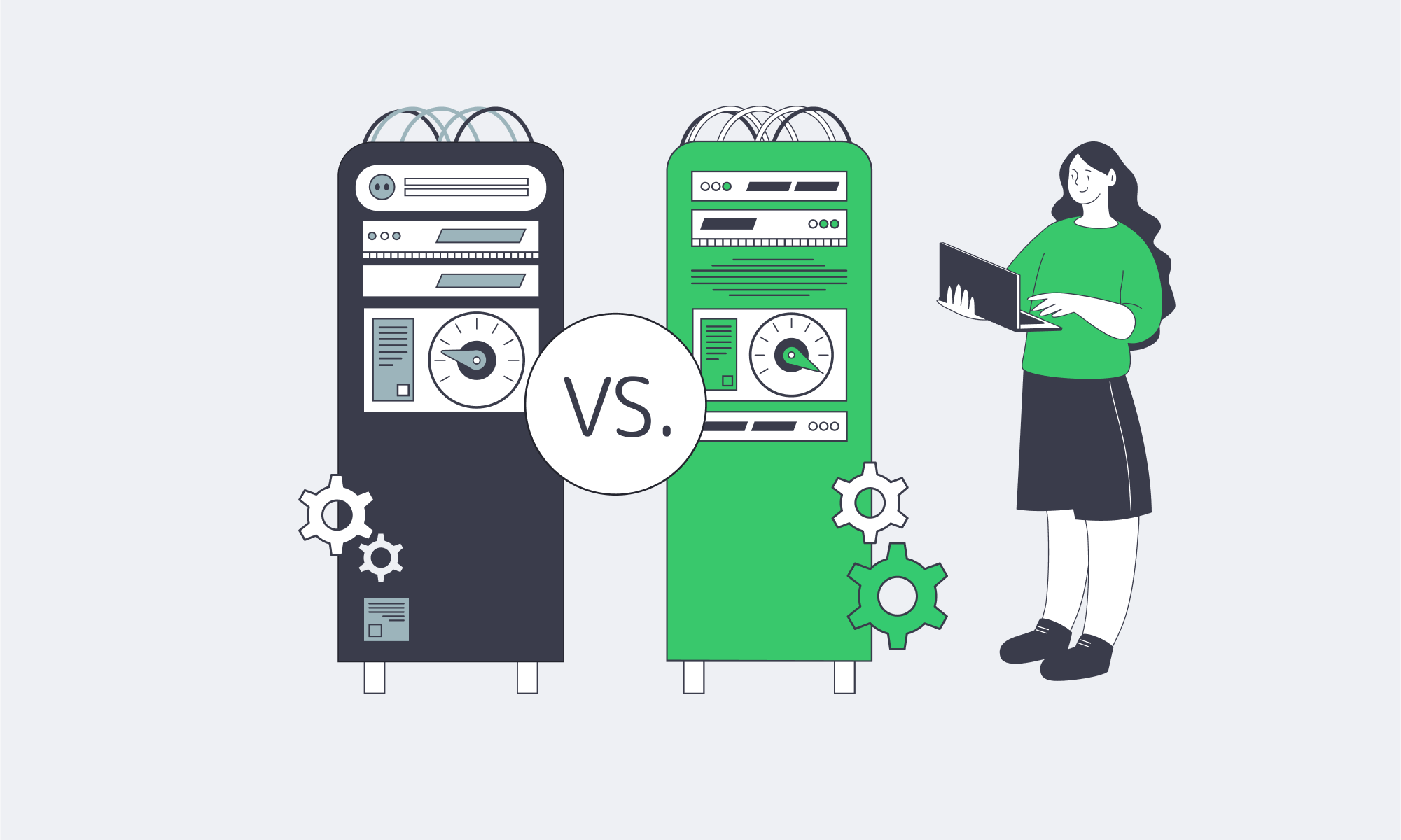
Rock-bottom pricing in a high-cost market has to come from somewhere. In Singapore, it usually comes from old hardware, thin networks, lower-tier facilities, and threadbare support. Those choices externalize risk to you, and the bill arrives as missed revenue, higher recovery costs, and distracted teams. The latency dividend of hosting in Singapore is real; so are the penalties for undermining it with compromised infrastructure.
For buyers who need discipline on spend, the winning move is not “cheapest”; it’s credible value: modern gear, a strong network, resilient facilities, and responsive people. That mix keeps pages fast, incidents rare, and growth plans intact—so your infrastructure behaves like an asset, not a liability.
Ready for Reliable Singapore Servers?
Host where your users are without the performance compromises of bargain plans. Choose modern hardware, a strong network, and 24/7 expert support—at transparent prices.
Get expert support with your services
Blog

24/7 Reliability: Ensuring Maximum Uptime for Affiliate Platforms
Affiliate platforms monetize every minute; if the click → redirect → landing → conversion → payout chain breaks at any point, revenue evaporates. The downtime costs across the industry are pegged by enterprise outage analyses at an average loss of $5,600 per minute, and; even if your costs are less per minute, it soon compounds if an incident isn’t dealt with rapidly and redirects continue.
It won’t just cost you your revenue either; trust soon begins to crumble between affiliates and advertisers who prioritize uptime in partnerships. Affiliates are vying for distribution and budget. Advertisers are more likely to allocate spend to a network with a solid four-nines (99.99%) availability record than to one with recurring hiccups. The thresholds for acceptable downtime are razor-thin; see Table 1.
Table 1 — Availability vs. allowable downtime (per year)
| Uptime percentage | Approx. downtime/year |
|---|---|
| 99.9% | ~8.8 hours |
| 99.99% | ~52.6 minutes |
| 99.999% | ~5.26 minutes |
The above figures are stated in SRE and hosting literature as standard conversions and highlight how hours of downtime can be reduced with marginal uptime improvement.
How Do 99.99% Uptime Servers for Affiliate Networks Eliminate Single Points of Failure
It is a misconception that the reliability of four-nines is simply bought; in reality, it has to be engineered, and that starts with dedicated servers. Servers give the control to engineer out SPOFs. Whether it’s a power issue, a network failure, a server fault, or a software bug, a dedicated setup gives you the control to engineer out single points of failure.
Choose Melbicom— 1,300+ ready-to-go servers — 21 global Tier IV & III data centers — 55+ PoP CDN across 6 continents |
 |
Redundant, data-centered design
For high-availability deployments, you need to first consider the Tier of the data center to give your architecture measurable availability from the get-go. Tier III facilities have a target of 99.982% resulting in ~1.6 hours of annual downtime, whereas Tier IV can slice that down to ~26 minutes per year with their target of 99.995%.
Melbicom operates Tier III/IV data centers worldwide, forming a high-availability network. We publish per-location specifications, and many sites offer 1–200 Gbps per-server bandwidth to support an always-on architecture for affiliate operations with ample headroom during traffic spikes.
Networking through multiple providers
The network architecture also needs to facilitate high availability; you can’t convert traffic that doesn’t reach you. You can implement a few things to make sure that no single carrier, fiber path, or router outage prevents business as usual.
Dual top-of-rack uplinks provide connectivity to separate aggregation planes, with two core routers. You can multi-home your upstream connectivity and use load balancers to perform health checks and distribute traffic to nodes. Using VRRP (or a similar protocol) provides address-failover, ensuring a single gateway failure doesn’t take the cluster offline. With multiple transit providers and plenty of peerings in your routing, you can maintain global reachability.
The network capabilities at Melbicom practically support this design; we have over 20+ transit providers as an ample backbone and an aggregate network capacity of 14+ Tbps allowing you to multi-home smartly. Melbicom can help you provision for reliable continuity regardless of path failures.
Designating clustered application tiers and automating failover
Running your critical tiers as clusters prevents single points of failure. Consider the following for affiliates:
- Click routing/redirects: Via multiple stateless nodes working behind L4/L7 load balancers, each is constantly health-checked, and failed nodes are ejected in seconds.
- Landing experiences are edge-cached via a CDN, with origins deployed in at least two different facilities.
- Datastores: Replicating in pairs or quorum clusters keeps recovery time near-zero. Active-active pairs are used where feasible, if not, fast failover is in place.
Latency can be kept to a minimum with the above pattern; if well maintained, it ensures that any unplanned faults shift traffic automatically and live campaigns remain functioning.
Cushioning origin issues with edge caching
Origin incidents and short-lived congestion can be cushioned through the use of a global CDN. With assets cached, pages can be rendered while origins fail over. The latency that arises with the distance in the equation can be trimmed through edge proximity protecting far-from-origin conversion rates. Melbicom has a wide CDN with more than 55 points of presence that span 36 different countries giving you edges broad enough to keep performance on point should origins experience any hiccups.
Capacity as a control factor
Redundancy is one factor that plays a part in the uptime equation; the other is headroom. If you routinely sustain use riding dangerously close to interface or CPU limits then an outage is just waiting to happen, the moment demands spike unexpectedly. So capacity is important. In terms of network capacity, you should be looking at 1–200 Gbps per-server options to prevent link saturation at peak, and for compute autoscaling, you can keep critical tiers below limits by working across multiple dedicated nodes via queue- or rate-based scaling policies. The Melbicom catalog publicly publishes the per-DC bandwidth options and in-stock configurations we have available that include 1,300+ ready-to-deploy servers that help expand capacity rapidly as needed.
Operational Practices to Keep Always-On Architectures Honest

Monitoring and drills. An actionable “four-nines on paper” plan only becomes a “four-nines in production” reality with monitoring and drills. Telemetry such as health checks, latency SLOs, and error budgets need to be kept an eye on. Taking synthetic probes regionally and putting aggressive alerting systems in place gives you the advantage of reacting before users experience an issue. In addition to tooling, you should schedule failover drills by pulling the plug on a primary database and blackholing a primary carrier. That way, you can make sure that the automation is in place and runbooks work as well as confirm that your teams can clear incidents in a window that meets recovery targets.
Discipline: Remember, many outages are self-inflicted, but testing through staged rollouts with canaries can help limit and prevent them. You can also automate rollback for routing, configuration, and application changes to remove human error.
An affiliate platform checklist for HA hosting
- Facilities with redundant power and cooling (Tier III/IV): review stated uptime values.
- Multi-provider transit available and redundant routing for flexibility from rack → aggregation → core → edge to ensure you are always-on.
- Health-checked load balancing across multiple servers for each tier, with automated failover in place.
- Cushioning of origin issues via CDN edge caching to reduce latency variability and keep paths active.
- Sufficient headroom to keep interfaces, CPUs, and queues below thresholds during traffic surges.
- Monitor telemetry, rehearse incident response, and feed findings from runbooks, paging, and postmortems back into your architecture design.
Always-on across regions
A blast radius can be contained through geographic segmentation. By deploying in two or more facilities on different metro power grids and carrier mixes, you keep global traffic converting. Should one stumble, the regional traffic is re-anchored near the next healthy origin with edge caching protecting it.
SLA-backing for cashback sites
Perceived tracking gaps can be detrimental to cashback sites and loyalty portals. SLA backing is important, although it doesn’t create uptime it can help by encoding expectations and incentives. First, consider your risk model, and then tailor availability commitments that align with it—high-nine targets for the tracking plane, transparent maintenance windows, and clear remedies. Make sure your architecture diagrams, provider certification links, and public status histories meet your agreements.
How Does Modern Infrastructure Achieve Four-Nines?
Maintaining availability at four-nines equates to ~52.6 minutes of downtime/year or about 4m 23s per month. Stacks can be designed so that you decide when those minutes are, ensuring they are during controlled maintenance and not when failure dictates.
- Engineer with the numbers as focus: With an SLA target of 99.99%, outage minutes across all incident classes need to land under ~52.6, requiring you to be strict. Dual routers are a must as are multi-region origins and health-checked service discovery instead of static targets.
- Maintenance budget planning: Although the risk floor is mitigated with Tier III/IV design, bad changes can affect targets. Active-active designs make maintenance transparent to users and keep experiences positive. You should also freeze risky changes during peak campaigns.
- Quarterly proof: Testing journeys and forced failovers synthetically from each region helps validate and make sure payouts stay intact.
Engineering Uptime that Protects Revenue: A Concise Summary

- Uptime protects revenues: The costs of an “average” outage can escalate quickly, make sure it is minutes annually and not hours of allowable downtime.
- Single points of failure elimination is key: Prevent isolated faults from having a knock-on effect through redundant power and cooling, the use of clustered servers, and multi-providers for active transit at all times.
- The edge is your advantage: Operating with CDN caching at the edge while keeping origins regional ensures positive user experiences and conversions during re-routing and failovers.
- Engineer to the numbers: Four-nines is ~52.6 minutes/year so your maintenance and incident budgets must align with that math. Drills can help you to verify.
- Vet partners: Validate your partners by reviewing published DC certifications, multi-provider networks. Inventories and bandwidth options should be verifiable.
A Practical Path to Four-Nines

It is no use hoping for availability when it is essentially a product requirement for affiliate work. Instead of leaving it to chance, engineer your architecture to ensure it. Start with two independent facilities for your core origin clusters; multi-provider transit with load-balancer-driven health checks; a load-balanced tracking plane; and a CDN that keeps static assets rendering when origins are busy or failing over. With all of the above, you can map click-to-payout journeys and assign SLOs and error budgets for every step, and size your capacity to prevent peaks from touching the redline. After that, you can instrument everything, rehearse for failure, and schedule controlled maintenance to make sure every moment counts.
With our Tier III/IV data-center options, 1–200 Gbps per-server bandwidth tiers, and 22 transit providers on a path-diverse backbone, we support the high-availability architectures affiliate platforms require. We also have a CDN with 55+ PoPs so that you can choose your regions and build to meet your traffic needs. Our 24/7 technical support is free of charge and ensures peace of mind for uptime.
Build your 99.99% uptime plan
Talk with our experts to choose the right data-center pairings, bandwidth tiers, and CDN edges that keep your affiliate campaigns online around the clock.
Get expert support with your services
Blog

Hybrid ERP Hosting for Cost, Control, and Speed
Public cloud made ERP modernization feel inevitable. But a sharper set of pressures—security and data sovereignty mandates, AI-driven analytics, real-time global access, and ballooning cloud bills—has pushed enterprises toward a more deliberate balance between cloud and dedicated infrastructure. The question isn’t “cloud or on-prem,” it’s how to blend both to get control, performance, and predictable cost.
Why Are Organizations Rebalancing Now?
Three forces dominate the recalculation:
- Cost variability. Cloud’s elasticity comes with opaque pricing. In the latest industry benchmark, 84% of organizations said managing cloud spend is their top challenge; budgets run ~17% over, and waste regularly lands around 30%+ of spend. Those are the very dynamics driving workload-by-workload rethinks.
- Sovereignty and control. New “sovereign cloud” options from major ERP providers underscore how serious data residency and jurisdiction have become. SAP expanded its Sovereign Cloud portfolio—including an “On-Site” model—to let customers keep workloads under local control. In parallel, AWS announced an EU-only operated European Sovereign Cloud to satisfy residency and administrative-control requirements.
- Performance and AI gravity. The further users are from the ERP, the more productivity takes a hit; Amazon’s famous finding—every extra 100 ms costs ~1% in sales—remains a simple proxy for how latency degrades outcomes. Meanwhile, AI features inside ERP (forecasting, anomaly detection, copilots) pull compute to where the data lives, often favoring dedicated machines for steady, high-throughput work.
A clearer picture emerges: cloud remains powerful for bursty or edge use cases, but security, sovereignty, and predictable performance are pushing core ERP components—especially databases—toward dedicated servers or private clouds.
Choose Melbicom— 1,300+ ready-to-go servers — 21 global Tier IV & III data centers — 55+ PoP CDN across 6 continents |
|
What Pitfalls of Cloud-Only ERP Hosting Matter Most?
- Unpredictable bills and waste. Egress, cross-region traffic, peak autoscaling, and orphaned resources drive overruns. Flexera’s latest data (84% cite spend management as the top challenge; ~17% over budget; ~30% waste) explains the wave of targeted repatriations—moving only specific ERP components where cost and control matter most. Barclays’ survey figure—83% of enterprises planning some repatriation—put a spotlight on the trend (with analysts noting the nuance: some workloads, not all).
- Latency and variability. Multi-tenant cloud is efficient, but “noisy neighbors” and distance from users introduce jitter. Dedicated servers isolate resources and let teams place compute near users (or near regulated data) to reduce round-trips—often the cheapest way to buy back seconds of user time.
- Integration and data gravity. ERP is never alone; it ties to MES/SCM/CRM, data lakes, and print/reporting servers. When source databases sit in one region and analytics or spreadsheets in another, latency and egress fees bite. Offloading reporting to local dedicated nodes (for example, running Epicor Spreadsheet Server against a nearby database) curbs both cost and lag. (Functionally, the same idea applies to a Sage X3 print server kept close to printers.)
- Security posture. Cloud is a shared-responsibility model; misconfiguration remains a common failure mode. For regulated datasets, single-tenant dedicated hardware simplify isolation, auditing, and key custody—and can sit in jurisdictions you control.
What is the Best ERP Server Hosting Mix for Control, Performance, and Cost?
Best ERP server hosting is rarely a single environment. A pragmatic pattern looks like this:
- Keep stateful, sensitive cores on dedicated servers or in a private cloud (your racks or a hosting partner) to meet data residency, performance, and customization needs.
- Use public cloud tactically—for development/test, burst analytics, seasonal closes, or global fan-out of stateless web tiers.
- Place nodes where your users and laws are. Distribute read replicas and app tiers to reduce latency without violating residency policies.
Sovereign-cloud moves by major vendors validate this trajectory. SAP’s sovereign and on-site options acknowledge that for many, control is a feature, not a bug. AWS’s EU-only operation model makes the same point from the infrastructure side.
How Do AI-driven ERP Analytics Change Infrastructure Choices?
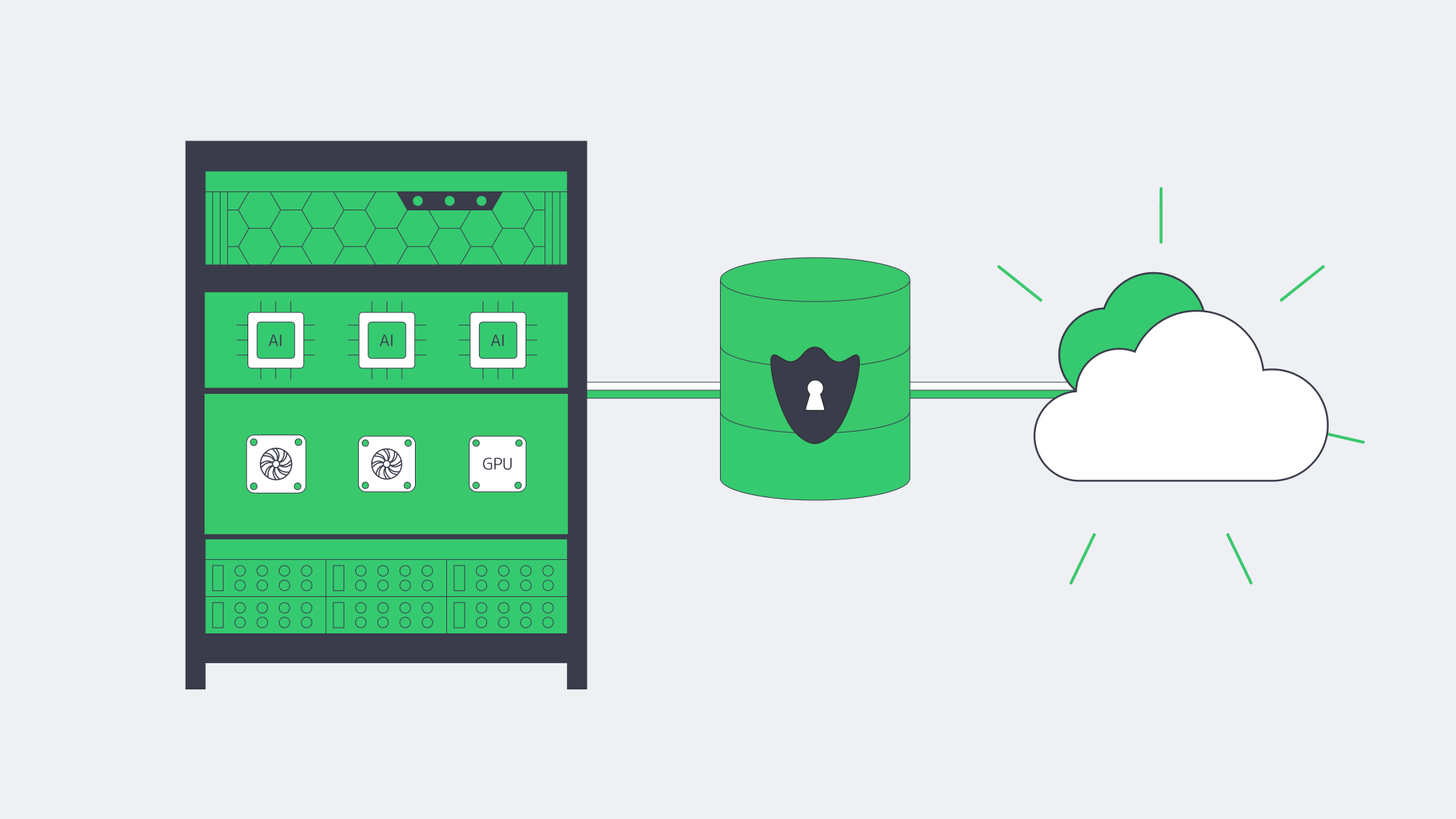
- Compute placement. Training and inference against ERP data (forecasts, quality alerts, fraud checks) benefit from high-memory, GPU-capable servers sitting close to the ERP database to minimize data movement and latency. Renting cloud GPUs ad-hoc is useful for spikes; renting dedicated GPU servers is often cheaper for continuous workloads.
- Data governance. Many teams are uncomfortable shipping sensitive ERP rows to third-party AI services. Keeping models next to the data, on dedicated hardware, preserves control and auditability.
This isn’t theoretical: surveys show more than 65% of organizations view AI as critical to ERP, and ~40% say built-in AI features influence ERP investment—evidence that infrastructure must evolve to feed AI features without breaking budget or policy.
How Can Companies Deliver Real-Time Global ERP Access Without Breaking Sovereignty Rules?
Distribute, cache, and route smartly. A few practical moves:
- Multi-region placement. Run the ERP database where the law requires, but deploy regional app tiers/read replicas near users.
- CDN acceleration. Cache static ERP assets (login pages, scripts, generated documents) at the edge. Melbicom’s CDN spans 55+ PoPs across 36 countries, making it easier to keep interfaces snappy while the system of record stays anchored in-country.
- High-bandwidth backbones. Where replication is needed, bandwidth matters. Melbicom’s network offers 14+ Tbps of aggregate capacity; location profiles indicate 1–200 Gbps per server, allowing aggressive sync and burst windows without throttling.
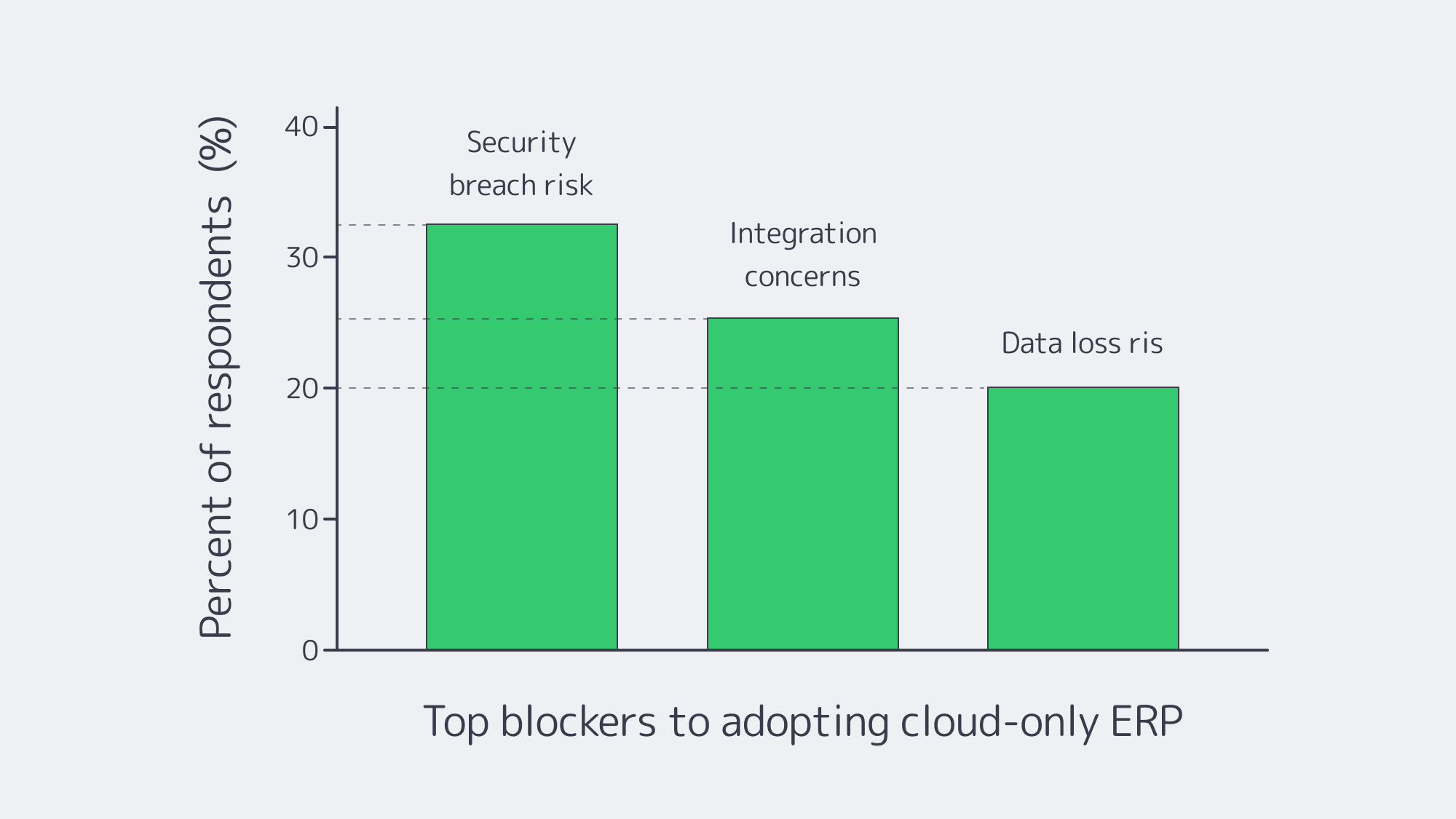
Chart — key blockers to cloud-only ERP adoption. Source: NetSuite.
Platform-Specific Notes That Shape Hosting (Quick Reference)
Odoo, IFS, Workday, Epicor, Infor, Sage X3
- Odoo server requirements. PostgreSQL-backed; small teams can start with a few vCPUs/GBs of RAM, but large, module-heavy estates benefit from an Odoo dedicated server (tuned I/O, pinned CPU, NVMe). An Odoo hosting server paired with a separate analytics node keeps reporting off the OLTP path.
- IFS server. Often Windows/SQL-Server heavy with industry add-ons; many deployments favor dedicated clusters for performance isolation and compliance.
- Workday server / Workday server locations. Workday is SaaS; customers select a region, but cannot self-host or enforce the same level of in-country control, which is why some orgs keep adjacent systems on dedicated servers to satisfy sovereignty rules.
- Epicor server. Manufacturers still run Epicor (Kinetic) on local dedicated servers tied to shop-floor systems. Epicor Spreadsheet Server benefits from local proximity to the DB.
- Infor server. Single-tenant deployments (self-hosted or partner-hosted) remain common where validation and customization are strict.
- Sage X3 print server. Keeping a dedicated print/reporting node on the same LAN slashes latency and avoids egress costs.
Table — What Changes When You Shift ERP Cores to Dedicated?
| Dimension | Dedicated servers / private cloud | Public cloud (SaaS/IaaS) |
|---|---|---|
| Data control | Pin data to specific countries/racks; single-tenant isolation. | Region choice, but less administrative and legal control. |
| Performance | Consistent, no noisy neighbors; place compute near users/data. | Elastic, but variable; latency tied to region distance. |
| Cost profile | Fixed, predictable; no egress fees. | Variable; prone to surprise fees and waste without tight FinOps. |
Which Modern Solutions Actually Resolve Today’s ERP Constraints?
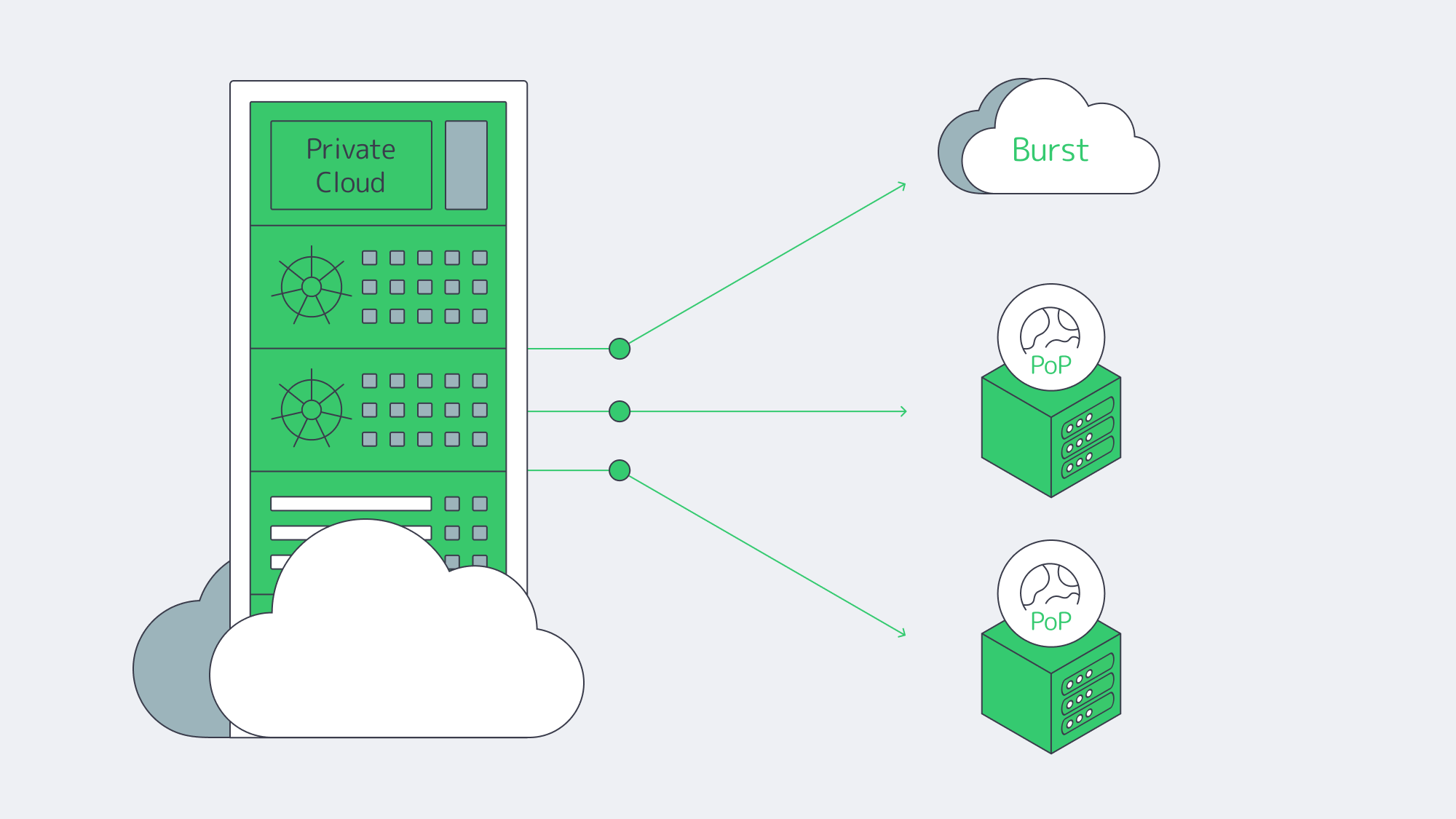
Hybrid architectures, by design. Treat the cloud as an extension of your dedicated footprint. Keep ERP databases on private or dedicated nodes; burst stateless services (APIs, web) to cloud as needed. Many organizations now plan or execute partial repatriations to rebalance cost and control—83% in one survey, with analysts clarifying that the number reflects some workloads moved, not whole-sale exits.
Private cloud and HCI. Build cloud-like agility on dedicated hardware (VMware/Hyper-V/Kubernetes). You get self-service provisioning and policy control, w/o multi-tenant risk.
FinOps discipline. Even in hybrid, the cloud portion needs guardrails. Flexera’s dataset highlights the levers: continuous rightsizing, reserved capacity for steady loads, and ruthless egress avoidance. Spend governance is now as critical as identity governance.
Edge + CDN choreography. Pin state to lawful regions; project UX globally by caching and smart routing. Melbicom’s CDN and global dedicated footprint let teams place ERP nodes where users are, while we keep the backbone fat and predictable.
Key Steps to Blueprint a Durable ERP Hosting Strategy
- Start with non-negotiables. Map sovereignty constraints, RTO/RPO, and latency budgets per region. Use those to decide where cores must live.
- Model true TCO across scenarios. Include egress, cross-region sync, and idle capacity.
- Place compute by data gravity. Run analytics/AI close to ERP data on dedicated or GPU nodes; burst to cloud for exceptional spikes.
- Design for distribution. Replicas and app tiers near users; CDN for static assets and heavy report delivery.
- Instrument and iterate. Apply FinOps to cloud and capacity planning to dedicated. Revisit placement quarterly as usage, laws, and AI needs evolve.
Balance for Sovereignty, Speed, and Spend

The new equilibrium for ERP is hybrid on purpose: dedicated servers or private cloud for the stateful, sensitive core; cloud where elasticity or reach is uniquely valuable. This blueprint squares the triangle of sovereignty, speed, and spend: regulate where data lives, minimize how far it travels, and predict what it costs.
Enterprises that act now—consolidating ERP cores on dedicated infrastructure, distributing app tiers and caches globally, and governing cloud usage with FinOps—will land an ERP estate that is faster, safer, and easier to budget for.
Talk to ERP Hosting Experts
Get a tailored ERP hosting plan with dedicated servers, global CDN, and 24/7 support, all optimized for sovereignty and cost.
Get expert support with your services
Blog

Navigating Adult VR Hosting Solutions and Why Choose Dedicated Servers
Immersive adult experiences—high-resolution 180°/360° VR scenes, live multi-camera shoots, and interactive adult gaming—are now mainstream engineering problems. What used to be a single HLS ladder is becoming a GPU-accelerated, edge-anchored, multi-protocol pipeline that must hold quality under extreme concurrency while keeping motion-to-photon latency imperceptible inside a headset. Below, we zero in on the infrastructure demands behind these formats and how dedicated servers, paired with an edge CDN and modern codecs, provide the determinism, bandwidth, and compute density needed to deliver them at scale.
Choose Melbicom— 1,300+ ready-to-go servers — 21 global Tier IV & III data centers — 55+ PoP CDN across 6 continents |
|
What Makes Immersive Adult Content So Hard to Host Well?
Throughput per viewer is an order of magnitude higher. An 8K 360° VR stream generally sits in the 60–100 Mbps range without viewport optimization or tiling; even well-engineered tiled streaming aims to keep decode within similar envelopes on the device. That’s 10× the bitrates of typical 1080p OTT ladders and still far above most 4K flatscreen profiles. Multiply by thousands of concurrent viewers at release and your origins must sustain multi-terabit bursts without jitter.
Latency budgets tighten dramatically. In VR, “good enough” isn’t seconds—it’s tens of milliseconds. Motion-to-photon (MTP) latency targets around ≤ 20 ms are widely cited in Cloud-VR and academic measurements; commercial headsets measured at 21–42 ms at movement onset require aggressive prediction to keep perceived latency inside comfort thresholds. The network portion of that budget must be shaved via regional ingest and edge-proximate delivery or interaction will feel wrong.
Protocols must match the experience. At one end, WebRTC reliably delivers sub-500 ms glass-to-glass latency for interactivity and live VR cam shows; at the other, Low-Latency HLS (LL-HLS) achieves ~2–5 s (sometimes lower with aggressive tuning) while preserving HTTP scalability and CDN friendliness. A production pipeline for adult VR rarely picks one protocol—it mixes them by workload.
Compute shifts from “nice to have” to “hard requirement.” Real-time HEVC/AV1 encoding for stereoscopic 4K and 8K ladders, AI-assisted upscaling/denoising, multi-angle compositing, and interactive state synchronization all compete for cycles. Hardware encoders (NVIDIA NVENC) now support AV1 and HEVC end-to-end—critical for meeting bitrate targets without sacrificing quality—while modern GPUs add split-frame and tiling modes to lift 8K throughput. Pair that with NVMe storage to avoid I/O stalls when segmenting large VR assets.
Global proximity matters. Moving the session logic and media edge close to the viewer is the only way to keep RTT and jitter inside headset-friendly limits. That means multi-origin deployment across continents and a CDN footprint dense enough to keep last-mile hops short during peaks. Melbicom’s footprint—21 data-center locations, per-server ports up to 200 Gbps, and a CDN with 55+ PoPs across 36 countries—was designed for exactly this pattern: put origins near exchanges, fan out cached segments globally, and place ultra-low-latency nodes where interactivity demands WebRTC.
Brief context: why the old stack fails
Classic OTT stacks assumed seconds of buffer, a handful of renditions, and region-limited audiences. They struggle when 8K stereoscopic assets must be transcoded in real time, and when control channels (camera switching, avatar state, haptic triggers) need sub-second round-trip. The modern answer is not “one giant cloud region,” but single-tenant dedicated servers tuned for throughput, paired with an edge CDN and regionally distributed real-time nodes. (Think: origins in Amsterdam/Ashburn/Singapore, WebRTC SFUs in additional metros, CDN caching everywhere your users are.)
Which Adult VR Hosting Solutions Actually Scale Globally?

1) GPU-optimized dedicated origins for encode, packaging, and authorization
VR ladders drive extreme parallel encodes. Dedicated servers with GPUs (AV1/HEVC via NVENC) cut encoder latency and shrink bitrates at constant quality, improving delivery economics while preserving clarity in head-locked views. NVENC’s current generations support AV1 8/10-bit and HEVC 8/10-bit pipelines; AV1 typically saves ~40% bitrate vs H.264 at comparable quality—meaning the network carries less data per user for the same perceived sharpness. On CPU-heavy workflows (e.g., volumetric preprocessing, AI stabilization), the same box can host CUDA kernels beside encoders to avoid PCIe round-trips. We at Melbicom provision GPU dedicated servers with high-speed NICs so your ingest/encode nodes aren’t starved by the network.
2) Edge CDN for scale; edge compute for interactivity
On-demand VR scenes cache efficiently. Use LL-HLS over a 55+ PoP CDN to keep last-mile latency low while origins focus on cache fill and authorization. For live VR cams and interactive adult gaming hosting, place WebRTC SFUs or micro-services (state sync, avatar presence, telemetry) on dedicated edge nodes. Operators routinely target < 500 ms for two-way interactions and 2–5 s for broadcast-style events; choosing per-workload protocols—and placing servers appropriately—is the difference between “immersive” and “makes you queasy.” Melbicom’s CDN and regional data centers let you anchor compute in the right metros and fan out assets globally.
3) High-bandwidth NICs and deterministic networking
VR peaks aren’t polite. Origins must burst 100 GbE (and above) without head-of-line blocking. Melbicom equips servers with 1–200 Gbps physical ports and ties them into a backbone engineered for high aggregate throughput, so your egress ceiling is the NIC—not the provider’s fabric. Deterministic NICs also reduce jitter into your encoder/packager chain, improving CTS/DTS alignment and reducing player drift.
4) NVMe for asset prep; S3-compatible object storage for libraries
VR masters are enormous. NVMe SSDs keep packaging/transmux and thumbnail/extract steps from blocking on I/O, while S3-compatible storage holds the long tail economically. Melbicom’s S3-compatible storage supports 1–500 TB per tenant/bucket with free ingress, making it natural to stage new scenes from encode nodes to durable storage and let the CDN fetch on demand.
5) Multi-origin layouts (don’t centralize your failure domain)
Spread origins across at least two regions per primary market. That keeps origin RTT short for the CDN, raises cache hit ratios at the edge, and avoids a single encoder pool becoming your global bottleneck when a new interactive release spikes. Melbicom operates in 21 global locations; we routinely place origins at major IX hubs (e.g., AMS-IX, DE-CIX, LINX) so your CDN “first mile” stays short and predictable.
Example workload mapping (adult VR focus)
| Workload | What it demands | What to deploy |
|---|---|---|
| 8K/4K stereoscopic VR VOD | 60–100 Mbps per viewer; large objects; global reach | GPU-equipped dedicated origins for AV1/HEVC; LL-HLS packaging; CDN with 55+ PoPs; NVMe scratch + S3 library. |
| Live VR cam & Q&A | Sub-500 ms interaction; regional ingest; rapid scale-up | WebRTC ingest/SFU on edge dedicated servers; 100 GbE NICs for fan-out; multi-origin failover. |
| Interactive adult gaming hosting (VR worlds/minigames) | 20–50 ms RTT targets; state sync; bursty peaks | Regional game/logic servers; proximity-aware routing; CDN for static assets; telemetry backhaul to origins. |
Architecture building blocks that work in production
- Encode where you ingest. Use regionally distributed GPU-optimized dedicated servers to transcode ladders near cameras and contributors; ship packaged outputs to nearby origins/CDN to minimize first-mile.
- Pick protocols by interaction level. WebRTC for two-way/live control; LL-HLS for scale when chat latency is tolerable. Keep the player’s buffer discipline separate from the control channel.
- Keep the network fat and simple. Favor 1–200 Gbps physical NICs with straightforward routing from origin to CDN. Jitter kills more VR QoE than raw throughput deficits.
- Use NVMe for hot paths; S3 for the library. Stage transcodes on NVMe, publish to S3-compatible storage, and let the CDN fill. This keeps origins autoscalable.
- Exploit AV1 where devices support it. AV1 saves ~40% bitrate at similar quality versus H.264; fall back to HEVC/H.264 as needed by headset/browser.
Why dedicated (single-tenant) servers instead of “just cloud VMs”?
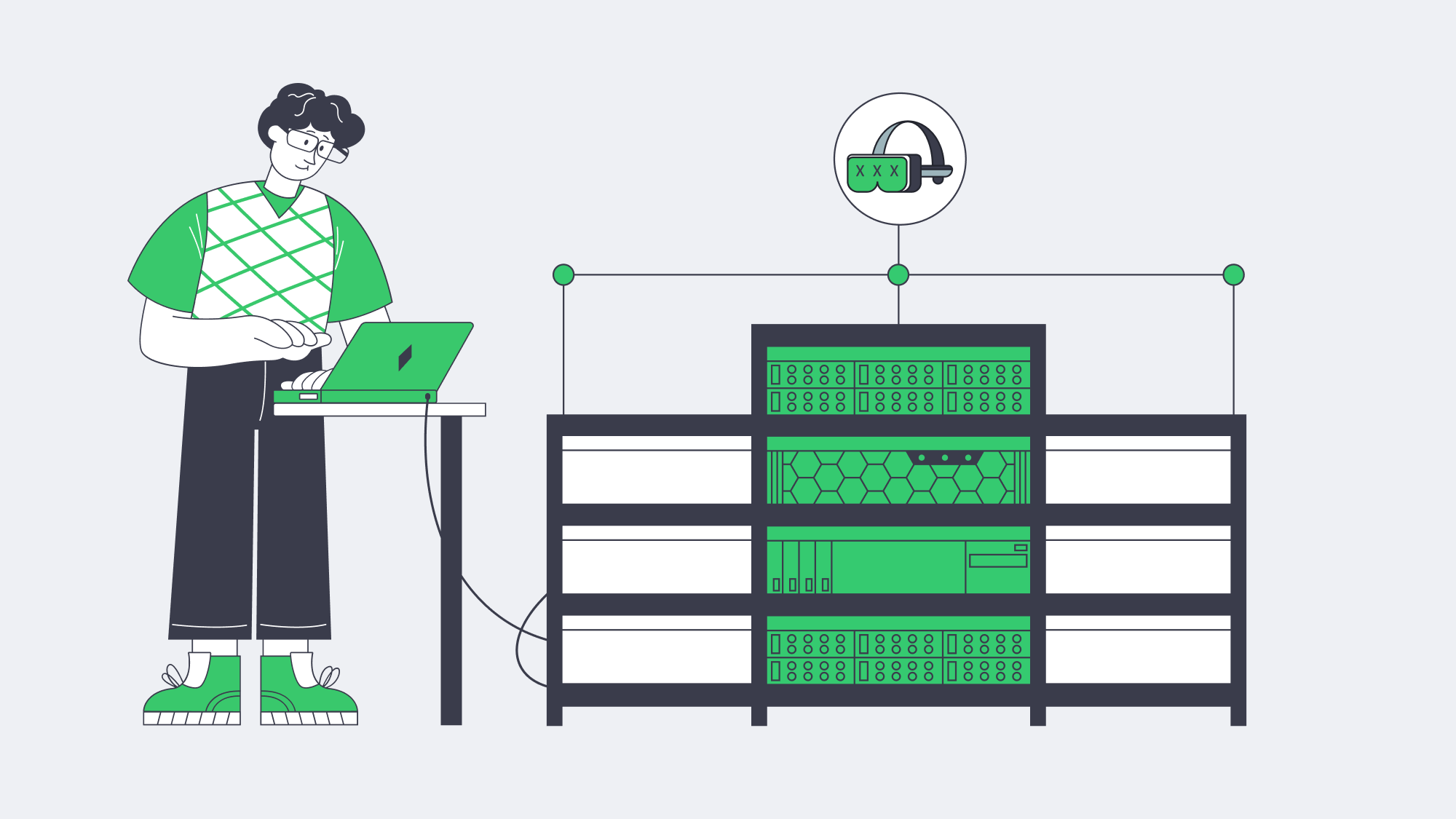
VR delivery is determinism-sensitive. You want guaranteed NIC bandwidth, exclusive CPU caches, and unshared NVMe queues when ladders spike. Dedicated servers give you root-level control to tune queues, congestion control, and driver stacks around real-time behaviors. Melbicom’s dedicated platform offers 1,000+ ready-to-go configurations, ports up to 200 Gbps, and 24/7 support, so you can size machines to the role—encode, origin, edge compute—without noisy-neighbor effects or egress metering surprises. Pair those with 55+ CDN locations so your viewers hit the nearest edge by default.
Reference pipeline
- Ingest/Encode (GPU) → Packager (per-workload: LL-HLS segments + WebRTC tracks) → Regional Origins (Ashburn, Amsterdam, Singapore, etc.) → CDN (55+ PoPs) for VOD/live cache → Edge WebRTC SFUs for sub-second interactions → Players & headsets.
- Storage: NVMe scratch on encode nodes; S3-compatible object storage for masters and long-tail renditions.
Implementation notes you can apply tomorrow
- Viewport-aware or tiled streaming for 8K 360° keeps device decode and network budgets sane. Use AV1 when the device supports it; HEVC otherwise.
- Hybrid live: LL-HLS for the “watch” cohort, parallel WebRTC for a smaller “interact” cohort (tip, vote, switch camera) sharing the same production feed.
- Edge selection: Direct interactive users to the nearest WebRTC SFU; leave VOD to CDN affinity. Melbicom’s multi-region footprint simplifies this split-brain routing.
How Should You Move from Pilot to Production without Re-Architecting Twice?
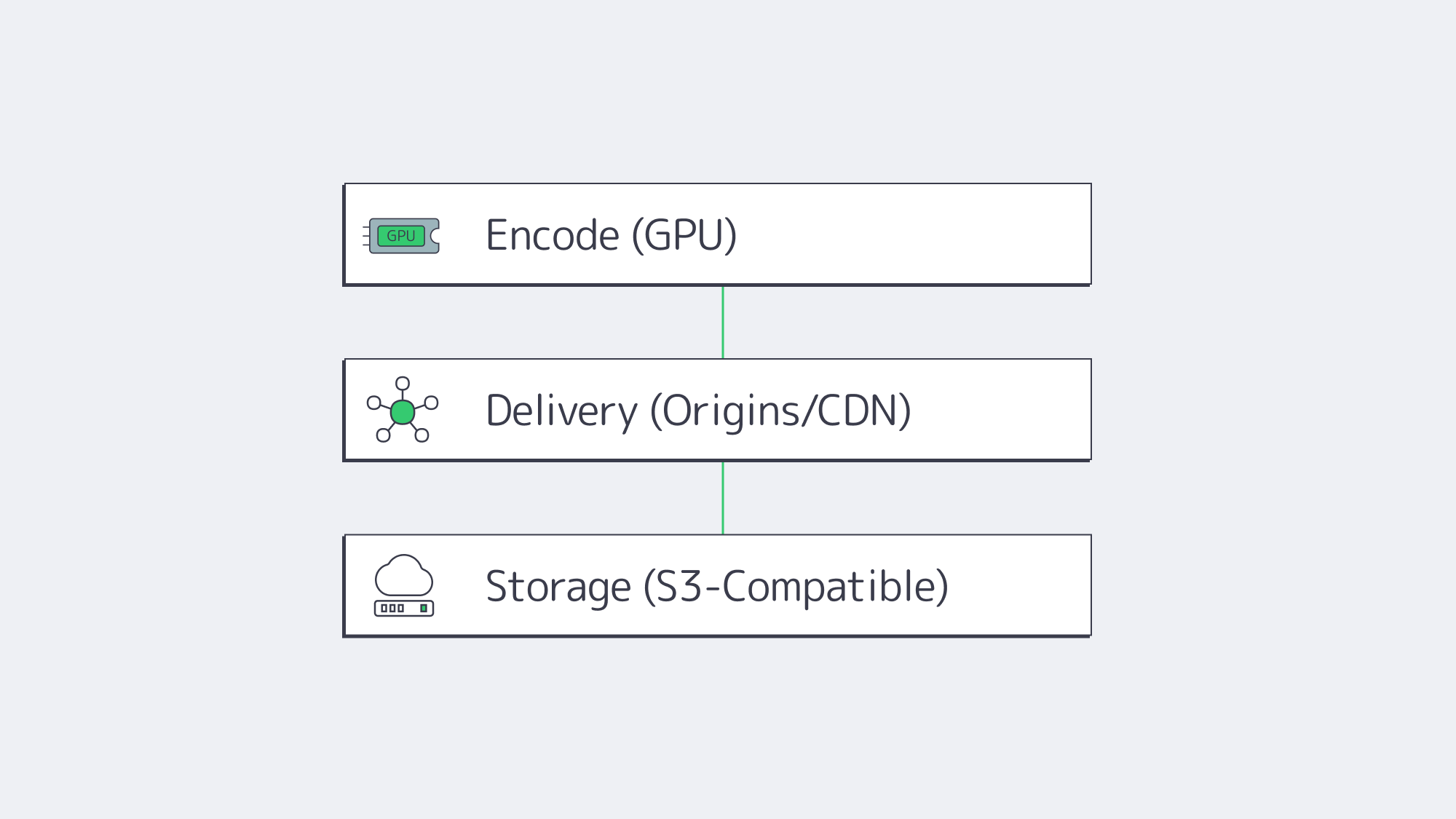
Start by right-sizing the three planes of your system:
- Encode plane: Place GPU encoders in the same metros where you gather content or where creators connect. Prefer AV1 when headsets/browsers decode it; keep HEVC ladders for fallback. Use NVMe for segmenting and thumbnails to maintain deterministic encode-to-publish timing.
- Delivery plane: Publish LL-HLS ladders to local origins (2 per market minimum), then cache via a CDN for scale; route interactive cohorts to edge WebRTC. This keeps your broadcast audience happy while preserving the < 500 ms paths required for presence.
- Storage plane: Keep your library on S3-compatible storage (multi-TB to hundreds of TB per tenant), with lifecycle rules to tier older renditions; serve “first frames” from NVMe caches on origins to minimize startup delay.
The outcome is a pipeline that de-risks growth: you can add origins by region, add encoders by ladder, and drop in new edge compute nodes as interactive formats evolve—without replacing your core.
Launch Your VR Platform
Get servers, storage, and a global CDN deployed within hours—purpose-built for bandwidth-intensive 180°/360° adult VR streaming.