
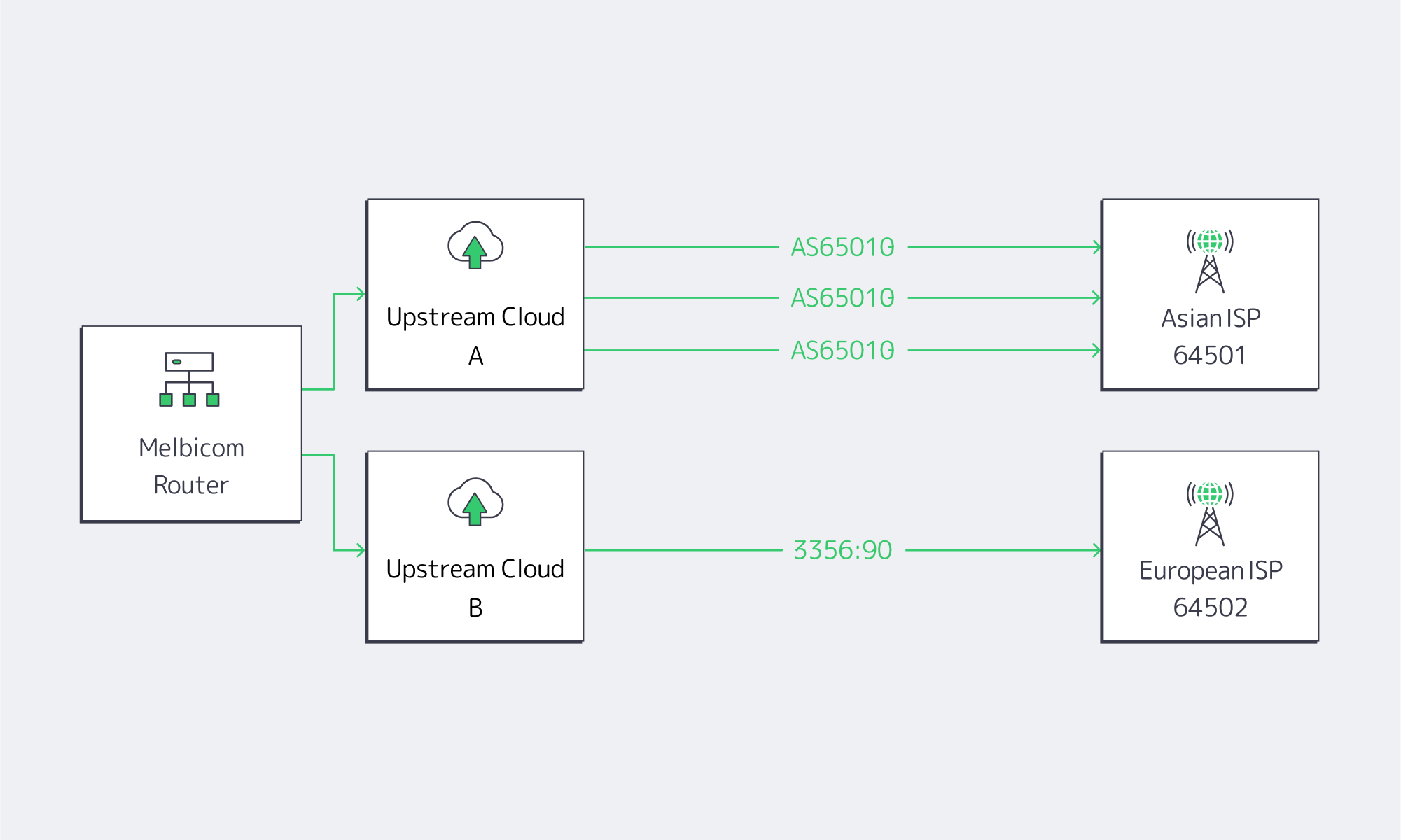
Melbicom guides clients to roll out targeted prepends in 3 phases: lab verify > announce to a /24 test prefix > extend to full production. Because our backbone links multiple upstreams in every POP, we can confirm prepend takes effect via looking-glass snapshots.
Author: Melbicom
Blog

Hybrid ERP Hosting for Cost, Control, and Speed
Public cloud made ERP modernization feel inevitable. But a sharper set of pressures—security and data sovereignty mandates, AI-driven analytics, real-time global access, and ballooning cloud bills—has pushed enterprises toward a more deliberate balance between cloud and dedicated infrastructure. The question isn’t “cloud or on-prem,” it’s how to blend both to get control, performance, and predictable cost.
Why Are Organizations Rebalancing Now?
Three forces dominate the recalculation:
- Cost variability. Cloud’s elasticity comes with opaque pricing. In the latest industry benchmark, 84% of organizations said managing cloud spend is their top challenge; budgets run ~17% over, and waste regularly lands around 30%+ of spend. Those are the very dynamics driving workload-by-workload rethinks.
- Sovereignty and control. New “sovereign cloud” options from major ERP providers underscore how serious data residency and jurisdiction have become. SAP expanded its Sovereign Cloud portfolio—including an “On-Site” model—to let customers keep workloads under local control. In parallel, AWS announced an EU-only operated European Sovereign Cloud to satisfy residency and administrative-control requirements.
- Performance and AI gravity. The further users are from the ERP, the more productivity takes a hit; Amazon’s famous finding—every extra 100 ms costs ~1% in sales—remains a simple proxy for how latency degrades outcomes. Meanwhile, AI features inside ERP (forecasting, anomaly detection, copilots) pull compute to where the data lives, often favoring dedicated machines for steady, high-throughput work.
A clearer picture emerges: cloud remains powerful for bursty or edge use cases, but security, sovereignty, and predictable performance are pushing core ERP components—especially databases—toward dedicated servers or private clouds.
Choose Melbicom— 1,300+ ready-to-go servers — 21 global Tier IV & III data centers — 55+ PoP CDN across 6 continents |
 |
What Pitfalls of Cloud-Only ERP Hosting Matter Most?
- Unpredictable bills and waste. Egress, cross-region traffic, peak autoscaling, and orphaned resources drive overruns. Flexera’s latest data (84% cite spend management as the top challenge; ~17% over budget; ~30% waste) explains the wave of targeted repatriations—moving only specific ERP components where cost and control matter most. Barclays’ survey figure—83% of enterprises planning some repatriation—put a spotlight on the trend (with analysts noting the nuance: some workloads, not all).
- Latency and variability. Multi-tenant cloud is efficient, but “noisy neighbors” and distance from users introduce jitter. Dedicated servers isolate resources and let teams place compute near users (or near regulated data) to reduce round-trips—often the cheapest way to buy back seconds of user time.
- Integration and data gravity. ERP is never alone; it ties to MES/SCM/CRM, data lakes, and print/reporting servers. When source databases sit in one region and analytics or spreadsheets in another, latency and egress fees bite. Offloading reporting to local dedicated nodes (for example, running Epicor Spreadsheet Server against a nearby database) curbs both cost and lag. (Functionally, the same idea applies to a Sage X3 print server kept close to printers.)
- Security posture. Cloud is a shared-responsibility model; misconfiguration remains a common failure mode. For regulated datasets, single-tenant dedicated hardware simplify isolation, auditing, and key custody—and can sit in jurisdictions you control.
What is the Best ERP Server Hosting Mix for Control, Performance, and Cost?
Best ERP server hosting is rarely a single environment. A pragmatic pattern looks like this:
- Keep stateful, sensitive cores on dedicated servers or in a private cloud (your racks or a hosting partner) to meet data residency, performance, and customization needs.
- Use public cloud tactically—for development/test, burst analytics, seasonal closes, or global fan-out of stateless web tiers.
- Place nodes where your users and laws are. Distribute read replicas and app tiers to reduce latency without violating residency policies.
Sovereign-cloud moves by major vendors validate this trajectory. SAP’s sovereign and on-site options acknowledge that for many, control is a feature, not a bug. AWS’s EU-only operation model makes the same point from the infrastructure side.
How Do AI-driven ERP Analytics Change Infrastructure Choices?
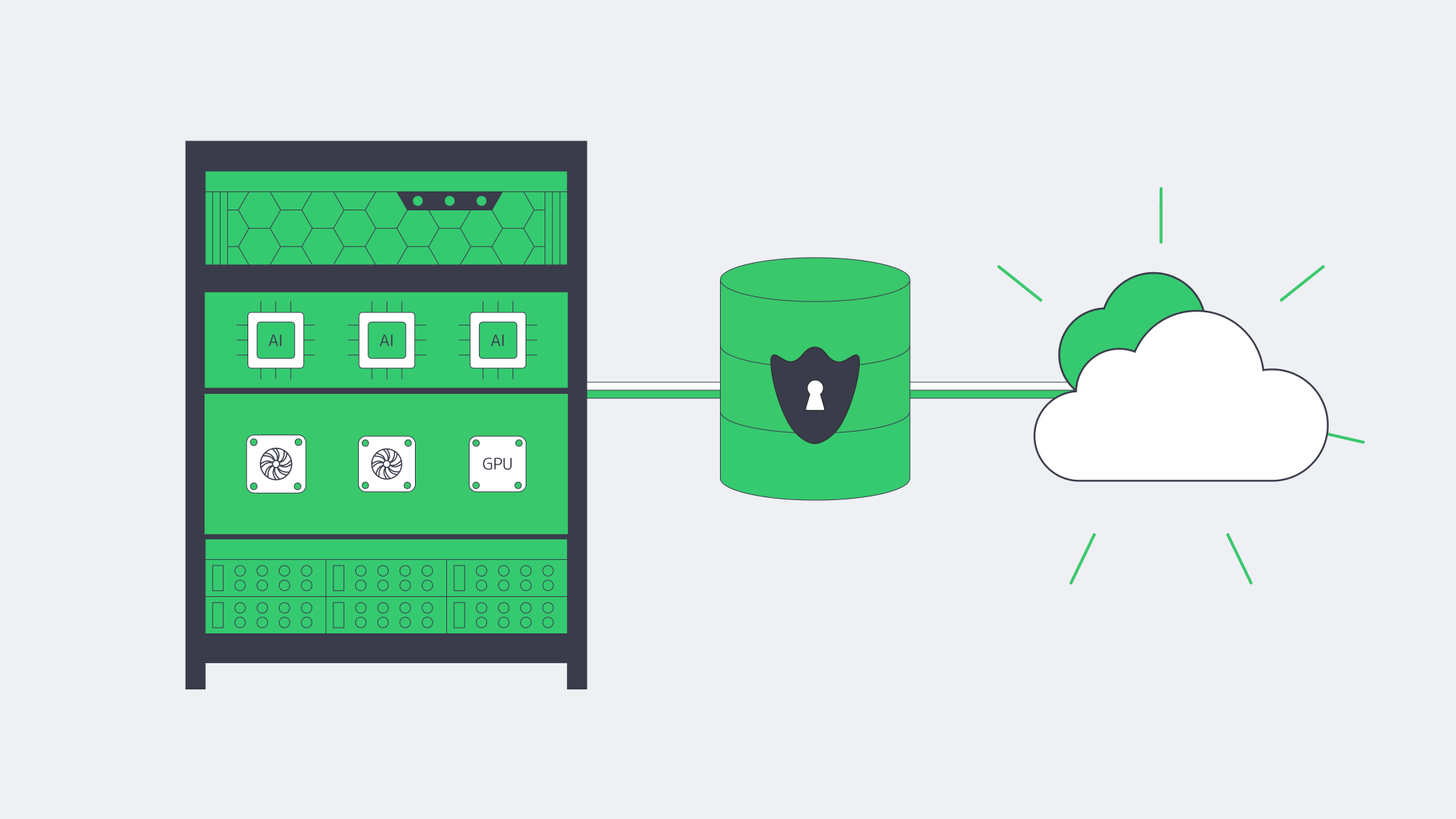
- Compute placement. Training and inference against ERP data (forecasts, quality alerts, fraud checks) benefit from high-memory, GPU-capable servers sitting close to the ERP database to minimize data movement and latency. Renting cloud GPUs ad-hoc is useful for spikes; renting dedicated GPU servers is often cheaper for continuous workloads.
- Data governance. Many teams are uncomfortable shipping sensitive ERP rows to third-party AI services. Keeping models next to the data, on dedicated hardware, preserves control and auditability.
This isn’t theoretical: surveys show more than 65% of organizations view AI as critical to ERP, and ~40% say built-in AI features influence ERP investment—evidence that infrastructure must evolve to feed AI features without breaking budget or policy.
How Can Companies Deliver Real-Time Global ERP Access Without Breaking Sovereignty Rules?
Distribute, cache, and route smartly. A few practical moves:
- Multi-region placement. Run the ERP database where the law requires, but deploy regional app tiers/read replicas near users.
- CDN acceleration. Cache static ERP assets (login pages, scripts, generated documents) at the edge. Melbicom’s CDN spans 55+ PoPs across 36 countries, making it easier to keep interfaces snappy while the system of record stays anchored in-country.
- High-bandwidth backbones. Where replication is needed, bandwidth matters. Melbicom’s network offers 14+ Tbps of aggregate capacity; location profiles indicate 1–200 Gbps per server, allowing aggressive sync and burst windows without throttling.
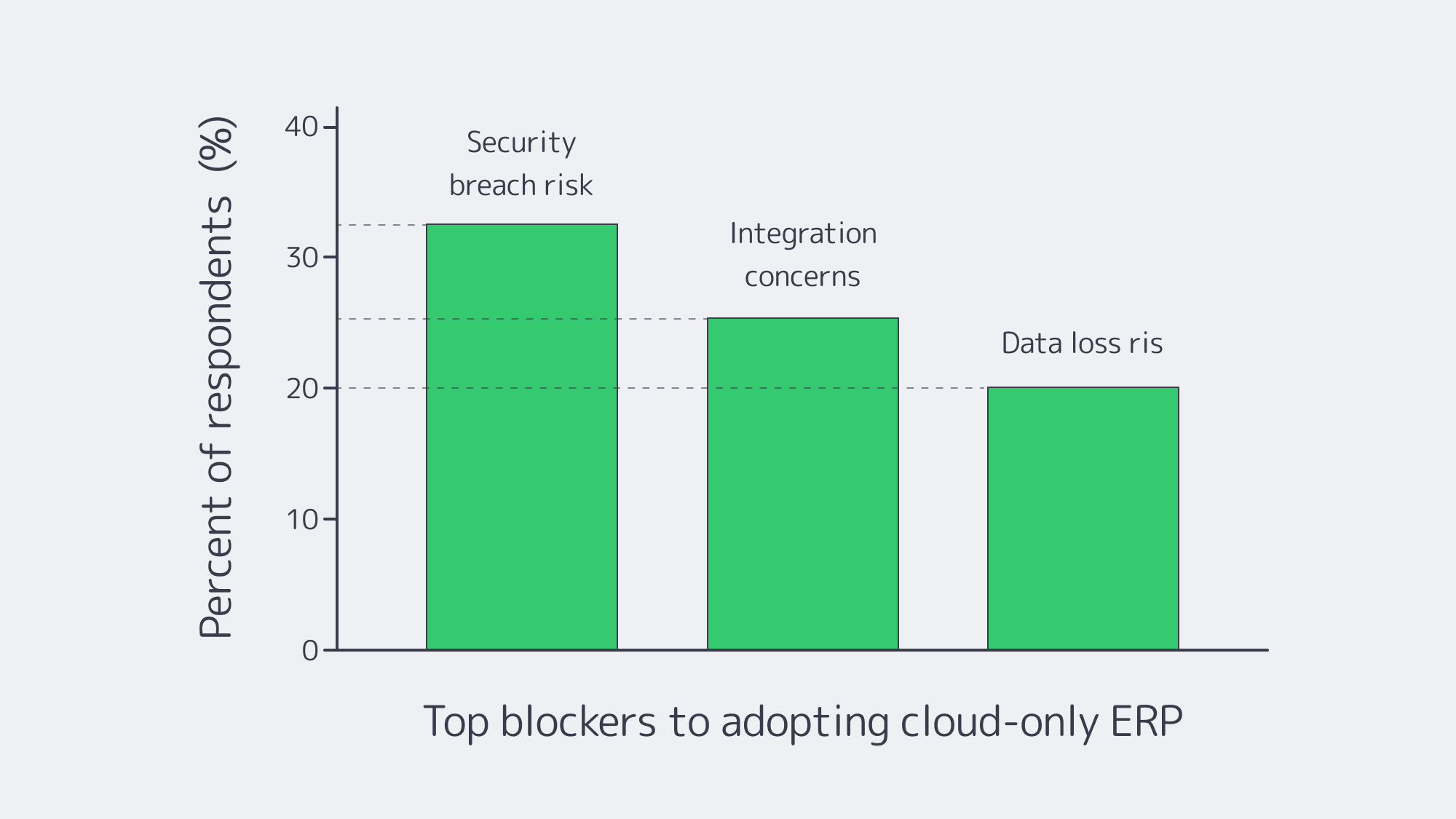
Chart — key blockers to cloud-only ERP adoption. Source: NetSuite.
Platform-Specific Notes That Shape Hosting (Quick Reference)
Odoo, IFS, Workday, Epicor, Infor, Sage X3
- Odoo server requirements. PostgreSQL-backed; small teams can start with a few vCPUs/GBs of RAM, but large, module-heavy estates benefit from an Odoo dedicated server (tuned I/O, pinned CPU, NVMe). An Odoo hosting server paired with a separate analytics node keeps reporting off the OLTP path.
- IFS server. Often Windows/SQL-Server heavy with industry add-ons; many deployments favor dedicated clusters for performance isolation and compliance.
- Workday server / Workday server locations. Workday is SaaS; customers select a region, but cannot self-host or enforce the same level of in-country control, which is why some orgs keep adjacent systems on dedicated servers to satisfy sovereignty rules.
- Epicor server. Manufacturers still run Epicor (Kinetic) on local dedicated servers tied to shop-floor systems. Epicor Spreadsheet Server benefits from local proximity to the DB.
- Infor server. Single-tenant deployments (self-hosted or partner-hosted) remain common where validation and customization are strict.
- Sage X3 print server. Keeping a dedicated print/reporting node on the same LAN slashes latency and avoids egress costs.
Table — What Changes When You Shift ERP Cores to Dedicated?
| Dimension | Dedicated servers / private cloud | Public cloud (SaaS/IaaS) |
|---|---|---|
| Data control | Pin data to specific countries/racks; single-tenant isolation. | Region choice, but less administrative and legal control. |
| Performance | Consistent, no noisy neighbors; place compute near users/data. | Elastic, but variable; latency tied to region distance. |
| Cost profile | Fixed, predictable; no egress fees. | Variable; prone to surprise fees and waste without tight FinOps. |
Which Modern Solutions Actually Resolve Today’s ERP Constraints?
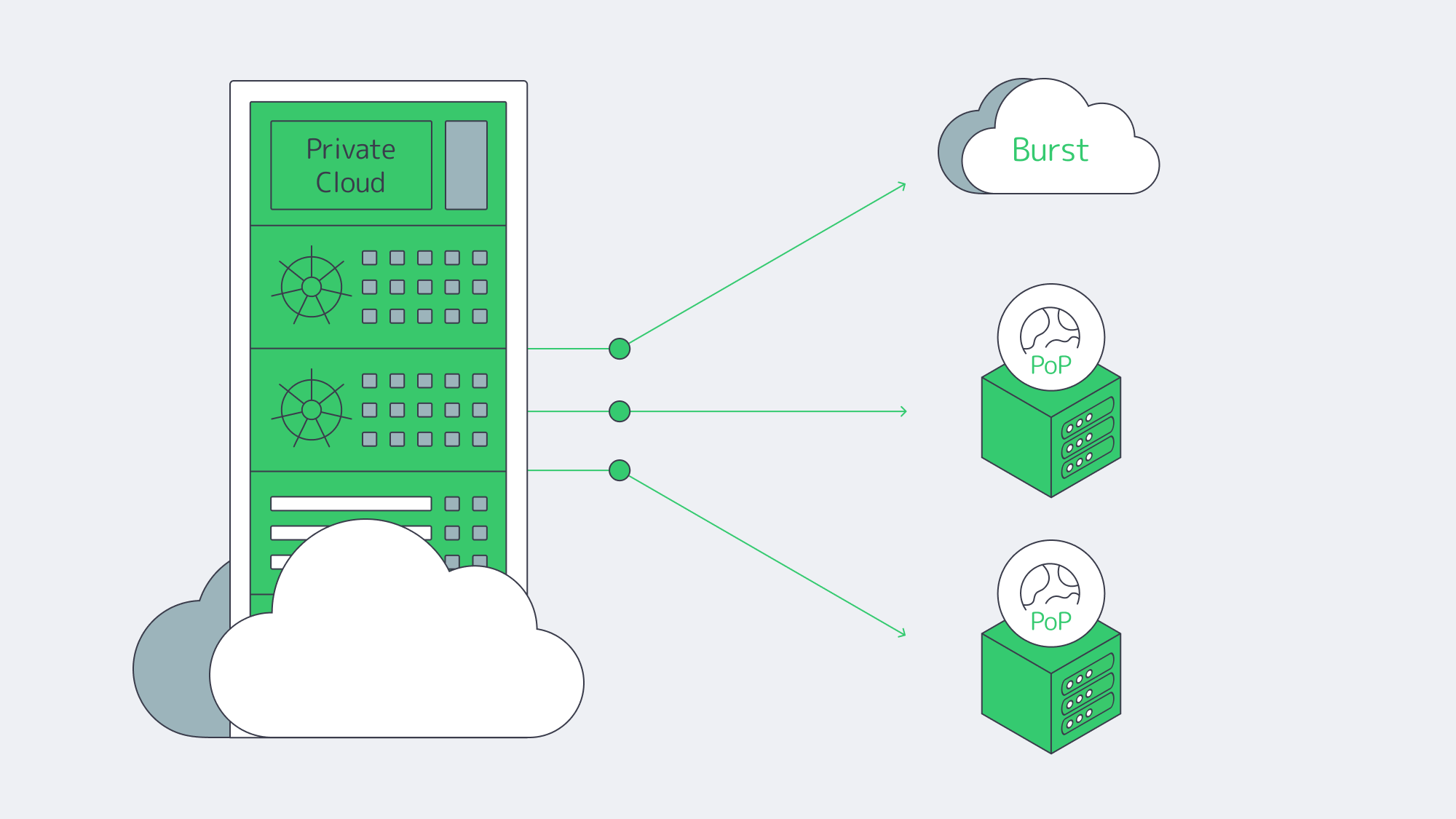
Hybrid architectures, by design. Treat the cloud as an extension of your dedicated footprint. Keep ERP databases on private or dedicated nodes; burst stateless services (APIs, web) to cloud as needed. Many organizations now plan or execute partial repatriations to rebalance cost and control—83% in one survey, with analysts clarifying that the number reflects some workloads moved, not whole-sale exits.
Private cloud and HCI. Build cloud-like agility on dedicated hardware (VMware/Hyper-V/Kubernetes). You get self-service provisioning and policy control, w/o multi-tenant risk.
FinOps discipline. Even in hybrid, the cloud portion needs guardrails. Flexera’s dataset highlights the levers: continuous rightsizing, reserved capacity for steady loads, and ruthless egress avoidance. Spend governance is now as critical as identity governance.
Edge + CDN choreography. Pin state to lawful regions; project UX globally by caching and smart routing. Melbicom’s CDN and global dedicated footprint let teams place ERP nodes where users are, while we keep the backbone fat and predictable.
Key Steps to Blueprint a Durable ERP Hosting Strategy
- Start with non-negotiables. Map sovereignty constraints, RTO/RPO, and latency budgets per region. Use those to decide where cores must live.
- Model true TCO across scenarios. Include egress, cross-region sync, and idle capacity.
- Place compute by data gravity. Run analytics/AI close to ERP data on dedicated or GPU nodes; burst to cloud for exceptional spikes.
- Design for distribution. Replicas and app tiers near users; CDN for static assets and heavy report delivery.
- Instrument and iterate. Apply FinOps to cloud and capacity planning to dedicated. Revisit placement quarterly as usage, laws, and AI needs evolve.
Balance for Sovereignty, Speed, and Spend

The new equilibrium for ERP is hybrid on purpose: dedicated servers or private cloud for the stateful, sensitive core; cloud where elasticity or reach is uniquely valuable. This blueprint squares the triangle of sovereignty, speed, and spend: regulate where data lives, minimize how far it travels, and predict what it costs.
Enterprises that act now—consolidating ERP cores on dedicated infrastructure, distributing app tiers and caches globally, and governing cloud usage with FinOps—will land an ERP estate that is faster, safer, and easier to budget for.
Talk to ERP Hosting Experts
Get a tailored ERP hosting plan with dedicated servers, global CDN, and 24/7 support, all optimized for sovereignty and cost.
Get expert support with your services
Phone, email, or Telegram: our engineers are available 24/7 to keep your workloads online.
Blog

Navigating Adult VR Hosting Solutions and Why Choose Dedicated Servers
Immersive adult experiences—high-resolution 180°/360° VR scenes, live multi-camera shoots, and interactive adult gaming—are now mainstream engineering problems. What used to be a single HLS ladder is becoming a GPU-accelerated, edge-anchored, multi-protocol pipeline that must hold quality under extreme concurrency while keeping motion-to-photon latency imperceptible inside a headset. Below, we zero in on the infrastructure demands behind these formats and how dedicated servers, paired with an edge CDN and modern codecs, provide the determinism, bandwidth, and compute density needed to deliver them at scale.
Choose Melbicom— 1,300+ ready-to-go servers — 21 global Tier IV & III data centers — 55+ PoP CDN across 6 continents |
 |
What Makes Immersive Adult Content So Hard to Host Well?
Throughput per viewer is an order of magnitude higher. An 8K 360° VR stream generally sits in the 60–100 Mbps range without viewport optimization or tiling; even well-engineered tiled streaming aims to keep decode within similar envelopes on the device. That’s 10× the bitrates of typical 1080p OTT ladders and still far above most 4K flatscreen profiles. Multiply by thousands of concurrent viewers at release and your origins must sustain multi-terabit bursts without jitter.
Latency budgets tighten dramatically. In VR, “good enough” isn’t seconds—it’s tens of milliseconds. Motion-to-photon (MTP) latency targets around ≤ 20 ms are widely cited in Cloud-VR and academic measurements; commercial headsets measured at 21–42 ms at movement onset require aggressive prediction to keep perceived latency inside comfort thresholds. The network portion of that budget must be shaved via regional ingest and edge-proximate delivery or interaction will feel wrong.
Protocols must match the experience. At one end, WebRTC reliably delivers sub-500 ms glass-to-glass latency for interactivity and live VR cam shows; at the other, Low-Latency HLS (LL-HLS) achieves ~2–5 s (sometimes lower with aggressive tuning) while preserving HTTP scalability and CDN friendliness. A production pipeline for adult VR rarely picks one protocol—it mixes them by workload.
Compute shifts from “nice to have” to “hard requirement.” Real-time HEVC/AV1 encoding for stereoscopic 4K and 8K ladders, AI-assisted upscaling/denoising, multi-angle compositing, and interactive state synchronization all compete for cycles. Hardware encoders (NVIDIA NVENC) now support AV1 and HEVC end-to-end—critical for meeting bitrate targets without sacrificing quality—while modern GPUs add split-frame and tiling modes to lift 8K throughput. Pair that with NVMe storage to avoid I/O stalls when segmenting large VR assets.
Global proximity matters. Moving the session logic and media edge close to the viewer is the only way to keep RTT and jitter inside headset-friendly limits. That means multi-origin deployment across continents and a CDN footprint dense enough to keep last-mile hops short during peaks. Melbicom’s footprint—21 data-center locations, per-server ports up to 200 Gbps, and a CDN with 55+ PoPs across 36 countries—was designed for exactly this pattern: put origins near exchanges, fan out cached segments globally, and place ultra-low-latency nodes where interactivity demands WebRTC.
Brief context: why the old stack fails
Classic OTT stacks assumed seconds of buffer, a handful of renditions, and region-limited audiences. They struggle when 8K stereoscopic assets must be transcoded in real time, and when control channels (camera switching, avatar state, haptic triggers) need sub-second round-trip. The modern answer is not “one giant cloud region,” but single-tenant dedicated servers tuned for throughput, paired with an edge CDN and regionally distributed real-time nodes. (Think: origins in Amsterdam/Ashburn/Singapore, WebRTC SFUs in additional metros, CDN caching everywhere your users are.)
Which Adult VR Hosting Solutions Actually Scale Globally?

1) GPU-optimized dedicated origins for encode, packaging, and authorization
VR ladders drive extreme parallel encodes. Dedicated servers with GPUs (AV1/HEVC via NVENC) cut encoder latency and shrink bitrates at constant quality, improving delivery economics while preserving clarity in head-locked views. NVENC’s current generations support AV1 8/10-bit and HEVC 8/10-bit pipelines; AV1 typically saves ~40% bitrate vs H.264 at comparable quality—meaning the network carries less data per user for the same perceived sharpness. On CPU-heavy workflows (e.g., volumetric preprocessing, AI stabilization), the same box can host CUDA kernels beside encoders to avoid PCIe round-trips. We at Melbicom provision GPU dedicated servers with high-speed NICs so your ingest/encode nodes aren’t starved by the network.
2) Edge CDN for scale; edge compute for interactivity
On-demand VR scenes cache efficiently. Use LL-HLS over a 55+ PoP CDN to keep last-mile latency low while origins focus on cache fill and authorization. For live VR cams and interactive adult gaming hosting, place WebRTC SFUs or micro-services (state sync, avatar presence, telemetry) on dedicated edge nodes. Operators routinely target < 500 ms for two-way interactions and 2–5 s for broadcast-style events; choosing per-workload protocols—and placing servers appropriately—is the difference between “immersive” and “makes you queasy.” Melbicom’s CDN and regional data centers let you anchor compute in the right metros and fan out assets globally.
3) High-bandwidth NICs and deterministic networking
VR peaks aren’t polite. Origins must burst 100 GbE (and above) without head-of-line blocking. Melbicom equips servers with 1–200 Gbps physical ports and ties them into a backbone engineered for high aggregate throughput, so your egress ceiling is the NIC—not the provider’s fabric. Deterministic NICs also reduce jitter into your encoder/packager chain, improving CTS/DTS alignment and reducing player drift.
4) NVMe for asset prep; S3-compatible object storage for libraries
VR masters are enormous. NVMe SSDs keep packaging/transmux and thumbnail/extract steps from blocking on I/O, while S3-compatible storage holds the long tail economically. Melbicom’s S3-compatible storage supports 1–500 TB per tenant/bucket with free ingress, making it natural to stage new scenes from encode nodes to durable storage and let the CDN fetch on demand.
5) Multi-origin layouts (don’t centralize your failure domain)
Spread origins across at least two regions per primary market. That keeps origin RTT short for the CDN, raises cache hit ratios at the edge, and avoids a single encoder pool becoming your global bottleneck when a new interactive release spikes. Melbicom operates in 21 global locations; we routinely place origins at major IX hubs (e.g., AMS-IX, DE-CIX, LINX) so your CDN “first mile” stays short and predictable.
Example workload mapping (adult VR focus)
| Workload | What it demands | What to deploy |
|---|---|---|
| 8K/4K stereoscopic VR VOD | 60–100 Mbps per viewer; large objects; global reach | GPU-equipped dedicated origins for AV1/HEVC; LL-HLS packaging; CDN with 55+ PoPs; NVMe scratch + S3 library. |
| Live VR cam & Q&A | Sub-500 ms interaction; regional ingest; rapid scale-up | WebRTC ingest/SFU on edge dedicated servers; 100 GbE NICs for fan-out; multi-origin failover. |
| Interactive adult gaming hosting (VR worlds/minigames) | 20–50 ms RTT targets; state sync; bursty peaks | Regional game/logic servers; proximity-aware routing; CDN for static assets; telemetry backhaul to origins. |
Architecture building blocks that work in production
- Encode where you ingest. Use regionally distributed GPU-optimized dedicated servers to transcode ladders near cameras and contributors; ship packaged outputs to nearby origins/CDN to minimize first-mile.
- Pick protocols by interaction level. WebRTC for two-way/live control; LL-HLS for scale when chat latency is tolerable. Keep the player’s buffer discipline separate from the control channel.
- Keep the network fat and simple. Favor 1–200 Gbps physical NICs with straightforward routing from origin to CDN. Jitter kills more VR QoE than raw throughput deficits.
- Use NVMe for hot paths; S3 for the library. Stage transcodes on NVMe, publish to S3-compatible storage, and let the CDN fill. This keeps origins autoscalable.
- Exploit AV1 where devices support it. AV1 saves ~40% bitrate at similar quality versus H.264; fall back to HEVC/H.264 as needed by headset/browser.
Why dedicated (single-tenant) servers instead of “just cloud VMs”?
VR delivery is determinism-sensitive. You want guaranteed NIC bandwidth, exclusive CPU caches, and unshared NVMe queues when ladders spike. Dedicated servers give you root-level control to tune queues, congestion control, and driver stacks around real-time behaviors. Melbicom’s dedicated platform offers 1,000+ ready-to-go configurations, ports up to 200 Gbps, and 24/7 support, so you can size machines to the role—encode, origin, edge compute—without noisy-neighbor effects or egress metering surprises. Pair those with 55+ CDN locations so your viewers hit the nearest edge by default.
Reference pipeline
- Ingest/Encode (GPU) → Packager (per-workload: LL-HLS segments + WebRTC tracks) → Regional Origins (Ashburn, Amsterdam, Singapore, etc.) → CDN (55+ PoPs) for VOD/live cache → Edge WebRTC SFUs for sub-second interactions → Players & headsets.
- Storage: NVMe scratch on encode nodes; S3-compatible object storage for masters and long-tail renditions.
Implementation notes you can apply tomorrow
- Viewport-aware or tiled streaming for 8K 360° keeps device decode and network budgets sane. Use AV1 when the device supports it; HEVC otherwise.
- Hybrid live: LL-HLS for the “watch” cohort, parallel WebRTC for a smaller “interact” cohort (tip, vote, switch camera) sharing the same production feed.
- Edge selection: Direct interactive users to the nearest WebRTC SFU; leave VOD to CDN affinity. Melbicom’s multi-region footprint simplifies this split-brain routing.
How Should You Move from Pilot to Production without Re-Architecting Twice?
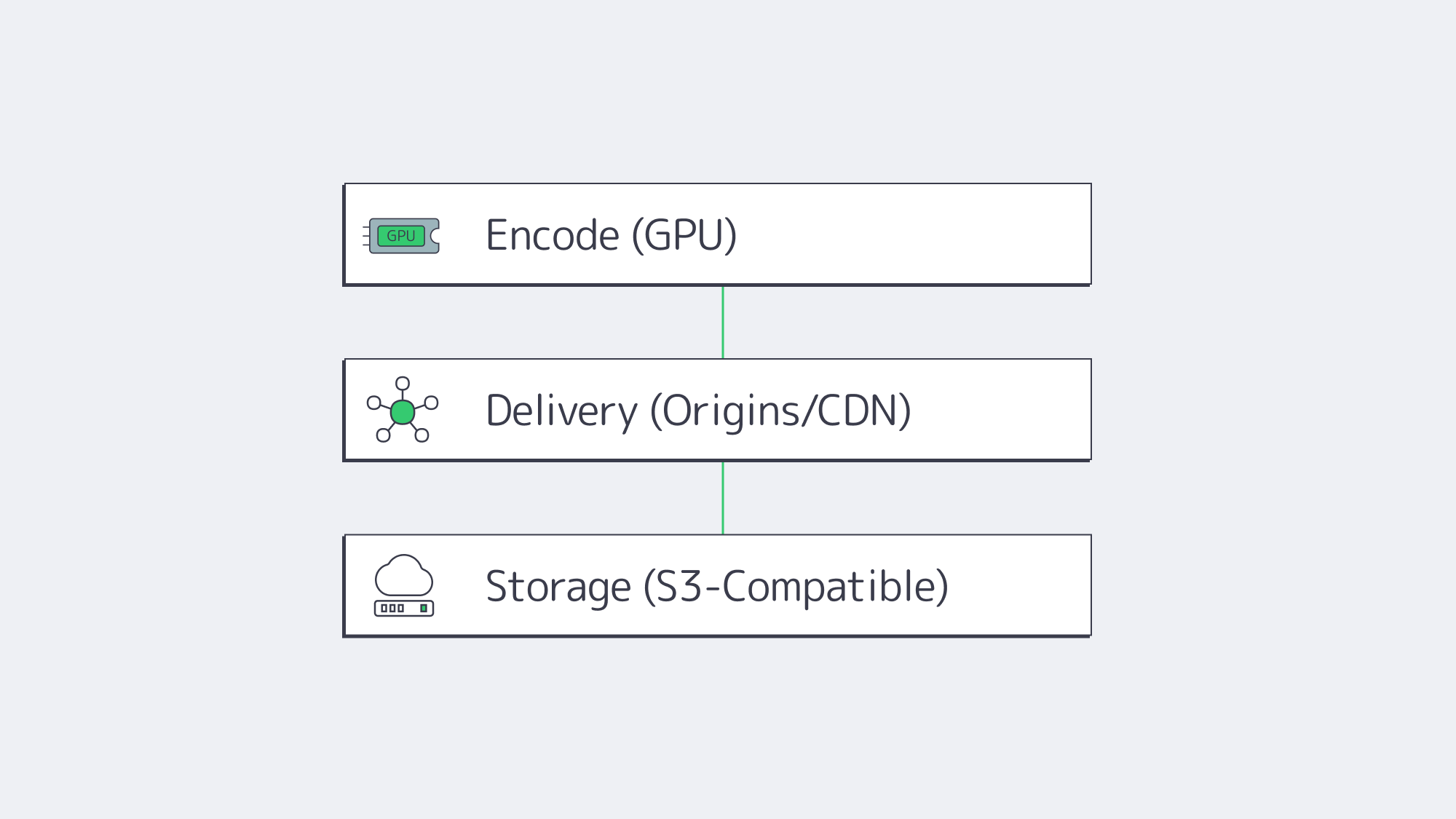
Start by right-sizing the three planes of your system:
- Encode plane: Place GPU encoders in the same metros where you gather content or where creators connect. Prefer AV1 when headsets/browsers decode it; keep HEVC ladders for fallback. Use NVMe for segmenting and thumbnails to maintain deterministic encode-to-publish timing.
- Delivery plane: Publish LL-HLS ladders to local origins (2 per market minimum), then cache via a CDN for scale; route interactive cohorts to edge WebRTC. This keeps your broadcast audience happy while preserving the < 500 ms paths required for presence.
- Storage plane: Keep your library on S3-compatible storage (multi-TB to hundreds of TB per tenant), with lifecycle rules to tier older renditions; serve “first frames” from NVMe caches on origins to minimize startup delay.
The outcome is a pipeline that de-risks growth: you can add origins by region, add encoders by ladder, and drop in new edge compute nodes as interactive formats evolve—without replacing your core.
Launch Your VR Platform
Get servers, storage, and a global CDN deployed within hours—purpose-built for bandwidth-intensive 180°/360° adult VR streaming.
Get expert support with your services
Phone, email, or Telegram: our engineers are available 24/7 to keep your workloads online.
Blog

BGP Guardrails for Secure, Stable, and Reliable Networks
The Border Gateway Protocol (BGP) is the worldwide traffic controller of the Internet—and it is the weakest link. The simplicity and scalability of the protocol have allowed tens of thousands of autonomous systems (ASNs) to share reachability information over the last 30 or so years, but the protocol continues to believe all that it hears.
In the past couple of years, that blind faith has led to spectacular outages and profitable hijacks: a crypto-exchange lost $1.9 million in minutes after attackers hijacked its prefixes (The Record); a tiny U.S. ISP accidentally leaked more-specific routes, cutting Cloudflare and Amazon off; and researchers reported nearly 12 million route leaks in Q3 2021 and about 2.5 million hijack events in Q3 2022 (Qrator Labs). The fact that those instances did not bring even more traffic to its knees is merely because a vast number of operators already implement a current guardrail stack – strict IRR/RPKI checking, max-prefix limits and flap damping, graceful-shutdown signaling during maintenance, and real-time route probing.
Choose Melbicom— 1,300+ ready-to-go servers — 21 global Tier IV & III data centers — BGP sessions with BYOIP |
|
This article summarizes what works in contemporary production networks, calculating the lessons in a very action-able audit checklist whilst taking a scalpel when wading through the historical curves and CLI depths.
First Line of Defense: IRR & RPKI Validation
Why it Matters
BGP updates propagate at Internet speed. Risk reduction is simplest by only taking in routes which can be demonstrated to be legitimate. That is possible due to two complementary sources of data:
- Internet Routing Registry (IRR) – Route and AS-SET objects that are human-curated.
- Resource Public Key Infrastructure (RPKI) – Cryptographic Route Origin Authorizations (ROAs) which attach a prefix to an origin AS.
They put up an allow-list which can kill most leaks on their way in.
How Modern Operators Deploy It
- IRR filters relevance. IRR filters are built during provisioning and updated through change control when customers request changes (such as adding prefixes).
- RPKI Route Origin Validation (ROV) at line rate. RPKI-invalid announcements are dropped at edge routers. ROV now blocks most hijack attempts with approximately 43 % of IPv4 and 45 % of IPv6 prefixes under the protection of ROA (currently, 62.5 % of all world traffic, Kentik).
- Defense-in-depth. IRR captures prefixes that have yet to get ROAs; RPKI rejects malicious origins that may be missed when using stale IRR data. Melbicom applies IRR-based prefix filters and RPKI origin validation during provisioning and updates them via customer change requests, aiming for compliance from the start of each BGP session.
Automation Spotlight
During provisioning, we capture the customer’s AS number and optional AS-SET, build IRR-based prefix filters, enable RPKI route-origin validation (ROV), and deploy the configuration via our change process.
Safety Valves: Max-Prefix Limits & Flap Damping

Max-prefix limits
A single typo can turn a router into a flood of unintended routes. Prefix-count limits are circuit breakers:
| Session type | Expected routes | Warning | Hard stop |
| Transit peer | 950 k | 1.0 M | 1.1 M |
| Equal peer | 50 k | 55 k | 60 k |
| Customer | ≤16 | 16 | 20 |
In the 2019 incident, a low per-session customer max-prefix limit—set close to the customer’s expected prefix count—would have tripped and isolated the leak; a high global limit (e.g., 1.1 M) would not (Cloudflare).
Route-Flap Damping
Flapping prefixes consume CPU and churn forwarding tables. Initial damping values were excessively rough, and RIPE-580/RFC-7196 tuning now restarted the feature. Seldom used – usually just in routes learned by customers – modern damping removes extreme churn without marginalising stable prefixes.
Automation Spotlight
Two-tier limits (warning + shutdown) are embedded in our config generator on a per-session basis and router counters are audited every minute. NOC is alerted when an upstream or client reaches 80 % of its limit, long before sessions can be reset.
Graceful Shutdown: Zero-Drama Maintenance
During planned maintenance, operators tag the advertised prefixes with the well-known 65535:0 graceful-shutdown community so neighbors lower local preference and traffic drains to alternate paths before the session is taken down. Neighbors lower local-preference, shifting traffic to alternate paths; then the physical link can be taken down with minimal packet loss.
In networks that support the 65535:0 graceful-shutdown community, operators can coordinate region-wide drains and customers can signal planned shutdowns. The tag can also be activated by customers can be used from their end, which is most suitable when shutting down test laboratories or accessing and moving workloads.
Continuous Eyes: Real-Time Route Monitoring

Guardrails work only if you know when they come into play—or fall short. Live tracking of BGP breaks that feedback loop:
- External vantage points (RIPE RIS, Qrator Radar, RouteViews) identify a rogue origin or an abnormal AS-path several seconds after it is created.
- Internal BMP streams send all BGP updates from edge routers to a central collector for analysis, flagging bursts of churn and invalids in real-time.
- Automated mitigations—prefix de-pref, FlowSpec filters, or prefix-limit adjustment—can be applied automatically, without waiting for manual commands.
Melbicom correlates external alerts with on-box logs (‘Invalid ROA drop’, ‘max-prefix exceeded’) and, as needed, removes a misbehaving peer or injects a cleaner path. As a result, many incidents are detected and mitigated quickly—often before customers notice any impact.
Quick-Scan Audit Checklist
| Control | What to Verify | Status |
| IRR filters | Per-neighbor prefix lists are created during provisioning and updated via change requests; review the update frequency. | ☐ |
| RPKI ROV | All edge routers drop RPKI-invalids; validator health monitored. | ☐ |
| Max-prefix limits | Settings provide warnings and hard limits at the maximum of the prefix sizes; tests. | ☐ |
| Flap damping | Disabled by policy; document the rationale and alternative controls (monitoring/BMP alerts), and review quarterly. | ☐ |
| Graceful shutdown | If implemented in your environment, document and test 65535:0; otherwise, document the in-use maintenance drain procedure. | ☐ |
| External monitors | RIS/BGPStream alerts wired to NOC channels. | ☐ |
| Internal BMP/telemetry | Invalid counts, graph of route-change-rate, and graphed state of the session. | ☐ |
| Log retention | BGP events for not less than 12 months. | ☐ |
Pulling It All Together
Human effort will never ensure that hundreds of routers are synchronized; automation must do the heavy lifting and humans can do the rest.
- Configuration as code — policy templates, device roles, and CI tests are version controlled as a way to detect fat-finger errors.
- Policy generation — validated IRR changes (via change control), live ROA feeds, and PeeringDB route counts inform prefix lists and max-prefix limits; customer IRR filters are updated on request, not via nightly auto-refresh.
- Event-driven mitigation — if BMP witnesses >2 k route changes in 60 s, scripts could decrease local-pref or separate a flapping peer spontaneously.
- Global rollout — atomic commit across 21 global locations; rollback on anomaly detection.
This stack is important to us at Melbicom. The users only see a basic form, which includes an AS number, prefixes, route view (default / full ) but, behind the scenes, each field initiates guardrail logic. The outcome: minutes between order to get the first BGP UPDATE, filters and limits are embedded plus monitoring at this point.
Developing a Resilient BGP Future

Combining route validation, prefix count circuit breakers, controlled damping, operator signaling, and inexhaustible monitoring helps operators ensure that they can contain the real risks of BGP without compromising flexibility. These guardrails are already mitigating leaks and hijacks; as usage becomes more common, the routing landscape of the Internet out develops into a more manageable entity.
Yet execution matters. False triggering of a filter update, or an absent prefix limit, can ruin months of effort. This is the reason that mature networks (such as hyperscale clouds and single rack deployments) now consider BGP policy living code, backed by telemetry and automated feedback loops. Get the mix right and it provides the holy grail of operations, stability at scale.
Get Protected BGP Connectivity
Deploy your ASN on a network secured by IRR, RPKI, and automated safeguards.
Get expert support with your services
Phone, email, or Telegram: our engineers are available 24/7 to keep your workloads online.
Blog

Real-Time Defense Recommendations for BGP Route Security
The Border Gateway Protocol (BGP) is still working hard to route every public packet worldwide three decades on. With so many years passing since its backbone links lit up, its weaknesses are as old and familiar as the protocol itself. Time and again, we see Autonomous Systems (AS) claim an IP prefix they don’t own; it’s believed by everyone unless another network filters the claim, leading to a costly prefix-hijack that is all too common. Last year (2024), in the first quarter alone, more than 15,000 AS-level hijacks and leaks were reported by analysts, along with countless other micro-events littering CDN logs.
Choose Melbicom— 1,300+ ready-to-go servers — 21 global Tier IV & III data centers — BGP sessions with BYOIP |
|
A BGP failure can soon cascade because it sits beneath TLS and zero-trust overlays. While a hijacked route’s traffic can’t be decrypted by the hijacker, the ciphertext is passed on, and the intermediary can delay, throttle, and discard whatever they like. Too many detours can have devastating results, especially in SaaS architectures with complex service meshes and multiple micro-services. One single path change can spawn thousands of failed API calls, desynchronize queues, and destroy tuned autoscaling heuristics. For example, an upstream’s acceptance of a forged /24 could misroute a payroll platform’s traffic into an unintended jurisdiction for about 14 minutes, during which transaction failures could spike to roughly 67%.
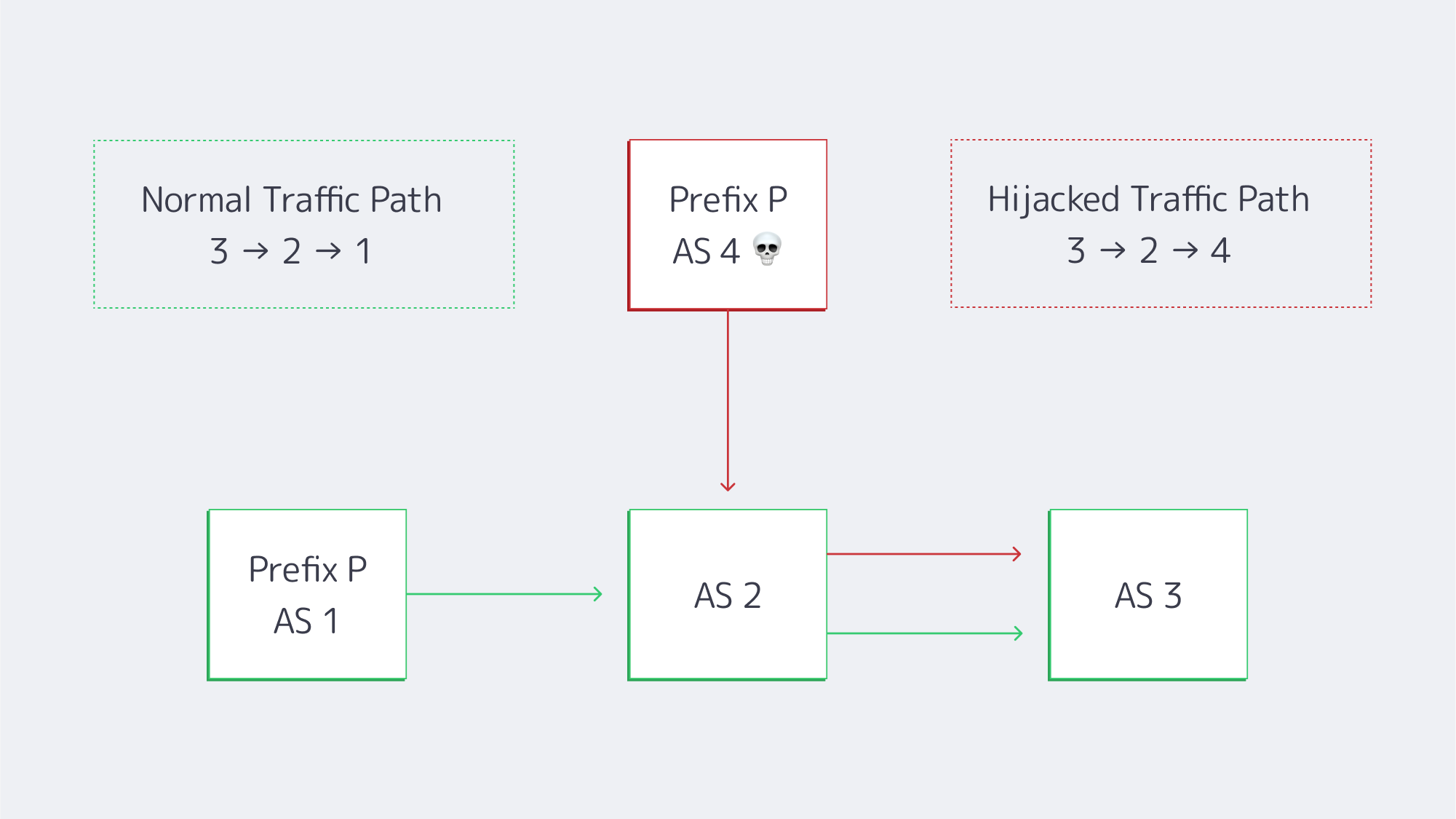
An AS 1 → AS 2 → AS 3 traffic flow is being advertised by rogue AS 4, misrouting users before filters kick in.
Resource Public Key Infrastructure (RPKI) is the industry’s solution. With around half of the global IPv4 table now covered by ROAs, invalid routes that once propagated widely stall at many networks due to RPKI enforcement. The progress comes at the hands of a growing cohort of operators, that Melbicom is proud to be a part of, that enforce a drop-invalid stance for all peering and transit edge.
How RPKI Mitigates Border Gateway Protocol Attacks
Protecting border gateways relies on origin validation. It is easy enough to deploy when you break it down into five disciplined phases:
| Phase | Action | Key Take-away |
|---|---|---|
| 1 | Publish ROAs in the RIR portal | Sign every prefix, keep max-length realistic, and set sensible end-dates. |
| 2 | Stand up validators (Routinator, FORT, OctoRPKI) | Feed them to routers over RTR; run at least two for fault-tolerance. |
| 3 | Monitor in “log-only” mode | Flag any customer whose prefixes appear invalid; fix before enforcement. |
| 4 | Flip to enforcement | Reject invalids on all eBGP sessions; stage by POP or peer type if nervous. |
| 5 | Continuous auditing | Track invalid counts, validator health, ROA expiry, and new prefix adds. |
Phase 3 is where the potential risk is at its highest. Consider the following: A cloud tenant originating a /22 from a forgotten AS; a DevOps team forgetting to extend an ROA before migrating to multi-cloud. So, you can see the importance of cleaning up to prevent outages when the day reject-invalid goes live. Tight prefix caps help. At Melbicom, we accelerate the process with 16 prefixes per session, as well as IRR vetting during onboarding and scheduled reviews. The customers are oblivious, but the hijacker with a bogus /24 can’t escape our edge.
The Importance of Strict IRR Filtering
As RPKI only covers around half of the IPv4 table as of yet, the gap must be closed with IRR filters until it becomes universal. A well-maintained route-object set needs to:
- Block any prefix outside of a customer’s allocation
- Reject RFC 1918 leaks.
- Attach max-prefix quotas to limit catastrophic full-table leaks.
The issue then becomes data hygiene: IRR entries don’t age well, and so prefix lists should be maintained from current IRR data and be constantly reviewed and only applied by engineers. IRR can’t substitute for RPKI, but together they can provide a solid layered defence. An IRR record can be forged by an attacker, but without acquiring a resource holder’s private key, forging a matching ROA is next to impossible.
Despite the risks, some hosts still accept a route “as-is”, but the strict IRR plus RPKI that Melbicom’s hardware employs gives our customers asymmetric protection, ensuring that only legitimately verified routes propagate outward while the announcements of hijackers die at the border.
Monitoring the Table With Real-Time Validation Dashboards
Even with filters, the table needs monitoring to ensure verification; luckily, BGP dashboards have significantly matured and can be watched in real-time. Failure to monitor in modern times is essentially negligence. Do the following:
- Public telemetry – Look for any sudden origin changes via Cloudflare Radar, RIPE RIS Live, and Qrator Radar, which stream updates.
- RPKI status portals – Validate routes through NIST RPKI Monitor or Cloudflare’s lookup, which will tell you whether a route is valid, unknown, or invalid.
- Local alerting – Use BGPalerter, a tool that feeds events into Slack, PagerDuty, or a SIEM, letting you know the instant an upstream accepts a new path.
These feeds are essentially data sets when working at a large scale. Melbicom’s NOC groups incidents by ASN and upstream, overlaying latency traces, meaning that engineers can see the RTT delta and user-impact scores when an unvalidated path creeps in, before the first ticket lands.
RPKI-ROV analysis of unique prefix-origin pairs (IPv4)
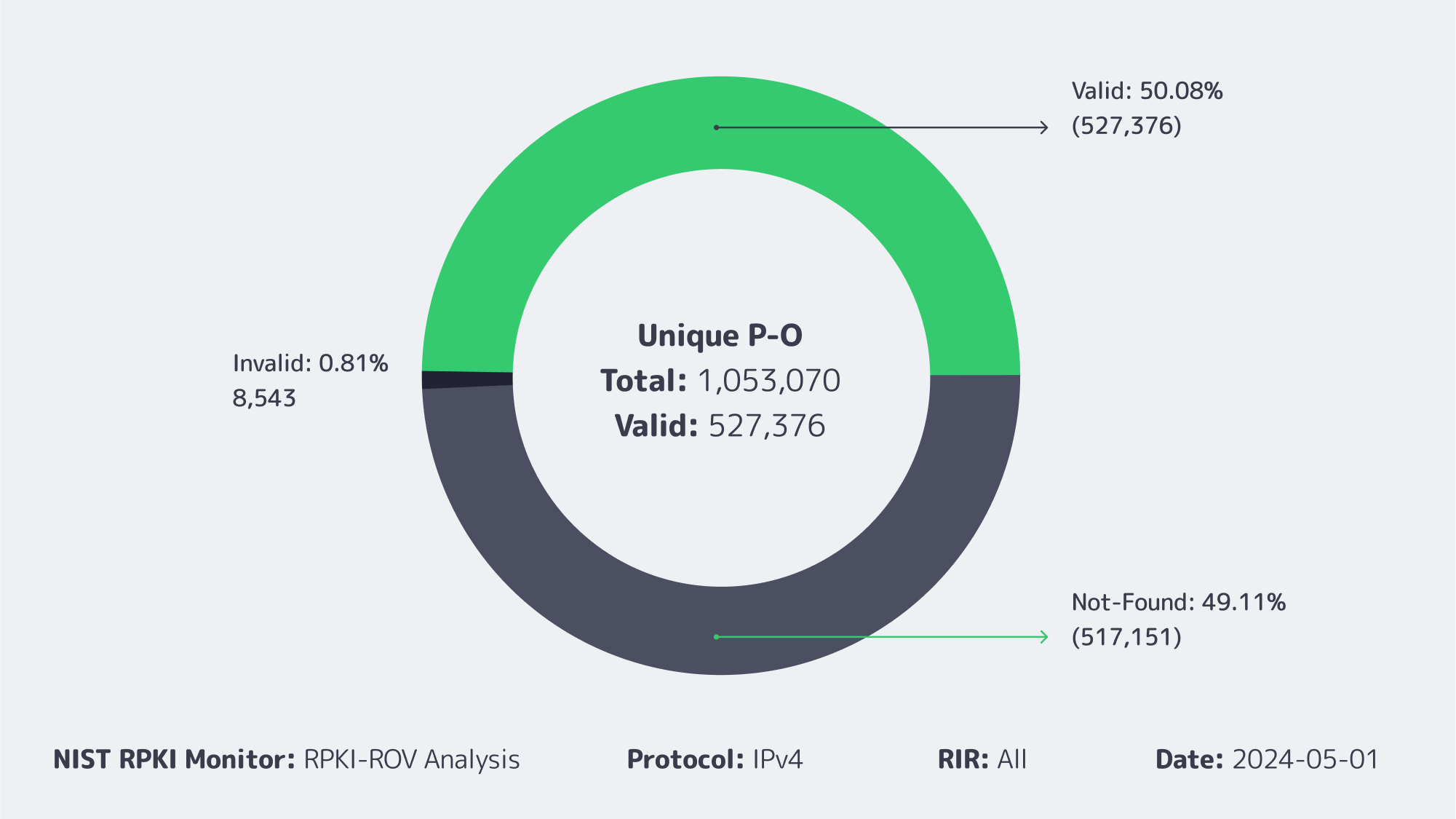
ROAs cover a little over half the IPv4 table, and invalids remain below 1 %.
Looking Forward: BGPsec and ASPA
Although RPKI authenticates the origin, it doesn’t validate the path. The future looks brighter with safeguards such as BGPsec and ASPA.
- BGPsec, once perfected, will further protect against tampering by sealing paths cryptographically by signing every AS hop. At the moment, live deployments are few and far between because the CPU and memory overheads and early hardware are currently struggling under full-table loads.
- AS Provider Authorisation (ASPA) links customer-provider relationships in RPKI, enabling routers to detect a leak should a customer suddenly appear to transit. In early testing, ASPA has been shown to catch over 90% of leaks missed by RPKI alone.
Conclusion: Secure Routing by Default
BGP security has grown from merely an academic talking point to an operational imperative in recent years. RPKI origin validation is now backed by half the table globally, and when enforced by security-minded networks, the blast radius for hijacking halves as well. Until ROA becomes universal, strict IRR filtering can help close the gap, aided by vigilant team monitoring through real-time dashboard feeds and alarms. Emerging technology is set to bring further control, with BGPsec and ASPA promising to validate paths and prevent leaks automatically in the years to come. All of which spells a future where hijacking will fade into the background.

Networks that drop invalids are dragging the rest of the industry forward. We at Melbicom committed early: edge routers on transit and peering links enforce drop-invalid, sessions are capped and IRR-verified during provisioning, and prefix events are actively monitored with real-time alerts. In a world where a single leaked /24 can crater latency or funnel traffic to a bogus site, that vigilance is non-negotiable.
Secure your routes
Deploy Melbicom dedicated servers with BGP origin validation and strict filters in minutes.
Get expert support with your services
Phone, email, or Telegram: our engineers are available 24/7 to keep your workloads online.
Blog

5 iGaming Infrastructure Insights from SBC Summit Lisbon 2025
Obrigado, Lisbon! SBC Summit Lisbon 2025 closed with 30,000+ delegates and 700 exhibitors across five zones—an ideal forum to pressure-test iGaming infrastructure strategies. For Melbicom, it meant 400+ productive conversations, 150+ giveaway entries, 60+ proposals, and 5 pilots signed already on-site with more to come—momentum we’re now scaling into delivery.
Key Takeaways
Contrary to the idea that big expos are only for sales and martech, our most valuable interactions were expert conversations with CIOs/CTOs. Here are the key takeaways:
- Dedicated is irreplaceable for core workloads: When predictability, control, and auditability matter (which is true of most iGaming workloads), dedicated servers win.
- Hybrid is how most teams balance trade-offs: The sensible default is dedicated clusters for latency-sensitive services and stateful data, combined with cloud where elastic bursting makes sense. That pairing gives cost control and performance without sacrificing speed-to-market.
- Global reach is a must, not a nice-to-have: Operators that master one region immediately look to launch in the next region. Success depends on low-latency footprints and the ability to replicate stack patterns quickly in new GEOs—the show’s scale and attendee mix underscored this global push.
- Compliance now designs the architecture: In-region hosting, data-residency guarantees, and audit-friendly topologies aren’t afterthoughts—they’re the blueprint. Servers in specific jurisdictions simplifies reviews and shortens time to approval.
- Milliseconds are money: Live odds, casino play, and streaming cannot tolerate jitter. The pattern that resonated: dedicated origins for compute and data, with an edge CDN offloading assets and video to keep the user experience crisp under peak loads.
What this means with Melbicom
We operate over 1,300 of ready-to-go servers across 21 global locations for in-region deployment and sovereignty (with custom configs delivered in 3-5 business days); our CDN spans 55+ PoPs to keep assets and streams near players; and our S3-compatible storage slots into existing pipelines for durable objects, logs, and media. It’s a stack designed for regulated, latency-sensitive iGaming at global scale.
Couldn’t catch us at SBC? Contact us – let’s keep the momentum!
Get expert support with your services
Phone, email, or Telegram: our engineers are available 24/7 to keep your workloads online.
Blog

BGP Communities: The Modern Traffic-Engineering Tool
Border Gateway Protocol (BGP) has always been the steering wheel of the Internet, but communities are the torque converter that lets operators shift routes with surgical precision. Roughly three-quarters of global prefixes now carry at least one community tag (RIPE Labs), and the number of distinct tags observed in global tables has tripled since the last decade. Those tiny integers are how sophisticated networks—ours included—tell upstream carriers exactly what to do with a route without ever touching a physical cable.
Below is a focused, outcome-driven look at three community techniques every multi-ISP architect should keep in the toolbox: setting local-preference, applying selective AS-path prepending, and issuing graceful-drain signals before planned work. Each section illustrates how documented tags from major Tier-1s can shape paths quickly where supported—plus the pitfalls to avoid.
Choose Melbicom— 1,300+ ready-to-go servers — 21 global Tier IV & III data centers — BGP sessions with BYOIP |
|
Changing the Game with Local-Pref Communities
Problem: A primary link costs less or delivers lower latency, yet inbound traffic ignores it.
Classic workaround: Globally prepend your AS on the backup path and hope everyone respects AS-path length.
Modern fix: Tag the route with a community that lowers local preference inside the backup provider’s network.
Most Tier-1s expose at least three “priority” values. Telia’s 1299:50 drops a route to the bottom of its stack; 1299:150 sits midway; the default 200 wins. Lumen’s 3356:70 and 3356:80 perform a similar downgrade. When a Melbicom customer wants all inbound traffic to favor Telia over another upstream, we advise:
| Step | Action | Result inside upstream |
|---|---|---|
| 1 | Announce prefix X to Telia without special tags | Telia assigns default local-pref 200 (highest) |
| 2 | Announce prefix X to the backup provider with its documented low-pref tag | That upstream lowers local-pref so its routers de-prefer the path |
Traffic shifts almost instantly, and if the preferred carrier fails, the alternate already has the route—just at a lower rank—so fail-over is automatic. Because local-pref is evaluated before AS-path length, the outcome is deterministic and doesn’t rely on transit domains interpreting prepends the same way.
Pitfall to avoid: Mixing contradictory communities. If you accidentally tag the same route with both high- and low-pref codes, upstream automation may default to the safest (lowest) value, turning a primary link into backup without notice.
BGP Fine-Tuning with Selective Prepend
Problem: A single eyeball network—or an entire continent—approaches your ASN on an expensive or long-latency route.
Classic workaround: Prepend your AS everywhere and accept collateral damage.
Modern fix: Use targeted prepend communities that instruct an upstream to lengthen the AS-path only when advertising to specific peers or regions.
Example: Lumen lets customers encode the number of prepends with the right-hand field of 3356:PP (PP = 70, 80, 90 …). Other carriers expose communities of the form <providerASN>:<peerASN> where the peer ASN selects exactly who sees the longer path. This means you can prepend three times only toward a latency-sensitive mobile carrier in Asia while leaving European paths untouched. Testing is reversible within a BGP re-advert interval—no need to wait for a maintenance window.
Pitfall to avoid: Prepending on top of a reduced local-pref tag. If the upstream already deprioritized your route via local-pref, the extra AS-path length adds no marginal value and complicates troubleshooting. Log all changes and keep the logic simple: lower local-pref OR prepend, rarely both.
Graceful-Drain Signals: Maintenance in the Age of Automation
Problem: You need to upgrade optics at 3 a.m. without the drama of BGP flap storms.
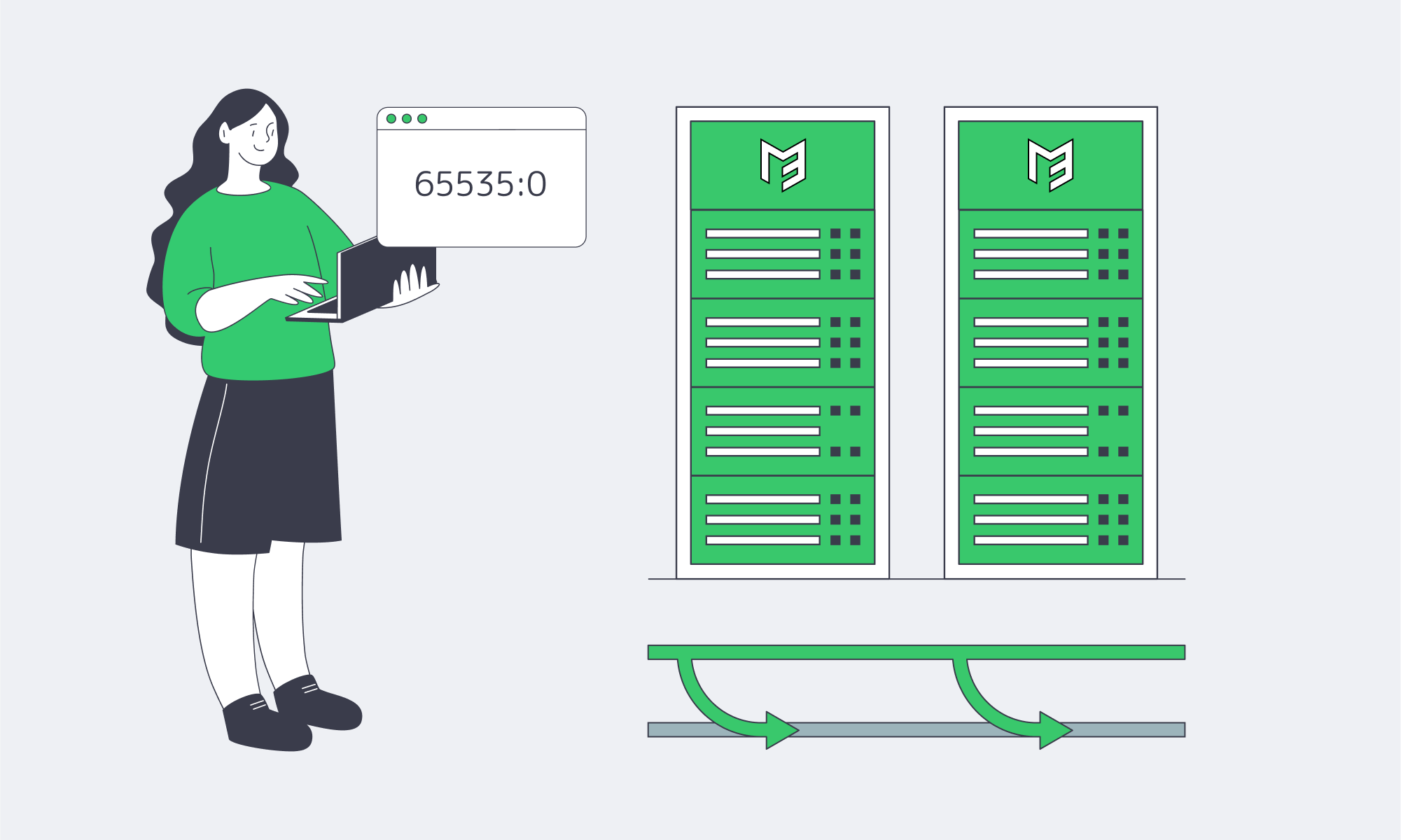
Modern fix: RFC 8326’s 65535:0 Graceful Shutdown community. Tag all routes, wait a few minutes for neighbors to rank them lowest, then close the session cleanly.
For example, Arelion documents lowering local-pref to 20 for this tag; many IX route servers propagate it so peers proactively re-route. If your upstreams support RFC 8326 graceful shutdown, you can:
- Tag
65535:0toward the link under work. - Confirm traffic volume is near zero.
- Shut down the BGP session or physical port.
- Bring it back up, withdraw the tag, and watch traffic return.
The method beats “cold-turkey” shutdowns that cause transient route flutters. It also dovetails with DevOps pipelines: plug the tag into CI/CD jobs instead of ad-hoc CLI sessions.
Pitfall to avoid: Announcing Graceful Shutdown to an upstream that doesn’t support it; you’ll gain no relief and assume traffic drained when it didn’t. Always validate via neighbor logs or external looking glasses.
Tags, Tables, and Large Communities
| Technique | Why It Matters | One-Line Best Practice |
|---|---|---|
| Local-pref tags | Deterministic primary/backup | Tag only one priority community per prefix |
| Selective prepend | Regional cost or latency tuning | Prepend narrowly—per ASN or per continent |
| Selective export / scope tags | Limit who hears your routes (e.g., regional or peer-specific) | Use documented no-export / regional communities; verify via looking glasses |
65535:0 drain |
Hit-less maintenance | Where supported, automate and verify before shutdown. |
Large communities (RFC 8092) simply expand the namespace to 96 bits, avoiding overlap and supporting 32-bit ASNs. Every technique above works identically in large-community form; the field order just changes from ASN:value to ASN:action:modifier. If your AS > 65535, plan to migrate.
Common Pitfalls—The 90-Second Checklist
- Assume Nothing. One provider’s backup tag could be another’s do-not-propagate.
- Strip Unknowns. We sanitize incoming communities from peers to prevent remote policy bleed-through.
- Harden Policy Changes. Require peer-review or approval before pushing community changes in automation.
- Log Everything. Use commit-log diffs or NetConf/YANG to track community edits; rollback is your friend.
- Monitor Results. Route-views, RIPE RIS, or our own looking glasses confirm a change propagated as planned.
Smart Communities, Smarter Routing
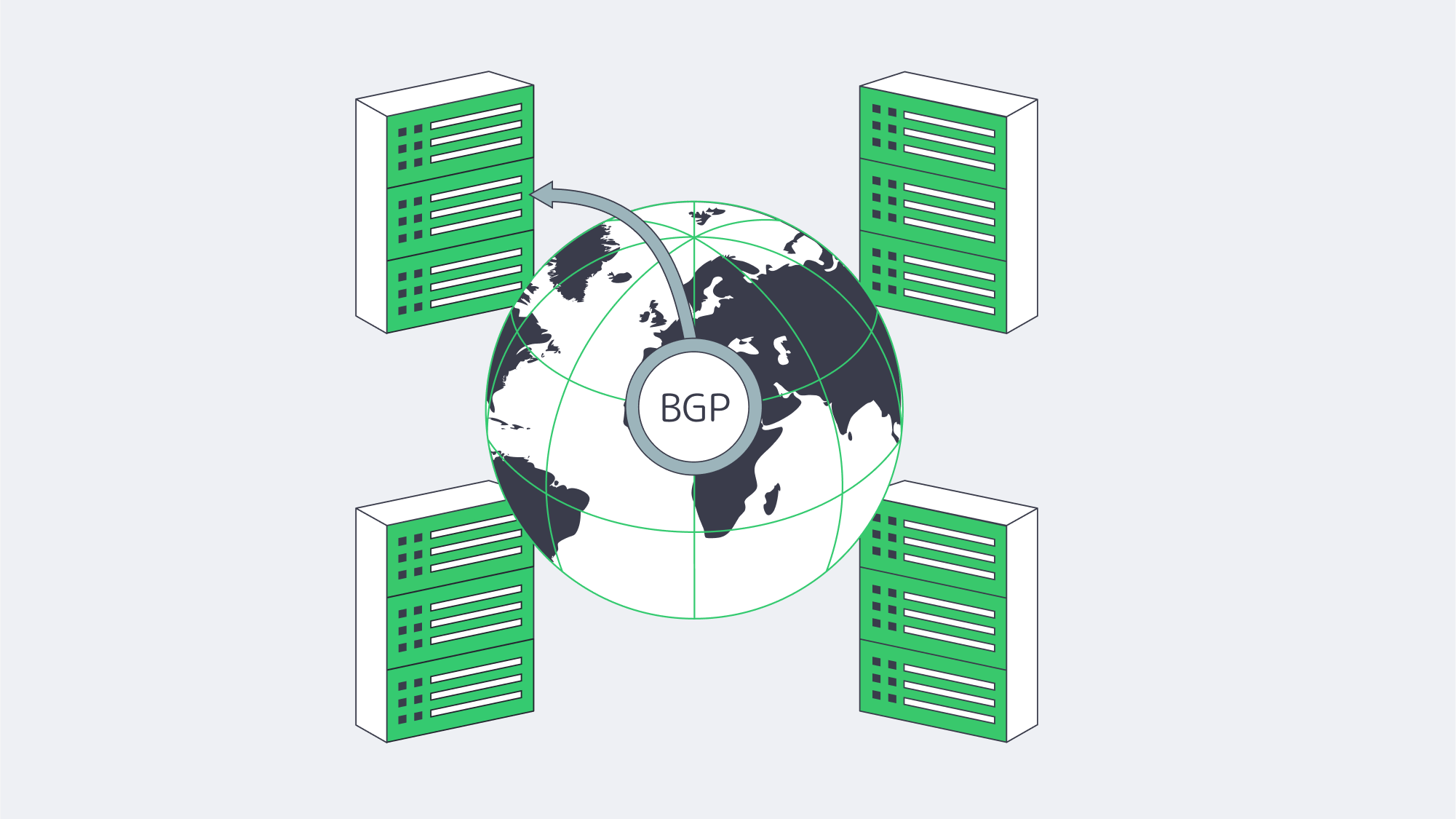
BGP communities have grown from obscure metadata to a de-facto control plane for fine-grained routing policy. Set a single 32-bit integer and you can decide which carrier hauls your packets and how gracefully users ride out maintenance. The networks that master communities extract more value from every transit dollar and deliver steadier performance to every end user—even as traffic volumes and topologies evolve.
For engineers, the message is clear: treat communities as code. Document the intended outcome, tag the route, verify in near-real time, and roll back with confidence. The Internet already understands these cues; you only need to speak its language fluently.
Order Your BGP Session
Instantly provision a BGP session and start shaping traffic with fine-grained community tags.
Get expert support with your services
Phone, email, or Telegram: our engineers are available 24/7 to keep your workloads online.
Blog

How Dedicated Servers Turbocharge NFT Drops
NFT marketplaces matured rapidly, and the initial boom was problematic. The high-traffic, high-stakes platforms saw tens of thousands arriving together for a hyped drop or auction. This inevitably led to timeouts, failed requests, and outages across sites during marquee releases. The market suffered as infrastructure buckled under the pressure of artist-led drops that doubled traffic in minutes, causing crashes that lasted up to an hour. With all eyes on the platforms, the lesson was tough. Failed transactions leave users out of pocket, reputations are ruined, and creators take their business elsewhere.
The once-emerging demand has only scaled since, with leading marketplaces recording an excess of 5 million visits each month. A single day can see over 111,000 active users, and on peak days tens of thousands of new traders sign up globally as a single drop stretches networks across continents, bringing concurrent bidders from Los Angeles, London, Lagos, and Singapore into the same trading battle. The situation soon becomes effectively first-come, first-served, and the margin for error is so tiny that just 100 ms of page latency can dent conversion.
The best philosophy that modern NFT platforms can take is to treat drop day as the blueprint for regular operation and engineer for high throughput and capacity, with cross-regional low latency. The core for such an approach rests on dedicated server clusters with advanced load balancing, which are optimized for content delivery and augmented by multi-chain back ends with resilient data pipelines that can keep up with the demands of real-time blockchain interactions.
Choose Melbicom— 1,300+ ready-to-go servers — 21 global Tier IV & III data centers — 55+ PoP CDN across 6 continents |
|
Scalable NFT Marketplace Hosting: Preventing Drop-Day Meltdowns
Being able to scale begins with a horizontal approach on single-tenant dedicated servers. The scaling starts with multiple front-end/API nodes to expand to, clustered databases, in-memory caches, and separate pools for blockchain connectivity. Keeping each tier stateless or replicated helps with raising and contracting capacity rapidly before and after a release. Place a load balancer in front of every critical service; it performs health checks and load-shedding, preventing any single point of failure from affecting the rest of the system.
With this type of architecture, hot traffic is spread under burst conditions; multiple application nodes handle browsing, searching, and bidding, preventing any one machine from becoming a choke point. It also isolates heavy components, so if one service, such as a slow indexer, fails, it doesn’t take down the entire marketplace. Separating everything into microservices (listing, bidding, metadata fetch, search, user profiles, and notification pipelines) means they can each scale independently, which equates to higher throughput and predictable performance regardless of how big the crowd.
NFT server solutions: A practical cluster pattern
- For edge and ingress: Route users via Anycast DNS + L7/L4 load balancers to their nearest region and fan requests across local app pools.
- In the application tier: Use 8–N stateless API/web nodes per region, autoscale for drops in advance, and keep queues bounded with circuit breakers and back-pressure.
- For the caching tier: Read surges for listings, trait filters, leaderboards, and collections can be absorbed by leveraging Redis or Memcached, so long as the dedicated server is rich enough in RAM.
- The data tier: With primary/replica SQL or NewSQL clusters on NVMe-backed dedicated servers, you can steer read-heavy traffic to replicas with paths optimized for idempotence and retries.
- For search/index: You can speed up trait filters with dedicated nodes for full-text and attribute searches.
- Blockchain I/O: Each chain should run its own nodes (full, archive, or validator-adjacent), pooled behind load-balanced RPC endpoints on compute- and disk-optimized hosts, with fallback providers routed by a rate-aware client.
It all boils down to juggling enough headroom and keeping sustained utilization below safe thresholds. That way, a sudden 5–10× spike won’t land beyond system capacity.
Dedicated hosting for NFT drops: Balancing objectivity and predictability
For MVPs and platforms with moderate traffic, cloud VMs remain solid enough, providing familiar autoscaling and managed services ideal for emerging contenders. However, for large-scale operations, dedicated servers have two advantages that can make all the difference on drop day:
- Deterministic performance: No noisy neighbors, you have full CPU/memory/disk I/O, and line-rate NICs, so there are truly no hidden throttles under saturation.
- Bandwidth is more economical: Generous egress with predictability is as important as compute when you’re globally serving terabytes of media and metadata.
What to consider:
| Dimension | Dedicated servers | Cloud VMs |
|---|---|---|
| Performance under surge | Deterministic; full hardware control | Variable, multi-tenant noise and tier caps |
| Bandwidth model | High per-server throughput; predictable egress | Typically metered egress; cost rises with success |
| Control surface | Root control for DB/OS/tuning and custom nodes | Faster primitives, but managed constraints apply |
For an ideal solution that ensures predictable UX at peak, many operators opt for a hybrid middle ground running core transaction paths, databases, caches, and chain I/O on dedicated clusters and sending overflow and ancillary jobs to the cloud.
Low-Latency, High-Throughput Design

Latency is naturally governed by geography. The requests of a Paris-based buyer being served from a Virginia origin will experience a delay, and in a competitive auction, the milliseconds matter, making it vital to push content outward and pull users inward and tackle the issue from both ends.
To do that, NFT media and static assets such as thumbnails, preview videos, and collection images should be cached via CDNs to keep them on edge nodes local to users so they don’t need to touch the origin to load. Dynamic API requests should be brought to the nearest region through geo-routing. These regional app pools lower the average latency, and the global routing layer prevents spikes in tail latency.
HTTP/2 and HTTP/3 (QUIC) should be enabled, and you can compress JSON and metadata to further reduce latency. Serve modern image formats (AVIF/WebP) and use server/CDN-side on-the-fly resizing so mobile users aren’t downloading 4K art when a 720p preview suffices. Another tactic is to keep connection reuse high and TLS handshakes short on the server to again lower the user-perceived latency. With all of the above in place, you should have faster pages, allowing users to place faster bids.
This design is simple to execute with Melbicom because we already operate with this blueprint in mind. Our servers are provisioned from 21 data center locations (Tier IV and Tier III facilities in Amsterdam and Tier III sites in other regions), and our CDN spans over 55 global locations to help reduce pressure on the origin during traffic spikes, keep close to demand centers, and considerably shorten paths. Melbicom adds power/network redundancy to the performance story, ideal for handling high traffic at scale.
Bandwidth for NFT platforms: Preparing the pipeline before crowds appear
- Keep high-capacity uplinks on origin so cache-miss storms don’t throttle.
- Set aggressive caching rules and warm edge caches for featured collections.
- Origin sharding can reduce load for hot collections by splitting media across multiple high-bandwidth servers behind DNS or CDN origin balancers.
The network design and per-server bandwidth ceiling at Melbicom give operators room to breathe when the crowd appears without warning.
Multi-Chain Back Ends: Are You Really Future-Ready?
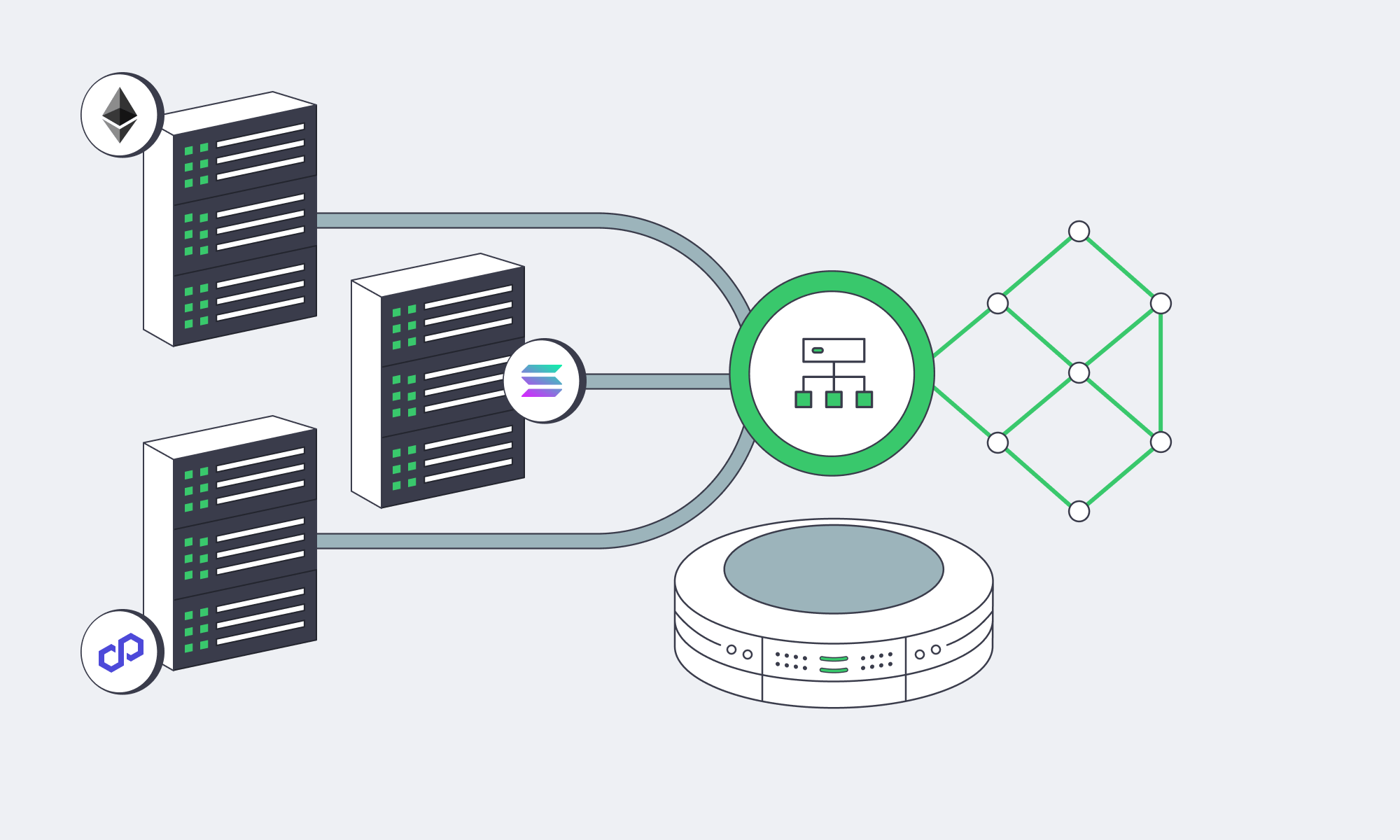
The marketplace choke point in the early days was the single-chain dependence; today, leaders span dozens of chains and L2s. This benefits users and keeps fees manageable, but it can be demanding in terms of infrastructure. With each chain, additional RPC traffic, indexing, confirmations, and reorg handling are added to your critical path.
The way around this is to work with a multi-chain I/O fabric that consists of pools of RPC endpoints per chain running behind a client-side load balancer. That balancer must be chain-aware, understanding rate limits, method cost, backoff, and geo-aware to help find the nearest healthy endpoint. Heavy chains should ideally have their own nodes placed on disk-rich, CPU-steady dedicated servers to scale horizontally wherever feasible, especially deep history archive nodes and indexers to help speed up trait/ownership queries. If you mix your own nodes and trusted third-party endpoints with dynamic routing and health checks, you have sufficient redundancy.
When it comes to the data side of operations, the aim is a consistent sub-second response regardless of how high the concurrency is, which can be achieved by designing for reads. This means keeping cached projections of on-chain states, such as ownership, listings, and floor prices, that refresh on events and using read replicas for API queries. Writes should be kept idempotent so a retried bid doesn’t result in a double-spend. Trait filters and search data can be offloaded to optimized search clusters for aggregation.
NFT server solutions: Spike-proof reliability patterns that scale
- Graceful degradation design: When RPC slows, you want browsing to remain responsive, so queue writes, show optimistic UI where appropriate, and reconcile.
- Circuit breaking: Avoid cascading timeouts by tripping RPC methods that are timing out; then try alternate regions/providers.
- Backpressure at ingress: During peaks, shed or delay low-value requests such as slow-polling clients to help keep bid and purchase paths rapid.
- SLO-driven autoscaling: Scale API nodes based on queue depth and p95 latency, not just CPU. Scale caches based on keyspace hotness.
Practical Operational Guidance

- Design for peak: If a typical day is 1×, you should engineer for 10× and practice load tests at 20×. If you can keep at least one region running at <50% utilization, then you know you can absorb a sudden spike without chaos.
- Place users at the core: Run two or three regions for global audiences and let your routing decide if your budget will cover it; keep failover active-active.
- Own the hot path: You need to keep bids, mints, purchases, metadata reads, and ownership checks on infrastructure you have full control of. That way, you can tune and overprovision. Batch jobs and low-priority tasks can be moved to overflow capacity.
- Observability is a key investment: For efficient incident response during a drop, real-time per-route latency, queue depth, and RPC method timing metrics are invaluable.
Melbicom already aligns with this playbook perfectly. With over 1,300 server configurations ready to deploy, sizing clusters is simpler. We have 21 global locations and a CDN with 55+ locations. You can reduce origin load and lower latency. Each server can reach up to 200 Gbps, addressing egress storms, and we provide free 24/7 support, meaning teams can focus on the product instead of wrestling with infrastructure.
Ready for Drop-Day Traffic?
Deploy high-performance dedicated servers with global bandwidth to keep your NFT marketplace lightning-fast at peak demand.
Get expert support with your services
Phone, email, or Telegram: our engineers are available 24/7 to keep your workloads online.
Blog

A Smarter Alternative to Dubai Dedicated Hosting in UAE
The network topology of the Gulf is evolving. For a long time, the default move was to simply spin up a Dubai dedicated server and be done with it. This knee-jerk reaction is easily understood; for years, Dubai served as the UAE’s de facto hub. But this pattern has recently given way to a more effective strategy: install compute where the international cables actually land and where the country’s peering fabric is densest – Fujairah – and connect directly into the Gulf’s traffic flows. The result: lower latency across key GCC markets, stronger route diversity and, most importantly, meaningfully better economics.
This report explains how Fujairah, backed by UAE-IX peering and multiple subsea systems, provides low-latency Gulf coverage without the overhead of Dubai and how Melbicom’s Fujairah dedicated servers turn those network advantages into real business value.
Choose Melbicom— Dozens of ready-to-go servers — Tier III-certified DC in Fujairah — 55+ PoP CDN across 6 continents |
|
Beyond the Default: Rethinking the Dubai Dedicated Server
Dubai’s environment enabled the region’s first digital expansion, but today’s hosting requirements—fast, sub-50 ms GCC response times, predictable costs, and built-in resiliency—are driving a shift toward infrastructure that scales at or near cable landings and exchange points. That is precisely what Fujairah offers. Instead of inward movement of traffic to access international gateways, Fujairah directly connects at gateway sources through east- and westbound subsea pathways.
This doesn’t reduce the importance of Dubai; it just repositions it
In a region now connected by mature peering fabrics and a dense network of cables, locating compute at Fujairah can mean shorter paths, fewer hops, and lower costs. Businesses still serve the UAE and the rest of the Gulf; they just do it from a location designed for fast exit and route diversity.
Fujairah’s Strategic Connectivity: UAE-IX + Subsea Density

Fujairah’s advantage is physical and architectural. Flagship subsea systems targeting the east coast land in multiples, creating a hub of aggregation where the routes to Europe, South Asia, and East Africa are all at hand. Traffic bound for Riyadh, Manama, Muscat, Doha, or Karachi can clear the country at the shortest viable exit, and inbound routes can fail over across multiple cables without leaving the campus.
No less critical is the peering fabric. UAE-IX cross-connects a long list of regional and international networks (well over a hundred) and operates at aggregate capacities measured in multiple terabits per second. In practice, that keeps Gulf traffic regional, eliminating the tromboning that historically ballooned both latency and transit bills. Industry deployments have documented up to 80% latency improvements after switching to in-country peering and local hand-offs at national exchanges. For end users, that’s the difference between a page that merely loads and an experience that feels instant.
Failover is intrinsic because Fujairah is not just a cable landing cluster but also an exchange location. If one cable segment degrades, traffic simply rides an alternate system. If a path westbound is congested, the same content can be served via an eastbound route. That multi-path optionality is what businesses actually buy when they choose Fujairah: performance that holds up during ordinary peaks and extraordinary events alike.
Avoiding “Dubai Overhead”: Cost Efficiency and Resilience
The three variables of hosting economics in the UAE are: 1) where you pivot to international transit; 2) the extent to which you can route your traffic on settlement-free peering; and 3) the real-estate and power premiums you pay to control those decisions. Fujairah reduces each of those pressures.
Lower operating costs
The east-coast campus model is optimized for throughput, not for proximity to city-center amenities. The result is more competitive rack and power pricing and a shorter chain of third-party markups.
Cheaper bandwidth at scale
Proximity to exchange fabric means a higher portion of your traffic can route on zero-cost peering. For the fraction that needs to pay upstream, engaging multiple carriers generates price competition; there’s no need to go through a single inland haul to a landing station.
Redundancy by design
In Dubai, achieving real geographic and provider diversity often requires planning and paying for separate infrastructure paths to the coast. In Fujairah, the multi-path redundancy is already on-premise. Multi-cable failover and dual-direction egress are built-in advantages of the location.
Compliance without complexity.
Onshore hosting accommodates government requirements like data sovereignty and sector-specific localization needs. Fujairah’s geography extends those benefits by providing in-country geographic diversity for programs that mandate separation between primary and recovery sites, without the burden of crossing national borders.
Put them together, and the net effect is simple: They achieve reduced Time to First Byte throughout the Gulf region while decreasing overall ownership expenses. For high-volume services, commerce, media, real-time apps, peering-first delivery from Fujairah is often the most direct route between performance goals and financial constraints.
A Quick Comparison
| Key Factor | Legacy Dubai Hosting | Fujairah (New Hub) Hosting |
|---|---|---|
| International Connectivity | Indirect access to many subsea systems via inland routes | On-site access to multiple global cables; direct hand-off east and west |
| Latency to Regional Users | Low for local UAE; Gulf traffic can inherit inland detours | Ultra-low across GCC via local peering and shortest-path egress; industry reports show up to 80% latency cuts |
| Bandwidth Costs | City-center premiums; more paid transit | More zero-cost peering, multiple carriers, more competitive transit |
| Infrastructure Overhead | Higher real-estate/power and cross-connect premiums | Lean campus economics focused on throughput and scale |
| Redundancy & Failover | Requires explicit dual-path engineering | Intrinsic multi-path across several cables and directions |
Advanced Scaling – Turn Connectivity Into Business Outcomes
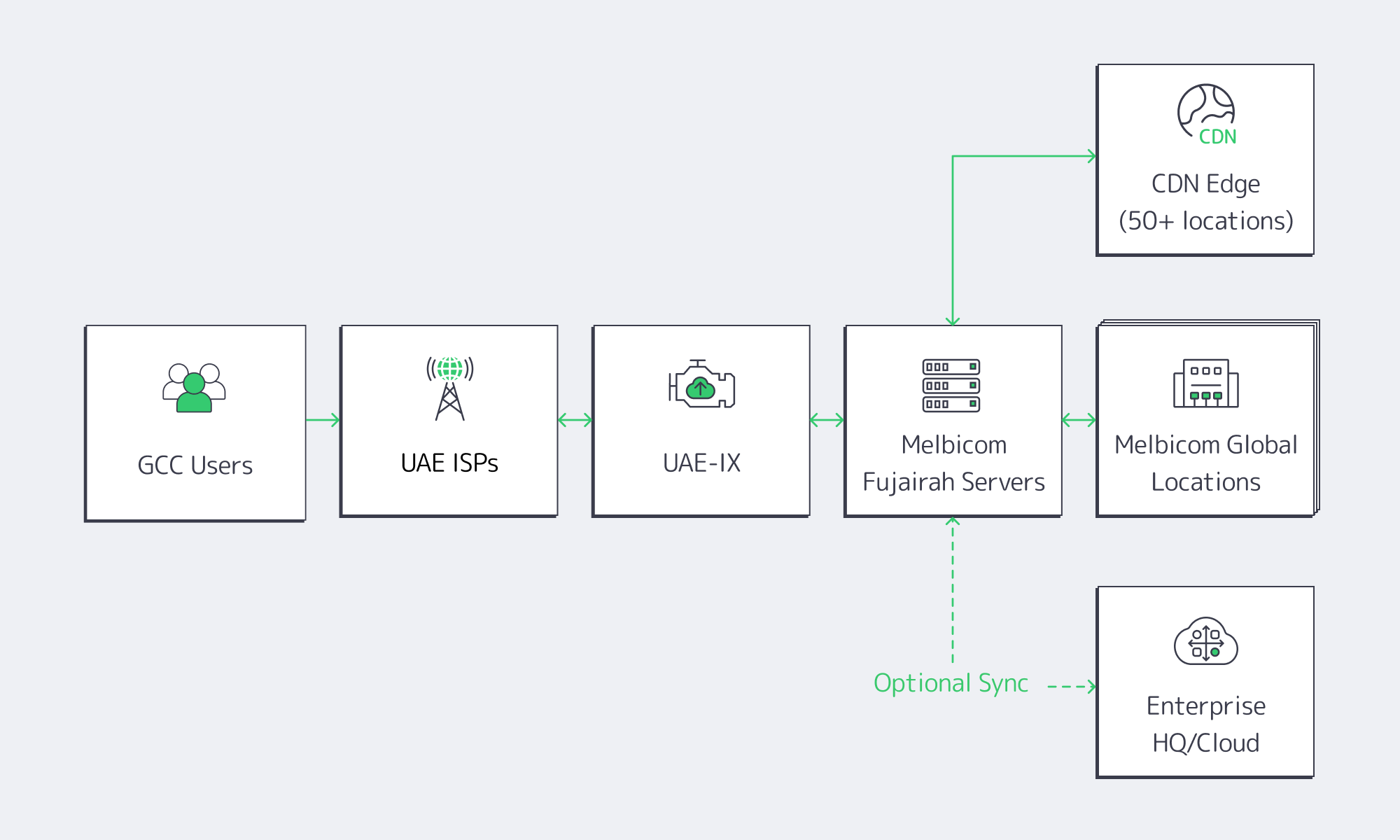
Right-sized compute, on demand. We offer dozens of ready-to-go dedicated server configurations in Fujairah to match compute (CPU, RAM, and storage) to workload without overbuying. As demand increases and peak levels rise, expand stack capacity instead of rewriting code.
Throughput headroom when it counts. With up to 200 Gbps of per-server bandwidth in our top-tier hubs, and Fujairah built for high throughput regional distribution, the result is: consistent multi-gigabit flows for streaming, software distribution, high volume APIs—without egress hand-wringing.
Global footprint, local results. With 20 additional locations across Europe, the Americas, Africa, and Asia, Melbicom gives you the freedom to place data and compute where they make operational sense and keep your Middle Eastern traffic local. Add a CDN in 55+ locations to cache assets close to end users and you double down on the latency benefits of Fujairah with edge acceleration everywhere else.
Tiered reliability where it matters. Melbicom has facilities with Tier IV & III in Amsterdam and Tier III everywhere else, including the UAE. Those are the levels of redundancy and maintainability enterprises require to keep 24×7 services available, and free 24/7 support means you have both the infrastructure and the operational response to keep the lights on.
Regulatory alignment without friction. Hosting in the UAE lets you simplify your adherence to local data handling regulations without the burden of cross-border carve-outs. For workloads that need in-country secondary sites, Fujairah gives you geographic diversity without performance sacrifice.
Final Thought: The business benefits from better financial results while maintaining positive cost efficiency on a per-unit basis. By expanding into Fujairah, you connect to sub-30 ms service envelopes with hundreds of millions of users around the Gulf and the near-abroad. With the right targeting, you also improve conversion on latency-sensitive journeys (checkout, log-in, live search) and benefit from a cost profile that tracks your growth rather than drags on it. Meanwhile, the macro demand for the service itself is increasing: the UAE data center market is on a high-teens CAGR trajectory toward the low-single-digit billions of dollars, propelled by cloud adoption, fintech expansion, and content localization. Placing compute at Fujairah positions teams to ride that demand efficiently, instead of paying an urban premium to stand still.
Why Fujairah, Why Now
It’s long been an axiom of technical teams: “the network is the computer.” In the Gulf, the network starts at the east-coast landing stations and at the national peering fabric. Hosting where those systems converge is the shortest path to speed and resilience. The fact that it’s also more cost-effective than a city-center deployment is a bonus, not a compromise.
For organizations targeting the Gulf or expanding an existing presence, the decision matrix has distilled to a few clear questions: Can we meet GCC-wide latency targets without over-engineering? Are we getting redundancy by default instead of by exception? And will our unit costs improve as we grow? In Fujairah, the answer to each is yes. Melbicom turns that “yes” into a turnkey deployment that integrates with your broader footprint—no detours, no waiting on external cross-connects, and no surprises on the invoice.
Conclusion: The Smarter Path to Gulf Performance

Fujairah has quietly become the UAE’s performance and resiliency sweet spot, thanks to direct adjacency to multiple subsea systems, deep peering via UAE-IX, and a campus model built for throughput rather than metropolitan optics. For businesses that need fast, reliable delivery across the Gulf, it’s the rare choice that improves both the user experience and the cost curve at once.
Melbicom’s role is to make that choice frictionless. By pairing right-sized dedicated servers in Fujairah with a global network, Tier-grade facilities, and 24/7 support, we remove the operational hurdles so teams can focus on product and growth. If “Dubai dedicated server” was yesterday’s shorthand for Middle East hosting, Fujairah with Melbicom is today’s smarter default.
Launch in Fujairah Now
Provision your dedicated server in seconds and tap into the UAE’s fastest, most resilient network hub.
Get expert support with your services
Phone, email, or Telegram: our engineers are available 24/7 to keep your workloads online.
Blog

When and How to Scale Storage on Dedicated Servers
Analysts estimate that the world datasphere will grow to approximately 175 ZB (zettabytes). Translate that to the local environment and the truth is unique and straightforward: Dedicated servers need to increase their storage capacity at an early stage, while maintaining fine scalability and limiting downtime of services to a minimum. This article analyzes clear indicators that help define scaling times and the real trade-offs between scaling options (vertical drive upgrades or horizontal clustering with solutions like Ceph) and automation techniques that allow seamless service during growth.
Choose Melbicom— 1,300+ ready-to-go servers — 21 global Tier IV & III data centers — 55+ PoP CDN across 6 continents |
|
When to Scale Storage on Dedicated Servers
Three different metric groups offer visible and measurable indicators.
1) Capacity saturation (leading indicator)
Consider ~80% utilization as a planning watermark. Filesystems lose sufficient space for temporary files and system maintenance after this point which results in growth rates that surpass procurement life cycles. Operating at 90-95% utilization exposes your system to critical risk where logging spikes or backup processes can trigger failures. Plan to begin expanding capacity or offloading data at the 70-80% band and add or evacuate before you ever go over 90%.
2) Read/write bottlenecks (throughput and IOPS)
Request volume delivered by storage I/O requires the layer to guarantee predictable latency performance. Key indicators include disk utilization approaching 100%, long I/O queues, and elevated CPU iowait that persists even when the queue depth is reduced. In a practical sense: if iowait is ~12% on an 8-core system (≈1/8 of total) and CPU load is high, the storage subsystem, not the CPU, is throttling forward progress. At this point, you can increase parallelism (add more drives, widen RAID sets, increase I/O queues) or upgrade media (HDD → SSD → NVMe). As an approximate reference point, HDDs achieve on the order of a few hundred IOPS with ~10 ms latency; modern NVMe SSDs achieve hundreds of thousands of IOPS at sub-millisecond latency, with 5-7 GB/s sustained throughput per device, shifting other bottlenecks toward compute and network.
3) Latency spikes (especially tail latency)
Metrics create positive feelings yet users interact with systems based on their 95th-99th percentile performance. The system appears to suffer from performance issues when 1% of operations that should take 10 ms extend to 100 ms or more despite having an acceptable mean operation time. Saturated queues, GC/trim on flash, and background rebuilds all cause tail amplification. Track and alert on high-percentile disk or block-device latency; repeated spikes under load are a clear signal to scale.
Finally, near-capacity errors, i.e., failed writes, throttled jobs, and backups running out of space, are lagging indicators that planning fell behind. Use them to tighten alerting thresholds and to justify keeping spare capacity.
Vertical vs. Horizontal: Choosing How to Add Capacity and IOPS
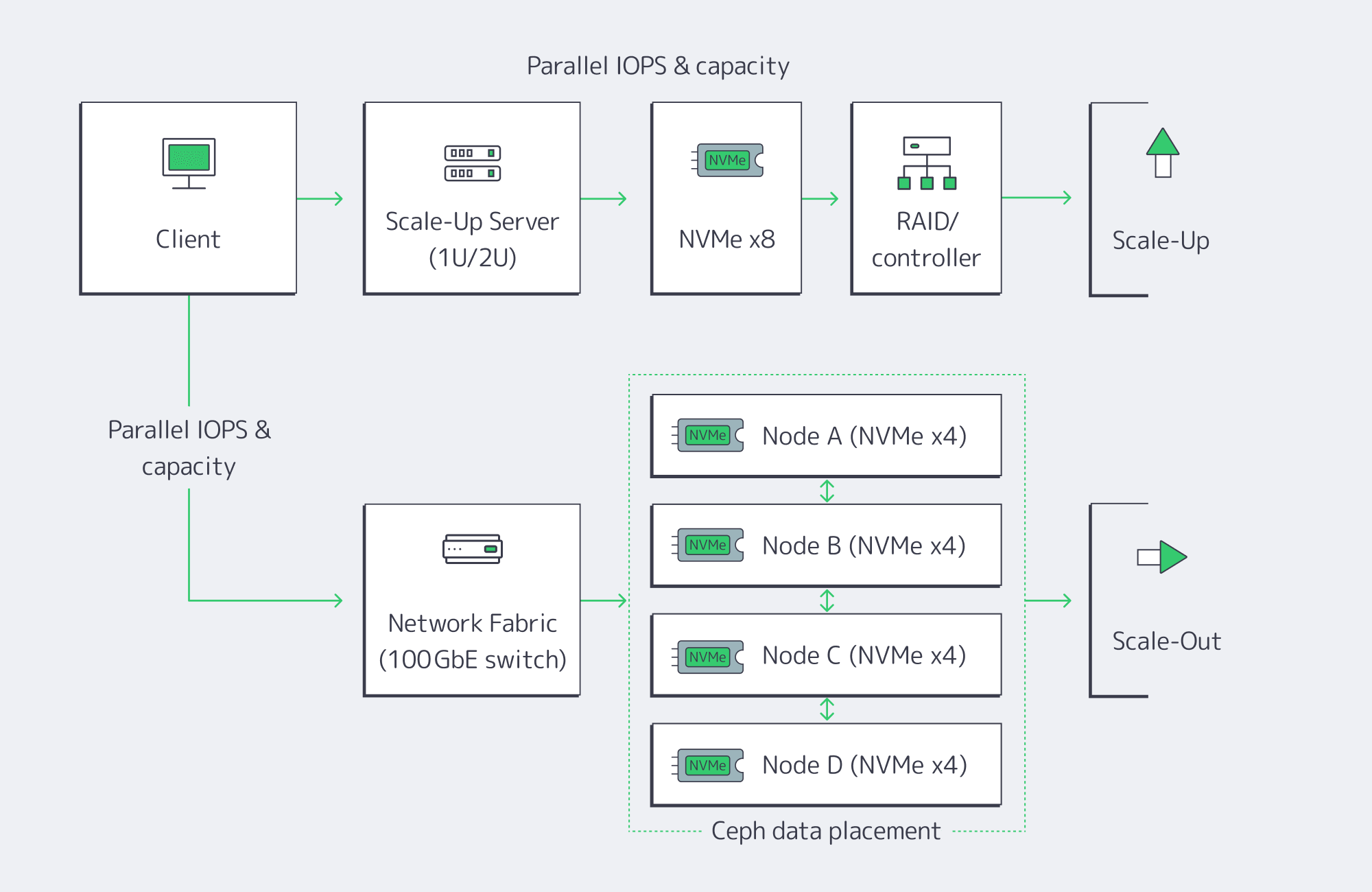
There are two basic paths to expansion. Most teams begin with vertical scaling (scale-up) on the existing server, and adopt horizontal scaling (scale-out) when a single box hits physical hard limits or availability targets require node-level redundancy.
Vertical (scale-up): upgrade inside the server
Add new drives to free bays, or replace existing drives with denser/faster media. The advantages are simplicity and low latency: everything’s local, no distributed software layer to manage. Swapping from HDD or SATA SSD to NVMe can be transformative, dropping latency to the tens or hundreds of microseconds and pushing aggregate throughput to multi-GB/s per device. NVMe is now mainstream and ubiquitous; it’s the default performance tier for new SSDs and accounts for well over half of enterprise-class SSD capacity in the field. The physical and architectural constraints are also server-bound: finite drive bays and controller bandwidth, and a single server as a single failure domain. Expansions can eventually become forklift upgrades: migrate to a larger chassis, or offload to another system.
Horizontal (scale-out): add nodes and distribute.
Add servers and distribute data using a distributed storage layer such as Ceph. Each node contributes CPU, RAM, and storage, so both capacity and throughput scale. The key: there’s no single controller or filesystem to saturate, and Ceph replicates or erasure-codes data across nodes (a RAIN pattern); the cluster automatically rebalances when new OSDs (drives) are added or replaced, so the system is resilient to node failures as well. The trade-off: operational complexity, and a slight network latency overhead vs. local disk access. High-speed fabrics and NVMe-over-Fabrics (NVMeoF) minimizes the penalty; 10-GbE or higher and RDMA-based protocols like RoCE are standard in clusters of this sort. Scale-out is the long game: if you’re in the hundreds of terabytes to petabyte scale and need parallel throughput for analytics or AI workloads, this is the model that keeps growing.
A quick comparison
| Approach | Advantages | Drawbacks |
| Vertical (scale-up) | Simple to operate, lowest possible latency (local NVMe), can fully leverage existing server | Hard limits on bays and controller bandwidth, a single failure domain; may require brief downtime if not hot-swap ready |
| Horizontal (scale-out) | Near-linear growth in storage capacity, throughput & IOPS; node failure tolerance, automatic online rebalancing | Increased operational complexity; network adds small latency overhead vs. local disk, higher initial footprint |
A practical pattern
Scale up within each node to the point that bays and controllers are well-utilized, then scale out across nodes with Ceph or a similar distributed layer. That hybrid gives you best-latency per node and the elasticity and resiliency of a cluster.
Automation for Minimal Downtime
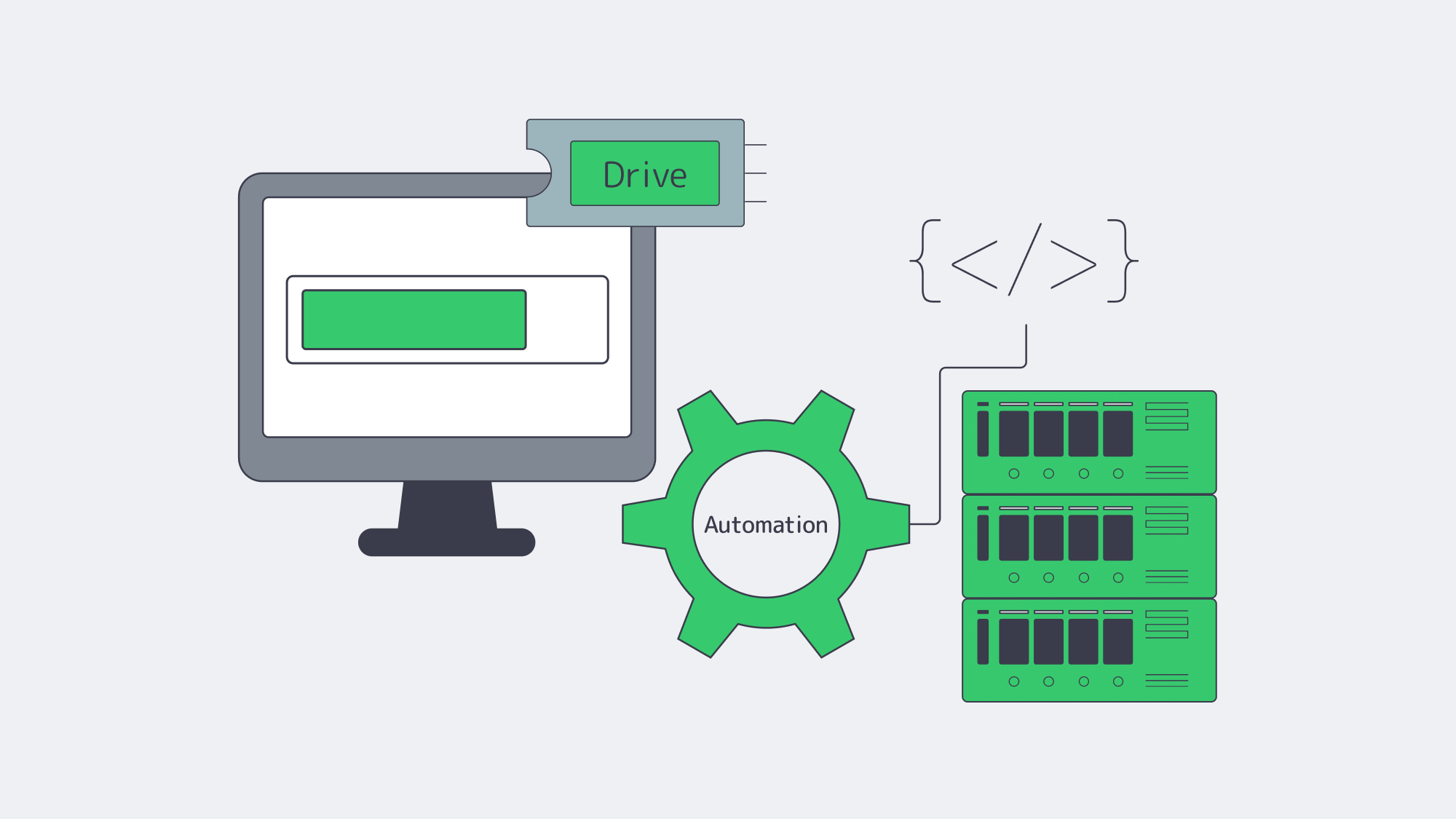
What used to require weeks or a weekend maintenance window can now be routine.
Hot-adding media
Enterprise servers support hot-plug for SATA/SAS drives and, increasingly, NVMe. You can literally insert a new NVMe drive without powering down; the OS automatically detects it, and you add it to your LVM volume group, ZFS pool, or RAID set. The practical impact: add capacity with no reboot required. If not dealing with old BIOS/boot devices, replace malfunctioning drives while the system remains active then add the new drive for automatic background rebuilding by the controller/software.
Online growth and rebalancing
Modern filesystems (XFS, ext4) and volume managers support online addition of capacity and re-growing of existing volumes. On clusters, Ceph is designed to add new OSDs (storage drives) and rebalance placement groups automatically, without interrupting client I/O while the cluster evens out free space and load.
Automating the triggers
Tie monitoring to action. When utilization approaches ~75-80%, automate an internal ticket/reminder/request to a runbook that (1) places an order for additional NVMe capacity or a new node with your server provider, (2) provisions the new node and joins it to your volume group or Ceph cluster, and (3) verifies that rebalancing has completed and restored healthy tail latencies. Here at Melbicom, we make the procurement side completely predictable by maintaining 1,300+ ready-to-go server configurations; your teams standardize on a few storage-optimized profiles and script the provisioning workflow for the rest.
Data layer elasticity
Database and streaming application stacks increasingly support online replication and sharding. Add a replica / shard server, allow the system to backfill / redistribute the keys, and then redirect the traffic; no global outage needed. Manual tape migrations and complete operating system/metadata data transfers are outdated processes that belong in history. This is just a gesture of understanding for those who survived the process of manual tape migrations and forklift OS/data moves.
Data Tiering and Offloading: Scale Smart, Not Just Big
Right-sizing your fastest storage is half the battle; the other half is putting colder data elsewhere consistently.
Object storage for cold/warm data
Melbicom’s S3-compatible storage provides elastic capacity (plans from 1 TB to 500 TB+) and durability with erasure coding in top-tier facilities. Keep hot working sets on server NVMe; push logs, media, and less-frequently-accessed files to S3 with lifecycle policies.
Backup targets outside the primary server
Cold backup storage over SFTP with RAID-protected capacity and 10 Gbps transfers lets you pull nightly snapshots and database dumps off the production box. This not only reduces restore time objectives but it also frees space.
Relieve origin reads
A worldwide CDN (55+ locations) positioned before static assets moves bandwidth and I/O away from main servers, which results in scaled read operations without requiring extra storage disks.
These layers support your existing server expansion methods and integrate seamlessly when your provider maintains uniformity in footprint and networking across locations. Consider Melbicom’s data center locations and tiers when architecting for locality, latency, and compliance.
Summary: a Decision Checklist
Are you ≥80% full? Plan capacity; if at 90–95%, act immediately.
Is iowait ~12%+ (8-core basis), queues long, or disks pegged? Add drives, expand RAID, or move to NVMe; if already tight on NVMe, then you know it’s time to scale out.
Are 95th–99th percentile latencies increasing? Approach this case like a production issue by implementing faster media together with horizontal scaling to ease the system load.
Do you need node-level durability or petabyte-class growth? Choose a scale-out (e.g., Ceph) product that provides replication/erasure coding and automatic rebalancing.
Can it scale automatically? Seek support for hot-adding of drives, online volume growth, and pre-scripted joining of nodes/rebalancing steps.
What should go off the box? Push cold data to S3 cloud storage, backups to SFTP, and static delivery to CDN.
Conclusion: Scale on Signal, then Automate

Storage growth on dedicated servers is controllable; you just need to make decisions based on signals, not stories. Capacity at ~80% is your early-warning, iowait and disk queues reveal your read/write ceilings, and tail latency will protect your user experience when averages lie. Vertical upgrades to NVMe should be your first step; horizontal clusters should come into play when constraints or availability targets require. Automation of both types, hot-plug media, online filesystem growth, and cluster rebalance is a must so that expansion is seamless and repeatable.
Combine this with tiering and offloading strategies to keep hot datasets on local NVMe, to store colder assets in S3-compatible storage, to run backups to a dedicated SFTP tier, and to place a CDN in front of static content. The result: a storage posture that grows with your product, not in fire drills. You watch the signals, you act when they flash, and the platform is engineered to absorb new capacity with barely a blink.
Scale Your Storage Now
Get dedicated servers with flexible NVMe and Ceph options deployed in minutes across 21 global locations.
Get expert support with your services
Phone, email, or Telegram: our engineers are available 24/7 to keep your workloads online.
Blog

Scaling Streaming Services with Dedicated Servers
Over 80% of total daily internet traffic is for video streaming. With the majority of us watching around 100 minutes on average every single day, it is easy to see why it now dominates the internet. Those statistics from industry analyses are augmented further by live streaming events; we are now seeing peaks of around 65 million concurrent streams. For platforms, it is no longer a question of whether or not they will receive a huge audience, but more a question of whether or not they can handle it. Without the right architecture buffering, outages and crippling costs arise. Streaming audiences have very little tolerance when it comes to delays; network latency of just 100 ms results in a measurable drop of 1% in engagement, which at scale can really affect revenue.
When audiences are large and traffic spikes are common, you need a scaling strategy in place to keep up with demands. Today, we will delve into the ideal blueprint that uses dedicated servers as an anchor to ensure performance and reliability, and load-balanced horizontal scaling with high-availability clusters and multi-region failover. This includes a hybrid infrastructure that keeps steady loads on dedicated servers and bursts to the cloud during peaks, reducing costs by around 40%. We will also explore hardware acceleration and next-gen codecs for dealing with 4K+ streaming efficiently.
Choose Melbicom— 1,300+ ready-to-go servers — 21 global Tier IV & III data centers — 55+ PoP CDN across 6 continents |
|
Why Use Dedicated Servers to Anchor Streaming at Scale?
Streaming services with high traffic have a high throughput and bandwidth. Heavy activities require consistency and predictability, which multi-tenant environments can’t provide. Often, they are affected by “noisy neighbors” and a hypervisor overhead, which means the network can’t guarantee the same throughput consistency. A fleet of dedicated servers delivers consistent CPU, predictable I/O, and stable latency at scale—even when millions tune in—because load is spread across many single-tenant nodes rather than contending in a multi-tenant environment. Single-tenant machines are also more economically viable for heavy bandwidth services because platforms can lock in high-capacity ports at a flat price instead of paying per-GB egress premiums and cloud tax on steady, always-on traffic.
Melbicom offers over 1,300 ready-to-go server configurations, including compute- and GPU-optimized profiles. We deploy servers in 21 global locations, and our network backbone provides up to 200 Gbps per server. We engineer across diverse carriers to ensure high-capacity upstreams, giving your teams the headroom to aggregate terabits at the cluster level without the instability of shared-tenancy environments. We also provide around-the-clock support at no extra cost because incidents rarely obey business hours, and rapid action protects revenue.
With a hybrid model that reserves cloud use only for unpredictable spikes, you also keep the costs down considerably while you scale. The steady portion of traffic is, after all, what dominates bills, and by keeping it on dedicated servers, you can consolidate spend and reduce TCO. Bandwidth drives cost up, and the figures vary according to workloads, but many large-scale studies show that by shifting sustained workloads from public clouds to dedicated servers, there are savings of 30–50% to be made.
Scaling Horizontally: A Server Fleet Design for High Traffic Streaming
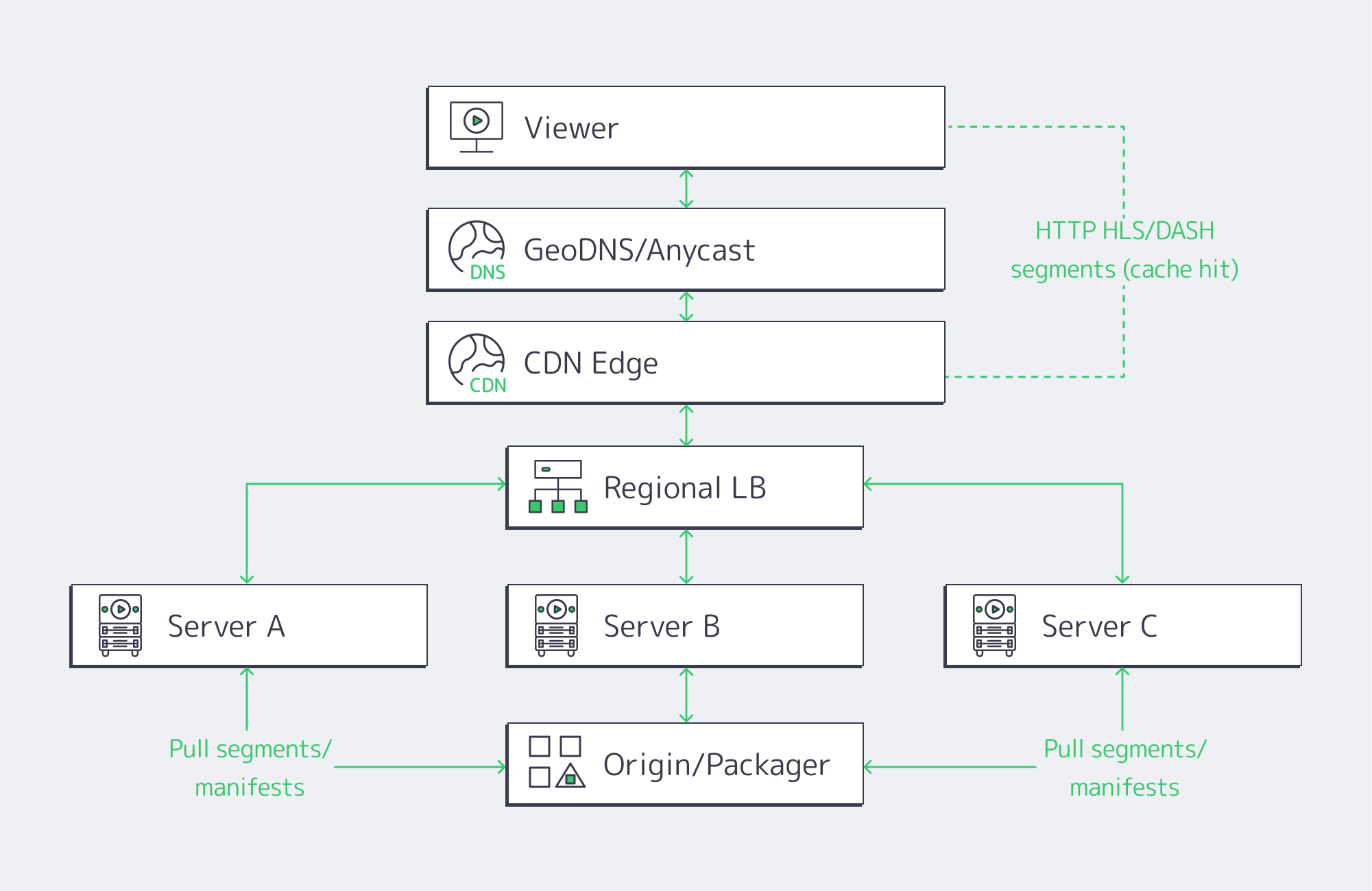
Horizontal scaling is simple. The core idea is that, rather than having to upgrade to an enormous server, you use many small, identical servers with a layer of load balancers across them to distribute. You essentially add nodes to grow your capacity, making it a natural choice for scaling up your streaming because HLS and DASH cut the video into chunks, and the player fetches them over HTTP, and segment requests can be handled by any server.
The balancing works best in two tiers:
- Global routing: Viewers are steered via GeoDNS or anycast to the nearest healthy region, be it Atlanta, Amsterdam, or Singapore.
- Local balancing: Traffic is spread across the server pool within the region using L4/L7 appliances or software on dedicated balancers using algorithms such as least-connections and slow-start.
Key design elements
- Statelessness/ light state: By keeping session state either in the client itself or a distributed store, any node can serve any segment. You can evade creating hard coupling and help localize caches through this short-lived operation.
- Back-pressure and shedding: Traffic is prevented from oversaturating nodes through health checks, circuit breakers, and queue depth signals. This ensures viewers don’t suffer at peak.
- Cache locality: Origin hits are minimized because each node serves from memory segments cached in RAM/NVMe, keeping startup fast.
- Rolling deploys: Node subsets can be drained, upgraded, and brought back before proceeding, which eliminates global maintenance windows.
With this design, the system degrades gracefully. When a node drops, you lose headroom, but the stream continues—unlike the failure cliff of traditional monoliths.
At Melbicom, we see horizontally scaling clusters achieve better p95 start times again and again simply because per-node contention is removed from the equation. And with the full OS/network control that single tenancy provides, teams can tune TCP stacks, IRQ affinity, and NIC queues. This allows for fine-grained optimizations that you simply don´t have the luxury of within shared environments.
Clusters, Regions, and Network Factors Needed for High Availability
The capacity to scale requires high availability and the ability to survive any failures along the way. High availability (HA) starts at the node requiring ECC memory, redundant PSUs, and mirrored NVMe, but the real key to ensuring availability relies on clustered service operation and a multi-region design.
- Use active-active clusters for origins and packagers to ensure that either node can serve the full load if its peer fails. Using stateless tiers facilitates things further; auth, catalogs, and watch history require consensus stores or primary-secondary with failover.
- Deploying in multiple regions prevents single point of failure if there is an incident at the data center itself. Regions can be rapidly pulled out using health-checked DNS/anycast, and you can shift viewers in seconds to the closest healthy site.
- Tiered redundancy shaves downtime considerably; top facilities, such as Tier IV-certified ones, aim for an uptime target of around 99.995% which equates to an acceptable 26 minutes of annual downtime, protecting revenue. Melbicom’s fleet includes Tier IV & III facilities in Amsterdam, while other locations meet Tier III, giving you the robust baseline needed for practical streaming SLAs.
The network also plays a huge role in maintaining high availability. To make sure your live streams flow regardless of a carrier having a bad day, you need multi-homed upstreams and enough route diversity, with rapid convergence. Single points can be eliminated within a site through redundant switching and NIC bonding, and BGP-based policies steer cross-site traffic around any regionally based issues. This is where having Melbicom’s dedicated multihomed backbone with its wide CDN truly pays off; it is already engineered for the high-volume, low-loss delivery that streaming platforms need at scale.
A Hybrid Infrastructure Solution: Steady Loads Kept Dedicated, Spikes to the Cloud

The capacity differences between a typical day of around 50k concurrents and a championship match explosion of 500k bring a capacity–cost dilemma. A hybrid model can help solve the volatile traffic patterns associated with streaming:
- Run the steady base on dedicated servers to keep latency predictable and benefit from a flat-rate bandwidth and tight cost per stream.
- Burst any spikes to the cloud by autoscaling groups or serverless entry points, so that you absorb overflow as and when needed.
- Leverage CDN and global routing with multiple origins—one pool on dedicated servers and another in the cloud—so you can shift percentages based on health and utilization.
Execution details for hybrid operation
- One artifact, two substrates: containerize the streaming stack so the same image runs on both dedicated servers and the cloud.
- Automate scale-out triggers by setting a threshold for the CPU/bandwidth so that burst capacity launches when traffic surges and drains when it subsides.
- Partition traffic, keeping existing sessions stable and only routing new sessions to the cloud when on-prem cluster limits are approached to avoid churn.
With the above model, bandwidth-heavy platforms regularly yield savings that hit double-digit percentages; up to 40% is common, considering a large chunk of the bill is driven by base traffic. There is no need to seek additional procurement, either, as the dedicated setup grows with you deliberately, while the cloud handles the unpredictable side.
Melbicom operates with 21 global locations, provisioning dedicated servers with an integrated CDN in 50+ locations to simplify the pattern, letting you anchor your origins local to your audience on our dedicated hardware, bursting only when needed.
Hardware Acceleration & Next-Gen Codecs
Scaling up means more servers, but more importantly, it means smarter servers to do the heavy lifting, which in modern streaming is transcoding single contribution feeds into renditions for adaptive bitrate ladders. Real-time 4K ladders are a tough task for CPUs alone; hardware encoders make it a different ball game.
- GPUs deliver throughput at a higher magnitude, allowing multiple 4K ladders per node with headroom to become a reality. Published tests show ~270 FPS vs ~80 FPS for certain 4K pipelines, almost triple the speed.
- AV1 and HEVC bring 30–50% bitrate savings when compared to older codecs; however, without hardware assist, software AV1 encoders can crawl at ~0.032 FPS, implying ~746× the compute for real-time 24 FPS.
- I/O and NICs. With multi-10-GbE and 25/40/100 GbE NICs, a single node is able to push tens of gigabits. That can be paired with NVMe and RAM caches to pull popular segments from memory-speed storage. Melbicom’s per-server ports reach up to 200 Gbps, preventing bottlenecks in the network.
All of this can then be tightened through edge placement. RTT can be trimmed by moving caches and GPU-assisted transcoders closer to viewers. The difference between a distant origin and a regional edge is dramatic; 200–300 ms round-trip times can be reduced to around 25 ms. When serving from closer metro-edge nodes, platforms report latency reductions in the region of 20–40%. The hardware acceleration and minimization of distance work hand in hand to reduce start times and lower rebuffer ratios during surges.
Delivering Content Globally via CDN + Distributed Origins

You can’t serve all viewers the same experience from a single facility, but CDNs can cache segments in the users’ region and keep experiences smooth. That way, the origin doesn’t serve each request, and each major region is served by distributed origins. For VOD, hot content is held by edges, and for live, edges relay segments seconds after creation.
Design aspects that scale well:
- Multiple origins per region eliminate single-point failures locally.
- Geo-routed entry ensures sessions land near viewers, preventing long-haul congestion.
- Efficient replication makes sure that published titles and live ladders appear at edges without thrashing the origin.
Creating this origin-plus-edge footprint is easy with Melbicom’s CDN that spans 50+ locations, integrated with dedicated servers in 21 data centers. Opting for Melbiсom means cross-continental consistency without multiple vendors and an origin that is controlled during surges.
Blending Everything Together

High-traffic streaming can be problematic for systems which have a direct impact on business. Coping with the bandwidth-heavy throughput requires a reliable, cost-effective plan that looks like this: Dedicated servers for predictable, always-on loads; horizontal fleets with load balancing; HA clusters and multi-region failover; and a hybrid infrastructure that sends rare spikes to the cloud. You also need hardware acceleration to assist with 4K/AV1 and CDN-first delivery. Following this blueprint, you have an architecture engineered to absorb audience spikes without any disgruntled viewers or soaring bills.
The right architecture also needs the right operational posture; the best hardware in the world can´t help you handle those high-traffic streams if it isn´t being utilized correctly. So be sure to measure your p95 start time, rebuffer ratios, and per-region error budgets. You can wire autoscaling to real signals and practice failover to stay ahead. Remember to place capacity near demand, which will naturally lower latency; the compounding effect is higher engagement that justifies broader distribution, which lowers latency further. Single-tenant hardware is the bedrock for scaling.
Scale with Dedicated Servers
Provision high-performance dedicated servers worldwide and handle traffic surges with confidence.
Get expert support with your services
Phone, email, or Telegram: our engineers are available 24/7 to keep your workloads online.