
Blog

Hybrid ERP Hosting for Cost, Control, and Speed
Public cloud made ERP modernization feel inevitable. But a sharper set of pressures—security and data sovereignty mandates, AI-driven analytics, real-time global access, and ballooning cloud bills—has pushed enterprises toward a more deliberate balance between cloud and dedicated infrastructure. The real question is how to blend cloud and on-prem infrastructure for control, performance, and predictable cost.
Why Are Organizations Rebalancing Now?
Three forces dominate the recalculation:
- Cost variability. Cloud’s elasticity comes with variable and complex pricing. Flexera’s 2026 State of the Cloud Report found that 85% of respondents ranked managing cloud spend as a top challenge, 17% exceeded public-cloud budgets in the prior year, and estimated IaaS/PaaS waste rose to 29%. Those dynamics justify workload-by-workload cost modeling rather than blanket migration.
- Sovereignty and control. New sovereign-cloud options from major enterprise technology providers underscore how serious data residency and jurisdiction have become. SAP expanded its Sovereign Cloud portfolio—including an “On-Site” model—to let customers keep workloads under local control. In parallel, AWS opened the AWS European Sovereign Cloud, operated in the EU by EU residents, to support data-residency and operational-control requirements.
- Performance and AI gravity. The farther users are from the ERP application and database, the more network latency compounds across interactive transactions. Meanwhile, AI features inside ERP—forecasting, anomaly detection, and copilots—pull compute toward the data, making predictable, close-to-data capacity attractive for steady, high-throughput work.
A clearer picture emerges: cloud remains powerful for bursty or edge use cases, but security, sovereignty, and predictable performance are pushing core ERP components—especially databases—toward dedicated servers or private clouds.
Choose Melbicom— 1,100+ ready-to-go server configurations — 21 global Tier IV & III data centers — 39 CDN PoPs across 35 countries |
 |
Cloud-Only ERP Hosting Pitfalls
- Unpredictable bills and waste. Egress, cross-region traffic, peak autoscaling, and orphaned resources drive overruns. Flexera’s 2026 report found cloud cost was a top challenge for 85%, 17% exceeded public-cloud budgets, and estimated IaaS/PaaS waste reached 29%. It also reported year-over-year increases in repatriated workloads and data, reinforcing targeted workload placement.
- Latency and variability. Shared-cloud contention and distance from users can introduce jitter and latency variability. Dedicated servers isolate compute and let teams place workloads closer to users or regulated data.
- Integration and data gravity. ERP is never alone; it ties to MES/SCM/CRM, data lakes, and print/reporting servers. When source databases sit in one region and analytics or spreadsheets in another, latency and transfer charges can accumulate. Offloading reporting to nearby dedicated nodes—for example, running Epicor Spreadsheet Server near its database—can curb cost and lag. The same principle applies to a Sage X3 print server placed near its application and database tiers.
- Security posture. Cloud is a shared-responsibility model, and misconfiguration remains a common failure mode. For regulated datasets, single-tenant dedicated hardware can simplify isolation, auditing, key custody, and jurisdictional control.
What Is the Best ERP Server Hosting Mix for Control, Performance, and Cost?
The best ERP server hosting mix keeps stateful databases and sensitive workloads on dedicated servers or private cloud, while using public cloud for development, burst capacity, and stateless services. Place each component according to data-residency rules, latency budgets, workload variability, recovery objectives, and the cost of moving data between environments.
- Keep stateful cores on dedicated servers or private cloud to meet data residency, performance, and customization needs.
- Use public cloud tactically—for development/test, burst analytics, seasonal closes, or global fan-out of stateless web tiers.
- Place nodes where your users and laws are. Distribute read replicas and app tiers to reduce latency without violating residency policies.
Sovereign-cloud moves by major vendors validate this trajectory. SAP’s sovereign and on-site options acknowledge that for many, control is a feature, not a bug. AWS’s EU-operated sovereign cloud makes the same point from the infrastructure side.
How ERP AI Shapes Infrastructure
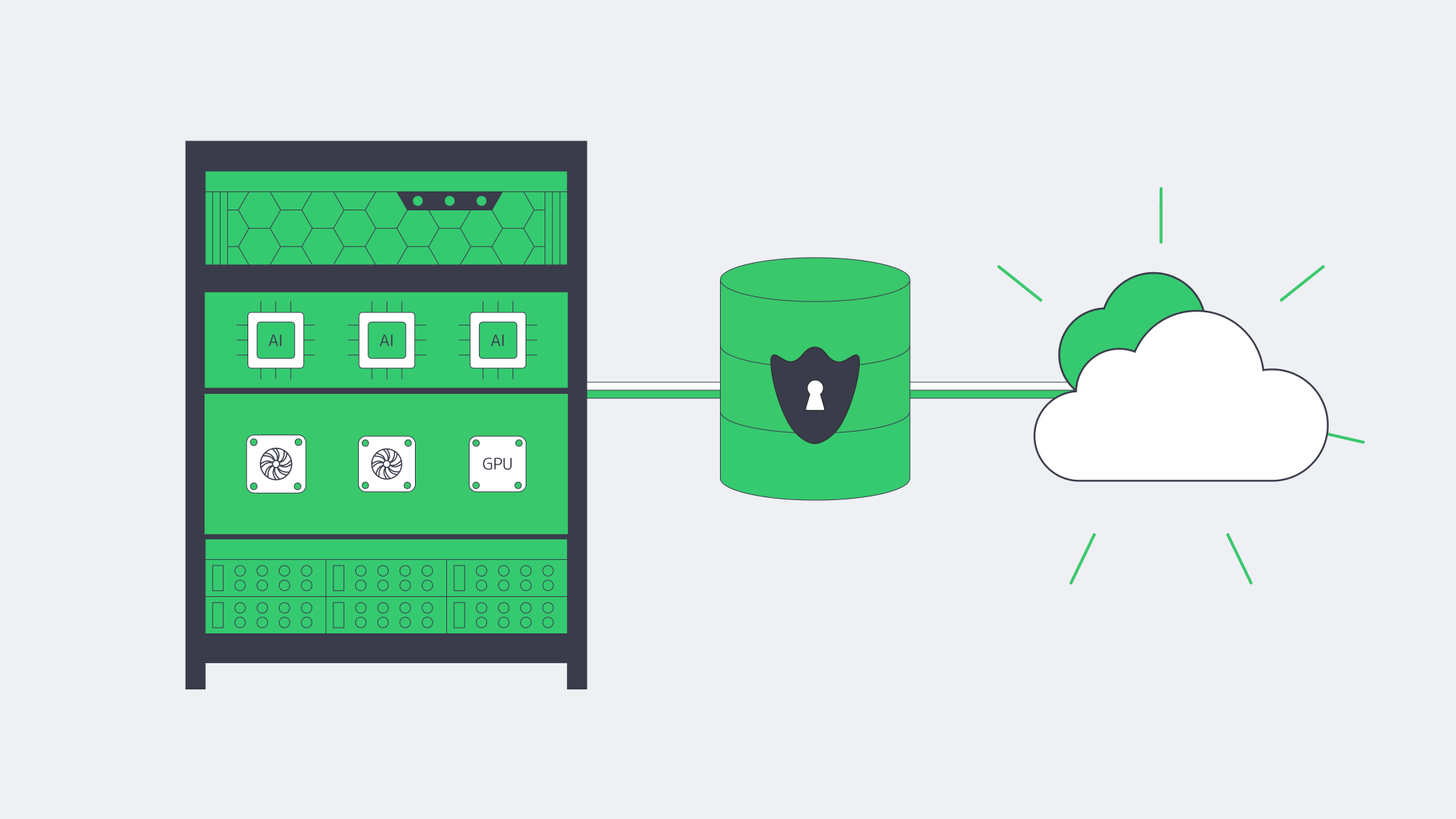
- Compute placement. Training and inference against ERP data—forecasts, quality alerts, and fraud checks—benefit from high-memory, GPU-capable servers close to the ERP database to minimize data movement and latency. Renting cloud GPUs ad hoc is useful for spikes; dedicated GPU servers can offer more predictable capacity and cost for continuous workloads.
- Data governance. Many teams are uncomfortable shipping sensitive ERP rows to third-party AI services. Keeping models next to the data, on dedicated hardware, preserves control and auditability.
Current cloud data reinforces the operational shift: Flexera’s 2026 survey found 81% of respondents using generative AI and 45% using it extensively. For ERP teams, that raises practical questions about model placement, governed data access, and whether continuous inference belongs on predictable dedicated capacity or burst cloud resources.
Global ERP Access Within Sovereignty Rules
Companies can deliver global ERP access by keeping the system of record in the required jurisdiction, placing app tiers or read replicas near users, and using a CDN only for cacheable assets. Separate data residency from interface acceleration, then size replication links against RPO, throughput, and security needs.
- Multi-region placement. Run the ERP database where policy or law requires, but deploy regional application tiers or read replicas near users.
- CDN acceleration. Cache public or non-sensitive static ERP assets—scripts, stylesheets, and approved documents—at the edge; exclude personalized or regulated responses. Melbicom’s CDN spans 39 locations across 35 countries, helping accelerate cacheable interfaces while the system of record stays in its required location.
- High-bandwidth backbones. Where replication is needed, bandwidth matters. Melbicom’s network supports up to 200 Gbps per server.

Platform-Specific ERP Hosting Notes
Odoo, IFS, Workday, Epicor, Infor, Sage X3
- Odoo server requirements. Odoo uses PostgreSQL; production sizing should follow its worker and memory guidance rather than a fixed small/large threshold. Module-heavy estates can pair an Odoo dedicated server for tuned I/O with a separate analytics node for reporting.
- IFS server. IFS Cloud supports cloud and remote deployment models. Remote deployments use a Linux/Kubernetes middle tier and Oracle database; physical, virtual, dedicated, or private infrastructure can suit controlled sites.
- Workday server / Workday server locations. Workday is SaaS rather than self-hosted ERP. Regional and sovereign-cloud options can address data-residency requirements, including Workday EU Sovereign Cloud, but adjacent integrations or data-processing systems may still need separate placement decisions.
- Epicor server. Epicor Kinetic remains available for cloud, hybrid, and on-premises deployments, but Epicor has scheduled the final on-premises Kinetic feature release for 2028.1 and is directing future innovation to Epicor Cloud. Existing local dedicated estates therefore need both proximity planning for shop-floor integrations and a lifecycle or migration plan.
- Infor server. Infor distinguishes multi-tenant cloud, single-tenant cloud, hosted/private cloud, and hybrid ERP deployment models. Choose among them based on update control, customization, compliance, and operational responsibility rather than assuming single tenancy is the default.
- Sage X3 print server. Sage X3 uses a Windows print-server component that communicates with the application and database servers. A dedicated node should be sized for print volume and network paths; multiple print servers can be used when volume requires.
Dedicated ERP Cores vs. Public Cloud
| Dimension | Dedicated servers / private cloud | Public cloud (SaaS/IaaS) |
|---|---|---|
| Data control | Pin data to selected countries or facilities; isolate compute on single-tenant hardware. | Choose regions, but operational and jurisdictional control varies by service and contract. |
| Performance | Consistent allocated resources; place compute near users and data. | Elastic capacity, with latency and variability shaped by service design and region distance. |
| Cost profile | Fixed or contract-based; bandwidth and capacity are easier to forecast, but transfer charges depend on the provider and plan. | Usage-based; egress, cross-region traffic, and idle resources require active FinOps controls. |
Which Modern Solutions Actually Resolve Today’s ERP Constraints?
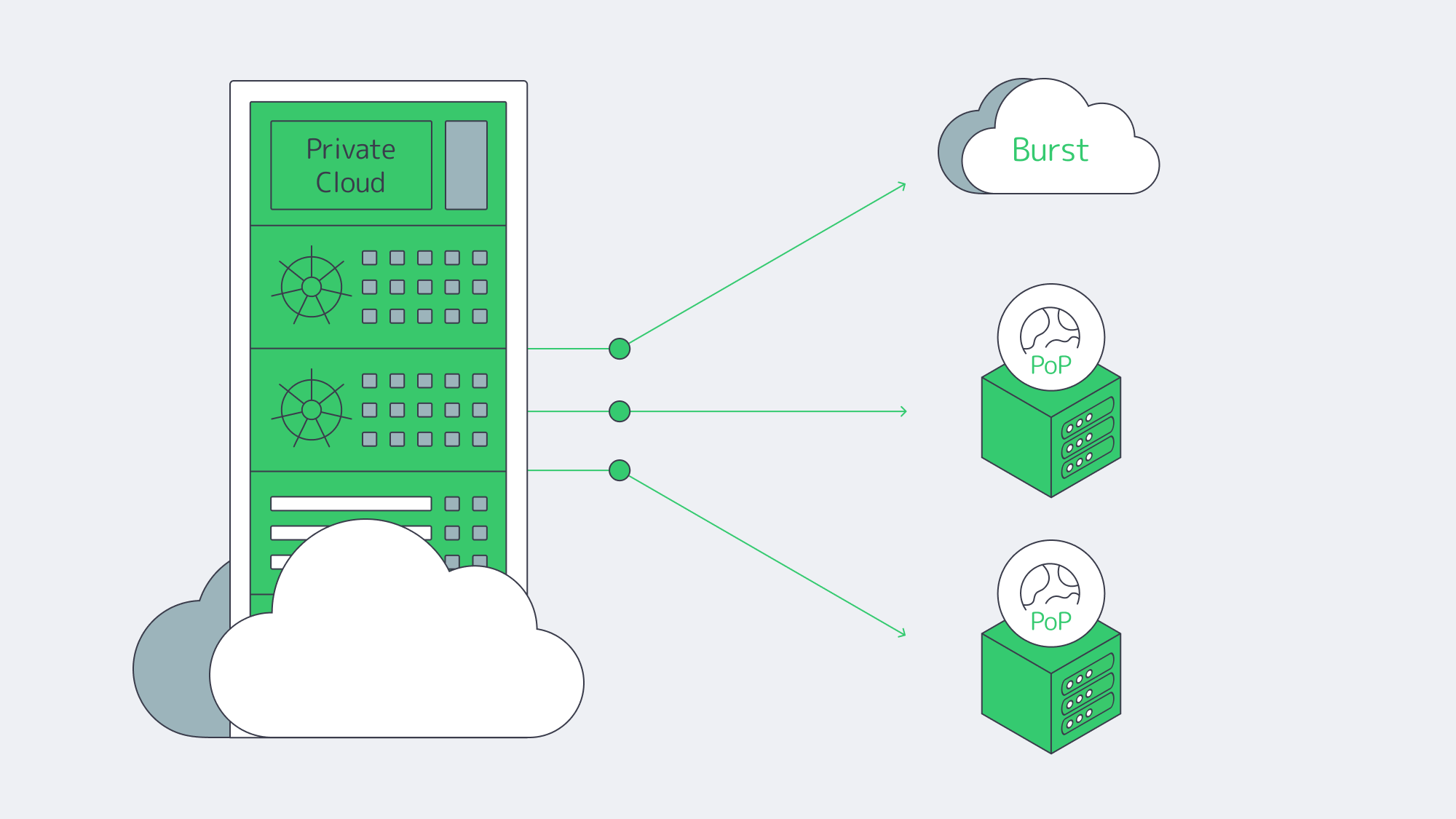
Hybrid architectures, by design. Treat the cloud as an extension of your dedicated footprint. Keep ERP databases on private or dedicated nodes; burst stateless services—APIs and web tiers—to cloud as needed. Flexera’s 2026 report found hybrid cloud in use at 73% of organizations and reported year-over-year increases in repatriated workloads and data, supporting selective workload placement rather than wholesale exits.
Private cloud and HCI. Build cloud-like agility on dedicated hardware with virtualization or Kubernetes. You get self-service provisioning and policy control without sharing compute with unrelated tenants.
FinOps discipline. Even in hybrid, the cloud portion needs guardrails. Flexera’s 2026 report highlights rightsizing, commitment discounts for steady loads, and unit economics that tie spend to business outcomes. Spend governance is now as critical as identity governance.
Edge + CDN choreography. Pin state to required regions; project the user experience globally through cacheable assets and smart routing. Melbicom’s CDN and global dedicated footprint support regional placement and edge delivery while the ERP system of record remains in its required location.
ERP Hosting Strategy Blueprint
- Start with non-negotiables. Map sovereignty constraints, RTO/RPO, and latency budgets per region. Use those to decide where cores must live.
- Model true TCO across scenarios. Include egress, cross-region sync, idle capacity, and support costs.
- Place compute by data gravity. Run analytics/AI close to ERP data on dedicated or GPU nodes; burst to cloud for exceptional spikes.
- Design for distribution. Place replicas and application tiers near users; use a CDN for cacheable static assets and approved document delivery.
- Instrument and iterate. Apply FinOps to cloud and capacity planning to dedicated. Revisit placement quarterly as usage, laws, and AI needs evolve.
Balance for Sovereignty, Speed, and Spend

The new equilibrium for ERP is hybrid on purpose: dedicated servers or private cloud for the stateful, sensitive core; cloud where elasticity or reach is uniquely valuable. This blueprint balances sovereignty, speed, and spend: control where data lives, minimize how far it travels, and forecast what it costs.
Enterprises that act now—consolidating ERP cores on dedicated infrastructure, distributing application tiers and caches globally, and governing cloud usage with FinOps—can build ERP estates with predictable performance, clearer security boundaries, and tighter costs.
Talk to ERP Hosting Experts
Get a tailored ERP hosting plan with dedicated servers, global CDN, and 24/7 support, all optimized for sovereignty and cost.