
Blog

Choosing Dedicated Server Storage: HDD, SSD, or NVMe?
Storage speed, scale, and cost are the lifeblood of modern infrastructure. When you’re tuning an AI training cluster, pushing multi-gigabit video streams, or safeguarding years of company records, the decision to use hard disk drives (HDDs), SATA solid-state drives (SSDs), or NVMe SSDs will determine both user experience and bottom-line economics. In this concise reference, we compare the three media in terms of latency, IOPS, reliability, power consumption, and cost-per-terabyte, then align them with the workloads that consume the most dedicated-server storage.
Choose Melbicom— 1,100+ ready-to-go servers — 21 Tier III/IV data centers — 39 CDN PoPs across 35 countries |
 |
From HDD to NVMe: Storage Evolution
Data centers were dominated by spinning disks until post-2018 price declines made flash viable at scale. SATA SSDs removed mechanical delay and cut access time to microseconds instead of milliseconds. NVMe links flash directly to PCIe, eliminating the final SATA bottleneck with 64,000 parallel queues and multi-gigabyte-per-second throughput. The goal is to combine media intelligently, not pick one winner.
How Do HDD, SSD, and NVMe Compare on Latency, IOPS, and Throughput?
| Storage Type | Typical Random-Read Latency | 4 KB Random IOPS | Max Sequential Throughput |
|---|---|---|---|
| HDD (7,200 RPM) | 4–6 ms | 170–440 | ≈ 150 MB/s (up to 260–275 MB/s peak on outer tracks) |
| SATA SSD (6 Gbps) | 0.1 ms | 90,000–100,000 | ≈ 550 MB/s |
| NVMe SSD (PCIe 4.0) | 0.02–0.08 ms | 750,000–1,500,000 | 7,000 MB/s |
Latency
The seek and spin delay of a hard drive is roughly two orders of magnitude slower than flash. In high-touch apps, such as transactional databases, virtual-machine hosts, and API backends, that delay is repeated across millions of operations and can become the bottleneck users perceive.
IOPS
A few hundred random operations per second is the maximum sustained by an HDD, and one busy table scan can consume it. SATA SSDs reach roughly 90,000 IOPS, while PCIe 4.0 NVMe drives surpass 750,000 and premium models approach or exceed 1 million IOPS. For workloads that generate thousands of simultaneous I/O threads, NVMe is the only interface that maintains shallow queue depths and high CPU utilization.
Throughput
Bandwidth matters most to sequential tasks such as backup jobs, video streaming, and model checkpointing. A 1 TB data set can be transferred by one NVMe SSD at 7 GB/s in less than three minutes, whereas it takes almost two hours to do the same with an HDD. The difference is even larger on PCIe 5.0, where enterprise drives can exceed 14 GB/s.
Which Storage Is Most Reliable—and How Do DWPD Ratings Matter?

Both HDDs and enterprise SSDs claim mean time between failures in the millions of hours, but the modes of failure are different:
- HDDs have mechanical wear, vibration sensitivity, and head crashes. They often provide SMART warnings before failure; failed platters can sometimes be imaged by labs.
- SSDs have no moving parts and can show lower annualized failure rates in some fleets, but flash cells have finite program/erase endurance. Enterprise models express endurance as drive writes per day (DWPD); read-intensive TLC models are commonly around 0.3 DWPD over five years, while mixed- or write-intensive SKUs can provide 1–3 DWPD or more. They rarely recover gracefully after controller or NAND failure.
Practical takeaway: mirror or RAID any media that stores irreplaceable data, over-provision SSD space on write-heavy workloads, and keep drive bays cool to extend drive life.
How Do HDD, SSD, and NVMe Compare on Energy Use and Cost per TB?
An enterprise HDD often idles around 5–6 W, while SSD power varies widely by capacity, form factor, and performance tier. A high-end NVMe drive can draw 10 W or more under sustained load, but it also finishes many jobs much faster. Consider work-done-per-watt instead: NVMe delivers far higher IOPS-per-joule, while large HDDs remain strong in capacity-per-watt. SNIA notes that device-level power comparisons can flip when workload, transfer size, and storage architecture change, so archival designs should evaluate watts per terabyte and access pattern rather than idle watts alone (SNIA).
Cost follows the same pattern, even though exact street prices move weekly. HDDs remain the lowest media-cost option for petabyte-scale capacity, SATA SSDs occupy the middle ground, and enterprise NVMe still carries a premium for latency, IOPS, endurance, and PCIe lanes. Electricity, rack space, and cooling can narrow the gap, especially with dense SSDs, but media cost remains the biggest lever in bulk dedicated server storage.
Which Storage Fits Each Server Workload?
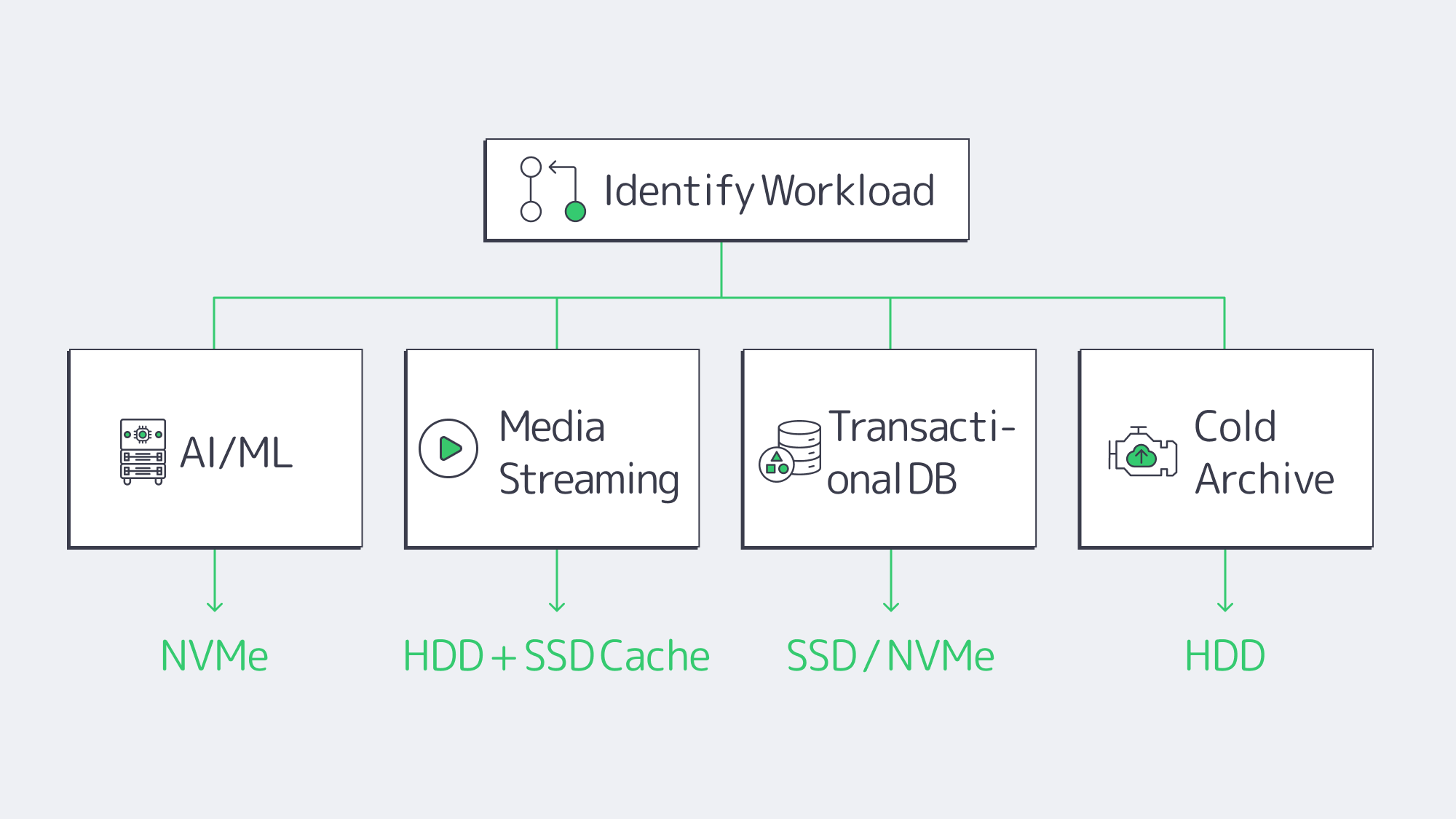
Dedicated server storage should match media to workload heat: NVMe for latency-sensitive AI, transactional logs, and high-concurrency VMs; SATA SSD for mixed read/write services and cache layers; and HDD for bulk archives, backups, and sequential media libraries where cost per terabyte matters more than response time.
AI / Machine Learning / HPC
GPUs can sit idle while waiting for tensor data, and every millisecond of idle time costs money. NVMe microsecond latency and 7 GB/s reads help keep pipelines full. Training volumes too large for pure flash can stage active subsets on NVMe and leave the long tail on HDD or in object storage. PCIe 4.0 is now sufficient for many pipelines; PCIe 5.0 doubles the headroom for next-generation models with wider data footprints.
Media Streaming & CDN Origins
Streaming video is largely sequential. HDDs in RAID can provide enough bandwidth for 4K streams when file requests are mostly sequential. Concurrency changes the math: hundreds of viewers accessing different files simultaneously create random seeks. A hybrid origin uses SSD caching in front of HDD capacity to balance performance and cost. Pair disks with high-bandwidth NICs; Melbicom dedicated servers support per-server port speeds up to 200 Gbps so the network does not become the storage bottleneck.
Transactional Databases & Enterprise Apps
Each commit writes to a log; each index lookup is a random access. In this pattern, transactions per second are constrained by the 5 ms latency of HDDs. SATA SSD is a starting point, and NVMe delivers tens of thousands of TPS with predictable sub-millisecond response. For write intensities greater than 1 DWPD, use high-endurance SKUs. Mirror at least two NVMe drives for durability without giving up read performance.
Archives, Backups, and Cold Data
Cold data is measured in dollars instead of microseconds. Helium-filled, multi-terabyte HDDs still provide capacity at low cost per gigabyte. Sequential backup windows fit disk strengths, and restore time is usually scheduled rather than interactive. For off-site copies, add tape or S3-compatible object storage; Melbicom SFTP and S3 services provide durable SMB-friendly targets.
NVMe over Fabrics and PCIe 5.0

NVMe over Fabrics: NVMe over Fabrics extends the NVMe low-latency protocol over Ethernet, Fibre Channel, InfiniBand, or RDMA, narrowing the gap between direct-attached and networked storage. Latency overheads are often in the tens of microseconds—insignificant in many apps—making it feasible to pool flash at rack scale. The technology is now within reach of mid-sized stacks, with deployments booting servers off remote NVMe volumes and using converged 25–100 GbE switches.
PCIe 5.0: PCIe 5.0 doubles the bandwidth per lane of Gen4. Current enterprise drives can reach about 14 GB/s reads and roughly 2.7–3 million random-read IOPS, a level that would have matched small all-flash arrays only a few years ago.
How to Build a Tiered Storage Stack
All-flash or all-disk is seldom the smartest storage architecture. Use NVMe for ultra-hot datasets, SATA SSD for mixed workloads, and high-capacity HDD for economical depth. This three-tier system preserves responsiveness for critical applications, feeds GPUs, and protects budgets. From a practical point of view:
- Size NVMe pools for AI staging, OLTP logs, and latency-sensitive VMs.
- Pin SSD caches to HDD sources for media libraries and hot/cold analytics tiers.
- Store immutable archives on helium HDDs or off-server object buckets.
- Validate dedicated servers have modern PCIe lanes and at least 10 Gbps networking so storage isn’t gridlocked.
Melbicom supports these hybrid designs with 1,100+ prebuilt server configurations across 21 Tier III and Tier IV data centers and per-server port speeds up to 200 Gbps.
Conclusion

Choosing storage for a dedicated server is an exercise in aligning performance thresholds with business goals. NVMe pushes latency and IOPS, SATA SSD balances speed and cost, and HDDs remain the affordable capacity option. With a clear view of each medium’s behavior across streaming, transactions, and archival workloads, you can design a tiered stack that meets today’s needs and scales toward an NVMe over Fabrics future.
Configure Your Dedicated Server
Choose from 1,100+ prebuilt configs, add NVMe or HDD, and scale bandwidth to 200 Gbps.