
Blog

Validate 10Gbps Dedicated Server Line-Rate Performance
A “10Gbps” port is not a guarantee. It is a systems claim that has to survive CPU scheduling, PCIe topology, kernel queues, storage I/O, and transit design. That matters because traffic keeps climbing: the ITU recently estimated roughly 6 zettabytes of annual fixed-broadband traffic and 1.3 zettabytes of mobile-broadband traffic, and Sandvine’s latest application data shows how heavily usage now skews toward bandwidth-intensive delivery (source).
Annual Broadband Traffic by Access Type:

Why a 10Gbps Unmetered Dedicated Server Is a System Design Problem
A 10Gbps unmetered dedicated server only performs as advertised when every stage of the path can sustain that rate. “Unmetered” usually removes per-terabyte billing, not contention, shaping, or design limits, so the real metric is repeatable throughput with acceptable jitter, loss, and latency under load.
That is why line rate can collapse in practice. “Unmetered” hosting usually means a port and a policy model, not infinite headroom (example).
What Hardware Bottlenecks Limit Sustained 10Gbps Throughput on Dedicated Servers

Sustained 10Gbps throughput is limited by four usual suspects: PCIe bandwidth to the NIC, single-thread CPU headroom on hot flows, kernel queue and offload behavior, and the storage path feeding or absorbing data. If any one of those falls behind, the “10Gbps” label becomes a best-case moment instead of an operating baseline.
NIC + PCIe Topology for a 10Gbps Dedicated Server
A capable NIC on a weak PCIe path is the fastest route to disappointment. PCIe 3.0’s bandwidth jump over PCIe 2.0 matters because slot generation and width can be the reason a 10GbE interface stalls below line rate. NIC manuals are explicit about slot requirements (example), and platforms such as AMD EPYC emphasize high lane counts for the same reason.
CPU Single-Thread Ceilings and Per-Flow Reality
Many teams over-index on total core count. The catch is that a single TCP flow, encryption path, or userspace process can still pin one core first. That is why single-stream tests often underfill 10Gbps while multi-stream tests look healthier, a pattern practitioners regularly report when troubleshooting 10GbE upgrades (discussion). Test both: one tells you what a real session can do, the other tells you what the platform can do.
Kernel Queues, Offloads, and the Packet Plumbing
At 10Gbps, the OS path matters. Check these first:
- Are receive or transmit queues dropping packets?
- Are interrupts collapsing onto one busy core?
- Are offloads and ring sizes sensible for the workload?
Tools like ethtool exist for this layer, and vendor documentation explains why checksum offload, TSO/GSO, interrupt moderation, and ring sizing reduce per-packet CPU cost. Linux buffer ceilings are not the same as defaults.
NVMe Read/Write Paths: The Hidden Limiter in Network Problems
A lot of “network” failures are storage failures in disguise. At 10Gbps, large-object delivery can require roughly 1+ GB/s of sustained storage throughput once overhead is included, and concurrent writes from logs or cache churn can introduce jitter if they share the same NVMe path. That is one reason to keep archive behavior off the hot path; Melbicom’s S3-compatible object storage is useful when you need to separate storage roles instead of forcing one delivery node to do everything.
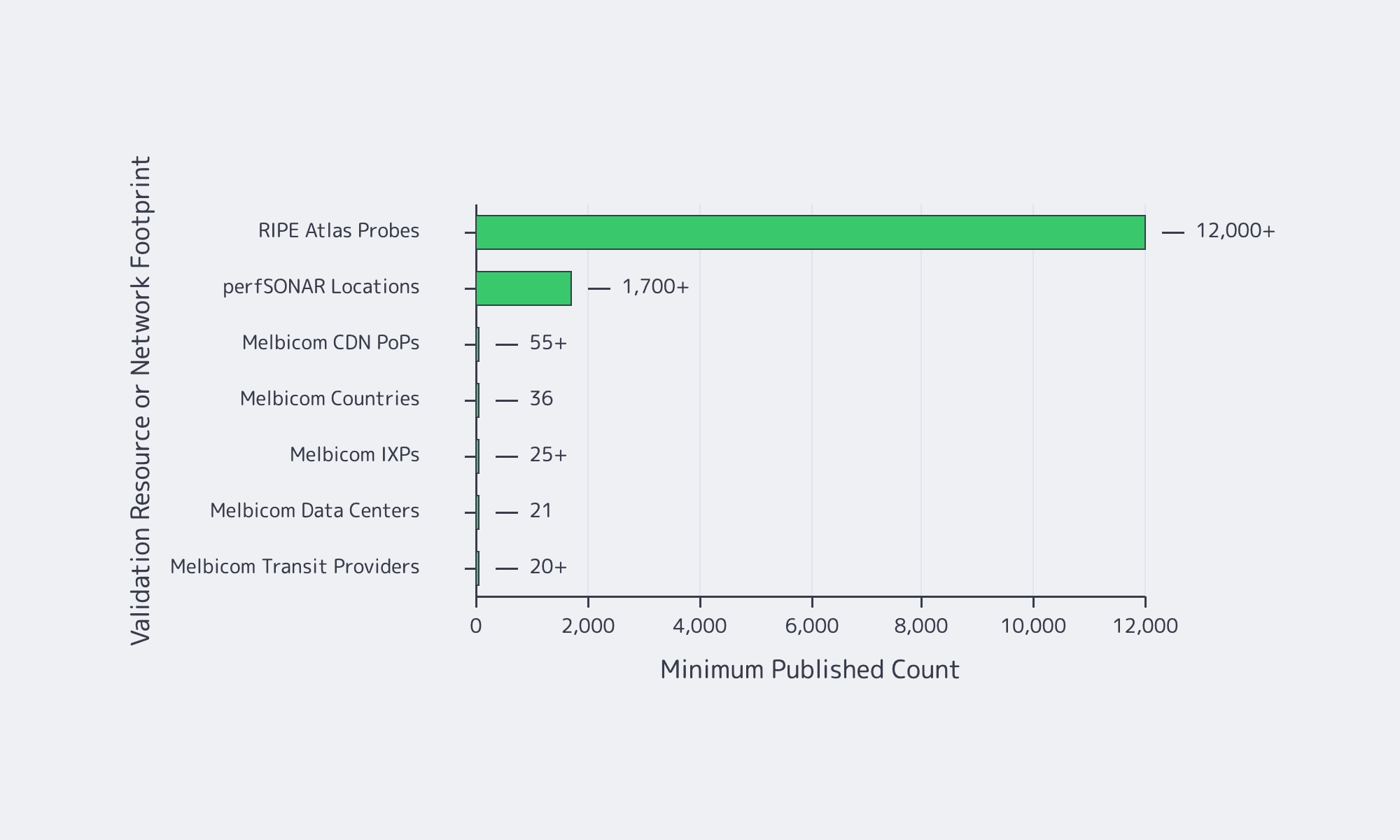
Choose Melbicom— Unmetered bandwidth plans — 1,300+ ready-to-go servers — 21 DC & 55+ CDN PoPs |
 |
How to Verify Line-Rate Performance on a 10Gbps Unmetered Dedicated Server
To verify line-rate performance on a 10Gbps unmetered dedicated server, prove three things in sequence: the host can hit line rate in controlled conditions, it can hold that rate long enough to expose drift, and it can repeat the result across real network paths. That is the mindset behind RFC 6349: throughput testing is a method, not a screenshot.
A practical plan starts with three questions:
- Can the server and NIC hit line rate in controlled conditions?
- Can the system sustain TPT long enough to expose thermal, IRQ, or buffering issues?
- Does performance still hold outside the provider’s immediate neighborhood?
Start With a Clean, Controlled Baseline
Begin locally or within the same metro. If the box cannot move bits there, WAN testing only adds ambiguity. ESnet’s iPerf guidance uses the same pattern: parallel streams, longer runs, interval output, and reverse testing.
| # On receiveriperf3 -s# On sender: multi-stream, longer run, 1s intervaliperf3 -c <server_ip> -P 8 -t 120 -i 1 # Reverse directioniperf3 -c <server_ip> -P 8 -t 120 -i 1 -R |
Use Linux endpoints when possible; Microsoft has warned that iPerf3 on Windows can be misleading in some cases. Do not stop at a burst.
Test UDP Separately When Jitter Matters
TCP can hide timing problems behind retransmits and backoff. If delay variation matters, test UDP explicitly. RFC 3393 and RFC 5481 are useful references because they treat jitter as a measurable delay-variation problem, not a hand-wavy complaint.
| # Start lower, then step upiperf3 -c <server_ip> -u -b 2G -t 60 -i 1iperf3 -c <server_ip> -u -b 8G -t 60 -i 1 |
Confirm TCP Windowing and Buffer Headroom on Wide Paths
Fast long-distance TCP is gated by bandwidth-delay product. If buffers are too small, the server underfills the pipe even when the hardware is fine. Linux’s tcp(7) and RFC 7323 are the right references: window scaling and autotuning only work when the system has enough headroom to use them.
How to Test Oversubscription, Jitter, and Real-World TPT Before Choosing a Provider
The tests that expose oversubscription and weak transit are the ones a provider cannot easily stage-manage: multi-region runs, multiple source networks, long-enough durations, and measurements taken during busy hours. The goal is not a flattering peak number. It is repeatable performance when the path is congested, asymmetric, or both.
Throughput Tests That Are Hard to Game
For realism, test across different geographies, different networks, and different times of day. Add infrastructure the provider does not control. RIPE Atlas offers more than 12,000 probes for path and latency checks. For multi-domain throughput troubleshooting, perfSONAR’s training material describes deployments in 1,700+ locations, and pScheduler shows how those tests are orchestrated (reference).
Jitter and Queueing: Proving Stability, Not Just Bandwidth
At high utilization, latency is often the first thing to break. That shows up in operator discussions on Hacker News and in newer IETF work. RFC 9341 describes alternate marking for measuring live loss, delay, and jitter, while RFC 9330 sets out the L4S architecture for lower queueing latency at high TPT. Hitting 10Gbps is not enough if the tail turns ugly.
Provider Questions That Reveal Oversubscription and Weak Transit
Ask whether the service is sold as guaranteed bandwidth without ratios. Ask how much transit and peering diversity exists. Ask whether external test files and test IPs are published. Ask whether BGP sessions are available if routing control matters. Melbicom makes that diligence easier because Melbicom publishes bandwidth tiers and test files, and BGP session capabilities, so you can validate the path rather than trust a sales claim.
Reference Server Builds for Predictable 10Gbps Egress
A reference build shows which components cannot be underspecified when 10Gbps is the baseline. Treat these as validation-oriented shapes, then map them to current inventory and location-specific bandwidth before ordering.
| Workload Pattern | Reference Build Focus | What to Validate Before Scaling |
|---|---|---|
| High-throughput streaming origin or large-file delivery | High-clock CPU, clean PCIe layout, NVMe for hot content, correct NUMA affinity | Sustained multi-stream TCP, single-stream ceiling, UDP jitter under load, disk read stability during concurrent writes |
| CDN cache or software distribution mirror | NVMe capacity and endurance, strong read plus concurrent-write behavior, enough RAM for page cache | Throughput during cache fill and eviction, queue drops, peering diversity, multiple external source networks |
| Real-time APIs and RPC endpoints with heavy egress | Stable CPU scheduling, low-jitter path, tuned queues, balanced interrupts, buffer headroom | Tail latency under load, route asymmetry, peak-hour behavior, TCP window scaling on longer RTT clients |
10Gbps Unmetered Dedicated Server: Verification Checklist
Reliable 10Gbps buying discipline looks like this:
- Buy the test plan before the port: define duration, regions, stream counts, and acceptable jitter ahead of time.
- Separate host proof from network proof: first prove the box can move data locally, then prove the provider can move it across real paths.
- Treat jitter as a first-class failure mode: a link that peaks at 10Gbps but blows out tail latency is still the wrong answer for real-time delivery.
- Ask location-specific questions: per-server bandwidth, transit mix, public test files, and BGP policy should vary by site, and you should know how.
Conclusion

A 10Gbps unmetered dedicated server is not validated by a product page. It is validated when the server holds line rate in controlled tests, repeats the result across real paths, and stays stable when storage, CPU, and kernel behavior are under pressure.
That is why provider due diligence matters as much as hardware choice. Buyers should demand transparent network details, test points, clear answers on contention, and operational data to build a repeatable test plan before moving production traffic.
Deploy 10Gbps Unmetered Servers
Validate sustained 10Gbps line rate with tested builds, real-path checks, and location-specific bandwidth. Launch faster on Melbicom with predictable egress and transparent network details.