
Blog
Linux Dedicated Server: Production Checklist for Control, Security, & Scale
Production teams usually outgrow VPS hosting for operational reasons before raw CPU. The trigger is variance. A 2023 academic study on public-cloud VMs found rented virtual machines lack hard performance guarantees and vary across providers and benchmarks; a 2026 Kubernetes testbed measured noisy-neighbor slowdowns up to 67% for I/O-bound workloads under combined contention. Flexera’s 2026 State of the Cloud survey found 73% of organizations run hybrid estates and estimated 29% wasted IaaS/PaaS cloud spend.
The point of a Linux dedicated server is not nostalgia for physical hardware. The point is deciding what the kernel, scheduler, storage stack, container runtime, and management plane are allowed to do, then keeping those decisions stable for databases, queueing tiers, worker pools, and edge nodes where jitter or weak failure boundaries become expensive.
Build Linux Hosts– 1100+ ready-to-go servers – 21 Tier III/IV data centers – KVM/API and 24/7 support |
 |
What a Linux Dedicated Server Enables
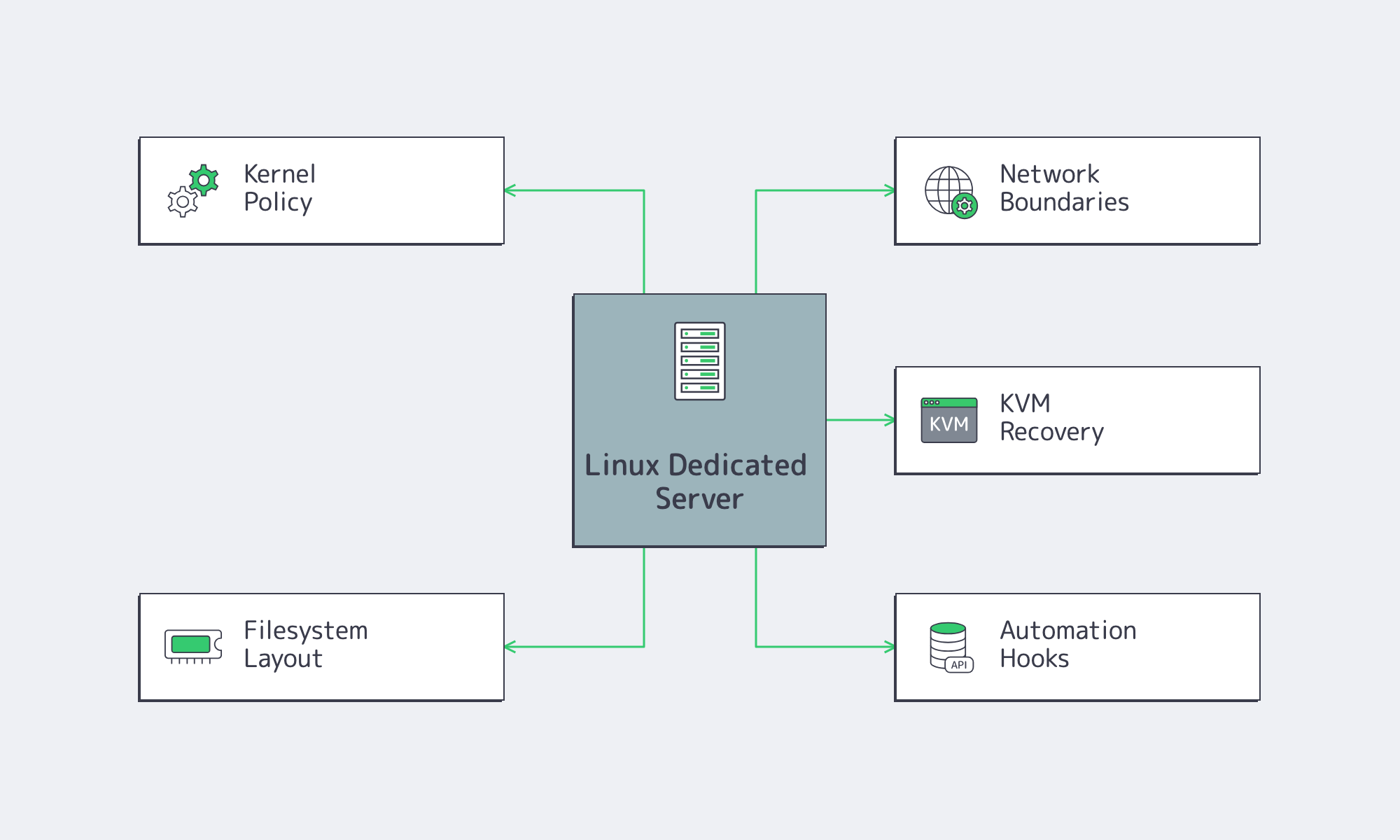
A Linux dedicated server gives production teams deterministic control over CPU, memory, storage, networking, and kernel behavior that VPS hosting cannot guarantee under multi-tenant contention. If a workload is sensitive to I/O jitter, needs custom kernel policy, or requires fixed per-host storage and network boundaries, dedicated infrastructure becomes a production design choice.
Dedicated Linux Is About Determinism
The production gain is fewer hidden variables. A dedicated Linux server removes hypervisor scheduling as a shared unknown, gives the team a fixed kernel and filesystem posture, and makes performance debugging less probabilistic. That is why dedicated infrastructure appears when P99 latency drifts without an application-level cause or storage-heavy services degrade during contention windows.
Melbicom’s dedicated servers support KVM/API access, initial OS installation help, and an isolated management network for control. Melbicom operates 21 Tier III and Tier IV data centers, offers 1100+ ready-to-go configurations, and supports up to 200 Gbps per server. Its backbone includes 23 transit partners and 29 IXP peering hubs for repeatable multi-region deployments.
Linux Server OS and Storage Decisions
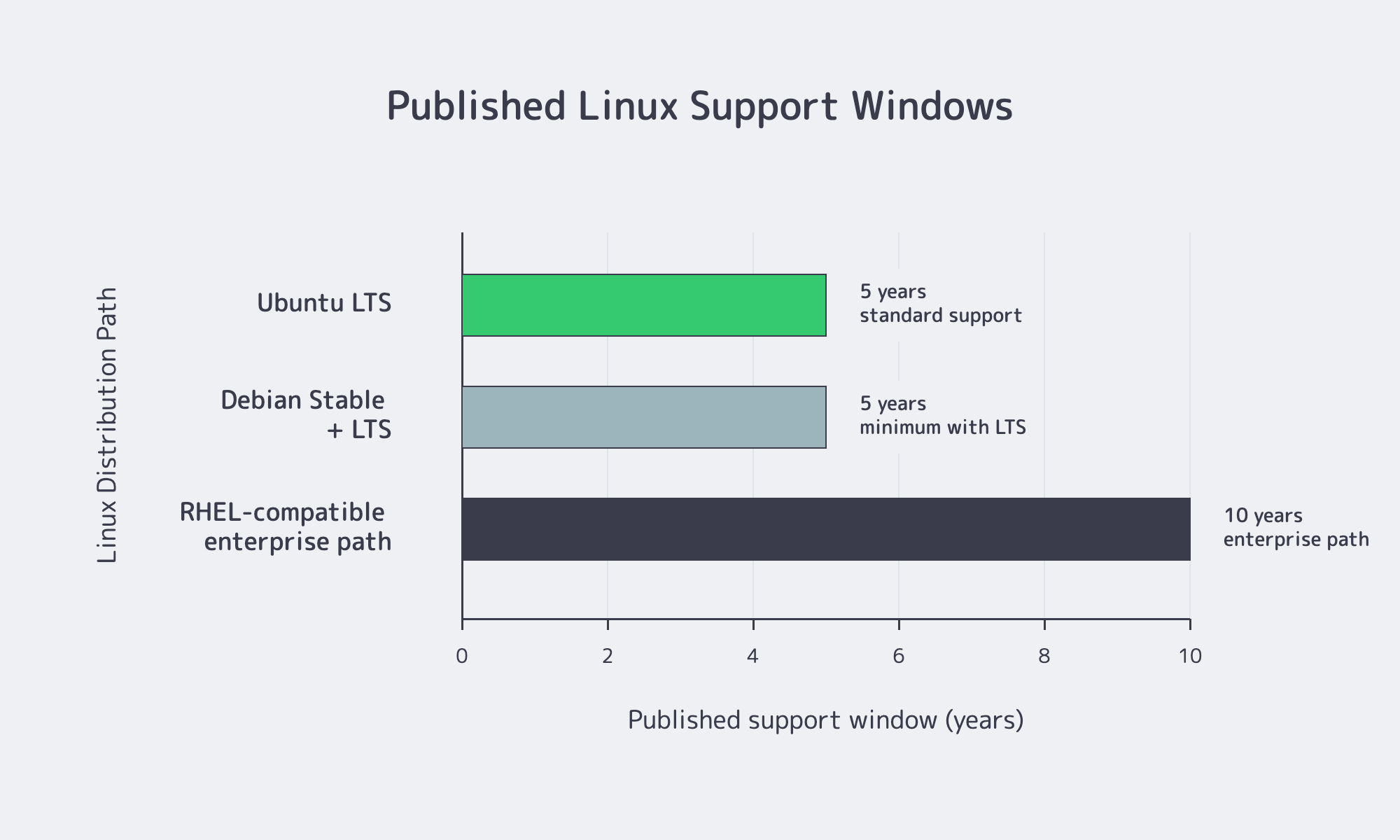
Select a Linux dedicated server by matching OS lifecycle, kernel policy, automation fit, and storage semantics to the workload. A five-year Debian or Ubuntu path fits fleets that upgrade regularly; ten-year RHEL-family paths fit environments that prioritize ABI stability, slower change, and longer maintenance planning.
| Fleet Priority | Distribution Path | Why It Fits |
|---|---|---|
| Vendor-backed support and long maintenance windows | RHEL or Ubuntu LTS | RHEL publishes a 10-year lifecycle; Ubuntu LTS publishes 5 years of standard support with longer coverage options |
| Stable application hosts with selective package refresh | Debian Stable | Debian Stable plus LTS gives at least 5 years, with backports used selectively |
| RHEL-compatible standardization without per-node subscription | AlmaLinux or Rocky Linux | Long RHEL-family release windows fit teams that own most OS-level troubleshooting |
Linux Dedicated Server by Distribution
Ubuntu is strong when teams want a fast-moving but production-friendly server Linux with clear LTS cadence, broad hardware coverage, and Livepatch options. Debian fits conservative bases and narrow backports. RHEL fits ABI stability, lifecycle planning, and vendor-backed errata. AlmaLinux and Rocky Linux fit RHEL-compatible behavior when the team can define its own escalation model.
Kernel Policy Is the Hidden Contract
Kernel choice is where many dedicated Linux server builds silently diverge. Ubuntu LTS defaults to a General Availability kernel and offers HWE kernels for newer NICs, storage controllers, and hardware enablement; the tradeoff is movement to newer kernel lines. RHEL favors stable major releases with backported fixes. Debian offers backports, but its guidance recommends using them selectively. GA kernels reduce surprise, HWE reduces hardware friction, and live patching reduces reboot urgency, but none replaces a documented reboot and rollback policy.
A Dedicated Linux Server Should Be Rebuilt from Code, Not Patched by Hand
Automation is mandatory once a team standardizes a dedicated Linux server fleet. HashiCorp describes infrastructure as code as a safe, consistent, repeatable way to define infrastructure, and Google’s Terraform guidance calls manual infrastructure management time-consuming and error-prone at scale. CNCF’s 2026 cloud native survey found that 82% of container users run Kubernetes in production, while 58% of cloud-native “innovators” report extensive GitOps use.
If users, SSH policy, firewalling, monitoring, packages, and mounts cannot converge from source-controlled definitions, the fleet will drift. Melbicom’s KVM/API access, stock configurations, custom builds in 3–5 business days, initial OS installation support, and managed services make rollout easier to fold into platform automation.
Storage Layout Keeps Incidents Small
Storage design should start with failure domains, not raw capacity. Red Hat recommends XFS as the default local filesystem on RHEL unless there is a specific reason to choose otherwise. Docker’s overlay2 driver supports XFS only when d_type=true is enabled and also supports ext4. Kubernetes states that local ephemeral storage is for scratch space, caches, logs, image layers, and writable container layers; it is not durable storage.
The lower-risk pattern is simple: separate the OS volume from application data, and separate persistent data from container image layers, writable layers, and logs. Use ZFS when checksums, snapshots, and scrubs justify the complexity. Use XFS or ext4 when tooling familiarity and standard container-host behavior matter more.
Security Hardening and Container Strategy for a Linux Dedicated Server
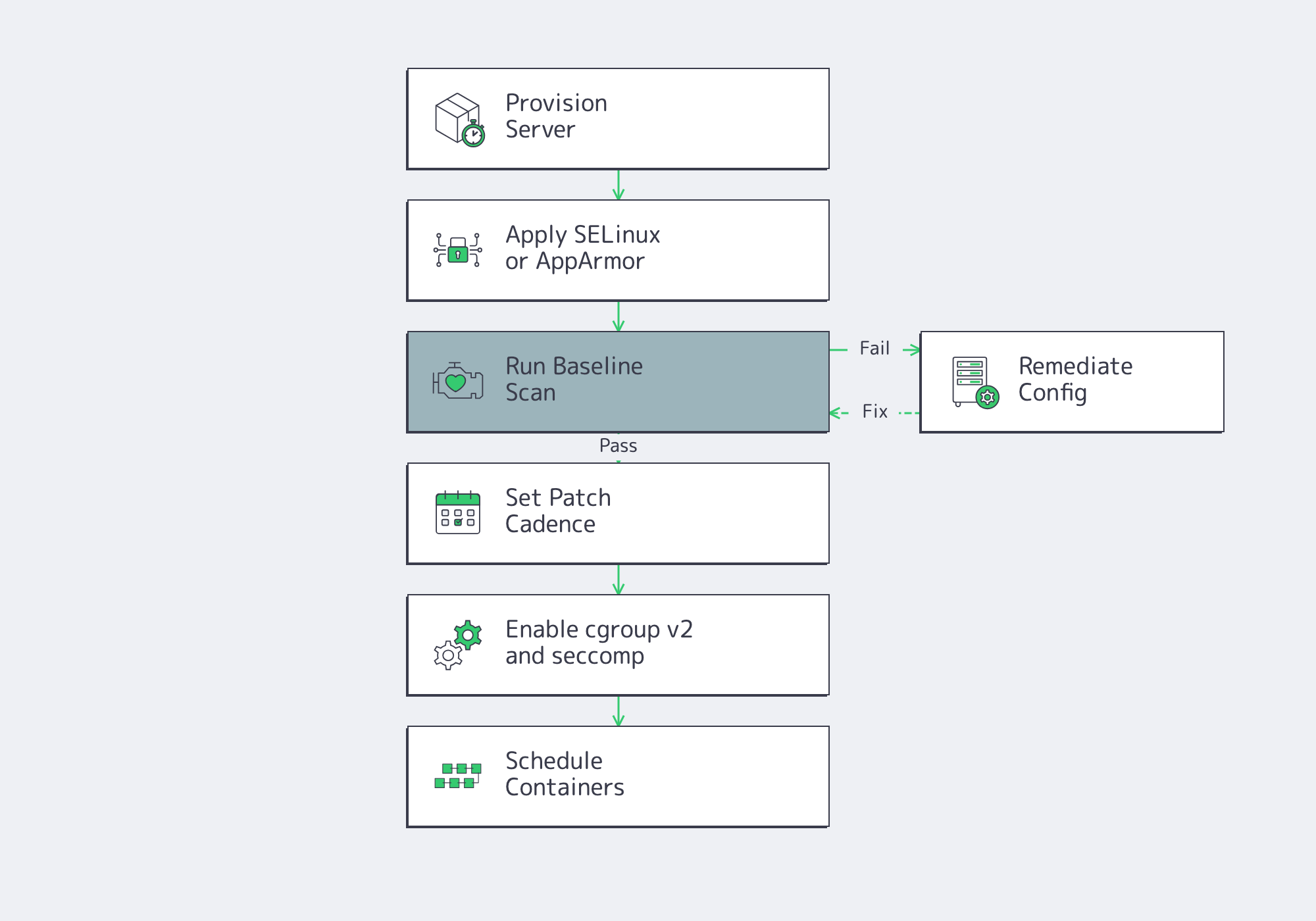
A Linux dedicated server should ship with enforcing mandatory access controls, audited baselines, documented patch cadence, and least-privilege container policy. For container hosts, cgroup v2, RuntimeDefault seccomp, and Kubernetes Baseline or Restricted Pod Security should be minimum production requirements.
Hardening Begins with the Host
The host still matters. Red Hat documents SELinux enforcing mode as the default and recommended mode on RHEL; Ubuntu ships AppArmor installed and loaded by default. ComplianceAsCode and OpenSCAP exist because security configuration has to be testable and automatable, not just written into a wiki.
Verizon’s 2026 DBIR reports vulnerability exploitation as the top breach entry point at 31% of breaches. The same source says only 26% of CISA KEV-listed critical vulnerabilities were fully remediated in 2025, with median full resolution rising to 43 days. Production hardening cannot depend on perfect patch velocity. Mandatory access control, audit coverage, and baseline scanning narrow blast radius while patch queues catch up.
Containers Must Respect the Host
Containers do not erase host decisions; they amplify them. NIST SP 800-190 frames containers as portable and automatable, but still emphasizes lifecycle-wide security. Kubernetes recommends cgroup v2 for stronger resource management and isolation, supports RuntimeDefault seccomp as the default profile on nodes, and defines Pod Security Standards from Privileged to Baseline to Restricted.
The right stance is not “run containers everywhere.” It is “run containers only on hosts whose kernel, cgroup, seccomp, namespace, admission, storage, and logging policies fit them.” The common mistake is turning one server into an accidental all-in-one cluster node, registry cache, build runner, and log sink. Stateful services, build caches, and logs should not compete for the same filesystem.
Support Model for Short Incidents
Support is a production design choice, not a procurement footnote. Ubuntu and RHEL publish formal vendor support structures; Debian publishes Stable plus LTS; Rocky Linux describes itself as community supported; AlmaLinux publishes long release windows for a forever-free enterprise operating system. Each model is valid, but each creates a different midnight escalation path.
Provider responsibility is separate. Melbicom supports production operations with 24/7 support, initial OS installation help, managed services, KVM access, network troubleshooting, private networking, BGP capability, and isolated management access. Hardware and network incidents have an owner; OS policy stays with the platform team unless managed services are added.
Linux Dedicated Server Rollout Checklist
A production Linux dedicated server rollout is ready when the team can answer these questions with configuration files, monitoring, and runbooks:

- Choose dedicated infrastructure when the workload has a measurable reason to leave multi-tenant hosting: I/O jitter, fixed placement, predictable utilization, or regional architecture that benefits from stable host-level control.
- Treat distribution choice as an escalation model, not a preference. Ubuntu LTS, Debian Stable, RHEL, AlmaLinux, and Rocky Linux can all be correct when lifecycle, package cadence, and support ownership match the fleet.
- Document kernel policy before deployment: GA versus HWE, backports, reboot cadence, live patching scope, rollback path, and hardware enablement tradeoffs.
- Rebuild servers from source-controlled automation. Users, SSH policy, firewalling, monitoring, packages, mounts, and container runtime settings should converge consistently across the fleet.
- Split storage by blast radius. OS, persistent data, image layers, writable container layers, and logs should not all share the same failure mode.
- Define container guardrails before scheduling workloads: cgroup v2, seccomp, RBAC, admission policy, Pod Security level, logging, and ephemeral-storage limits.
- Separate provider-owned hardware and network responsibilities from team-owned OS and application responsibilities, then add managed services intentionally where operational coverage requires it.
If that checklist points toward dedicated infrastructure, the next step is configuration. Selection should compress around distribution lifecycle, kernel policy, storage boundaries, automation depth, container posture, placement, and support ownership.
Build Your Linux Server
Match OS, kernel, storage, automation, and support needs to Melbicom dedicated server capacity.