
Blog
Blueprint for High-Performance Backup Server Solutions
Backup performance depends less on a single hardware label than on the recovery objective, protected-data volume, change rate, concurrency, retention policy, and the slowest stage in the path. Purpose-built backup server solutions can combine parallel compute, enough memory for the selected backup software, storage pools designed for the required failure tolerance, object storage for an off-site or capacity tier, and network capacity sized from measured backup and restore tests. Backup copies should be isolated from production access and recovery procedures tested regularly, consistent with CISA guidance. The sections below map the essential design decisions.
Choose Melbicom— 1100+ ready-to-go servers — 21 global Tier IV & III data centers — Up to 200 Gbps per server |
 |
Backup Server Specs That Matter
High-performance backup servers should be sized from concurrent backup and restore jobs, compression, encryption, deduplication, catalog activity, and the throughput of the storage and network path. Benchmark the selected backup software with representative data, then add headroom for restores that must run while new backups continue.
High-Core CPUs for Parallel Compression
Modern backups may run concurrent jobs with compression, encryption, checksums, or deduplication. Zstandard supports multithreaded compression, but end-to-end scaling depends on the data, compression level, software, core count, storage, and network limits. For a backup dedicated server, benchmark the actual workflow and add cores only while they measurably improve throughput.
RAM as the Deduplication Fuel
Catalogs, block indexes, filesystem caches, and concurrent jobs all consume memory. For OpenZFS deduplication specifically, current OpenZFS guidance says to plan for at least 1.25 GiB of RAM per 1 TiB of stored data, with actual needs depending on block size and duplication. Other backup products use different sizing rules, so measure peak memory during full backups and restores rather than treating 128 GB or 4 GB per core as universal.
How Do 25–40 GbE Links Cut Restore Times for Backup Servers?
Treat Line-Rate Math as an Upper Bound
At 1 Gbps, the theoretical minimum time to transfer 10 TB of decimal data is about 22 hours 13 minutes; at 10 Gbps, it is about 2 hours 13 minutes. These figures assume continuous nominal throughput and exclude protocol, filesystem, compression, encryption, disk, and application overhead.
| Nominal Network Throughput | Theoretical Minimum for 10 TB |
|---|---|
| 1 Gbps | 22 h 13 m |
| 10 Gbps | 2 h 13 m |
| 25 Gbps | 53 m |
| 40 Gbps | 33 m |
| 100 Gbps | 13 m |
Redundant uplinks can protect against a single cable, NIC, or switch path, but redundancy does not automatically aggregate throughput; bonding mode and network design determine behavior. Melbicom offers bandwidth up to 200 Gbps per server, depending on location and configuration. Size the ordered port from measured restore demand and confirm that the selected data center and configuration support it.
Disk Pools Built to Survive
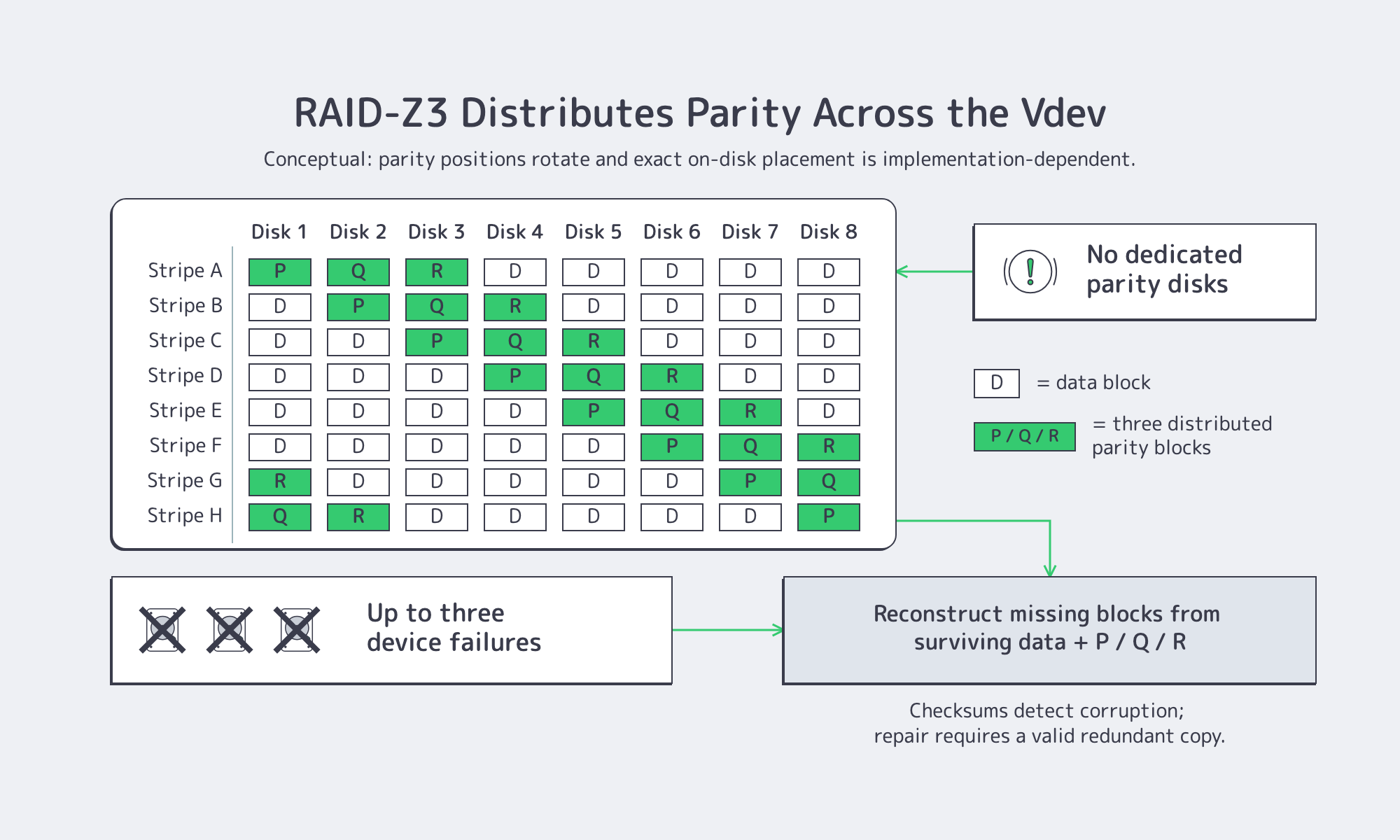
RAID-Z: Modern Parity Without the Drawbacks
OpenZFS RAIDZ supports single, double, or triple parity; RAID-Z2 and RAID-Z3 can tolerate two or three device failures, respectively. OpenZFS also uses checksums and can repair damaged data when a valid redundant copy is available. Vdev width, record size, drive performance, capacity, and workload determine the usable-space and I/O tradeoffs, so 8+2 or 8+3 layouts should not be treated as universal defaults.
Note: RAID-Z on dedicated servers requires disks to be presented individually to ZFS. OpenZFS advises against hardware RAID controllers for ZFS; confirm that an HBA/JBOD or IT/pass-through mode is available before ordering. Provisioning and operation remain administrator responsibilities through the operating system and out-of-band console.
Erasure Coding for Dense, Distributed Repositories
Erasure coding can reduce capacity overhead in multi-node or multi-chassis repositories, but the exact data-plus-parity scheme, failure-domain behavior, rebuild traffic, and CPU cost are properties of the backup or storage software. A 10+6 layout can tolerate six missing fragments only when that scheme is actually configured; it is not a general recommendation for every backup server.
Tiered Pools for Hot, Warm, and Cold Data
Fast NVMe mirrors or RAID 10 can serve recent restore points, while larger HDD pools retain longer windows. Retention tiers should follow measured restore frequency, recovery objectives, legal requirements, and the cost of keeping each tier online. Move older copies off-site only after verifying integrity, encryption, access separation, and the destination’s retention controls.
Object Storage for Backups
S3-class object storage fits as an off-site or capacity tier when the backup software supports the S3 API, multipart transfers, integrity checks, and the destination’s retention controls. S3 compatibility alone does not guarantee Object Lock, immutability, cross-region replication, or free egress, so verify those features and prices before relying on them.
Verify Immutability Instead of Assuming It
WORM or Object Lock can prevent protected objects from being changed or deleted during a retention period, but only when the destination supports the feature and the correct mode, retention, permissions, and lifecycle rules are configured. Treat immutability as a tested configuration requirement, not a default S3 feature.
Bandwidth & Budget Considerations
Initial seeding can be slower than daily incremental transfers because the first copy contains the full selected dataset. Estimate transfer windows from changed-data volume, measured compression or deduplication ratio, protocol overhead, and available WAN throughput. Melbicom S3 Object Storage supports the AWS S3 API and free ingress; confirm current storage, request, and egress charges before finalizing the retention budget.
Backup Architecture Checklist
- Compute: Size cores from measured compression, encryption, deduplication, and concurrency; reserve restore headroom.
- Memory: Follow the selected backup software and repository guidance; measure peak catalog, cache, and deduplication use.
- Network: Calculate theoretical transfer time, then benchmark end-to-end throughput with protocol and storage overhead.
- Disk Landing Tier: Choose NVMe mirrors, RAID 10, or RAID-Z to meet resilience needs.
- Capacity Tier: Define retention, rebuild exposure, and failure domains before choosing RAID-Z or erasure coding.
- Off-Site Tier: Keep isolated, encrypted copies and verify Object Lock/WORM support and egress terms.
- Automation: Use policy-based aging, checksums or scrubs, monitoring, and regular restore tests.
With those controls, server data backup solutions can be validated against recovery point and recovery time objectives instead of relying on nominal component specifications.
Why Dedicated Hardware Still Matters
Dedicated hardware can isolate backup I/O, firmware, and maintenance from production workloads, making bottlenecks and failure domains easier to attribute. It also gives administrators direct control of disk presentation, filesystem, backup software, encryption, and network configuration. Those benefits do not replace off-site copies, access separation, monitoring, or restore testing.
Melbicom offers 1100+ ready-to-go dedicated servers across 21 Tier III and Tier IV facilities, with per-server bandwidth up to 200 Gbps depending on location and configuration, plus 24/7 support. Storage layouts, drive counts, HBA/JBOD availability, and delivery timing vary by configuration; request a custom build when a ready-to-go system does not match the repository design.
Backup Servers: Windows or Linux?
- Linux (ZFS, Btrfs, Ceph): Often chosen for OpenZFS/RAID-Z and broad open-source tooling. Match the filesystem and repository design to the backup application; ZFS requires direct disk visibility for software-managed parity.
- Windows Server (ReFS + Storage Spaces): Fits environments that depend on Windows-native backup agents, VSS application-consistent snapshots, ReFS, or Storage Spaces. Verify feature support in the selected Windows Server edition and backup product.
- Mixed estates may use separate proxies or repositories for Linux and Windows workloads. Keep application-consistent snapshot requirements, credentials, networking, storage, and cloud tiers explicit; these do not automatically remain identical across platforms.
Should Backup Servers Replace Tape?
Tape is not obsolete. LTO-10 lists a 400 MB/s native data rate and 30 TB native cartridge capacity. Offline media can support long-term retention and cyber-recovery designs by remaining disconnected from production networks. Disk and object storage usually simplify frequent restores and automation, but they need deliberate isolation, retention controls, and tested recovery procedures.

The comparison should be operational, not ideological. Tape can provide an offline copy and long-term retention, but retrieval may require media handling and sequential reads. Disk can accelerate restores but needs redundant design and active maintenance. A cloud object store can simplify off-site copies, yet retention controls, availability, request costs, and egress terms must be verified for the chosen service.
Backup Server Deployment Steps
Start with recovery requirements: define recovery point and recovery time objectives, protected-data volume, daily change rate, retention, acceptable failure domains, and the restores that must run concurrently. Benchmark the backup software on representative data, verify end-to-end throughput rather than port speed alone, isolate administrative access, keep an off-site copy, and test recovery regularly. Use the network speed, storage, compute, and cloud tiers results to size the final server.
Blueprint for Next-Gen Backups
High-core processors, large RAM pools, faster links, RAID-Z, erasure coding, and object storage are options—not a universal blueprint. A defensible design ties each component to measured backup and restore demand, explicit failure tolerance, retention controls, and tested recovery procedures. Dedicated hardware can provide a clear operating boundary while the customer remains responsible for the backup software, security, monitoring, and recovery process.
Order Your Backup Server Now
Choose from 1100+ ready-to-go dedicated servers with per-server bandwidth up to 200 Gbps, or request a custom build delivered in 3–5 business days.