
Blog

Dedicated Server Storage Options: HDD vs. SSD vs. NVMe—Speed, Cost & Fit
Storage speed, scale, and cost are the lifeblood of modern infrastructure. When you’re tuning an AI training cluster, pushing multi-gigabit video streams, or safeguarding years of company records, the decision to use hard disk drives (HDDs), SATA solid-state drives (SSDs), or NVMe SSDs will determine both the user experience and the bottom-line economics. In this concise reference, we compare the three media in terms of latency, IOPS, reliability, power consumption, and cost-per-terabyte and align them against the workloads that take the most dedicated-server space.
Choose Melbicom— 1,300+ ready-to-go servers — 21 global Tier IV & III data centers — 55+ PoP CDN across 6 continents |
 |
How Did Dedicated Server Storage Evolve from HDD to NVMe?
Data centers were dominated by spinning disks until recent post-2018 declines in price enabled flash at scale. SATA SSDs removed all the mechanical delays and reduced the average access time to microseconds, compared to milliseconds. NVMe, which links flash directly to the PCIe bus, eliminates the final SATA bottlenecks with 64,000 parallel queues and throughput into multi-gigabytes per second. The issue is no longer to select one winner but to combine media intelligently.
How Do HDD, SSD, and NVMe Compare on Latency, IOPS, and Throughput?
| Storage Type | Typical Random-Read Latency | 4 KB Random IOPS | Max Sequential Throughput |
|---|---|---|---|
| HDD (7 200 RPM) | 4–6 ms | 170–440 | ≈ 150 MB/s (up to 260-275 MB/s peak on outer tracks) |
| SATA SSD (6 Gbps) | 0.1 ms | 90 000–100 000 | ≈ 550 MB/s |
| NVMe SSD (PCIe 4.0) | 0.02–0.08 ms | 750 000–1 500 000 | 7 000 MB/s |
Latency
The seek and spin delay of a hard drive is roughly two orders of magnitude slower than flash. In high-touch apps, e.g. transactional databases, virtual-machine hosts, API backends, that latency surfaces millions of times per second becomes the bottleneck on perceived performance to the user.
IOPS
A few hundred random operations per second is the maximum sustained by an HDD, and is attained by a single busy table scan. SATA SSDs are lapping 90 k IOPS, PCIe 4.0 NVMe drives surpass 750 k and premium models approach or exceed 1 M IOPS. With the workloads that generate thousands of simultaneous I/O threads, NVMe is the only interface that maintains shallow queue depths and high CPU utilization.
Throughput
Bandwidth is most important to sequential tasks such as backup jobs, video streaming, model checkpointing. A 1 TB set of data can be transferred by one NVMe SSD at 7 GB/s in less than three minutes, whereas it takes almost two hours to do the same with an HDD. The difference is further increased on PCIe 5.0 where early enterprise drives exceed 14 GB/s.
Which Storage Is Most Reliable—and How Do DWPD Ratings Matter?

Both HDDs and enterprise SSDs claim a mean-time-between-failures in the millions of hours, but the modes of failure are different:
- HDDs have mechanical wear, vibration sensitivity, and head crashes. They frequently have SMART warnings before failure, and occasionally, failed platters may be imaged by a recovery lab.
- SSDs do not have any moving parts and experience slightly lower annualized failure rates, but flash cells cannot withstand an infinite number of program/erase operations. Enterprise models are rated in wear in the form of drive-writes-per-day (DWPD); light-write TLC units can be rated up to 0.3 DWPD over 5 years, and heavy-write SKUs can provide 1-3 DWPD. They rarely bounce back in case they fail.
Practical takeaway: mirror or RAID whichever you trust with data you can never get back, over-provision SSD space on write-heavy work, keep drive bays cool to extend their life.
How Do HDD, SSD, and NVMe Compare on Energy Use and Cost per TB?
An enterprise HDD consumes ~5 W at idle, while a SATA SSD typically consumes ~1–2 W at idle (around 2 W for 128 GB models and ~4 W for 480 GB models). With the sustained load, however, a high-end NVMe drive can draw 10 W or more as it transfers data tens of times faster. Consider the metric of work-done-per-watt instead: NVMe delivers far higher IOPS-per-joule, while large HDDs remain superior in capacity-per-watt. A recent test of a vendor disk revealed that it wrote data with approximately 60 percent less energy per terabyte compared to a 30 TB SSD deployed to perform the same archival workload (Windows Central).
Cost says almost the same. Near 20 TB disks have now been dropping to about 0.017 / GB, and enterprise NVMe is still at ≈ $0.11–$0.13 / GB (typical) and consumer SATA SSDs at around 0.045 / GB. At scale the delta increases: to fill a petabyte it will take ~50 helium HDDs or 125 NVMe drives. Electricity, rack space and cooling reduce the difference a little; media cost remains the largest contributor of total cost of ownership in bulk storage.
Matching Media to Workloads
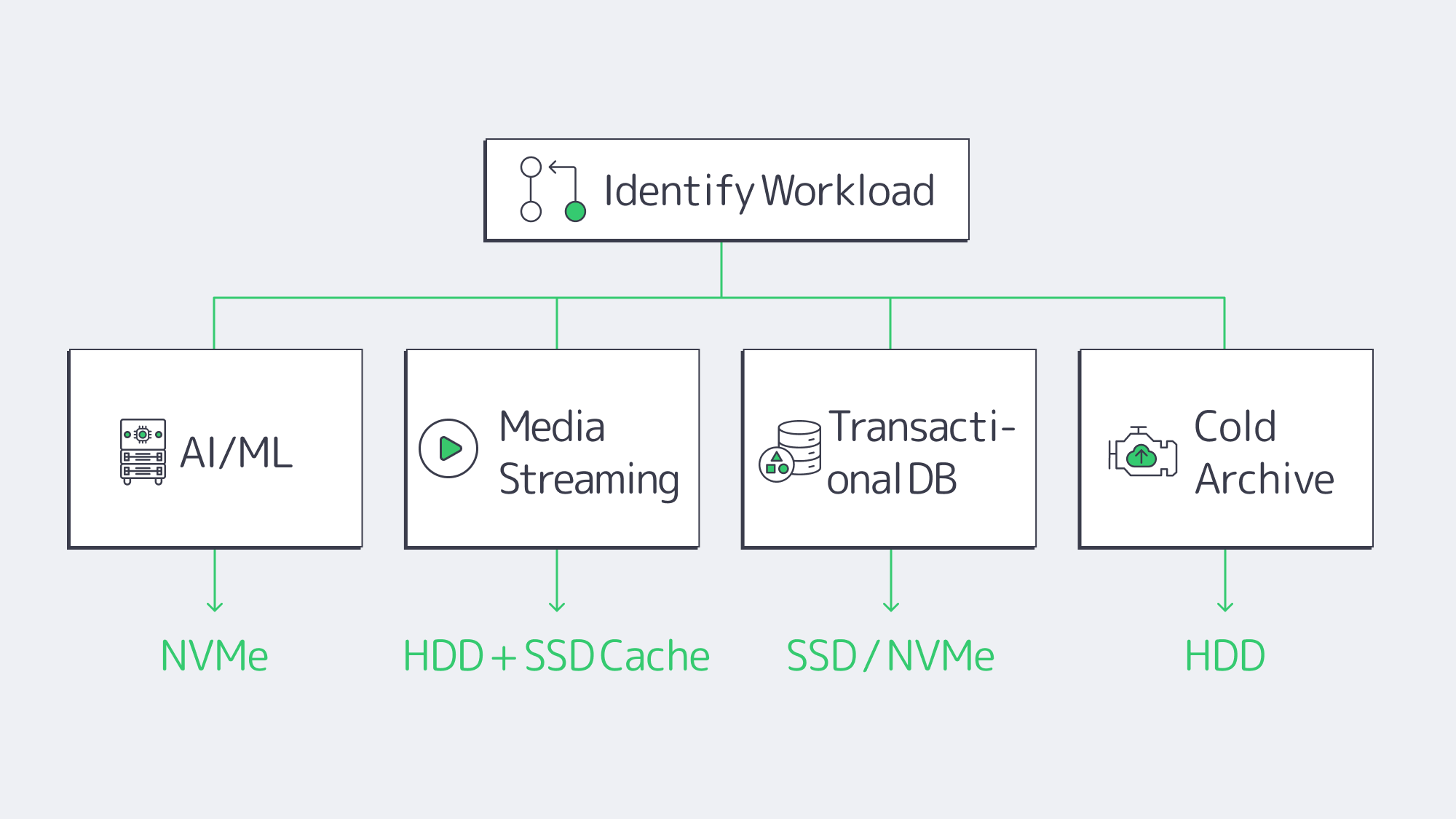
AI / Machine Learning / HPC
GPUs are waiting microseconds for arriving tensor data, but every millisecond of idle costs dollars. NVMe microsecond latency and 7 Gbps reads ensure that pipelines are full. Training volumes too big to fit pure flash may train subsets on NVMe and leave the long-tail on HDD or in object storage. PCIe 4.0 is now sufficient; PCIe 5.0 doubles the headroom for next-gen models that have a wider data footprint.
Media Streaming & CDN Origins
Streaming video is to a great extent sequential. Some HDDs in RAID have sufficient bandwidth to support 4K streams when file requests are mostly sequential. Then there is the issue of concurrency — hundreds of viewers accessing various files simultaneously causes random seeks. A hybrid origin spreads out the performance and SSD caching in front of HDD capacity balances the performance and keeps the cost down. Use high-bandwidth NICs with paired disks; Melbicom regularly configures 10, 40, or 200 Gbps uplinks so that the storage never saturates the link.
Transactional Databases & Enterprise Apps
Each commit makes an entry in the log; each access of the index is a random access. In this, transactions per second are put in check by the 5ms latency of HDDs. SATA SSD is a starting point, and NVMe delivers tens of thousands of TPS with predictable sub-millisecond response. For write intensities greater than 1 DWPD, use high-endurance SKUs. Most operators replicate two NVMe drives to be durable and not to lose performance.
Archives, Backups, and Cold Data
Cold data is quantified in dollars instead of microseconds. Helium-filled, multi-terabyte HDDs are impressive, with decade-level storage available at pennies per gigabyte. Sequential backup windows fit disk strengths like a glove and restore time is more often than not a scheduled event. For off-site copies, supplement on-premise disks with tape or S3-compatible object storage. Melbicom SFTP and S3 services deliver economical durability without compromising SMB-friendly interfaces.
NVMe-over-Fabric and PCIe 5.0

NVMe-over-Fabric: The NVMe low-latency protocol is extended over Ethernet or InfiniBand by NVMe-over-Fabric, collapsing the divide between direct-attached and networked storage. Latency overheads are in the tens of microseconds—insignificant in most apps—making it feasible to pool flash at rack scale. The technology is now within the scope of mid-sized stacks with the early deployments already booting servers off remote NVMe volumes and converged 25-100 GbE switches in the market.
PCIe 5.0: PCIe 5.0 doubles the bandwidth per lane of Gen4. Peak performance of debut drives is 14 GB/s reads and ~3 M IOPS, a level that would have matched small all-flash arrays only a couple of years ago.
How to Build a Tiered Dedicated Server Storage Stack
All-flash or all-disk is seldom the smartest storage architecture. Use NVMe on ultra-hot datasets, SATA SSD on mixed workloads and high-capacity HDD on cheap depth. This three-tier system maintains responsiveness to critical applications, feeds GPUs, and maintains budgets. From a practical point of view:
- NVMe pools sized to support maximum random I/O loads — AI staging, OLTP logs, and latency-sensitive VMs.
- Pin SSD caches to HDD source when hot and cold media libraries or analytics data exist.
- Store immutable archives on helium HDDs or off-server object buckets.
- Validate dedicated servers have modern PCIe lanes and at least 10 Gbps networking so storage isn’t gridlocked.
We at Melbicom regularly design these hybrids that allow customers to combine over 1,300 prebuilt server configurations at 21 Tier III-plus data centers and scale port speeds up to 200 Gbps per server.
Conclusion

The decision of storage for a dedicated server is, after all, an exercise in aligning performance thresholds with business goals. NVMe is latency and IOPS pushing, with SATA SSD being a compromise between speed and cost, and HDDs retaining their position as the affordable capacity option. With this knowledge of each medium’s behavior at various workloads, including streaming, transactions, and archival, you can design a tiered stack that meets today’s needs and scales to the NVMe-over-Fabric world of tomorrow.
Configure Your Dedicated Server
Choose from 1,300+ prebuilt configs, add NVMe or HDD, and scale bandwidth to 200 Gbps.