
Blog

GoDaddy Dedicated Server Alternative: VPS vs. Dedicated
GoDaddy is a familiar name in domains and hosting, so buyers still search for a GoDaddy dedicated server. But GoDaddy’s dedicated server end-of-life notice says all Dedicated Servers will be retired. As of July 2026, the former dedicated-server product URL presents VPS Hosting. The buying decision is whether GoDaddy VPS fits the workload or dedicated hardware from another provider is required (Melbicom is not affiliated with GoDaddy).
Choose Melbicom– 1,100+ dedicated servers – 21 global Tier III/IV DCs – Bandwidth up to 200 Gbps |
 |
GoDaddy VPS is a valid option for many workloads. Current plans offer KVM-based virtualization, root access, Linux or Windows, optional cPanel or Plesk, and up to 32 vCPU, 128 GB RAM, and 1.5 TB of NVMe storage. A dedicated server becomes relevant when the application needs single-tenant hardware, out-of-band recovery, stricter IP control, predictable sustained resources, or greater network headroom.
Why GoDaddy Dedicated Server Searches Now Lead to VPS
A GoDaddy dedicated server search now leads buyers toward VPS because GoDaddy’s public help center says its Dedicated Servers are being retired and its current server product page sells VPS Hosting. Buyers who need root access and scalable virtual resources may still find a fit; buyers who need dedicated hardware should compare dedicated-server alternatives from other vendors.
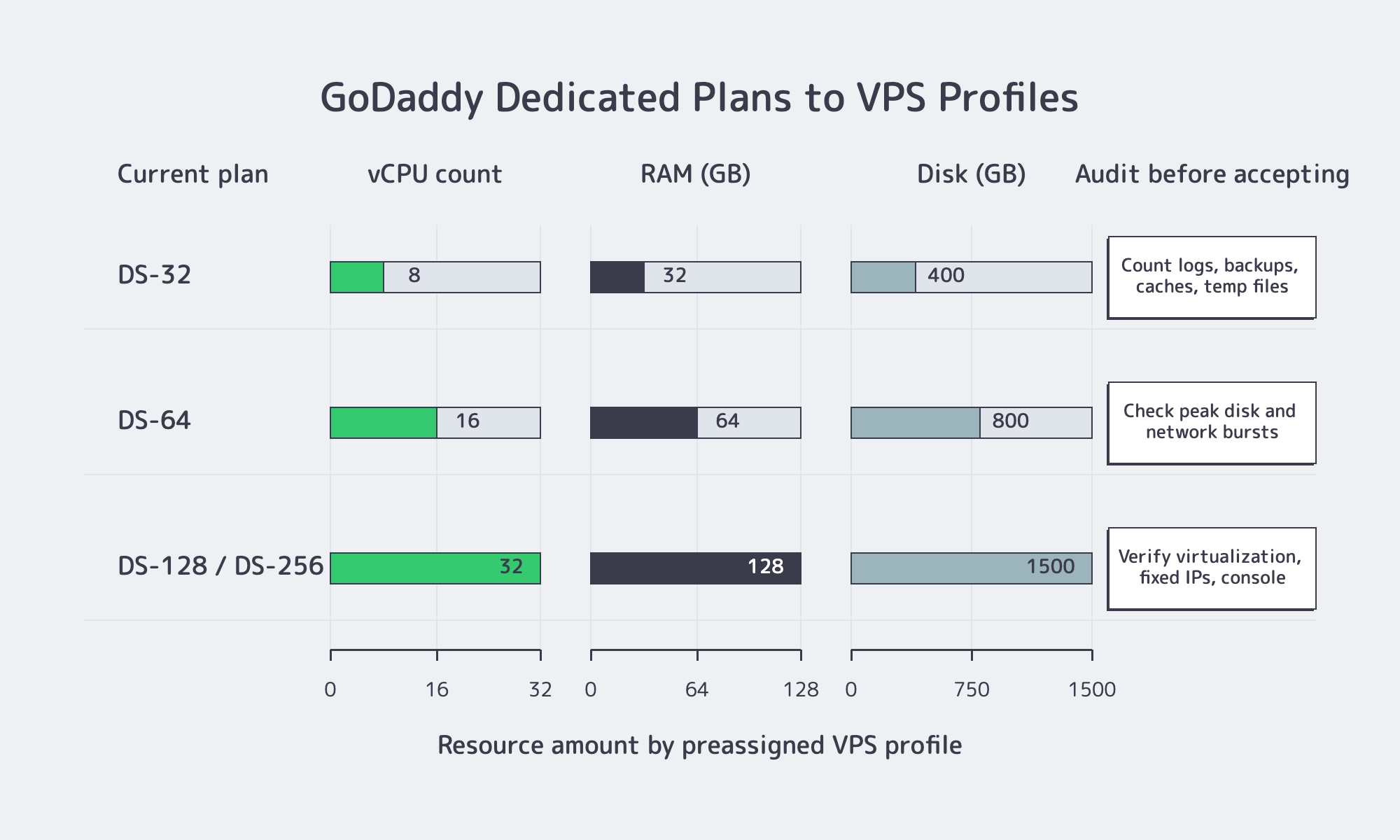
The retirement notice explains the mixed search results. It maps former DS-32, DS-64, and DS-128 or DS-256 plans to VPS profiles and says automated migrations were expected to begin in July 2024. That is product history, not a current dedicated-server catalog. Buyers should compare the available VPS service with the workload they plan to run.
| Workload Requirement | GoDaddy VPS Can Fit When | Choose a Dedicated Server When |
|---|---|---|
| Compute and storage | The workload fits within 32 vCPU, 128 GB RAM, and 1.5 TB NVMe | The workload needs full-host resources, larger local capacity, or predictable sustained load |
| Administrative control | Root or Administrator access and OS-level configuration are sufficient | The workload needs single-tenant hardware, out-of-band console recovery, or nested infrastructure |
| Network and IPs | Dedicated VPS IPs and standard regional placement meet the requirement | The design depends on IP portability, customer network announcements, or higher port capacity |
The distinction is architectural, not a quality judgment. A VPS abstracts the physical host and is easier to resize. A dedicated server assigns the machine to one customer and provides a different recovery and resource-isolation model. The correct option depends on what the application actually requires, not on which category sounds more powerful.
GoDaddy VPS or a Dedicated Server Alternative?
Choose GoDaddy VPS when a virtual machine with root access, supported Linux or Windows options, control-panel availability, and up to 32 vCPU is enough. Choose a dedicated server alternative when the workload requires single-tenant hardware, remote hardware-level recovery, stricter IP control, sustained resource use, or network capacity beyond the available VPS profile.
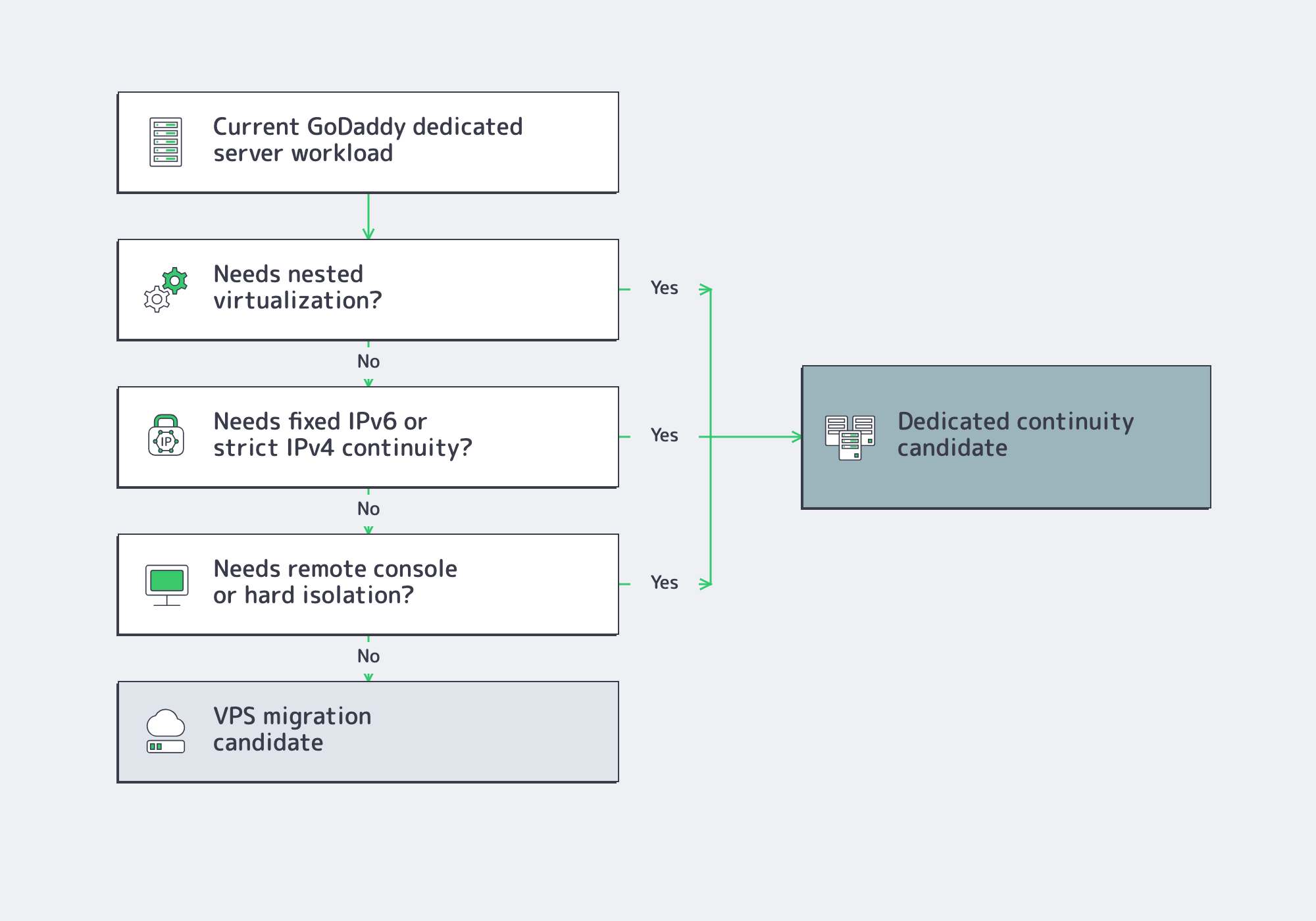
VPS is the efficient default for many websites, application servers, development environments, and control-panel estates. GoDaddy’s current offer includes root access, snapshots, Linux or Windows, and optional cPanel or Plesk. A team that mainly needs administrative control and a defined virtual resource allocation may gain little from an entire physical machine.
A dedicated server is the stronger fit when the hardware boundary matters: sustained CPU or storage load, IP-KVM recovery when the OS will not boot, customer-owned IP space announced through BGP, or technologies the GoDaddy retirement notice says cannot move into its VPS environment. The question is not whether VPS offers root, but whether OS-level control is enough.
Applications that send mail should also verify outbound ports, relay requirements, reverse DNS, SPF, and dedicated-IP policies. GoDaddy’s retirement notice specifically lists SMTP relay, port 25, and SPF changes for migrated services.
What to Compare in a GoDaddy Dedicated Server Alternative
A useful GoDaddy dedicated server alternative should be evaluated against the workload, not against a brand name. Verify operating-system support, root or Administrator access, control-panel migration, IP allocation and portability, tested backups, recovery access, sustained bandwidth, geographic placement, and provisioning time before comparing headline CPU, RAM, or monthly price.
Root Access and Control Panel Requirements
GoDaddy VPS includes root access, so root alone does not justify a dedicated server. Check the required Linux distribution or Windows version, panel availability, and recovery options when SSH or RDP fails. cPanel’s Transfer Tool documentation requires root-equivalent access for full transfers; Plesk’s migration documentation requires root or SSH-key access on Linux and built-in Administrator credentials on Windows.
A panel transfer still needs an audit of DNS and AAAA records, scheduled tasks, firewall rules, secrets, mail routing, database and PHP versions, and assigned IPs. cPanel notes that settings such as two-factor authentication do not transfer automatically.
IP Address and DNS Requirements
A dedicated VPS IP is not portable addressing. Check IPv4 and IPv6 availability, reverse-DNS control, support for customer-owned networks, and what happens to addresses after a move. GoDaddy’s notice says IPv4 retention during automated migrations is best effort and IPv6 cannot be retained, showing why IP dependencies need a separate inventory.
For rollback, lower the TTL on the A, AAAA, or CNAME records that will change, then wait for the previous TTL to expire. AWS Route 53 guidance recommends an initial shorter value such as 300 seconds for live-record changes. Increase it after stabilization.
Backups That Can Actually Be Restored
A platform comparison should separate provider snapshots from an independent backup strategy. Snapshots are convenient for fast rollback, but they may share the same account, platform, or failure domain. Microsoft’s SQL Server backup guidance states that there is no restore strategy until backups are tested. Restore representative data to a clean target before production moves.
Bandwidth, Locality, and Performance Planning
Port speed, included transfer, and traffic pattern are separate variables. Cloudflare’s 2025 internet trends release reported 19% year-over-year global traffic growth. Plan with 95th-percentile production traffic, replication volume, and campaign bursts rather than monthly averages.
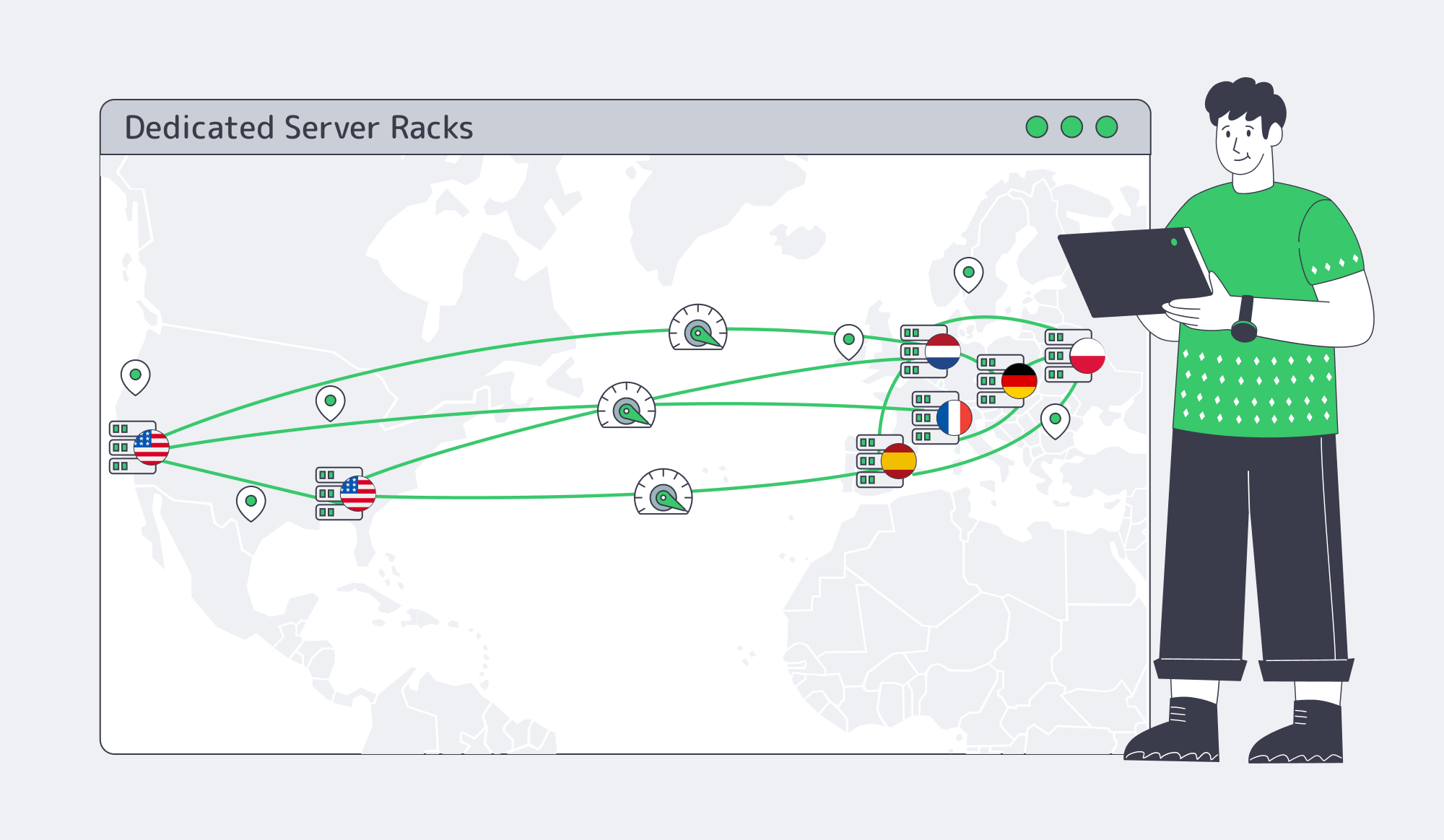
Geography can matter as much as CPU. Cloudflare’s latency guidance puts roughly 100 miles at about 5–10 ms and 2,200 miles near 40–50 ms before application processing. Compare Atlanta or Los Angeles for North America and Amsterdam, Frankfurt, Madrid, Paris, or Warsaw for European workloads.
Migration Runbook for a New Dedicated Server Deployment
The destination usually replaces a VPS, aging physical server, control-panel host, or another provider. Provision first, replicate while the source remains live, validate the destination, lower DNS TTLs, run a final delta sync, switch traffic, and retain the source until monitoring is clean.
For Linux, validate the supported OS, packages, PHP, cron jobs, databases, mail routing, and permissions. For Windows, verify Administrator access, service identities, drive letters, backups, licensing, firewall rules, and bindings. A clean destination is often safer than combining an OS upgrade with the production cutover.
Before cutover, prove the rollback path is practical:
- Treat a successful restore test, not a completed backup job, as the migration gate.
- Lower the DNS records that will change before the cutover window, not during it.
- Document every partner allowlist, reverse-DNS entry, and application dependency tied to the old IP.
- Keep the source available, preferably read-only after final sync, until logs, mail queues, jobs, and customer traffic are clean.
- Define failure thresholds in advance, such as payment-webhook failures for 15 minutes or admin-login errors above 1%.
Choose the Right Alternative
If GoDaddy VPS fits the resource ceiling and the application only needs OS-level control, it remains a valid option. If the design depends on single-tenant hardware, IP-KVM recovery, customer IP announcements, larger storage layouts, sustained throughput, or a specific location, compare servers directly rather than forcing those requirements into a VPS.
Melbicom provides dedicated servers across 21 global Tier III/IV data centers, with 1,100+ ready-to-go configurations and custom configurations delivered in 3–5 business days. Depending on location and configuration, per-server bandwidth ranges from 1 to 200 Gbps. IP-KVM access supports recovery outside the operating system, BGP is available for announcing customer IP networks, and engineers provide 24/7 support. Use the DC footprint to match GEO to the workload instead of buying a generic replacement.
Configure a Dedicated Server Alternative
Compare ready-to-go and custom configurations for the control, location, storage, and bandwidth your workload requires.