
Blog

Dedicated Servers for Video Streaming at Scale
Video drives a large share of internet traffic. Audiences expect fast starts, crisp 4K playback, and minimal buffering.
That expectation collides with physics and infrastructure: Netflix reported a 65 million concurrent-stream peak for the Jake Paul–Mike Tyson event. At 20 Mbps, one 4K stream transfers about 9 GB per hour. Multiply by thousands—or millions—of viewers and the arithmetic becomes unforgiving.
Choose Melbicom— 1100+ ready-to-go servers — 21 Tier III & IV data centers — 40 PoP CDN across 6 continents |
 |
Choosing the right dedicated server is no longer about generic CPU and a 1 Gbps port. It’s about bandwidth headroom, predictable performance under concurrency, CPU/GPU capacity for real-time encoding, and storage I/O sized to keep the network fed. This piece lays out the modern requirements for video streaming hosting, trims legacy considerations to context only, and shows where dedicated infrastructure—paired with a global CDN—gives you smoother playback and room to scale.
Modern Video Streaming Server Hosting
Four pillars define streaming-ready servers today:
- Network throughput and quality. Size port capacity against peak bitrate, viewers, CDN offload, and failover rather than assuming one minimum. Melbicom operates a 14+ Tbps global backbone and provides up to 200 Gbps per server.
- Compute for encoding/transcoding. HD, 4K, and AV1 workloads can consume substantial CPU. Use high-core processors plus GPU offload when benchmarked channel density or latency targets justify it.
- Fast storage and I/O. NVMe SSDs remove mechanical seek latency and can sustain multi-gigabyte-per-second reads. Hybrid tiers (NVMe + HDD) can work for large libraries, while hot content is usually best placed on flash.
- Distributed reach via CDN. Even a well-sized origin cannot compensate for a long path to users. A CDN with dozens of global PoPs puts cacheable segments closer to users and offloads origin bandwidth. Melbicom’s CDN spans 40 PoPs across 35 countries; operators can use custom headers, Origin Shield, and Secure Link access controls.
Everything else—kernel tuning, congestion control variants, packaging tweaks—adds incremental value only if these pillars are sized correctly.
Dedicated Servers vs. Cloud
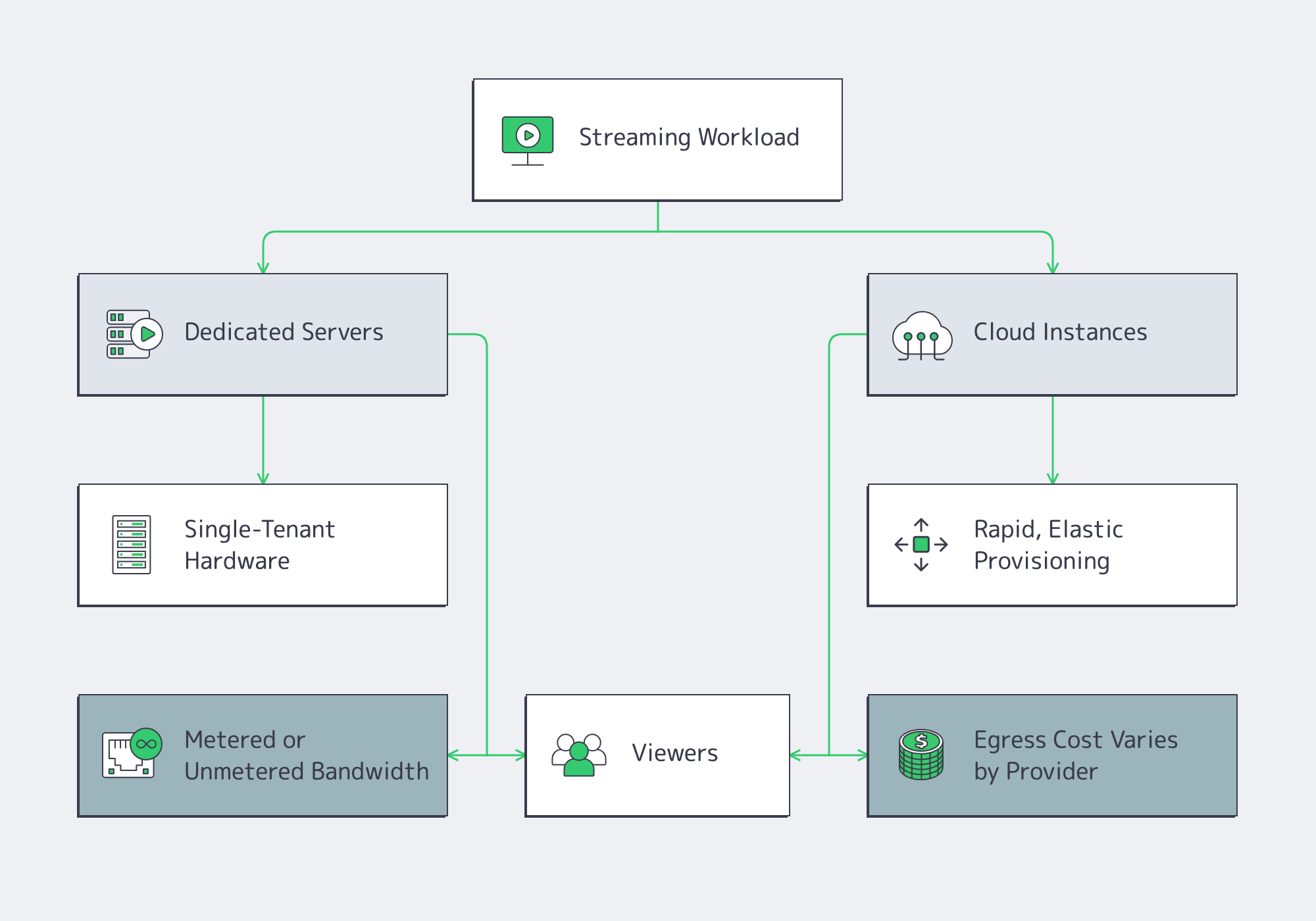
Cloud advantages. Fast time-to-first-instance and elasticity are real benefits. If you’re validating a format or riding unpredictable bursts, cloud can bridge the gap.
Cloud trade-offs for streaming. Video is egress-heavy, and provider, region, service tier, and committed volume all affect the bill. At petabyte scale, even a few cents per gigabyte can become tens of thousands per month. Shared instances can also add resource and network variability. Dedicated-host and higher-bandwidth options alter that trade-off.
Dedicated advantages. You get exclusive hardware: full CPU cores, RAM, and NICs, plus a defined metered or unmetered bandwidth plan. That can stabilize resource availability as concurrency climbs and improve cost predictability at steady high utilization. Dedicated servers also give you full-stack control: CPU model, GPU option, NICs, NVMe layout, kernel version, and I/O schedulers—all tunable for media workloads.
A pragmatic strategy. Many teams run steady state on dedicated for performance and cost efficiency, then keep cloud capacity for edge cases. Melbicom supports this path with 1100+ ready-to-go servers across 21 Tier III & IV data centers for rapid provisioning of the right shape at the right place.
How Much Bandwidth Does Video Streaming Server Hosting Need?
Video streaming server hosting needs enough sustained throughput for peak concurrent viewers, average delivered bitrate, protocol overhead, and failover headroom. Multiply peak viewers by expected average bitrate, add overhead, account for CDN offload, and divide the remaining traffic across origins. A 1 Gbps port may suit smaller origins; large live events can require 10–200 Gbps per server.
Using illustrative delivered bitrates, the math is:
- 10,000 × 1080p at ~5 Mbps ≈ 50 Gbps sustained.
- 10,000 × 4K at ~20 Mbps ≈ 200 Gbps sustained.
A 1 Gbps port transfers roughly 324 TB over a 30-day month if saturated continuously. The right starting point may be 1 Gbps, 10 Gbps, or higher, depending on measured traffic and CDN offload; 40/100/200 Gbps options become relevant where concurrency or bitrate warrants. The interface is only part of the story; you also need:
- Committed throughput and transfer model. Confirm whether capacity is dedicated or shared and whether traffic is metered or unmetered.
- Good routes and peering. Closer, cleaner paths reduce retransmits and startup delay.
- Redundancy. Dual uplinks and diverse routing reduce single points of failure.
Melbicom’s network combines up to 200 Gbps per server with a 14+ Tbps backbone, 23 transit providers, and 29 IXPs. Streaming teams should still validate sustained throughput, routing, and failover for each target region before a live event.
Compute: CPU and GPU for Real-Time Encoding and Packaging
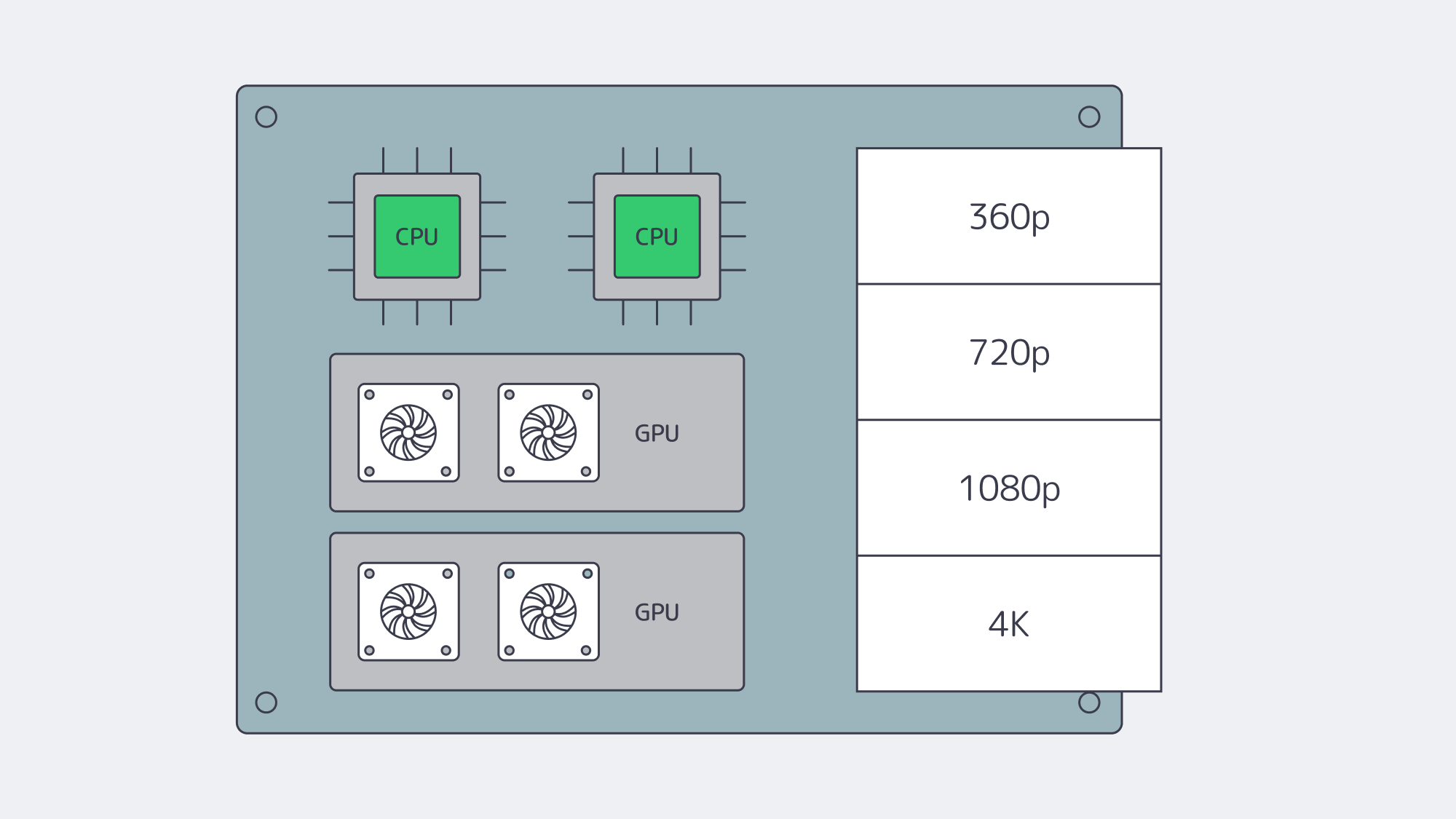
Software encoders for H.264/H.265 consume substantial CPU, and AV1 demand varies with preset and quality target. Size high-core CPUs from measured encode speed, ladder count, and latency targets rather than a generic core count. As workflows scale, GPU acceleration can improve channel density, but throughput varies by codec, resolution, frame rate, preset, and GPU generation. Benchmark the exact ladder and quality settings before assigning channels per card, while reserving CPU for packaging, DRM, timers, and I/O.
A few practical notes when sizing:
- Match encoders to business logic. Each additional rendition increases work; hardware encoders can raise channel density, but quality and latency settings still need testing.
- Use the right instruction set. AVX2/AVX-512 can help software encoders; benchmark the actual encoder build and CPU generation.
- Right-size RAM. Treat 32–64 GB as a starting point for many origins and packagers; live transcoders may need more for buffers and queues.
Melbicom offers dedicated systems with CPU-dense footprints and GPU options for media workloads. We’ll help you align codec plans, density targets, and cost per channel.
Storage and I/O: NVMe and Hybrid Tiers
Video delivery can be sequential, but production origins also handle concurrent segment requests, seeks, and popular timestamps. Those patterns add random I/O and queue depth that a single HDD handles poorly. For hot content, NVMe SSDs are often the safer default:
- Throughput. A single NVMe drive can sustain several GB/s of sequential reads; arrays vary with PCIe lanes, RAID, filesystems, and workload.
- Latency. Low-latency storage reduces wait during cache misses and segment fan-out, but startup time also depends on player, network, and CDN behavior.
- Concurrency. High IOPS helps keep per-stream fetches responsive under heavy fan-out.
For large libraries, pair NVMe (hot tier) with HDD capacity (cold tier). Software caching (filesystem or application-level) keeps the working set on flash, while HDD arrays hold the long tail. For a direct-serving origin, verify that aggregate storage throughput can feed planned NIC throughput under the actual access pattern. A 40 Gbps port fed by a single HDD will not reach line rate; multiple NVMe drives or a wide HDD array may be needed. Melbicom offers dedicated servers with NVMe-first storage so storage can be sized not to limit an otherwise capable high-bandwidth network path.
Global Reach, Low Latency: Origins in the Right Places, CDN at the Edge
You cannot fight the speed of light. The farther a user is from your origin, the higher the startup delay and the larger the buffer required to hide jitter. Best practice is twofold:
- Multi-region origins. Place dedicated servers near major exchanges in your key audience regions—e.g., Amsterdam/Frankfurt, Atlanta/Los Angeles, Singapore/Tokyo—so CDN origin fetches are short and reliable. Melbicom’s footprint spans 21 data centers in 19 cities.
- CDN everywhere your users are. A 40 PoP footprint like Melbicom’s CDN can shorten delivery paths and offload origin traffic. With sound cache rules, the CDN serves viewers while origins handle cache fill, authorization, and long-tail content.
Routing features—peering with local ISPs, tuned congestion control, and judicious use of anycast or GeoDNS—can trim further milliseconds. For live formats such as LL-HLS, low-latency DASH, or WebRTC, these choices help reduce glass-to-glass delay when the full pipeline is tuned.
Concurrency at Scale: Predictable Performance when it Counts
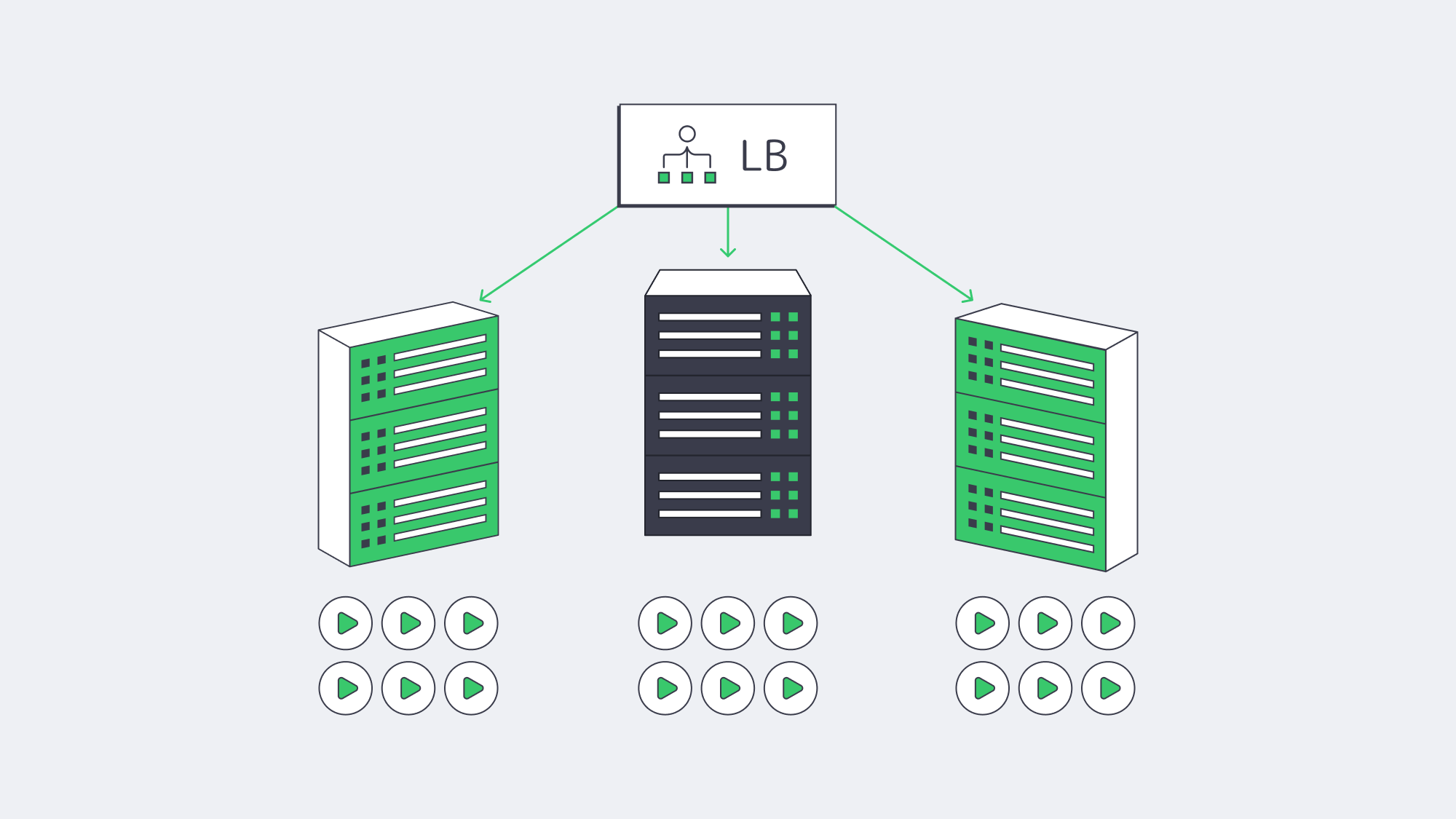
Smooth playback under high concurrency is where dedicated servers can repay the decision. Without hypervisor contention, dedicated servers provide a defined CPU, memory, and NIC budget for each origin. Packet pacing, queueing, and throughput still depend on kernel, application, and network configuration, so load-test the full path before peak events. This defined resource envelope also simplifies capacity planning:
- Estimate your peak simultaneous viewers and average ladder bitrate.
- Convert to Gbps/headroom targets per origin.
- Add elasticity with either more origins (horizontal scale) or higher-capacity ports (vertical scale).
With a defined bandwidth plan, teams can reserve headroom for spikes without relying on per-request scaling during the event.
Future-Proofing: Codecs, Bitrates, Growth
Codec transitions such as AV1 and richer formats such as HDR, high frame rates, and 8K in select use cases can increase bitrate or compute demand. Build with headroom:
- Network. Start from measured peak demand and keep an upgrade path through 10/40/100/200 Gbps as required.
- Compute. Favor CPU families with strong SIMD, and keep a path to GPU-accelerated encoding.
- Storage. Plan NVMe for latency-sensitive hot sets; scale horizontally with sharding or caching as libraries grow.
- Placement. Add regions as your audience map changes; test performance regularly.
Melbicom’s model combines configurable dedicated servers across 19 cities, an integrated 40 PoP CDN, and high-bandwidth options that scale with viewership.
Video Streaming Server Hosting Checklist
- Bandwidth & routing. Calculate peak throughput from viewers and bitrate; verify committed capacity, transfer terms, and peering quality. Keep an upgrade path to 40/100/200 Gbps where needed.
- CPU/GPU. Use high-core CPUs for software encodes; GPUs can raise channel density when benchmarks support the selected codec and quality settings.
- Storage. Use NVMe for hot read paths and hybrid tiers for cost control. Verify that aggregate storage can feed the NIC under concurrency.
- CDN. Use it for cacheable segments and assets. Match the footprint to your audience; configure Origin Shield and sane cache keys for segments.
- Regions. Place origins near user clusters and IXPs; plan failover across regions.
- Costs. Model egress carefully. Dedicated servers with defined metered or unmetered plans can improve cost predictability at steady high utilization.
- Operations. Monitor CPU, NIC, and disk saturation; tune kernel and socket buffers; automate capacity adds before events.
Build for Smooth Playback, Scale for Spikes

The core job of a streaming platform is simple to say and hard to do: start quickly and minimize rebuffering. That demands large, reliable network paths, compute engineered for codecs, and NVMe-class I/O—backed by a CDN that puts cacheable content closer to viewers. Dedicated servers can provide defined resource capacity under concurrency and improve cost discipline at high sustained egress. When each origin has measured bandwidth headroom, benchmarked encoding capacity, and storage that can feed the delivery path, viewers feel the difference—especially during peak moments.
If you’re mapping next steps—migrating off the cloud for economics, preparing for a rights-holder’s audience surge, or adopting AV1 at scale—the blueprint is consistent: place origins where they make sense, pair them with a broad CDN, and size network/compute/storage for tomorrow’s ladders, not yesterday’s.
Stream-ready dedicated servers
Deploy high-bandwidth servers across 21 Tier III and Tier IV data centers and size capacity for your streaming workload.