
Blog

How Dedicated Servers Power Seamless Live Streaming
Live streaming at scale is ruthless on infrastructure. Millions of viewers can arrive within seconds; every additional millisecond of delay compounds into startup lag, buffer underruns, and churn. Decades of QoE research show the audience has little patience: abandonment begins when startup delay exceeds ~2 seconds, rising ~5.8% for each additional second—a brutal slope for real‑time broadcasts.
This piece examines how dedicated server infrastructure delivers seamless live streaming for events and real‑time broadcasts: why single‑tenant performance matters under concurrency stress, how edge computing and a CDN pull content closer to viewers to minimize lag, and which failover patterns keep streams online through faults.
Choose Melbicom— 1100+ ready-to-go servers — 21 global Tier IV & III data centers — 39 PoP CDN across 6 continents |
 |
Why Is “Seamless” Live Streaming So Hard?
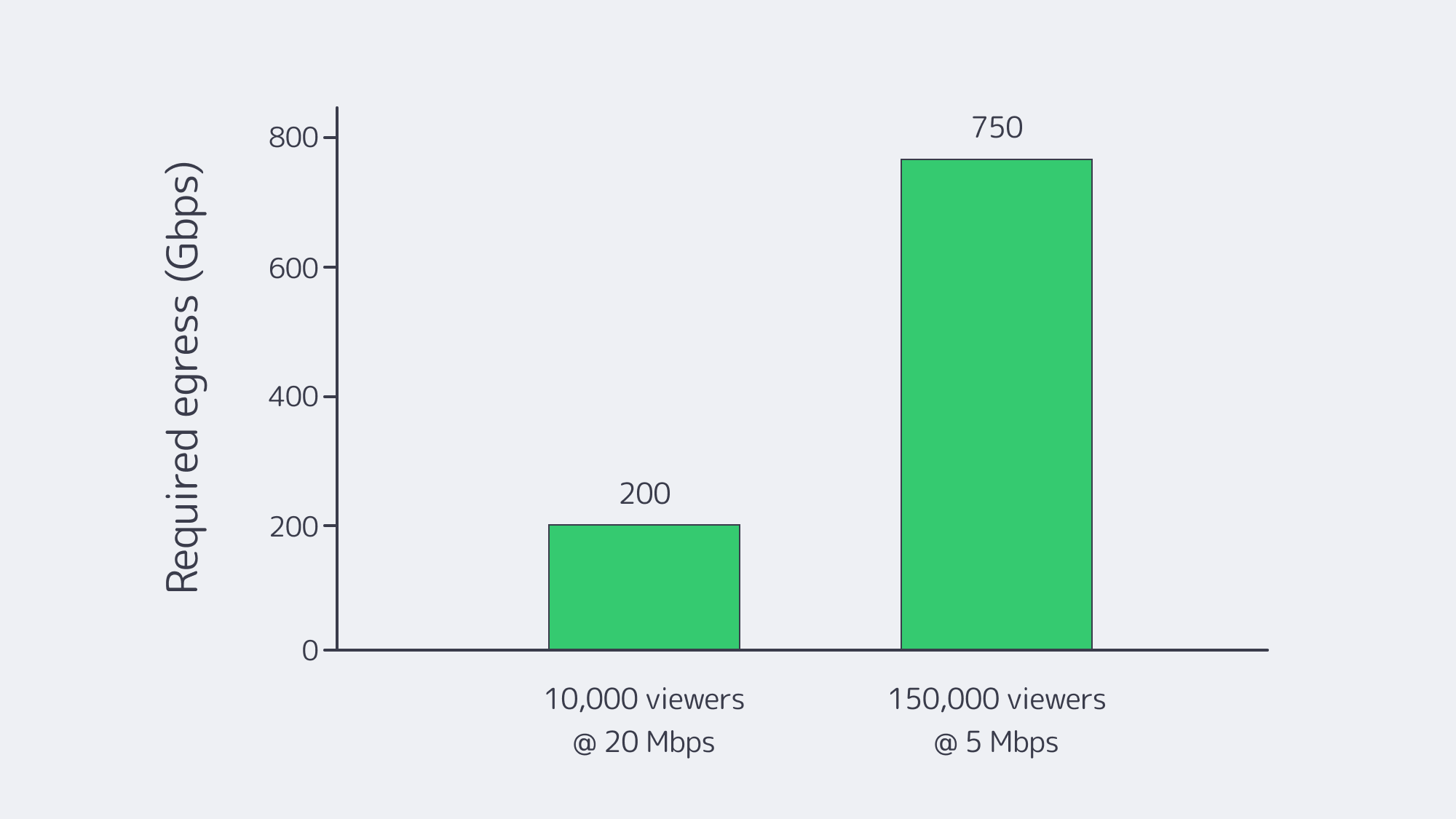
Concurrency and bandwidth. Peaks are spiky and simultaneous. If 10,000 viewers watch a 4K ladder at ~20 Mbps, origin egress must sustain ~200 Gbps instantly. At a million viewers, that arithmetic hits tens of Tbps—well beyond any single facility’s comfort zone. And the payloads are heavy: Netflix’s own guidance pegs 4K at ~7 GB per hour per viewer—petabytes evaporate quickly at audience scale.
Physics and protocol trade‑offs. The farther a viewer is from origin, the larger the buffer needed to ride out jitter. Traditional HLS/DASH favored stability over speed; newer modes (LL‑HLS/LL‑DASH) trade smaller chunks and partial segment delivery for 2–5 second end‑to‑end delays—only if the network and servers keep up.
Viewer intolerance for interruptions. The research is unambiguous: seconds of startup or rebuffering drive measurable abandonment and revenue loss. That’s why platforms that win on live events are the ones that engineer for steady latency under unpredictable demand, not just average throughput.
What Makes a Live Streaming Dedicated Server the Right Foundation?
Dedicated servers give streaming teams exclusive, predictable performance—no hypervisor jitter, no “noisy neighbors,” and full control of CPU, RAM, NIC queues, storage layout, and kernel networking. When tuned for live media (fast NVMe for segments and manifests; large socket buffers; modern congestion control), dedicated hosts push line‑rate 10/40/100+ Gbps consistently, which is the difference between a stable 2‑sec ladder and a stuttering one at peak.
Melbicom’s platform illustrates the point: 1100+ ready‑to‑go servers across 21 global data centers (Tier III/IV) enable precise right‑sizing and regional placement; per‑server bandwidth options reach up to 200 Gbps in select sites; and free 24/7 support plus component replacement within 4 hours keep incidents from turning into outages.
Cost and predictability also tilt in favor of dedicated as you scale: flat‑priced ports (rather than per‑GB egress) and the ability to drive them at capacity let teams provision for the peak rather than the median—critical when a broadcast goes viral.
Comparison at a glance
| Key factor | Dedicated server infrastructure for streaming | Cloud VM infrastructure for streaming |
|---|---|---|
| Performance under load | Exclusive hardware; stable CPU/I/O and line‑rate 10–200 Gbps per server when available. | Multi‑tenant variability; hypervisor overhead can add jitter under peak. |
| Latency & routing | Full control of stack, peering, and placement; regions chosen to minimize RTT to viewers. | Less control over routing; regions may not align with audience clusters. |
| Customization | Tune OS, NICs, storage, and encoders; add GPUs for real‑time transcode. | Constrained instance shapes; less low‑level tuning; GPU/storage premiums. |
Why it matters: LL‑HLS/LL‑DASH only hold low single‑digit‑second latency at scale when origin and mid‑tier nodes can serve small segments immediately and the upstream routes stay clean. That favors single‑tenant boxes on fast ports in the right metros.
How Does Edge Computing Cut Latency?
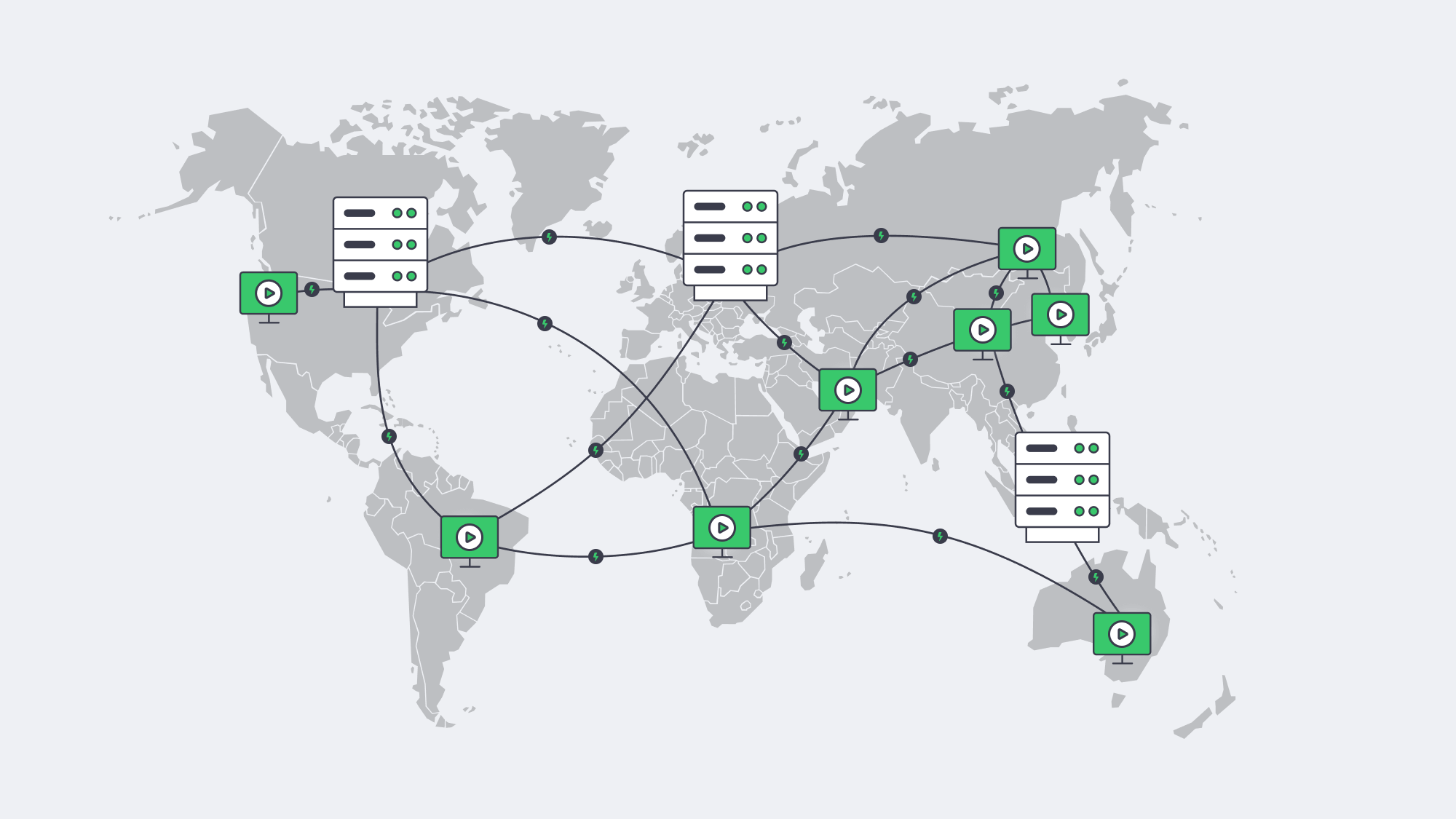
The single most reliable way to reduce live delay and buffering is to shorten the distance between content and viewer. A CDN/edge layer fetches each segment once from origin, then serves it from nearby points of presence—collapsing round‑trip time and stabilizing last‑mile variability. Industry analyses attribute step‑function latency gains to pushing compute and cache deeper into the network; the architectural goal is simple: keep media within a handful of hops of the player.
Melbicom’s CDN spans 39 PoPs across 35 countries and 6 continents, with HTTP/2, TLS 1.3, and video delivery features (HLS/DASH). In practice, that lets teams park origins on dedicated hosts in a few strategic metros and let the edge take the fan‑out load—especially during flash crowds.
Low‑latency protocols amplify the benefit. LL‑HLS relies on small parts and chunked transfer; when those parts originate from an edge 15–30 ms away instead of a core 150–300 ms away, live delay stays in budget and rebuffer risk collapses. Apple’s LL‑HLS design notes and independent guidance consistently place live latency targets around 2–5 seconds for scalable HTTP‑based delivery—achievable only with strong edge proximity.
Where should the best streaming server sit?
- Place dedicated origins in the same continent (often the same country) as your largest live cohorts; use secondary origins where you see sustained daily concurrency.
- Put a CDN/edge in front; prefer footprints with PoPs near your audience (and peering with their ISPs).
- Keep origins lean: hot segments on NVMe; manifest/segment I/O localized; avoid mixing heavy analytics or ad‑decision engines on the same hosts.
Melbicom’s model—21 data centers for origins and a 39 PoP CDN—is designed for that split‑brain: origins where compute belongs, distribution where distance matters.
Keeping Streams Online When Things Break
No single point of failure—that’s the operational mantra for live. The core patterns:
- Multi‑origin, multi‑region. Two or more independent origin clusters pull the same live feed and package segments concurrently. A CDN config lists both; on health‑check failure, fetches shift automatically.
- Smart routing. DNS steering or BGP anycast (where appropriate) places viewers at the nearest healthy entry point; a failed site simply stops announcing and traffic drains to the next‑closest.
- Encoder redundancy. Dual ingest pipelines (primary/backup) keep the feed flowing even if one encoder or network path fails.
- Rapid repair and human cover. When a host does fail, component replacement within 4 hours and 24/7 on‑call engineers mean the cluster’s redundancy window is short—and viewers never notice. Melbicom documents both practices for streaming workloads.
Testing matters: schedule controlled “chaos” during low‑stakes windows—kill an origin, yank a transit, drop an encoder—until failover is boring. That’s the only path to confidence on show day.
Low Latency and Stability During Live Events
A pragmatic capacity rubric for live events:
- Work backward from concurrency × bitrate. Example: a marquee match with 150,000 viewers at 1080p (~5 Mbps) implies ~750 Gbps sustained across your edge, plus headroom for ABR steps and spikes.
- Provision origin ports for miss traffic and first‑segment storms. LL‑HLS/LL‑DASH means many tiny requests; NIC interrupt coalescing, TCP autotuning, and modern CC (BBR) help maintain microburst stability.
- Keep buffers honest. Target 2–5 second live latency end‑to‑end; avoid masking slow servers with oversized player buffers, which trades perceived “stability” for unacceptable delay.
- Monitor what viewers feel, not just what servers see. Track startup time, rebuffers per hour, edge cache‑hit ratio, and per‑region RTT to the player. Set alerts on deviation, not just thresholds.
A note on payload planning: at ~7 GB/hour per 4K viewer, turnover can be staggering on cross‑region peak nights. Build object storage and inter‑PoP replication policies that keep hot ladders close to viewers and cold renditions out of the way.
Choosing the Best Video Streaming Server Configuration
- CPU vs. GPU for encode/transcode. Software x264/x265 on high‑clock CPUs is flexible, but real‑time multi‑ladder pipelines often benefit from GPU offload (NVENC/AMF) to cap per‑channel latency.
- NICs and queues. Favor 10/25/40/100 GbE with sufficient RX/TX queues and RSS; pin interrupts and leave CPU headroom for packaging.
- NVMe everywhere. Manifests, parts, and recent segments should live on low‑latency NVMe to avoid I/O becoming your bottleneck.
- Network placement beats pure horsepower. A “big” server in a far‑away DC is worse for latency than a “right‑sized” box near the viewers behind a good CDN.
Melbicom supports these patterns with per‑server bandwidth up to 200 Gbps, 21 data centers for origins, and a CDN with 39 PoPs—so teams can pair the best server for streaming workloads with the right geography and delivery fabric.
Key Takeaways You Can Act On
- Place servers near demand. Stand up origins in the same continent as your biggest live cohorts; let the CDN handle the fan‑out.
- Engineer for the peak, not the average. Provision ports and hosts to absorb first‑minute storms; keep 20–30% headroom during events.
- Hit the latency budget. Design for 2–5 second live latency with LL‑HLS/LL‑DASH; verify via synthetic beacons from viewer ISPs.
- Remove single points of failure. Multi‑origin, multi‑region; automatic health‑checked failover; periodic game‑day drills.
- Watch what viewers feel. Startup delay and rebuffer minutes drive churn; know per‑region QoE every minute.
- Use infrastructure that scales with you. Melbicom offers 1100+ ready-to-go servers, 21 data centers, up to 200 Gbps per server, 39 CDN PoPs, and 24/7 support—the raw materials to keep latency tight and streams steady as you grow.
Powering a Seamless Live Experience?

Focus relentlessly on distance and determinism. Put deterministic performance (dedicated servers) where your encode, package, and origin cache must never stall; then erase distance with a CDN and edge placement aligned to your audience map. Use low‑latency ladders only when your end‑to‑end chain—from NVMe to NIC to route to edge—is tuned for microbursts. Finally, accept that failures will happen and practice the failovers until they are invisible to the viewer. Do that, and you’ll meet the modern bar for live streaming: ultra‑low latency, stable startup, and no buffering during the moments that matter.
Melbicom’s fit for live streaming
Build a low‑latency stack on dedicated origins and a global CDN. Our team can help size ports, place servers in the right metros, and get you online fast.