
Blog
1Gbps Reality: Goodput, Bottlenecks, And Upgrade Cues
A 1Gbps port still lands in the sweet spot for production infrastructure: fast enough for serious web traffic, predictable for monthly planning, and affordable. But the number on the order form is line rate, not guaranteed application payload. That gap matters more now because HTTPS is effectively default on the public web, median home pages are still measured in multi-megabytes, and modern DDoS campaigns operate at scales far beyond a single server port.
So the real question is not “Is 1Gbps fast?” It is: how much can a dedicated server 1Gbps setup move over a month, which workloads fit, which ones hit the wall, and when does a port upgrade solve the problem rather than just move it?
Dedicated Server 1Gbps Reality Check: Line Rate Is Not Monthly Payload
A 1Gbps Ethernet port is a wire-speed number. Your users see goodput, not line rate. Ethernet framing, IP and TCP headers, TLS, retransmits, congestion control, and proxy overhead all shave usable payload before the application sees a byte. As a planning rule, treating about 928 Mbps as a clean TCP ceiling without jumbo frames is more honest than budgeting around a perfect 1,000 Mbps.
That distinction is why a port can be “dedicated” and still disappoint. User experience is often capped first by CPU used for encryption and proxying, disk I/O serving cold files, connection handling under concurrency, or latency over longer paths.
How Much Traffic a 1Gbps Dedicated Server Can Realistically Handle per Month
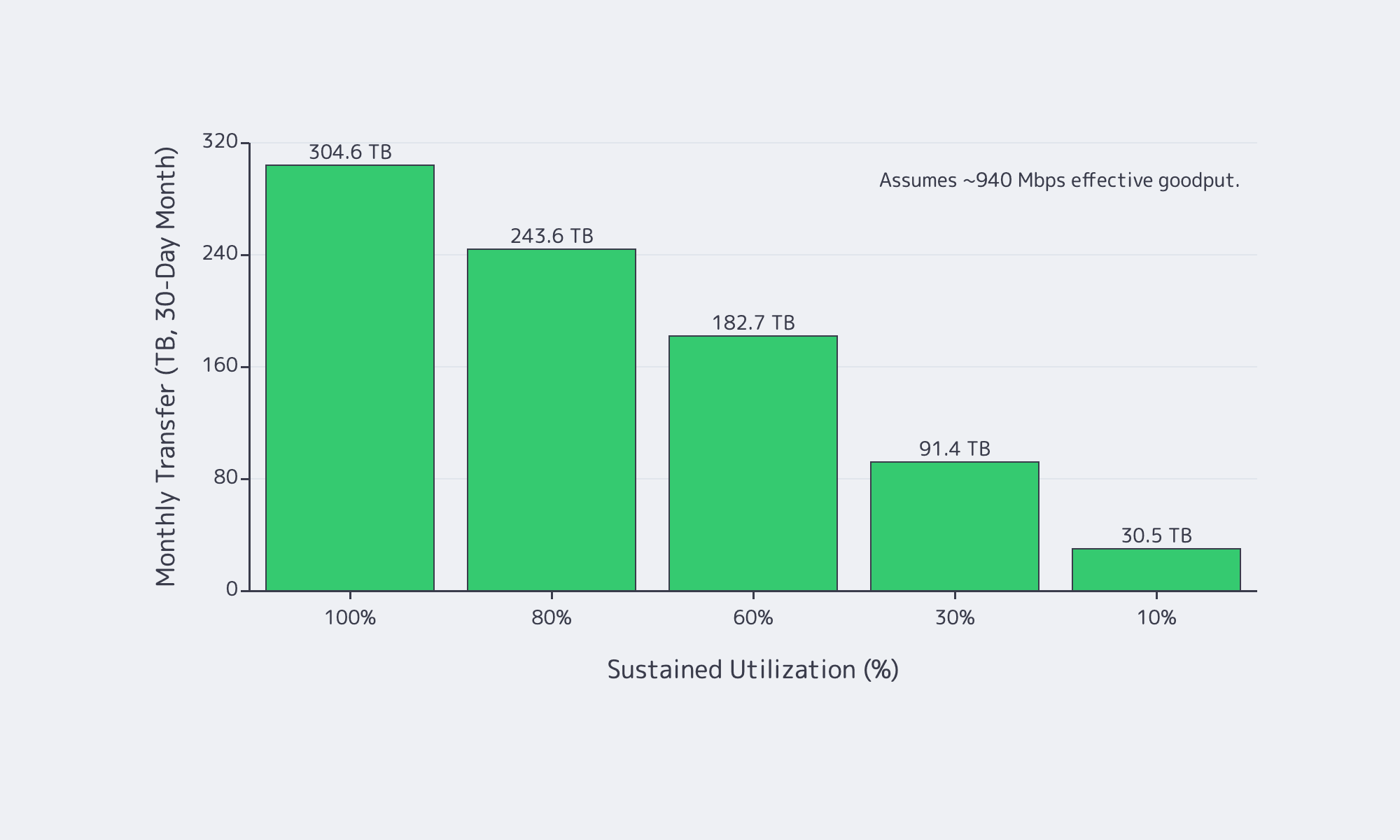
In practice, a 1Gbps port tops out at about 324 TB/month in perfect math, but realistic TCP goodput is closer to 928–940 Mbps, so plan around roughly 300 TB/month at full sustained utilization—and much less once burstiness, retransmits, and headroom enter the picture.
If a link could run at exactly 1,000,000,000 bits per second for a full 30-day month, it would move about 324 TB, or about 295 TiB. But nobody should buy a port on perfect math. A safer model is to treat about 940 Mbps as the top end of realistic sustained TCP payload and then scale monthly transfer by average utilization, not by peak screenshots.
| Sustained Utilization | Effective Goodput | Monthly Transfer (30-Day) |
|---|---|---|
| 100% | 940 Mbps | 304.6 TB |
| 80% | 752 Mbps | 243.6 TB |
| 60% | 564 Mbps | 182.7 TB |
| 30% | 282 Mbps | 91.4 TB |
| 10% | 94 Mbps | 30.5 TB |
Two numbers matter more than the headline maximum. First, average utilization decides the month. Second, maintenance-window math matters. A 1Gbps link is about 125 MB/s at line rate and roughly 117 MB/s at 940 Mbps payload, so moving 1 TB in ideal conditions still takes about 2.4 hrs. It is a hard constraint when larger transfers must finish before morning.
Which Workloads Fit 1Gbps Dedicated Bandwidth and Which Outgrow It
1Gbps is comfortable for web apps, APIs, SaaS platforms, backups, and regional delivery when caching is healthy and transfer windows are controlled. It starts to break when the origin serves many large files, high-bitrate video, or time-sensitive bulk data that cannot be shifted off-peak.
For interactive web applications, bandwidth is often not the first ceiling. Latency, cache efficiency, and compute matter more. Even so, pages are not lightweight: the HTTP Archive Web Almanac puts the median home page at about 2.86 MB on desktop and 2.56 MB on mobile. That is why a 1Gbps dedicated server works well as an origin when it is focused on dynamic responses and cache misses instead of every image, script, font, download, and backup artifact. Melbicom’s S3 Storage also helps here because it is AWS S3-compatible storage rather than a reason to keep treating the origin like a file warehouse.
Where 1Gbps starts to run out is simple: large objects times high concurrency times tight time windows. That is why downloads, patch distribution, regional file delivery, and streaming pressure a 1Gbps port so quickly. YouTube’s current live guidance still puts 1080p and 4K streams in the single-digit to tens-of-megabits range, and Ericsson says global mobile data traffic reached 200 EB per month with video accounting for 76 percent of it. If your origin mostly answers requests, 1Gbps is usually healthy. If your origin mostly ships bytes, you will outgrow it faster than you think.
This is where Melbicom’s CDN matters: keeping static files and large downloads on a delivery layer with 55+ PoPs across 36 countries makes a 1Gbps origin feel much larger.
Choose Melbicom— Unmetered bandwidth plans — 1,300+ ready-to-go servers — 21 DC & 55+ CDN PoPs |
 |
Dedicated Server 1Gbps Bottlenecks That Usually Appear Before the Port Saturates
A bandwidth graph does not tell you which subsystem is failing. In many production environments, the first hard wall appears before the NIC ever gets close to 1Gbps.
Why a 1Gbps dedicated server can be CPU-bound before it is bandwidth-bound
Encryption is baseline now, not optional overhead. Google says HTTPS navigations climbed into the 95–99 percent range and then plateaued, while W3Techs currently puts HTTP/3 usage at 38.5 percent of websites. A server handling TLS termination, compression, reverse proxying, and app logic can run out of CPU long before it runs out of port speed.
Why a 1Gbps dedicated server can be I/O-bound before it is download-bound
A 1Gbps link can sustain roughly 100+ MB/s of payload. If the server is repeatedly serving cache-cold assets, large downloads, or backup data from local disks, storage throughput and latency become the real limiter. Slow downloads with a half-empty network graph are often an I/O story, not a bandwidth story.
Why a 1Gbps server can look “full” at 300 Mbps
High-concurrency APIs and proxy tiers often fail on connection handling first. Linux still documents the default ephemeral port range as 32768–60999, and connection tracking has its own scaling behavior around bucket sizing and active flow counts. Accept queues, file descriptors, and state tables can all break a service while bandwidth looks moderate.
Why DDoS changes bandwidth planning
Modern attacks routinely exceed anything a single server port can absorb. Cloudflare’s latest reporting includes a 31.4 Tbps record attack and HTTP floods above 200 million requests per second. The right lesson is not “buy a bigger port.” It is “do not force a single origin port to absorb internet-scale abuse.”
How to Decide When 1Gbps Should Be Upgraded to 10Gbps
Move past 1Gbps when utilization stays high for hours, backup or replication windows slip, or large-object concurrency turns peaks into constant pressure. But upgrade bandwidth only after checking CPU, disk I/O, connection limits, and traffic offload; otherwise a faster port just exposes a different bottleneck.
Use this decision tree:
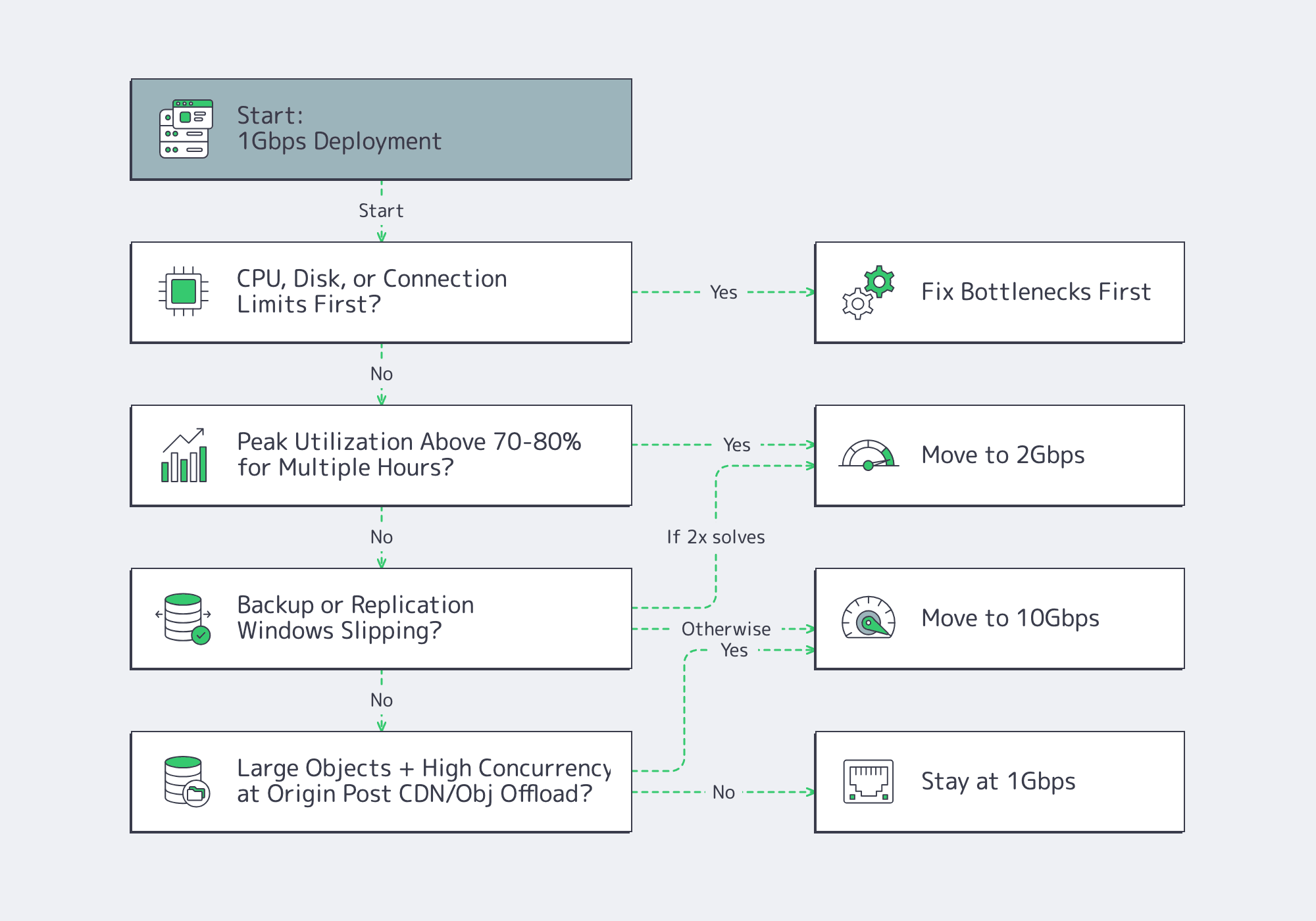
That step-up path matters because a port upgrade only helps if the node can keep up. Melbicom’s live public catalog already pairs 1, 10, 100, and 200 Gbps offers with current Ryzen 7 9700X and EPYC 7402 NVMe-based servers, which is the right kind of alignment between hardware and bandwidth tiers rather than abstract bandwidth labels.
- Model 1Gbps bandwidth against monthly goodput and peak-hour headroom, not order-form line rate.
- Treat CPU, disk, conntrack, and ephemeral ports as first-class capacity metrics; a half-empty NIC graph can still hide a full server.
- Offload large static objects, backup traffic, and regional delivery paths before buying more port speed; upgrade only when the line itself is the limiting resource.
Buy Bandwidth for the Month You Actually Run, Not the Peak Graph You Screenshot
A 1Gbps port is a strong choice when monthly transfer stays inside realistic goodput math, concurrency is controlled, and origin bandwidth is not wasted on content better served from a CDN or object store. The mistake is assuming 1Gbps solves a CPU problem, a storage problem, or a distribution problem.

We at Melbicom see the best results when teams treat bandwidth as one layer of a delivery stack. Keep the origin focused on dynamic work, push large files outward, and upgrade the port only when utilization, time windows, and concurrency say the line itself has become the constraint.
Scale beyond 1Gbps with Melbicom
Upgrade from 1Gbps to 10–200 Gbps on Ryzen and EPYC servers. Keep origins for dynamic content and offload static files to CDN or S3-compatible storage.