
Blog

Navigating Budget‐Friendly Dedicated Servers in Los Angeles
If you want a dedicated server in LA that balances reliability with a low budget, focus on maximizing value rather than simply chasing low sticker prices. Los Angeles is a well-connected hub that handles as much as one-third of trans‑Pacific internet traffic through the One Wilshire carrier hotel. That interconnection creates broad route choice, but buyers still need to compare facility, power, bandwidth, and support costs rather than assume every Los Angeles offer is competitively priced.
However, it also means that competition among providers is fierce, leading to aggressive pricing tactics and the need for strong features. The market is also subject to false economies. For buyers, evaluating attractive offers and understanding the workload well enough to right-size the configuration are vital.
Choose Melbicom— Dozens of ready-to-go options — Tier III-certified LA facility — 39 CDN PoPs across 35 countries |
 |
Why Dedicated Server Hosting in LA?
Firstly, Los Angeles Metro offers global reach through its mature data‑center ecosystem with a capacity that sits in the high hundreds of megawatts. Secondly, despite persistent demand in the area, growth is modest, highlighting the value of existing footprints and network density for latency‑sensitive workloads. Tier III infrastructure represented the majority of Los Angeles capacity in the cited 2025 market data, but buyers should still verify the certification and redundancy of the specific facility rather than assume every low-cost offer inherits the same standard.
How to Get a Cheap Dedicated Server in LA Without False Savings
Overall value should trump the monthly price.
The key to a good deal on a low budget is to look beyond the monthly fee. While the price tag might meet your budget, a dedicated plan that seems “too cheap” can shift costs elsewhere. Budget plans may include low default bandwidth with steep overages, underpowered CPUs, or paid-only support tiers. These hidden costs from subpar performance and avoidable outages can erase the savings from a cheap deployment. In ITIC’s 2024 survey of more than 1,000 firms, hourly downtime costs exceeded $300,000 for over 90% of mid-size and large enterprises surveyed. The figure is not a universal rate for every business, but it reinforces the need to price incident exposure and confirm that 24/7 support covers network and hardware issues.
Right‑sizing to prevent overprovisioning: The CPU, RAM, and storage you need
Overprovisioning often starts when teams buy for an assumed peak before measuring real demand. That can leave paid CPU, memory, and storage idle for much of the billing cycle, which is far from ‘budget-friendly.’ By right-sizing with a profiling pass that identifies true CPU concurrency, RAM working set, and I/O profile, you can reduce waste. Higher‑clocked CPUs for lightly threaded apps and NVMe for hot datasets and logs, paired with HDD for bulk storage, can help keep the cost per TB low. Start with measured demand and add nodes when utilization or latency justifies it; Los Angeles has enough network and data-center choice to support that scale-out approach.
Timing purchases and negotiating discounts
The competitive nature of the LA market can work to your advantage if you keep an eye out for seasonal or launch promotions. Many providers offer first‑term discounts or price breaks on longer billing cycles. If you are buying multiple servers or considering a longer term in Los Angeles, ask sales for a customized quote and confirm whether bandwidth upgrades, RAM increases, or setup-fee waivers are available. Promotions and inventory can change, so compare the full first-term and renewal cost instead of assuming the lowest advertised monthly price will remain available. Use review sites as one signal, then verify the quoted configuration, traffic allowance, setup fees, and renewal terms directly with the provider.
Avoid overbuying with a scale‑out design
With a Los Angeles deployment, working incrementally is practical. At Melbicom, LA dedicated servers from a catalog of dozens of ready-to-go configurations can be activated within two hours. That makes it practical to add nodes as sustained demand appears instead of paying for unused capacity from day one.
Verify the facility and network, not just the node
Tier III and Tier IV facilities are available across Los Angeles at a range of price points, but the facility tier still needs to be paired with strong upstreams and adequate port speed. Melbicom’s Los Angeles location supports 1–200 Gbps per-server network options for streaming, multiplayer game backends, frequent large-object replication, and other high-traffic uses. For global audiences, our CDN can offload static and video delivery through 39 CDN PoPs across 35 countries, reducing origin load and traffic swings.
Benchmarks & Third‑Party Signals to Check
To help keep your evaluation grounded in realistic outcomes, use this checklist:
- Economic predictability: Find a fixed monthly price that includes sufficient outbound traffic and an appropriate port speed. For SMBs, 1 Gbps might be enough, but if you push concurrency or lots of media, then look for 10 Gbps+.
- Provisioning targets: How quickly can you add nodes when demand and revenue justify it? Melbicom activates ready-to-go servers within two hours and offers 1,200+ ready-to-go configurations globally.
- Support for incidents: Technical support should never be overlooked; network and hardware incidents should be included. You may find that paid add‑ons for full management are required.
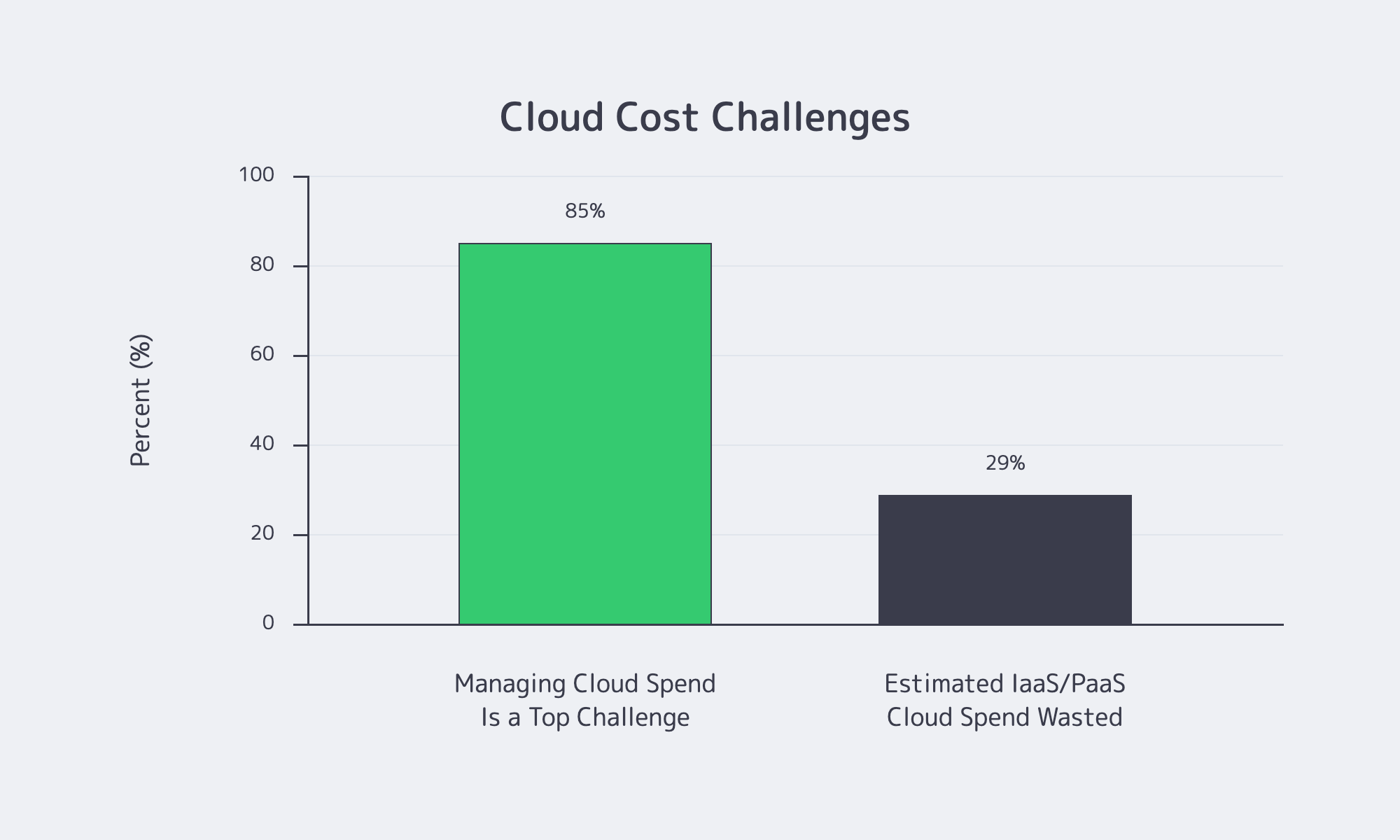
- Cloud cost control: Flexera’s 2026 State of the Cloud Report found that 85% of respondents viewed managing cloud spend as a top challenge, while estimated wasted IaaS and PaaS cloud spend reached 29%. Treat these figures as a reason to compare steady-state utilization and total operating cost across dedicated servers, cloud services, and hybrid designs, not as proof that one infrastructure model is always cheaper.
Cloud Cost Challenges in Flexera’s 2026 Survey
Comparing Cost Drivers and Savings Levers To Find Where Value Truly Lies
Compare the factors that raise monthly cost with the levers that reduce waste so you can balance performance and price in dedicated server hosting in Los Angeles without cutting the capacity or support the workload actually needs.
| Feature | Impact on Cost | Budget‑Friendly Tip |
|---|---|---|
| CPU (Processor) | Newest/high‑core CPUs are pricier. | Match threads to the workload; older-generation or mid-tier CPUs can offer better price/performance when workload-specific benchmarks confirm that their core count and clock speed are sufficient. |
| Memory (RAM) | Large RAM configs also raise the price. | Size for your requirements + 20–30% headroom; you can upgrade later. |
| Storage (SSD vs. HDD) | NVMe/SSD is more expensive per GB. | Lower your price per TB by putting hot data/DB on NVMe and using HDD for bulk. |
| Bandwidth & Port | Higher port speeds and unmetered traffic usually increase monthly cost. | Pick the lowest port speed and transfer tier that covers peak + growth; don’t pay for redundant headroom. |
| Support & Management | Fully managed plans add recurring cost. | Go unmanaged if you can; insist on 24×7 infra support included. |
How LA Competition Benefits Buyers
The following three characteristics can improve value in Los Angeles when the provider’s actual offer supports them:
- Interconnection gravity: The One Wilshire ecosystem concentrates carriers and connects to trans-Pacific cable routes, creating route choice and low-latency options. Buyers should still compare the upstream mix and traffic terms of each plan.
- Facility standards at scale: Tier III+ accounts for the majority share of LA capacity, but facility tier does not guarantee application availability. Verify the specific site, power design, network path, and support coverage behind a budget offer.
- Flexible, high‑bandwidth offerings: Los Angeles providers offer a range of traffic allotments and port options. Melbicom’s LA location supports up to 200 Gbps per server, giving high-traffic workloads room to scale without changing locations solely because of port capacity.
Choosing a Cheap Dedicated Server in Los Angeles That Won’t Backfire

Before wrapping up, use this checklist to help avoid “false savings”:
- Scope workloads precisely: Profile CPU threads, RAM working set, and I/O (random vs. sequential). Right‑size for your current needs; plan future upgrade paths for growth instead of paying in advance for waste.
- Scrutinize bandwidth: Check included traffic, overage rates, and default port speed.
- Verify the facility and network quality. Confirm the selected facility’s tier, upstream mix, and redundancy; do not infer them from the city or price tier.
- Test provisioning and support. Confirm provisioning targets, 24×7 coverage, and incident response expectations.
- Time your purchases to promotions: Compare first-term discounts and seasonal offers, and request a volume quote when ordering multiple nodes.
- Prioritize providers with scale options: Providers with multiple ready-to-go configurations and optional CDN integration can simplify growth without forcing an immediate platform move.
Budget-Friendly Provisioning Takeaways

When trying to minimize your spending on a dedicated server in Los Angeles, look beyond headline prices and optimize for outcome‑per‑dollar. Dense interconnection and the availability of Tier III and Tier IV facilities make it possible to compare affordable options without treating low price as proof of weak infrastructure. The specific facility, upstreams, traffic terms, and support coverage still need verification.
Ultimately, right-sizing is the crux: cut idle cores and unnecessary RAM, verify transparent network terms, and add capacity when measured demand justifies it. Promotions can reduce first-term cost, but they should not replace a full comparison of renewal pricing, bandwidth, support, and operational overhead. The same cost discipline applies across cloud, dedicated, and hybrid designs; no model is always cheaper.
Given the range of Los Angeles offers, these principles can be translated into specific builds. A Tier III facility with scalable bandwidth options lets you add capacity as traffic grows without paying for large amounts of unused headroom from day one. If high-quality performance is non-negotiable, then “budget‑friendly” looks a little different.
Budget-Friendly LA Dedicated Servers
Scale on Tier III infrastructure with two-hour provisioning, up to 200 Gbps per server, and 24×7 support. Right-size CPU, RAM, and bandwidth as you grow.