
Blog
Live streaming latency explained: Where does the delay come from?
“Live” video is never literally live. Between a camera capturing an image and a viewer seeing it, the stream passes through encoders, networks, packagers, CDNs, playback buffers, and decoders. Every stage can add delay.
Live streaming latency and buffering are different problems. A stream can play smoothly while remaining ten seconds behind the event. Another can run two seconds behind but stall repeatedly. As DASH Industry Forum guidance explains, moving closer to live reduces the buffer available to absorb delivery fluctuations.
The entire pipeline can be expressed as a conceptual latency budget:
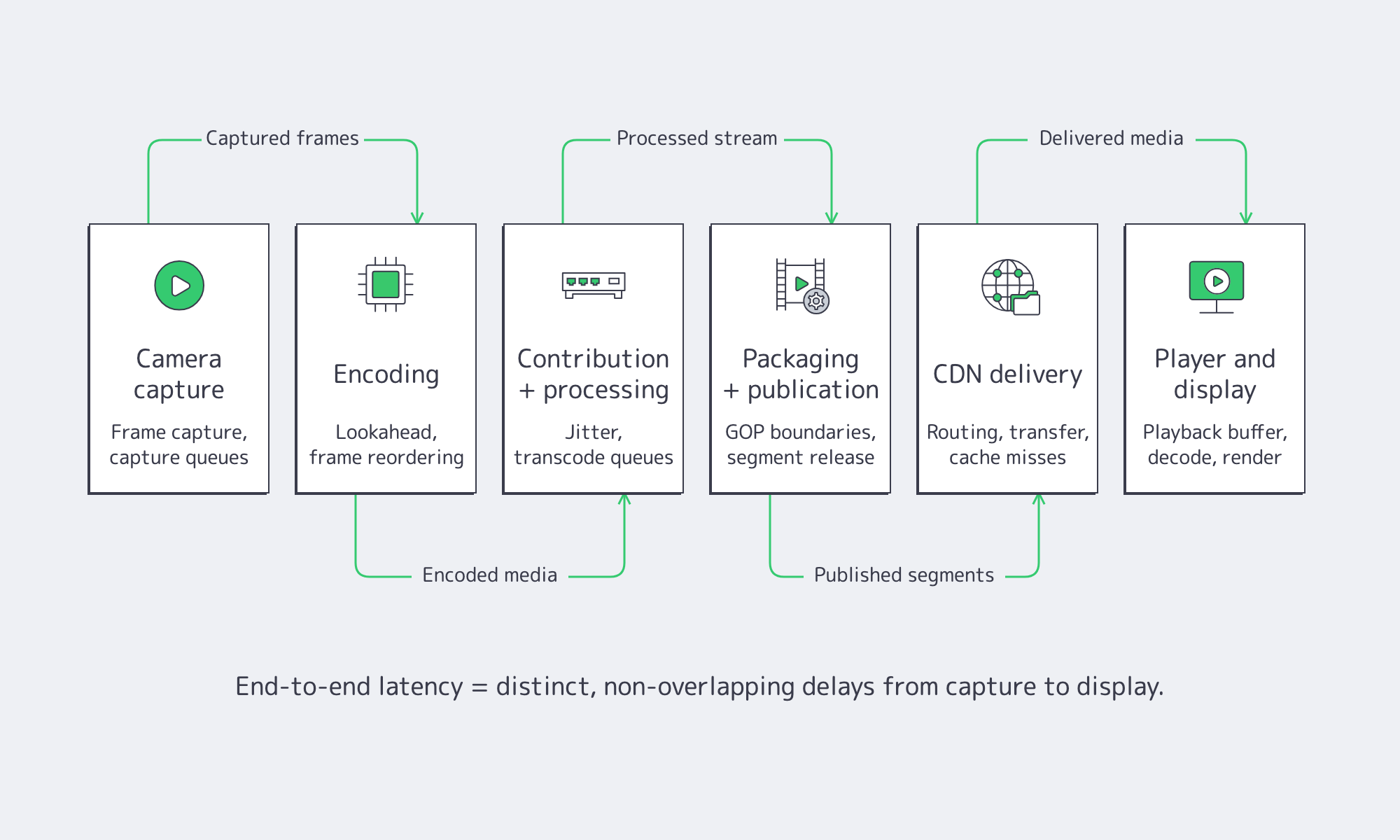
end-to-end latency = capture + encode + contribution + processing + packaging + publication + delivery + player buffer + decode/render
These terms represent distinct, non-overlapping delays. Actual measurements must follow the same media frame through the pipeline to avoid double-counting overlapping encoding, processing, packaging, or publication intervals.
Reducing live streaming latency means identifying which stages consume that budget—and which delays are necessary for reliable playback.
Melbicom CDN– 40 Premium CDN PoPs – HLS and DASH delivery – Cache controls and raw logs |

|
Where Live Streaming Latency Accumulates
Live streaming latency accumulates wherever media waits: camera capture, encoder queues, contribution networks, transcoding, packaging, CDN delivery, and player buffering. HTTP streaming can introduce seconds of delay through segment publication and playback hold-back. Real-time systems depend more heavily on jitter management. At 30 frames per second, each additional queued frame interval represents approximately 33.3 milliseconds.
Capture and Encoding Delays
At 30 fps, each frame interval lasts approximately 33.3 milliseconds; at 60 fps, approximately 16.7 milliseconds. These are frame intervals, not fixed camera or encoder processing times. Camera processing and capture queues can add multiple intervals before encoding begins.
Encoding introduces further delay. Video compression requires processing frames, allocating bits, and potentially examining future frames. Encoder lookahead improves compression decisions but holds frames in memory. Bidirectionally predicted frames can introduce additional reordering delays.
NVIDIA's Video Codec SDK documentation explains how lookahead buffers frames for analysis and describes latency-oriented encoding settings.
The trade-off is straightforward: reducing lookahead and frame reordering can improve responsiveness, but may require higher bitrates to maintain equivalent quality.
Processing capacity matters equally. A 30 fps encoder must sustainably process at least 30 frames per second to avoid accumulating an unbounded queue, unless frames are dropped or another form of backpressure is applied. If transcoding cannot keep pace with the source, frames accumulate. Faster CDN delivery cannot recover time lost upstream.
Contribution networks introduce jitter—variation in packet arrival timing. RFC 3550 defines interarrival jitter for RTP streams. Receiver buffers compensate for this variation, but holding packets also increases delay.
Packaging, CDN Delivery, and Buffering in Low Latency Live Streaming
HTTP streaming adds another waiting point: media must become available before viewers can request it.
Traditional HLS publishes video in segments. RFC 8216 advises clients against starting playback at a segment beginning less than three target durations from the playlist's end. With six-second target durations, that corresponds to 18 seconds of separation from the playlist's end. This shows how playback policies can intentionally introduce delay before network delivery and decoding are considered.
The HLS 2nd Edition Internet-Draft recommends six-second target durations and approximately one-to-two-second GOPs. It warns that shorter segments reduce buffering capacity, complicate adaptation, and increase delivery overhead.
Low-Latency HLS changes the publication model. Rather than waiting for complete segments, players can request partial segments. Apple illustrates a six-second segment divided into thirty 200-millisecond parts, allowing media to become available before the complete segment is finished.
Blocking playlist reloads and preload hints further reduce media-discovery delays. Low-latency DASH uses a similar principle through CMAF chunks.
Once published, media must traverse the Internet. Geographic distance, routing, congestion, cache misses, and connection establishment affect delivery time.
This is where a CDN helps. Caching packaged HLS or DASH content near viewers can reduce repeated origin requests and shorten delivery paths. It cannot remove encoding queues, segment construction time, or deliberate player hold-back. Supporting conventional HLS/DASH delivery also does not automatically establish compatibility with every low-latency partial-segment or blocking-playlist mechanism; validate those behaviors.
| Pipeline Stage | Sources of Delay | Engineering Response |
|---|---|---|
| Capture and encoding | Frame queues, lookahead, reordering | Reduce unnecessary buffering; benchmark sustained encoding throughput |
| Contribution and processing | Jitter, recovery, transcoding backlog | Monitor queue age and processing capacity |
| Packaging | GOP boundaries, segment completion, playlist updates | Use appropriate GOPs and partial segments where supported |
| CDN delivery | Distance, RTT, cache misses, congestion | Improve cache freshness and geographic delivery |
| Player | Live offset, ABR decisions, safety buffer | Tune hold-back and catch-up behavior together |
| Decode and display | Decoder queues, synchronization, rendering | Measure device-side presentation delay |
Why Can a Stream Stay Delayed Even Without Buffering Interruptions?
A live stream can remain delayed without buffering interruptions because end-to-end latency measures the time between capture and display, while rebuffering measures playback interruptions caused by insufficient available media. A player holding three seconds of content can run without stalls while remaining three seconds or more behind the live source.
Latency and Rebuffering
Consider two viewers watching the same event.
Viewer A watches continuously, eight seconds behind live. Viewer B watches two seconds behind but repeatedly stalls.
Viewer A experiences higher latency but better playback stability. Viewer B experiences lower latency but worse continuity.
Player buffering protects against unpredictable delivery.
A three-second buffer can absorb temporary throughput reductions, delayed requests, and bitrate switches. Reducing that buffer to 500 milliseconds removes much of the protection.
The WebRTC specification exposes jitterBufferTarget, allowing applications to influence receiver buffering. Its purpose reflects the same trade-off: lower playout delay versus increased exposure to jitter and packet recovery.
Zero buffering interruptions therefore do not demonstrate low latency. They may indicate that the player maintains a substantial safety margin.
Live-Edge Drift and Catch-Up Behavior
A stream can also become progressively delayed after playback begins.
Suppose a player stalls for one second, then resumes at normal 1.0× speed. Unless it catches up, playback remains an additional second behind the live source.
DASH-IF's reference player addresses this through playback-rate adjustments and seeking toward the live edge.
Other sources of drift include stale playlists, conservative adaptive-bitrate decisions, and device scheduling.
Consequently, target latency and actual latency must be measured separately. Lowering the configured target does not necessarily reduce measured latency if the player cannot sustain that position.
For WebRTC, the W3C Statistics API exposes jitter-buffer and processing-delay measurements. These help isolate receiver-side delay but do not independently measure capture-to-display time. For HLS, EXT-X-PROGRAM-DATE-TIME helps relate media timestamps to wall-clock time.
A smooth stream only proves that playback is receiving media in time for its current position—not that the position is sufficiently close to live.
When Is Lower Streaming Latency Worth the Playback Stability Trade-Offs?
Lower streaming latency is worthwhile when delayed information directly harms the experience, such as interactive broadcasts, live auctions, or synchronized viewing. The appropriate target depends on the interaction deadline and acceptable playback interruptions. Smaller buffers reduce the time available to absorb network variation, so latency, rebuffering, and video quality must be evaluated together.
Choose Latency Targets Based on the Application
An interactive broadcast may require sub-second responsiveness. A live sports platform might prioritize synchronization with other distribution channels. A passive broadcast may favor uninterrupted playback over shaving several seconds.
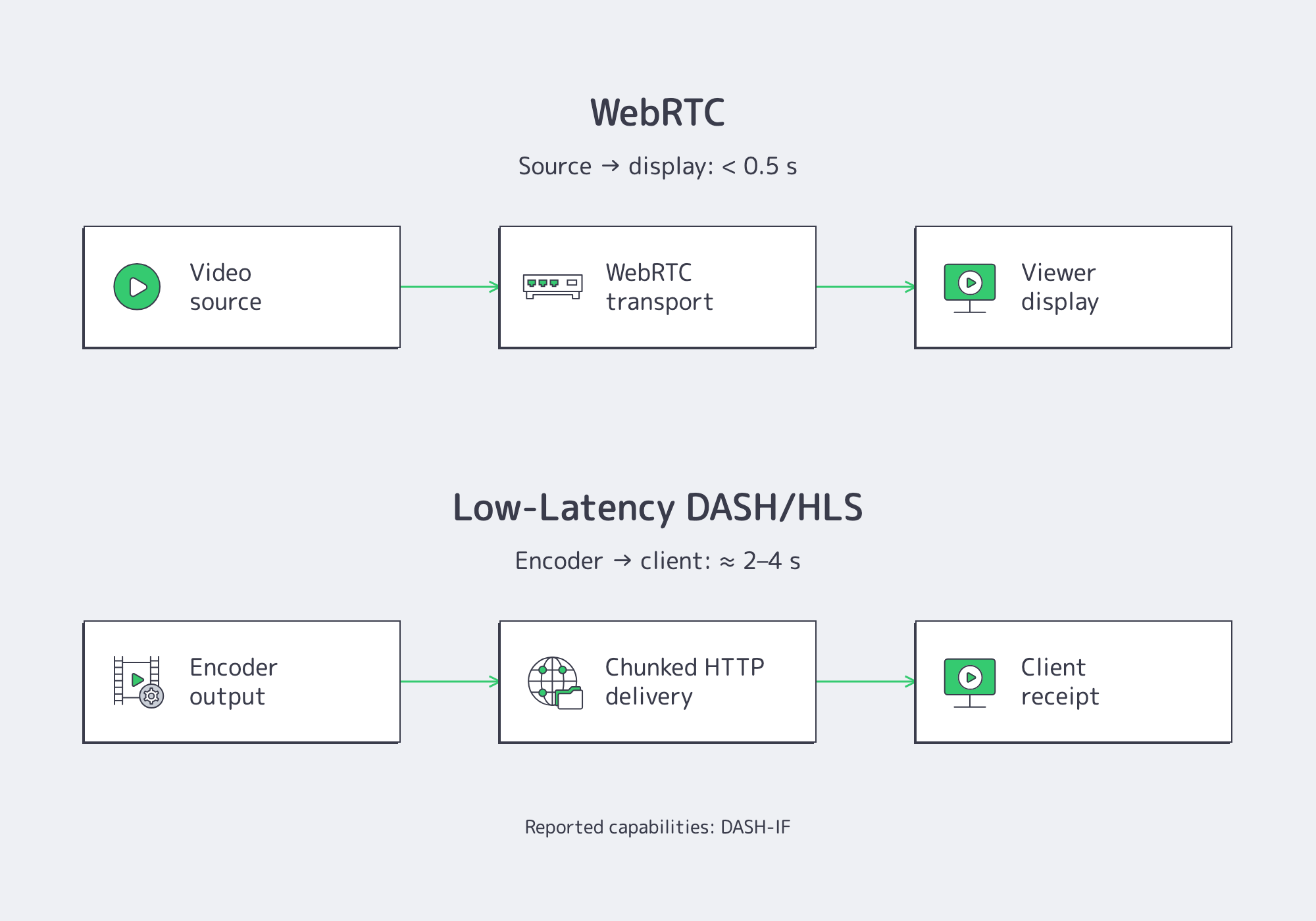
The DASH Industry Forum report describes WebRTC systems capable of source-to-display latency below half a second and low-latency HTTP streaming around two to four seconds from encoder to client.
These measurements cover different portions of the pipeline. The HTTP figure excludes upstream capture and encoding delay, so the two ranges cannot be treated as directly comparable glass-to-glass results.
Network conditions determine how aggressively an HTTP streaming system can operate. For Apple's device ecosystem, the HLS authoring specification states that Low-Latency HLS Part Target Duration MUST be at least the expected P95 RTT, SHOULD be at least three times P95 RTT, and has a recommended value of one second. PART-HOLD-BACK MUST be at least three part durations.
Consider an audience with a hypothetical P95 RTT of 250 ms. Three times that value is 750 ms. Choosing 200 ms parts would fall below both the 250 ms mandatory minimum and the 750 ms recommended margin.
The engineering objective should therefore combine latency percentiles, rebuffering, and video quality—not optimize one metric independently.
Measuring and Reducing Live Streaming Latency in Production
A glass-to-glass measurement captures the complete delay between an event entering the camera and appearing on-screen. It establishes user-facing latency but cannot identify which pipeline stage caused it.
For diagnosis, timestamp the same media frame at capture, encoder output, packaging, origin, CDN response, player receipt, decoding, and presentation. Synchronize clocks, track measurement uncertainty, and sum only distinct residence times.
Monitor P50 and P95 behavior across viewer geographies, access networks, devices, and event loads. Separate media age from request timing: a fast CDN response can still deliver stale media. Neither CDN RTT, time to first byte, nor segment duration independently measures end-to-end live latency.
At the distribution stage, Melbicom CDN provides cache controls, real-time analytics, and raw logs that help teams investigate delivery behavior. Comparing CDN request timing and cache behavior with origin publication timestamps helps distinguish delayed media availability from delays introduced during distribution.
Our CDN delivers pre-transcoded HLS and DASH streams, while encoding, packaging, and player policies remain under the streaming platform's control.
The Lowest Sustainable Latency
Live streaming latency accumulates throughout the media pipeline, not simply because of a slow network. Every queue and buffer represents a decision about immediacy, compression efficiency, recovery, or playback stability.
For engineering teams, the practical priorities are:
- Establish a measurable source-to-screen objective. Set acceptable P50 and P95 latency alongside rebuffering and video-quality requirements.
- Investigate the largest non-overlapping delays first. Follow the same media frame through capture, encoding, packaging, delivery, and display instead of assuming the network is responsible.
- Evaluate latency and continuity together. Compare live-edge distance, stalls, and catch-up behavior under the same network conditions.
- Use audience-specific network measurements. Size low-latency parts and playback margins against high-percentile RTT and jitter, not ideal laboratory conditions.
- Validate the complete delivery path. Confirm media freshness, cache behavior, protocol compatibility, and player performance before treating a lower latency target as a production improvement.
The objective is not zero latency. It is the smallest sustainable source-to-screen delay consistent with the project's quality and reliability requirements.
Once encoding, packaging, and playback behavior are understood, improving content distribution becomes a measurable next step.
Explore Melbicom CDN
If your latency analysis points to the distribution stage, explore Melbicom CDN to see how our infrastructure can support your streaming delivery requirements.