
Blog
Latency vs Bandwidth: Why a Faster Connection Does Not Always Mean a Faster Website
A website feels slow. Someone proposes upgrading its connection from 1 Gbps to 10 Gbps. Problem solved? Not necessarily. That upgrade could transform multi-gigabyte downloads while barely affecting a 30 KB API response traveling from an origin 90 milliseconds away.
Website performance depends on latency, bandwidth, actual throughput, backend processing, and browser rendering—not one network speed figure.
A modern website combines small, latency-sensitive requests with larger files that take time to transfer. Improving one part of the network doesn't necessarily improve the other.
The important question isn't how fast your connection is. It's which part of the loading process is actually waiting.
Melbicom CDN– Configurable caching – Geographic routing – Distributed delivery |

|
Latency vs Bandwidth: Core Metrics
Latency measures delay, commonly expressed as round-trip time (RTT). Bandwidth describes theoretical connection capacity. Throughput is the achieved transfer rate; goodput counts useful data, excluding retransmissions and overhead.
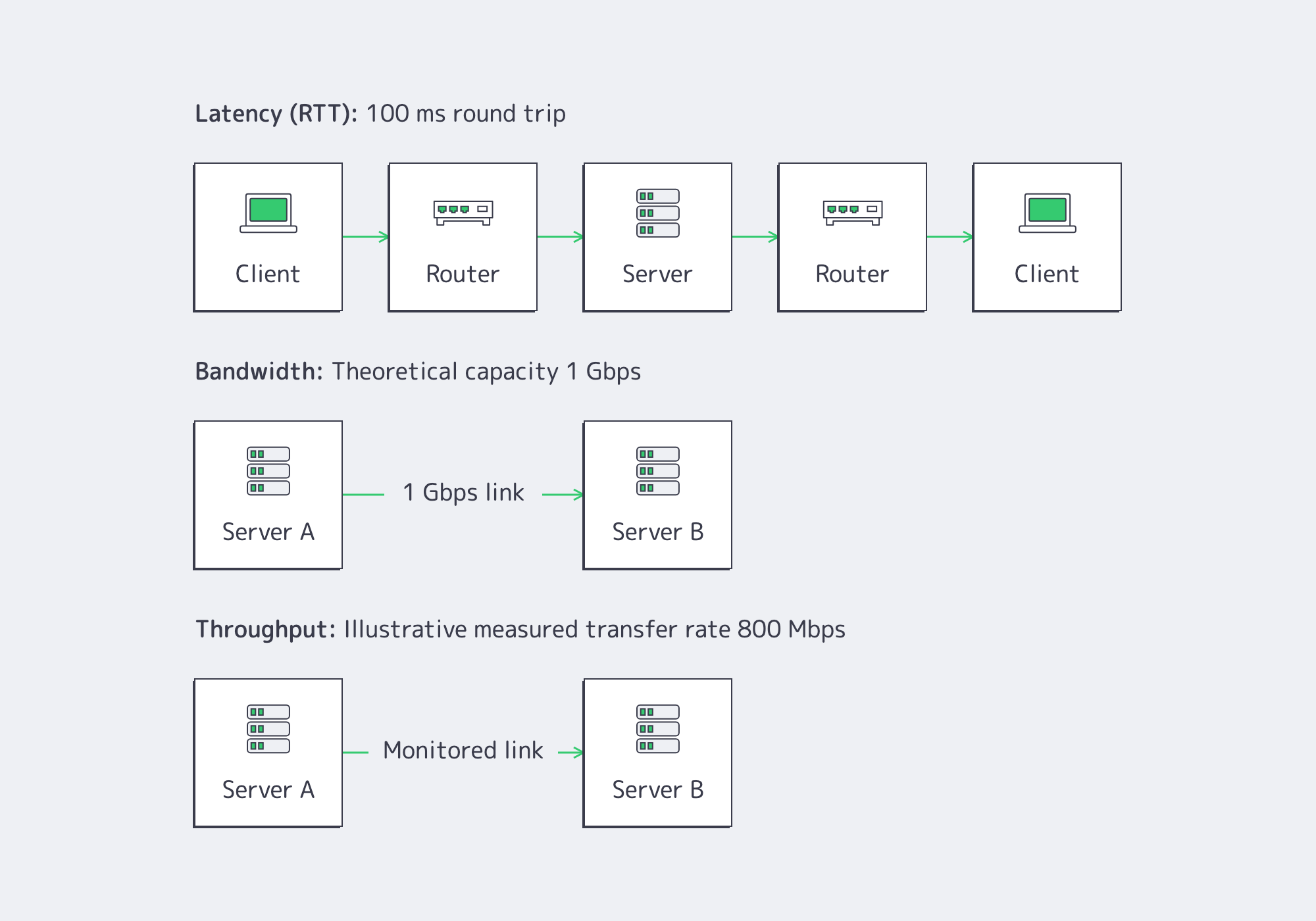
The IETF's network performance definitions distinguish these measurements because none independently describes application performance.
Think of bandwidth as highway capacity, latency as travel time, and throughput as traffic reaching its destination.
A 10 Gbps interface offers capacity but cannot guarantee fast individual requests.
Completion time ≈ connection setup + network latency + server processing + payload transfer + client-side delays
Connection reuse, caching, and multiplexing can eliminate or overlap certain delays. The Chrome DevTools Network panel separates connection establishment, Waiting (TTFB), and Content Download.
Bandwidth vs. Speed and Throughput
A larger interface doesn't guarantee proportionally faster transfers.
TCP performance depends partly on the bandwidth-delay product:
Bandwidth-delay product = bandwidth × RTT
At 1 Gbps and 100 ms RTT, filling the connection requires approximately 12.5 MB in flight. At 10 Gbps, that becomes 125 MB.
The IETF's TCP performance guidance explains how insufficient window capacity limits high-bandwidth connections.
Packet loss creates further constraints. TCP congestion control can reduce throughput even when physical capacity remains available.
Before upgrading, distinguish insufficient aggregate capacity from limitations elsewhere along the path.
Latency vs. Bandwidth in Browser Request Chains
A webpage isn't one continuous download.
Browsers fetch HTML, discover resources, execute scripts, and render content. Some operations overlap; others depend on preceding responses.
HTTP/2 and HTTP/3 support multiplexing, but neither eliminates resource dependencies.
HTTP/3's QUIC transport reduces certain connection and head-of-line blocking costs, as documented in RFC 9000.
But HTTP/3 doesn't turn an 80 ms network path into an 8 ms path. Protocol improvements reduce waiting overhead; better routing and proximity shorten network journeys.
How Do Latency and Bandwidth Affect Small Requests Versus Large Transfers?
Latency primarily affects small, latency-sensitive requests because round-trip delays and server processing can outweigh transmission time. Bandwidth becomes increasingly important for large transfers where moving bytes dominates completion time. Compare payload transfer duration with total request duration: when most time is spent waiting rather than downloading, additional bandwidth has limited room to improve the result.
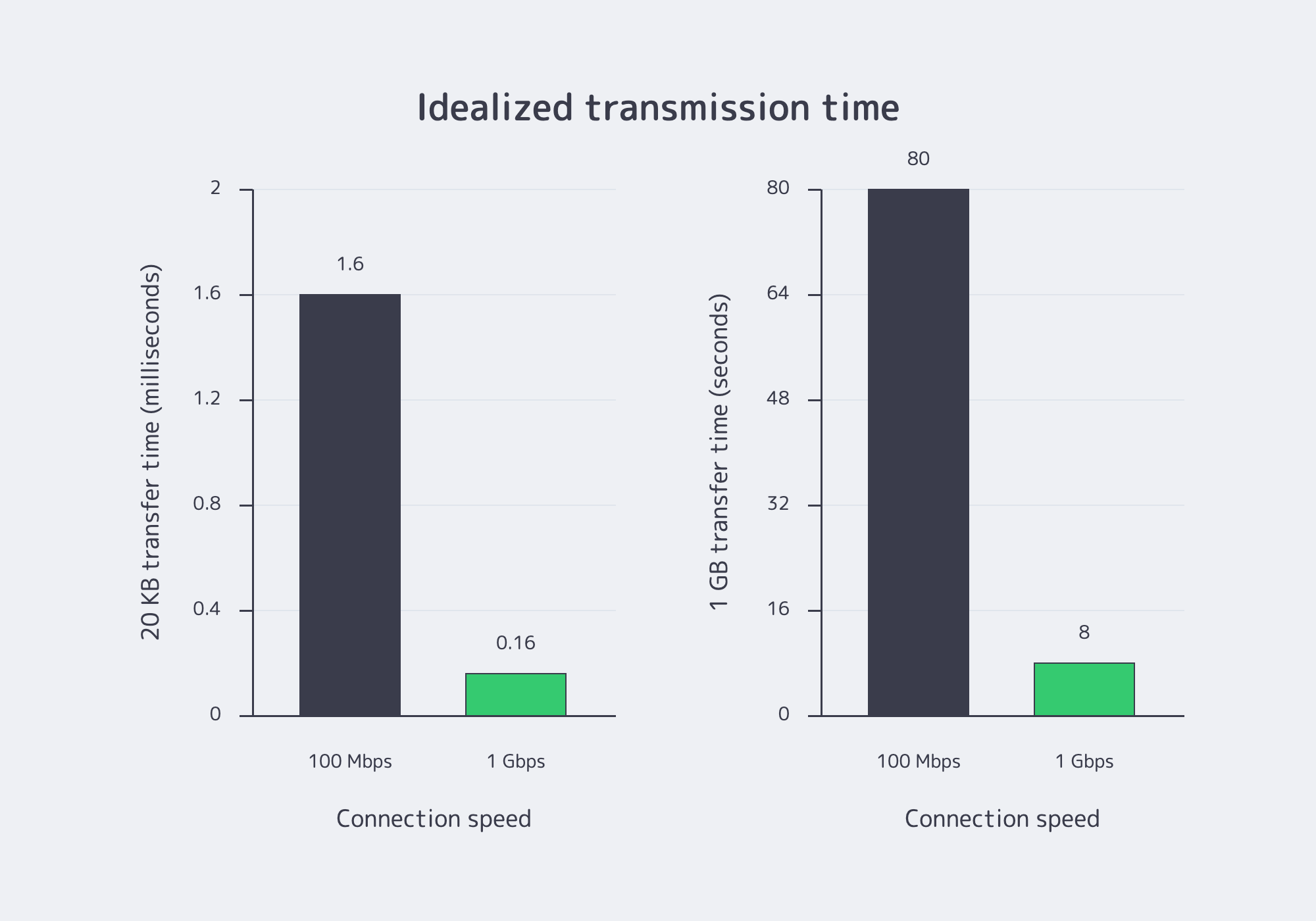
Consider a 20 KB JSON response over an established connection with 80 ms RTT and 20 ms backend processing.
| Connection | 20 KB API Response | 1 GB File |
|---|---|---|
| 100 Mbps | 1.6 ms | 80 seconds |
| 1 Gbps | 0.16 ms | 8 seconds |
Idealized transmission times exclude protocol overhead and other bottlenecks.
For the API response, a tenfold bandwidth increase saves approximately 1.44 ms. Simplified completion time falls from 101.6 ms to 100.16 ms: only about a 1.4% improvement.
For the 1 GB download, the same upgrade potentially saves 72 seconds.
The Crossover Depends on Payload Size
Assume 100 ms of fixed delay. At 100 Mbps, approximately 1.25 MB takes another 100 ms to transmit. At 1 Gbps, approximately 12.5 MB takes the same time.
Below those sizes, fixed delay dominates. Above them, transfer capacity matters.
Small HTML and authentication responses can block subsequent work, while images and JavaScript bundles may be throughput-sensitive.
Google's LCP optimization guidance separates Largest Contentful Paint into TTFB, resource-load delay, resource-load duration, and element-render delay.
Only resource-load duration directly represents downloading the LCP resource.
The recommended good LCP threshold is 2.5 seconds or less at the 75th percentile. More bandwidth helps only when transfer time meaningfully contributes to that budget.
Why Can Higher Bandwidth Fail to Improve Website Loading Times?
Higher bandwidth cannot fix website delays caused primarily by geographic distance, inefficient routing, backend processing, packet loss, request dependencies, or browser rendering. When network utilization remains below the operating ceiling and requests spend substantially more time waiting for first bytes than downloading content, additional connection capacity is unlikely to resolve the underlying bottleneck.
Distance and routing. Increasing origin capacity doesn't shorten the route to distant users. Small requests can spend longer traversing the network than transmitting their payloads.
Backend processing. Database queries, rendering, cache misses, and upstream services contribute to TTFB. Google's TTFB guidance recommends investigating backend work before assuming insufficient bandwidth.
A 900 ms TTFB on a 20 ms RTT path warrants investigating processing and waiting.
Connection overhead. DNS, TLS, redirects, and connection establishment delay transfers. W3C Navigation Timing helps separate these phases.
Loss and congestion. Retransmissions use capacity without adding useful data. IETF congestion-control metrics distinguish bandwidth from throughput.
Browser execution. JavaScript, layout, and rendering can delay visible content after downloads finish.
Read the Waterfall Before Upgrading
Browser waterfalls reveal where time disappears.
Long Content Download phases suggest investigating throughput. Long Waiting (TTFB) phases suggest checking RTT and backend processing. Late-starting resources indicate dependency problems.
The Chrome UX Report provides real-user measurements. Compare p75, p95, and p99 across geography, device categories, and cache states.
If one region experiences 900 ms p95 TTFB while backend processing consistently takes 60 ms and origin utilization remains low, routing deserves investigation.
Conversely, if a 600 MB download slows whenever egress approaches its provisioned ceiling, additional capacity has stronger justification.
Which Measurements Justify More Bandwidth, Better Routing, or CDN Delivery?
Infrastructure investment should follow measurements that isolate the actual performance bottleneck. Sustained link saturation and download-dominated requests support additional bandwidth; elevated RTT with low backend processing supports routing improvements; and faster cache-hit responses with reduced origin traffic support CDN delivery. Compare production measurements by region and percentile before committing infrastructure spending.
Start with user-visible performance, then investigate individual components.
Measure LCP and TTFB. Separate response waiting, downloads, and rendering.
Measure request phases. Browser waterfalls and Resource Timing distinguish connection setup, response waiting, and body transfer.
Measure backend contribution. The W3C Server Timing specification enables reporting server-side processing durations.
Measure network paths. Track RTT, retransmissions, loss, and routing variation across representative regions.
Measure utilization and goodput. Correlate p95 or p99 egress with slow transfers. Compare single-flow and aggregate throughput rather than advertised interface speed.
Measure caching. Compare edge hits and misses, cache-hit ratio by bytes, regional TTFB, and origin egress.
| Production Evidence | Likely Bottleneck | Recommended Action |
|---|---|---|
| Large downloads slow during sustained high egress utilization | Capacity saturation | Add bandwidth or distribute delivery |
| Small requests have high RTT but low backend processing | Distance or routing | Improve routing or proximity |
| Cacheable content repeatedly travels from distant origins | Origin distance | Evaluate CDN delivery |
| High TTFB with low RTT and expensive backend operations | Application processing | Optimize backend services |
| Fast downloads but delayed LCP | Discovery or rendering | Optimize frontend execution |
Measure First, Then Change the Responsible Layer
A CDN addresses a different problem from increasing origin bandwidth.
Additional bandwidth expands origin capacity. Edge caching changes where eligible requests are served, potentially reducing origin round trips and distributing large transfers closer to users.
For small cacheable assets, the benefit can be lower latency. For large reusable files, it can be improved delivery efficiency and reduced origin egress.
When measurements point to repeated origin fetches for cacheable content, Melbicom's CDN provides distributed edge delivery with configurable caching and geographic request routing. Teams can compare cache-hit TTFB, large-object transfer duration, and origin egress before and after moving eligible traffic to the edge.
The appropriate configuration depends on traffic geography, cacheability, payload size, and measured performance.
Choose the Upgrade Users Need
A faster connection matters when transfer capacity limits performance. Otherwise, users continue waiting on network distance, backend processing, or browser execution while additional bandwidth remains unused.
Before purchasing infrastructure, establish whether critical transactions are waiting for round trips, server responses, or payload bytes.
- Add bandwidth when large transfers slow during sustained capacity pressure.
- Improve routing or proximity when latency dominates small requests.
- Use CDN delivery when distributed users repeatedly request cacheable content.
- Optimize the application when backend processing or rendering causes delays.
When measurements identify repeated origin-distance penalties or unnecessary centralized delivery, distributed caching becomes a practical optimization rather than another speculative upgrade.
Explore Melbicom CDN
Serve cacheable assets closer to users with Melbicom CDN. Measure regional TTFB, transfer duration, and origin traffic before and after edge delivery.